# Introduction
Source: https://docs.nestjs.com/openapi/introduction
The [OpenAPI](https://swagger.io/specification/) specification is a language-agnostic definition format for describing RESTful APIs. Nest provides a dedicated [module](https://github.com/nestjs/swagger) that generates such a specification from decorators in your code.
#### Installation
To begin, install the required dependency:
```bash
$ npm install --save @nestjs/swagger
```
> warning **Warning** If you use Fastify, also install `@fastify/static`:
>
> ```bash
> $ npm install --save @fastify/static
> ```
#### Bootstrap
Once the installation is complete, open the `main.ts` file and initialize Swagger using the `SwaggerModule` class:
```typescript
import { NestFactory } from '@nestjs/core';
import { SwaggerModule, DocumentBuilder } from '@nestjs/swagger';
import { AppModule } from './app.module.js';
async function bootstrap() {
const app = await NestFactory.create(AppModule);
const config = new DocumentBuilder()
.setTitle('Cats example')
.setDescription('The cats API description')
.setVersion('1.0')
.addTag('cats')
.build();
const documentFactory = () => SwaggerModule.createDocument(app, config);
SwaggerModule.setup('api', app, documentFactory);
await app.listen(process.env.PORT ?? 3000);
}
await bootstrap();
```
> info **Hint** Wrapping `SwaggerModule.createDocument()` in a factory function defers document generation until the document is first requested, which saves initialization time. The resulting document is a serializable object that conforms to the [OpenAPI Document](https://swagger.io/specification/#openapi-document) specification. Instead of serving it over HTTP, you can also save it as a JSON or YAML file and use it elsewhere.
> warning **Warning** If you call `createDocument()` eagerly (rather than in a factory function, as shown above), make sure `app.enableVersioning()` runs first. Otherwise, the generated `paths` are missing the version prefix. The factory pattern is unaffected, because the document isn't built until it is first requested.
`DocumentBuilder` structures a base document that conforms to the OpenAPI Specification. Its methods let you set properties such as the title, description, and version. To create a full document (with all HTTP routes defined), use the `createDocument()` method of the `SwaggerModule` class. It takes two arguments: an application instance and the base document configuration returned by `DocumentBuilder#build()`. An optional third argument, of type `SwaggerDocumentOptions`, is covered in the [document options](/openapi/introduction#document-options) section.
Next, call the `setup()` method. It accepts:
1. The path to mount the Swagger UI on
2. An application instance
3. The document object, or a factory function that returns it (as above)
4. An optional configuration object (see [setup options](/openapi/introduction#setup-options))
Now run the following command to start the HTTP server:
```bash
$ npm run start
```
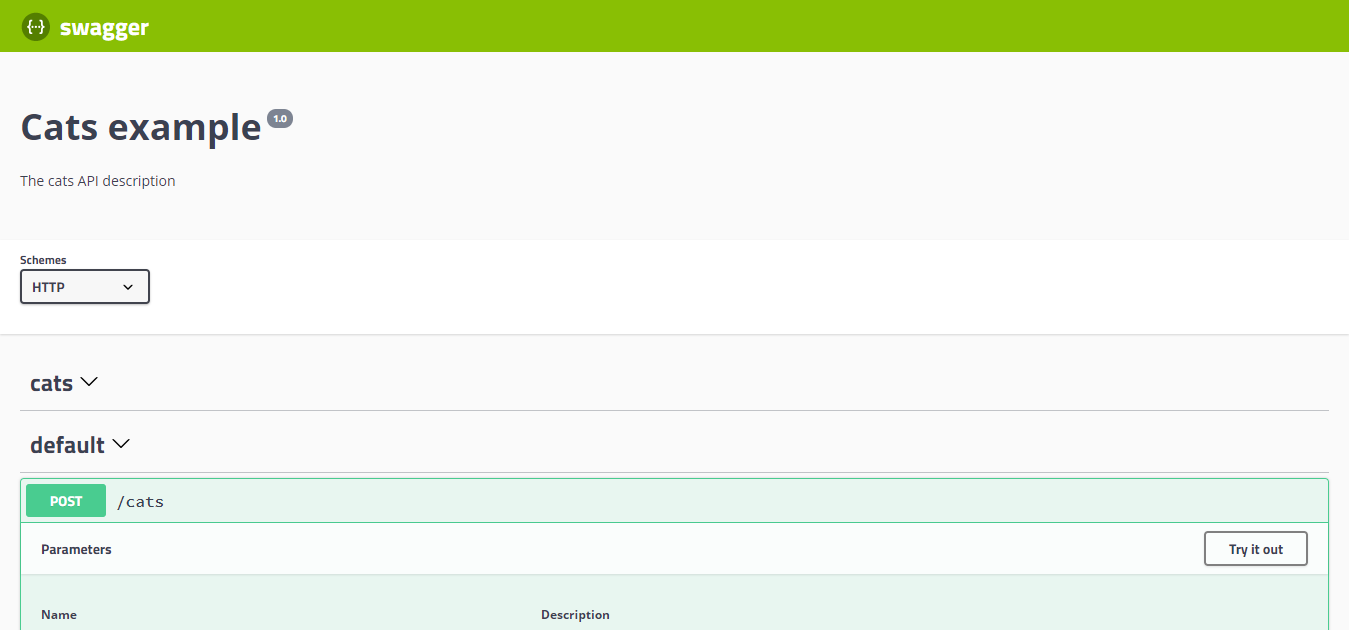
While the application is running, open your browser and navigate to `http://localhost:3000/api`. You should see the Swagger UI.
The `SwaggerModule` automatically reflects all of your endpoints.
> info **Hint** To generate and download a Swagger JSON file, navigate to `http://localhost:3000/api-json` (assuming that your Swagger documentation is available under `http://localhost:3000/api`).
> You can also expose it on a route of your choice with the `jsonDocumentUrl` option of the `setup()` method:
>
> ```typescript
> SwaggerModule.setup('swagger', app, documentFactory, {
> jsonDocumentUrl: 'swagger/json',
> });
> ```
>
> This exposes it at `http://localhost:3000/swagger/json`.
> info **Hint** Swagger UI works with the default [Content Security Policy](https://developer.mozilla.org/en-US/docs/Web/HTTP/CSP) of Nest's built-in [security headers](/security/helmet). If you add scripts through `customJs`/`customJsStr`, or serve Swagger UI over plain HTTP outside local development, see [Swagger UI and GraphQL IDEs](/security/helmet#swagger-ui-and-graphql-ides) for the directives to adjust.
> warning **Warning** When you register `helmet` directly with Fastify instead, its [CSP](https://developer.mozilla.org/en-US/docs/Web/HTTP/CSP) can block the Swagger UI. To resolve this conflict, configure the CSP as shown below:
>
> ```typescript
> app.register(helmet, {
> contentSecurityPolicy: {
> directives: {
> defaultSrc: [`'self'`],
> styleSrc: [`'self'`, `'unsafe-inline'`],
> imgSrc: [`'self'`, 'data:', 'validator.swagger.io'],
> scriptSrc: [`'self'`, `https:`, `'unsafe-inline'`],
> },
> },
> });
>
> // If you are not going to use CSP at all, you can use this:
> app.register(helmet, {
> contentSecurityPolicy: false,
> });
> ```
#### Document options
When creating a document, you can pass extra options to fine-tune the library's behavior. These options are of type `SwaggerDocumentOptions`:
```TypeScript
export interface SwaggerDocumentOptions {
/**
* List of modules to include in the specification
*/
include?: Function[];
/**
* Additional, extra models that should be inspected and included in the specification
*/
extraModels?: Function[];
/**
* If `true`, swagger will ignore the global prefix set through `setGlobalPrefix()` method
*/
ignoreGlobalPrefix?: boolean;
/**
* If `true`, swagger will also load routes from the modules imported by `include` modules
*/
deepScanRoutes?: boolean;
/**
* Custom operationIdFactory that will be used to generate the `operationId`
* based on the `controllerKey`, `methodKey`, and version.
* @default () => controllerKey_methodKey_version
*/
operationIdFactory?: OperationIdFactory;
/**
* Custom linkNameFactory that will be used to generate the name of links
* in the `links` field of responses
*
* @see [Link objects](https://swagger.io/docs/specification/links/)
*
* @default () => `${controllerKey}_${methodKey}_from_${fieldKey}`
*/
linkNameFactory?: (
controllerKey: string,
methodKey: string,
fieldKey: string
) => string;
/*
* Generate tags automatically based on the controller name.
* If `false`, you must use the `@ApiTags()` decorator to define tags.
* Otherwise, the controller name without the suffix `Controller` will be used.
* @default true
*/
autoTagControllers?: boolean;
/**
* If `true`, swagger will only include routes that are decorated with the `@ApiIncludeEndpoint()` decorator
* @default false
*/
onlyIncludeDecoratedEndpoints?: boolean;
/**
* If `true`, `default` values that are non-plain objects at runtime
* (e.g., `new Date()` or class instances) are omitted from the document,
* so the document doesn't change on every restart.
* @default false
*/
excludeDynamicDefaults?: boolean;
/**
* If set, `example` and `examples` values on component schemas are
* truncated once their nested object/array depth exceeds this number.
* Per-property `@ApiProperty({ exampleMaxDepth })` overrides it.
* @default undefined
*/
exampleMaxDepth?: number;
/**
* Converts Standard Schema instances passed to route parameter decorators
* into OpenAPI schemas (see "Standard Schema (Zod, Valibot)" below).
*/
standardSchemaConverter?: StandardSchemaConverter;
}
```
For example, to generate operation names like `createUser` instead of `UsersController_createUser`, set the following:
```TypeScript
const options: SwaggerDocumentOptions = {
operationIdFactory: (
controllerKey: string,
methodKey: string
) => methodKey
};
const documentFactory = () => SwaggerModule.createDocument(app, config, options);
```
#### Standard Schema (Zod, Valibot)
Nest route parameter decorators accept a [Standard Schema](https://standardschema.dev/) compatible schema through their `schema` option (see the [controllers](/controllers#request-object) chapter):
```typescript
import { Body, Controller, Post } from '@nestjs/common';
import { z } from 'zod';
const createCatSchema = z.object({
name: z.string(),
age: z.number().int().positive(),
breed: z.string(),
});
type CreateCatDto = z.infer;
@Controller('cats')
export class CatsController {
@Post()
create(@Body({ schema: createCatSchema }) createCatDto: CreateCatDto) {
return this.catsService.create(createCatDto);
}
}
```
The Swagger module picks up these schemas and turns them into request bodies and parameters in the generated document.
##### Libraries that need no configuration
If your validation library implements the **Standard JSON Schema** extension (that is, its schemas expose `~standard.jsonSchema`), Nest converts the schemas itself, and there is nothing to configure. Zod 4.2 and later implements this extension, for example. Nest requests the `openapi-3.0` target and uses the `input` or `output` variant, depending on whether the schema describes a request or a response.
##### Supplying a converter
For libraries that don't expose that extension (or when you want to control the conversion yourself), provide a `standardSchemaConverter` in `SwaggerDocumentOptions`. It receives the raw schema and the `schemaType` being generated, and returns the converted OpenAPI schema:
```typescript
standardSchemaConverter?: (
schema: unknown,
options: { schemaType: 'input' | 'output' },
) => { schema: unknown; components?: Record } | undefined;
```
Nest calls the converter before trying the native conversion. Returning `undefined` tells Nest that the converter doesn't handle this schema, so Nest falls back to the native conversion described above. This makes it safe to support several libraries from one converter.
For **Zod**, you can use [zod-openapi](https://github.com/samchungy/zod-openapi):
```bash
$ npm i --save-dev zod-openapi
```
```typescript
import { SwaggerDocumentOptions, SwaggerModule } from '@nestjs/swagger';
import { createSchema } from 'zod-openapi';
const documentOptions: SwaggerDocumentOptions = {
standardSchemaConverter: (schema, { schemaType }) => {
const converted = createSchema(schema as never, {
io: schemaType,
openapiVersion: '3.0.0',
});
return { schema: converted.schema, components: converted.components };
},
};
const documentFactory = () =>
SwaggerModule.createDocument(app, config, documentOptions);
```
For **Valibot**, use [@valibot/to-json-schema](https://github.com/fabian-hiller/valibot/tree/main/packages/to-json-schema):
```bash
$ npm i --save-dev @valibot/to-json-schema
```
```typescript
import { SwaggerDocumentOptions } from '@nestjs/swagger';
import { toJsonSchema } from '@valibot/to-json-schema';
const documentOptions: SwaggerDocumentOptions = {
standardSchemaConverter: (schema, { schemaType }) => ({
schema: toJsonSchema(schema as never, {
target: 'openapi-3.0',
typeMode: schemaType,
}),
}),
};
```
The two converters differ in one respect. `createSchema()` can hoist reusable definitions, so its result carries a `components` map, which you pass through and Nest merges into the document's shared components. `toJsonSchema()` returns a single self-contained schema, so the Valibot converter omits `components`.
##### Supporting several libraries at once
Because the converter receives the schema as `unknown`, you can branch on the schema's vendor and support more than one library in the same application. Every Standard Schema exposes its vendor at `~standard.vendor`:
```typescript
import { SwaggerDocumentOptions } from '@nestjs/swagger';
import { toJsonSchema } from '@valibot/to-json-schema';
import { createSchema } from 'zod-openapi';
function hasVendor(schema: unknown, vendor: string) {
return (
!!schema &&
typeof schema === 'object' &&
(schema as { '~standard'?: { vendor?: string } })['~standard']?.vendor ===
vendor
);
}
const documentOptions: SwaggerDocumentOptions = {
standardSchemaConverter: (schema, { schemaType }) => {
if (hasVendor(schema, 'zod')) {
const converted = createSchema(schema as never, {
io: schemaType,
openapiVersion: '3.0.0',
});
return { schema: converted.schema, components: converted.components };
}
if (hasVendor(schema, 'valibot')) {
return {
schema: toJsonSchema(schema as never, {
target: 'openapi-3.0',
typeMode: schemaType,
}),
};
}
// Not handled here - let Nest fall back to native conversion
return undefined;
},
};
```
> warning **Warning** Always narrow by vendor before calling a library-specific converter. Passing a Valibot schema to `createSchema()` (or the reverse) throws at document generation time instead of failing gracefully.
> info **Hint** `schemaType` matters when your schema performs transformations: the `input` shape is what clients send, and the `output` shape is what your handler receives after parsing. Nest requests the variant that fits the position being documented, so pass the value straight through to your converter instead of hardcoding one.
#### Setup options
You can configure Swagger UI by passing an options object that implements the `SwaggerCustomOptions` interface as the fourth argument of the `SwaggerModule#setup()` method.
```TypeScript
export interface SwaggerCustomOptions {
/**
* If `true`, Swagger resources paths will be prefixed by the global prefix set through `setGlobalPrefix()`.
* Default: `false`.
* @see https://docs.nestjs.com/faq/global-prefix
*/
useGlobalPrefix?: boolean;
/**
* If `false`, the Swagger UI will not be served. Only API definitions (JSON and YAML)
* will be accessible (on `/{path}-json` and `/{path}-yaml`). To fully disable both the Swagger UI and API definitions, use `raw: false`.
* Default: `true`.
* @deprecated Use `ui` instead.
*/
swaggerUiEnabled?: boolean;
/**
* If `false`, the Swagger UI will not be served. Only API definitions (JSON and YAML)
* will be accessible (on `/{path}-json` and `/{path}-yaml`). To fully disable both the Swagger UI and API definitions, use `raw: false`.
* Default: `true`.
*/
ui?: boolean;
/**
* If `true`, raw definitions for all formats will be served.
* Alternatively, you can pass an array to specify the formats to be served, e.g., `raw: ['json']` to serve only JSON definitions.
* If set to `false` or an empty array, no definitions (JSON or YAML) will be served.
* Use this option to control the availability of Swagger-related endpoints.
* Default: `true`.
*/
raw?: boolean | Array<'json' | 'yaml'>;
/**
* Url point the API definition to load in Swagger UI.
*/
swaggerUrl?: string;
/**
* Path of the JSON API definition to serve.
* Default: `-json`.
*/
jsonDocumentUrl?: string;
/**
* Path of the YAML API definition to serve.
* Default: `-yaml`.
*/
yamlDocumentUrl?: string;
/**
* Hook allowing to alter the OpenAPI document before being served.
* It's called after the document is generated and before it is served as JSON & YAML.
* The hook can return either a plain `OpenAPIObject` or a `Promise`.
*/
patchDocumentOnRequest?: (
req: TRequest,
res: TResponse,
document: OpenAPIObject
) => OpenAPIObject | Promise;
/**
* If `true`, the selector of OpenAPI definitions is displayed in the Swagger UI interface.
* Default: `false`.
*/
explorer?: boolean;
/**
* Additional Swagger UI options
*/
swaggerOptions?: SwaggerUiOptions;
/**
* Custom CSS styles to inject in Swagger UI page.
*/
customCss?: string;
/**
* URL(s) of a custom CSS stylesheet to load in Swagger UI page.
*/
customCssUrl?: string | string[];
/**
* URL(s) of custom JavaScript files to load in Swagger UI page.
*/
customJs?: string | string[];
/**
* Custom JavaScript scripts to load in Swagger UI page.
*/
customJsStr?: string | string[];
/**
* Custom favicon for Swagger UI page.
*/
customfavIcon?: string;
/**
* Custom title for Swagger UI page.
*/
customSiteTitle?: string;
/**
* File system path (ex: ./node_modules/swagger-ui-dist) containing static Swagger UI assets.
*/
customSwaggerUiPath?: string;
/**
* @deprecated This property has no effect.
*/
validatorUrl?: string;
/**
* @deprecated This property has no effect.
*/
url?: string;
/**
* @deprecated This property has no effect.
*/
urls?: Record<'url' | 'name', string>[];
}
```
> info **Hint** `ui` and `raw` are independent options. Disabling the Swagger UI (`ui: false`) doesn't disable the API definitions (JSON/YAML). Conversely, disabling the API definitions (`raw: []`) doesn't disable the Swagger UI.
>
> For example, the following configuration disables the Swagger UI but keeps the JSON API definition available:
>
> ```typescript
> const options: SwaggerCustomOptions = {
> ui: false, // Swagger UI is disabled
> raw: ['json'], // JSON API definition is still accessible (YAML is disabled)
> };
> SwaggerModule.setup('api', app, documentFactory, options);
> ```
>
> In this case, `http://localhost:3000/api-json` is still accessible, but `http://localhost:3000/api` (the Swagger UI) is not.
#### Example
A working example is available in the [Nest repository](https://github.com/nestjs/nest/tree/master/sample/11-swagger).