
Harnessing the power of TypeScript & GraphQL
GraphQL is a powerful query language for APIs and a runtime for fulfilling those queries with your existing data. It's an elegant approach that solves many problems typically found with REST APIs. For background, we suggest reading this comparison between GraphQL and REST.
GraphQL combined with TypeScript helps you develop better type safety with your GraphQL queries, giving you get end-to-end typing.
In this chapter, we assume a basic understanding of GraphQL, and focus on how to work with the built-in @nestjs/graphql module. The GraphQLModule is a wrapper around the Apollo server. We use this proven GraphQL package to provide a way to use GraphQL with Nest.
Installation#
Start by installing the required packages:
$ npm i --save @nestjs/graphql graphql-tools graphqlAnd depending on what you use (Express or Fastify), you need to install apollo-server-express or apollo-server-fastify.
Overview#
Nest offers two ways of building GraphQL applications, the schema first and the code first methods.
In the schema first approach, the source of truth is a GraphQL SDL (Schema Definition Language) SDL is a language-agnostic way to share schema files between different platforms. Nest automatically generates your TypeScript definitions based on the GraphQL schemas (using either classes or interfaces) to reduce redundancy.
In the code first approach, you use decorators and TypeScript classes to generate the corresponding GraphQL schema. This approach is useful if you prefer to work exclusively with TypeScript and avoid context switching between language syntaxes.
Getting started with GraphQL & TypeScript#
Once the packages are installed, we can import the GraphQLModule and configure it with the forRoot() static method.
import { Module } from '@nestjs/common';
import { GraphQLModule } from '@nestjs/graphql';

@Module({
  imports: [
    GraphQLModule.forRoot({}),
  ],
})
export class ApplicationModule {}
The forRoot() method takes an options object as an argument. These options are passed through to the underlying Apollo instance (read more about available settings here). For example, if you want to disable the playground and turn off debug mode, pass the following options:
import { Module } from '@nestjs/common';
import { GraphQLModule } from '@nestjs/graphql';

@Module({
  imports: [
    GraphQLModule.forRoot({
      debug: false,
      playground: false,
    }),
  ],
})
export class ApplicationModule {}
As mentioned, these options will be forwarded to the ApolloServer constructor.
Playground#
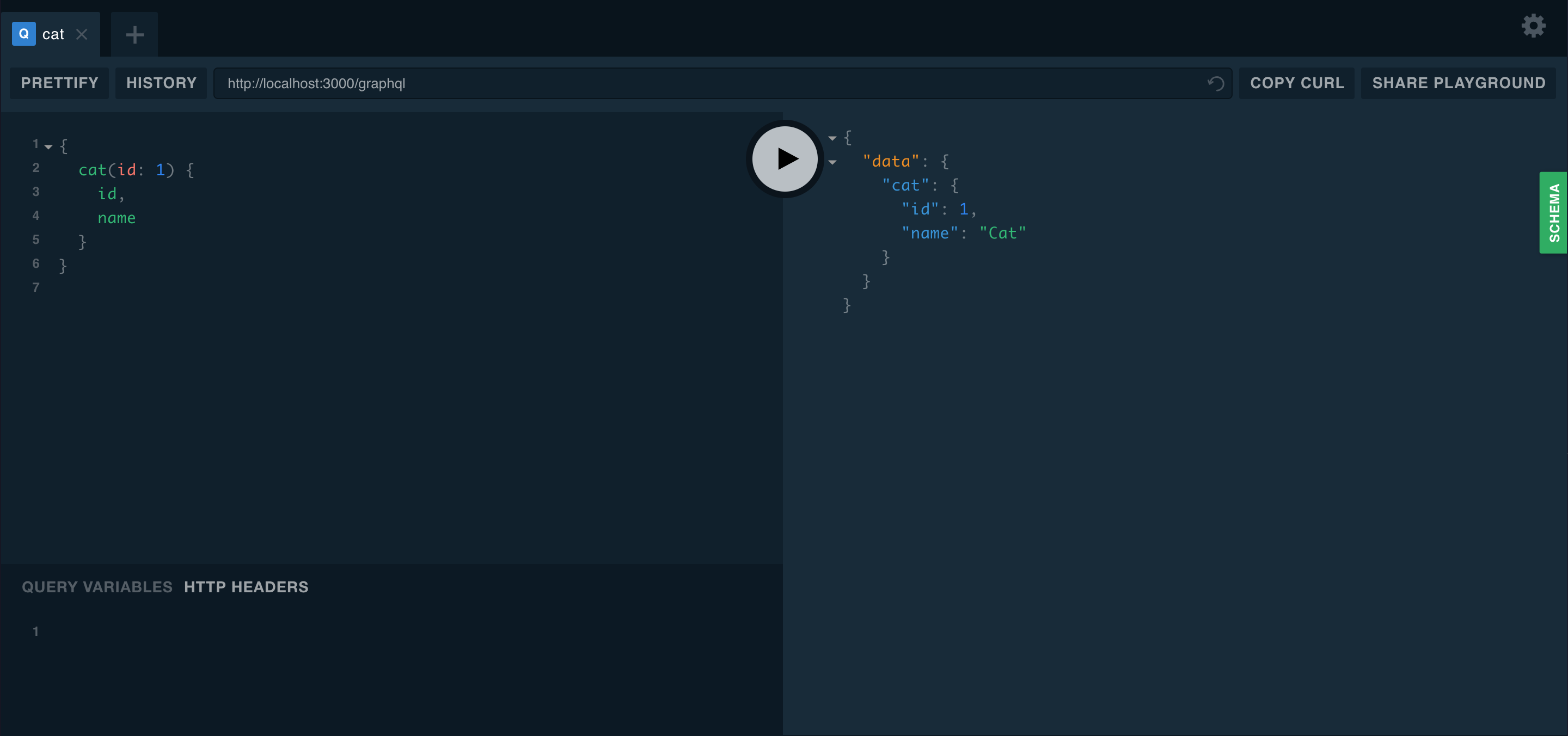
The playground is a graphical, interactive, in-browser GraphQL IDE, available by default on the same URL as the GraphQL server itself. With your application running in the background, open your web browser and navigate to http://localhost:3000/graphql (host and port may vary depending on your configuration). You should see the GraphQL playground, as shown below.
Multiple endpoints#
Another useful feature of the @nestjs/graphql module is the ability to serve multiple endpoints at once. This lets you decide which modules should be included in which endpoint. By default, GraphQL searches for resolvers throughout the whole app. To limit this scan to only a subset of modules, use the include property.
GraphQLModule.forRoot({
  include: [CatsModule],
}),
Schema first#
To use the schema first approach, start by adding a typePaths property to the options object.
GraphQLModule.forRoot({
  typePaths: ['./**/*.graphql'],
}),
The typePaths property indicates where the GraphQLModule should look for GraphQL files. These files will be combined in memory; this allows you to split your schemas into several files and locate them near their resolvers.
Creating GraphQL types and corresponding TypeScript definitions is redundant and tedious. It leaves us without a single source of truth -- each change made within SDL forces us to adjust interfaces as well. To address this, the @nestjs/graphql package can automatically generate TS definitions from the abstract syntax tree (AST). To enable this feature, add the definitions options property when configuring the GraphQLModule.
GraphQLModule.forRoot({
  typePaths: ['./**/*.graphql'],
  definitions: {
    path: join(process.cwd(), 'src/graphql.ts'),
  },
}),
The path property of the definitions object (e.g., src/graphql.ts above) indicates where to save TypeScript output. By default, all types are generated as interfaces. To generate classes instead, specify the outputAs property with a value of 'class'.
GraphQLModule.forRoot({
  typePaths: ['./**/*.graphql'],
  definitions: {
    path: join(process.cwd(), 'src/graphql.ts'),
    outputAs: 'class',
  },
}),
The above approach dynamically generates type definitions each time the application starts. Alternatively, it may be preferable to build a simple script to generate these on demand. For example, assume we create the following script as generate-typings.ts:
import { GraphQLDefinitionsFactory } from '@nestjs/graphql';
import { join } from 'path';

const definitionsFactory = new GraphQLDefinitionsFactory();
definitionsFactory.generate({
  typePaths: ['./src/**/*.graphql'],
  path: join(process.cwd(), 'src/graphql.ts'),
  outputAs: 'class',
});
Now you can run this script only when needed:
$ ts-node generate-typingsHint You can compile the script beforehand (e.g., withtsc) and usenodeto execute it.
To enable watch mode for the script (to automatically generate typings whenever any .graphql file changes), pass the watch option to the generate() method.
definitionsFactory.generate({
  typePaths: ['./src/**/*.graphql'],
  path: join(process.cwd(), 'src/graphql.ts'),
  outputAs: 'class',
  watch: true,
});
A fully working sample is available here.
Code first#
In the code first approach, you use decorators and TypeScript classes to generate the corresponding GraphQL schema.
Nest uses the powerful type-graphql library under the hood to provide this functionality. To start using it, first install the package.
$ npm i type-graphqlOnce installation is complete, we can add the autoSchemaFile property to the options object.
GraphQLModule.forRoot({
  autoSchemaFile: 'schema.gql',
}),
The autoSchemaFile property value is the path where your automatically generated schema will be created. Additionally, you can pass the buildSchemaOptions property - an options object which will be passed in to the buildSchema() function (from the type-graphql package). Alternatively, the schema can be generated on-the-fly in memory. To enable this, set the autoSchemaFile property to true:
GraphQLModule.forRoot({
  autoSchemaFile: true,
}),
A fully working sample is available here.
Async configuration#
When you need to pass module options asynchronously instead of statically, use the forRootAsync() method. As with most dynamic modules, Nest provides several techniques to deal with async configuration.
One technique is to use a factory function:
GraphQLModule.forRootAsync({
  useFactory: () => ({
    typePaths: ['./**/*.graphql'],
  }),
}),
Like other factory providers, our factory function can be async and can inject dependencies through inject.
GraphQLModule.forRootAsync({
  imports: [ConfigModule],
  useFactory: async (configService: ConfigService) => ({
    typePaths: configService.getString('GRAPHQL_TYPE_PATHS'),
  }),
  inject: [ConfigService],
}),
Alternatively, you can configure the GraphQLModule using a class instead of a factory, as shown below:
GraphQLModule.forRootAsync({
  useClass: GqlConfigService,
}),
The construction above instantiates GqlConfigService inside GraphQLModule, using it to create options object. Note that in this example, the GqlConfigService has to implement the GqlOptionsFactory interface, as shown below. The GraphQLModule will call the createGqlOptions() method on the instantiated object of the supplied class.
@Injectable()
class GqlConfigService implements GqlOptionsFactory {
  createGqlOptions(): GqlModuleOptions {
    return {
      typePaths: ['./**/*.graphql'],
    };
  }
}
If you want to reuse an existing options provider instead of creating a private copy inside the GraphQLModule, use the useExisting syntax.
GraphQLModule.forRootAsync({
  imports: [ConfigModule],
  useExisting: ConfigService,
}),