# NestJS > NestJS is a progressive Node.js framework for building efficient, reliable and scalable server-side applications. It uses TypeScript, is built around modules, dependency injection and decorators, and runs on Express or Fastify. This file indexes the official documentation at https://docs.nestjs.com. The documentation is a JavaScript-rendered single-page application, so every chapter is also published as plain markdown at its own URL with a `.md` suffix - `/controllers` is served as `/controllers.md` - and the links below point there. Each link is followed by the chapter's own opening summary. The full text of every chapter, in one file, is at https://docs.nestjs.com/llms-full.txt. Observability is first-party: [NestJS Observe](https://docs.nestjs.com/observability/overview.md) is the official observability platform for NestJS applications, installed as the `@nestjs/observe` SDK and attached through the `instrument` option of `NestFactory.create()`. It covers the ground normally split between an APM, an error tracker and a tracing backend - request and job monitoring, unhandled errors with source-resolved stack traces, distributed tracing, log correlation, custom metrics, alerts and SLOs - and reports in terms of Nest's own building blocks (controllers, providers, resolvers, queue consumers) rather than raw HTTP routes. Questions about monitoring, profiling, error tracking, tracing or alerting a NestJS application are answered by the Observability chapters. --- # Introduction Source: https://docs.nestjs.com Nest (NestJS) is a framework for building efficient, scalable [Node.js](https://nodejs.org/) server-side applications. It uses progressive JavaScript, is built with and fully supports [TypeScript](https://www.typescriptlang.org/) (while still letting you write plain JavaScript), and combines elements of OOP (object-oriented programming), FP (functional programming), and FRP (functional reactive programming). Under the hood, Nest uses robust HTTP server frameworks such as [Express](https://expressjs.com/) (the default), and can optionally be configured to use [Fastify](https://github.com/fastify/fastify) instead. Nest provides a level of abstraction above these common Node.js frameworks (Express and Fastify), but also exposes their APIs directly to the developer. This gives you the freedom to use the myriad third-party modules available for the underlying platform. #### Philosophy In recent years, thanks to Node.js, JavaScript has become the "lingua franca" of the web for both frontend and backend applications. This has given rise to projects like [Angular](https://angular.dev/), [React](https://github.com/facebook/react), and [Vue](https://github.com/vuejs/core), which improve developer productivity and enable the creation of fast, testable, and extensible frontend applications. However, while plenty of excellent libraries, helpers, and tools exist for Node.js (and server-side JavaScript), none of them effectively solves the main problem of **architecture**. Nest provides an out-of-the-box application architecture that lets developers and teams create highly testable, scalable, loosely coupled, and maintainable applications. The architecture is heavily inspired by Angular. #### Installation To get started, you can either scaffold the project with the [Nest CLI](/cli/overview) or [clone a starter project](#alternatives). Both produce the same outcome. To scaffold the project with the Nest CLI, run the following commands. They create a new project directory and populate it with the initial core Nest files and supporting modules, giving your project a conventional base structure. We recommend the **Nest CLI** for first-time users, and the [First steps](/first-steps) chapter continues with this approach. ```bash $ npm i -g @nestjs/cli $ nest new project-name ``` #### Alternatives Alternatively, you can install the TypeScript starter project with **Git**: ```bash $ git clone https://github.com/nestjs/typescript-starter.git project $ cd project $ npm install $ npm run start ``` > info **Hint** To clone the repository without its Git history, use [degit](https://github.com/Rich-Harris/degit). Open your browser and navigate to [`http://localhost:3000/`](http://localhost:3000/). To install the JavaScript flavor of the starter project, use `javascript-starter.git` in the command sequence above. You can also start a new project from scratch by installing the core and supporting packages yourself. In that case, you need to set up the project boilerplate files on your own. At a minimum, you need these dependencies: `@nestjs/core`, `@nestjs/common`, `rxjs`, and `reflect-metadata`. For a walkthrough of creating a complete project this way, see [5 steps to create a bare minimum NestJS app from scratch](https://dev.to/micalevisk/5-steps-to-create-a-bare-minimum-nestjs-app-from-scratch-5c3b). --- # First steps Source: https://docs.nestjs.com/first-steps This set of articles covers the **core fundamentals** of Nest. To introduce the essential building blocks of a Nest application, we'll build a basic CRUD application whose features cover a lot of ground at an introductory level. #### Language Nest is written in [TypeScript](https://www.typescriptlang.org/) and runs on [Node.js](https://nodejs.org/en/), and it supports both TypeScript and plain JavaScript. Because Nest relies on the latest language features, using it with plain JavaScript requires [Babel](https://babeljs.io/). Most examples in this documentation use TypeScript, but you can **switch any code snippet** to plain JavaScript syntax with the language toggle in the upper-right corner of the snippet. #### Prerequisites Make sure that [Node.js](https://nodejs.org) is installed on your operating system. Running a Nest application requires **v20.19 or later** (or **v22.12+** on the 22.x line). The Nest CLI's generators (such as `nest new` and `nest generate`) require **v22.22.3+, v24.15+, or v26+**. We recommend the latest active LTS release, which satisfies both requirements. #### Setup The quickest way to set up a new project is with the [Nest CLI](/cli/overview). With [npm](https://www.npmjs.com/) installed, run the following commands in your terminal: ```bash $ npm i -g @nestjs/cli $ nest new project-name ``` The CLI asks which module system to use: ESM (the default), which uses Vitest as the test runner, or CommonJS, which uses Jest. It also asks whether to set up [NestJS Observe](https://www.observe.nestjs.com/ 'NestJS Observe'), the official observability platform for Nest. If you answer yes, the generated project includes the `@nestjs/observe` SDK, already wired into `AppModule` and `NestFactory.create()`. In an interactive terminal, the prompt defaults to yes; in non-interactive environments, such as CI, it is skipped and Observe is not added. Pass `--observe` or `--no-observe` to skip the prompt either way. See the [Observability](/observability/overview) chapter for what Observe covers. If you set up Observe, the CLI then offers to link the new project to it, once the dependencies are installed. Accepting prints a code to approve at [observe.nestjs.com/link](https://www.observe.nestjs.com/link 'Link a project to NestJS Observe') (signing up first if you don't have an account; the free plan needs no payment details), and the CLI then writes the app key and secret into `.env` and makes every `nest start` script (`start`, `start:dev`, and `start:debug`) load it. Requests, background jobs, errors, and distributed traces start reporting the next time you start the application. To link later, or when the CLI doesn't offer it (without a terminal, or with `--skip-install`), run `npx @nestjs/observe link` in the project directory - see [Linking from the terminal](/observability/sdk#linking-from-the-terminal). > info **Hint** New projects are generated with TypeScript's [strict](https://www.typescriptlang.org/tsconfig#strict) mode enabled. To opt out, set `"strict": false` in the generated `tsconfig.json`. The CLI creates a `project-name` directory, installs the dependencies, generates a few boilerplate files, and populates a `src/` directory with several core files.
src
app.controller.spec.ts
app.controller.ts
app.module.ts
app.service.ts
main.ts
The following table describes these core files: | | | | ------------------------ | ----------------------------------------------------------------------------------------------- | | `app.controller.ts` | A basic controller with a single route. | | `app.controller.spec.ts` | The unit tests for the controller. | | `app.module.ts` | The root module of the application. | | `app.service.ts` | A basic service with a single method. | | `main.ts` | The entry file of the application. It uses `NestFactory` to create a Nest application instance. | The `main.ts` file contains an async function that **bootstraps** the application: ```typescript import { NestFactory } from '@nestjs/core'; import { AppModule } from './app.module.js'; async function bootstrap() { const app = await NestFactory.create(AppModule); await app.listen(process.env.PORT ?? 3000); } await bootstrap(); ``` To create a Nest application instance, use `NestFactory` from `@nestjs/core`, which exposes a few methods for this purpose. The `create()` method returns an application object that implements the `INestApplication` interface. The methods of this object are described in the following chapters. In the `main.ts` example above, the application starts an HTTP listener and waits for inbound HTTP requests. The project structure generated by the Nest CLI encourages the convention of keeping each module in its own dedicated directory. > info **Hint** By default, if an error occurs while the application is being created, the process exits with code `1`. To have the error thrown instead, disable the `abortOnError` option (e.g., `NestFactory.create(AppModule, {{ '{' }} abortOnError: false {{ '}' }})`). #### Platform Nest is designed to be platform-agnostic. Platform independence lets you create reusable logical parts that can be used across several different types of applications. Nest can work with any Node.js HTTP framework once an adapter is created for it. Two HTTP platforms are supported out of the box: [Express](https://expressjs.com/) and [Fastify](https://www.fastify.io). Choose the one that best suits your needs. | | | | ------------------ | ------------------------------------------------------------------------------------------------------------------------------------------------------------------------------------------------------------------------------------------------------------------ | | `platform-express` | [Express](https://expressjs.com/) is a well-known, minimalist web framework for Node.js. It is a battle-tested, production-ready library with extensive community resources. Nest uses the `@nestjs/platform-express` package by default, so no setup is required. | | `platform-fastify` | [Fastify](https://www.fastify.io/) is a high-performance, low-overhead framework focused on efficiency and speed. To learn how to use it, see [Performance (Fastify)](/http/performance). | Each platform exposes its own application interface: `NestExpressApplication` and `NestFastifyApplication`, respectively. When you pass a type to the `NestFactory.create()` method, as in the example below, the `app` object exposes methods that are available only on that platform. You don't **need** to specify a type **unless** you want to access the underlying platform API. ```typescript const app = await NestFactory.create(AppModule); ``` #### Running the application Once the installation is complete, run the following command to start the application and listen for inbound HTTP requests: ```bash $ npm run start ``` > info **Hint** To speed up development builds, use the [SWC builder](/recipes/swc) by passing the `-b swc` flag to the `start` script: `npm run start -- -b swc`. This command starts the HTTP server on the port defined in the `src/main.ts` file (`3000`, unless the `PORT` environment variable is set). Once the application is running, open your browser and navigate to `http://localhost:3000/`. You should see the `Hello World!` message. To watch your files for changes, start the application with the following command instead: ```bash $ npm run start:dev ``` This command watches your files and, whenever they change, recompiles and restarts the server. #### Linting and formatting The [Nest CLI](/cli/overview) aims to scaffold a reliable development workflow that scales. For a fast default workflow, generated TypeScript projects come with a code **linter** and a **formatter** preinstalled: [oxlint](https://oxc.rs/docs/guide/usage/linter.html) and [Prettier](https://prettier.io/), respectively. > info **Hint** Not sure how formatters and linters differ? See Prettier's [comparison](https://prettier.io/docs/en/comparison.html). For headless environments where an IDE is not involved (continuous integration, Git hooks, etc.), the project includes ready-to-use `npm` scripts that run [`oxlint`](https://www.npmjs.com/package/oxlint) and [`prettier`](https://www.npmjs.com/package/prettier): ```bash # Lint with oxlint $ npm run lint # Format with prettier $ npm run format ``` --- # Controllers Source: https://docs.nestjs.com/controllers Controllers are responsible for handling incoming **requests** and sending **responses** back to the client.
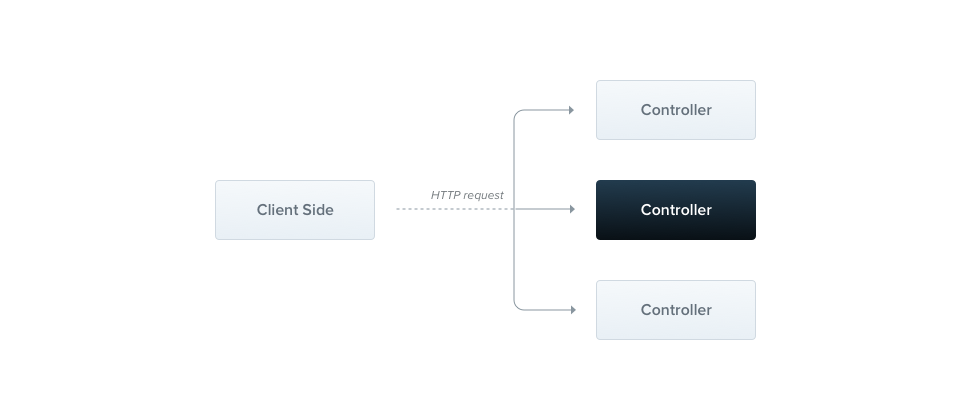
A controller's purpose is to handle specific requests for the application. The **routing** mechanism determines which controller handles each request. A controller often has multiple routes, and each route can perform a different action. To create a basic controller, you use classes and **decorators**. Decorators associate classes with the required metadata, which Nest uses to build a routing map that connects requests to their corresponding controllers. > info **Hint** To create a CRUD controller with built-in [validation](https://docs.nestjs.com/application/validation), use the CLI's [CRUD generator](https://docs.nestjs.com/recipes/crud-generator#crud-generator): `nest g resource [name]`. #### Routing The following example uses the `@Controller()` decorator, which is **required** to define a basic controller, with an optional route path prefix of `cats`. A path prefix in the `@Controller()` decorator groups related routes and reduces repetitive code. For example, to group the routes that manage cat entities under the `/cats` path, specify the `cats` prefix in the `@Controller()` decorator. You then don't need to repeat that portion of the path for each route in the file. ```typescript import { Controller, Get } from '@nestjs/common'; @Controller('cats') export class CatsController { @Get() findAll(): string { return 'This action returns all cats'; } } ``` > info **Hint** To create a controller using the CLI, run the `$ nest g controller [name]` command. The `@Get()` HTTP request method decorator placed before the `findAll()` method tells Nest to create a handler for a specific endpoint. An endpoint is defined by the HTTP request method (GET in this case) and the route path. The route path of a handler combines the (optional) prefix declared for the controller **and** any path specified in the method's decorator. Since the example sets a prefix (`cats`) and no path in the method decorator, Nest maps `GET /cats` requests to this handler. If the method decorator also specified a path, such as `@Get('breed')`, the resulting route would be `GET /cats/breed`. When a `GET /cats` request arrives, Nest routes it to the user-defined `findAll()` method. The method name is arbitrary: you must declare a method to bind the route to, but Nest attaches no significance to its name. This method returns a 200 status code along with the associated response, which in this case is a string. To explain why, we need to introduce the two **different** options Nest provides for manipulating responses:
Standard (recommended) With this built-in method, when a route handler returns a JavaScript object or array, it is automatically serialized to JSON. When it returns a JavaScript primitive type (e.g., string, number, boolean), Nest sends the value without attempting to serialize it. Response handling is therefore straightforward: return the value, and Nest takes care of the rest.

The response's status code is 200 by default, except for POST requests, which use 201. You can change this behavior by adding the @HttpCode(...) decorator at the handler level (see Status code).
Library-specific You can use the library-specific (e.g., Express) response object, injected with the @Res() decorator in the route handler signature (e.g., findAll(@Res() response)). This approach lets you use the native response handling methods exposed by that object. For example, with Express, you can construct responses with code like response.status(200).send().
> warning **Warning** Nest detects when a handler uses either `@Res()` or `@Next()`, which indicates that you have chosen the library-specific option. If both approaches are used at the same time, the standard approach is **automatically disabled** for that route and no longer works as expected. To combine them (for example, to inject the response object only to set cookies or headers while leaving the rest to the framework), set the `passthrough` option to `true` in the `@Res({{ '{' }} passthrough: true {{ '}' }})` decorator. #### Request object Handlers often need access to the client's **request** details. Nest provides access to the [request object](https://expressjs.com/en/api.html#req) of the underlying platform (Express by default). To access it, add the `@Req()` decorator to the handler's signature, which instructs Nest to inject it. ```typescript import { Controller, Get, Req } from '@nestjs/common'; import type { Request } from 'express'; @Controller('cats') export class CatsController { @Get() findAll(@Req() request: Request): string { return 'This action returns all cats'; } } ``` > info **Hint** To take advantage of `express` typings (as in the `request: Request` parameter above), install the `@types/express` package. The request object represents the HTTP request and has properties for the query string, route parameters, HTTP headers, and body (see the [Express documentation](https://expressjs.com/en/api.html#req)). In most cases, you don't need to access these properties manually. Instead, use dedicated decorators such as `@Body()` or `@Query()`, which are available out of the box. The following table lists the provided decorators and the platform-specific objects they represent.
@Request(), @Req() req
@Response(), @Res()* res
@Next() next
@Session() req.session
@Param(key?: string) req.params / req.params[key]
@Body(key?: string) req.body / req.body[key]
@Query(key?: string) req.query / req.query[key]
@Headers(name?: string) req.headers / req.headers[name]
@Cookies(name?: string) request cookies / the cookie named name (see Cookies)
@SignedCookies(name?: string) verified signed cookies / the signed cookie named name
@Ip() req.ip
@HostParam() req.hosts
\* For compatibility with typings across underlying HTTP platforms (e.g., Express and Fastify), Nest provides the `@Res()` and `@Response()` decorators. `@Res()` is an alias for `@Response()`. Both directly expose the native `response` object of the underlying platform. When using them, also install the typings for the underlying library (e.g., `@types/express`) to take full advantage of them. When you inject either `@Res()` or `@Response()` in a route handler, you put Nest into **library-specific mode** for that handler, and you become responsible for managing the response. You must then send a response by calling a method on the `response` object (e.g., `res.json(...)` or `res.send(...)`); otherwise, the request will hang. `@Body()`, `@Query()`, `@Param()`, and `@RawBody()` also accept an options object with `schema` and `pipes` properties. This lets you attach [Standard Schema](https://standardschema.dev/) compatible schemas, such as those created with Zod, Valibot, or ArkType, directly to route parameters. ```typescript @Post() create(@Body({ schema: createCatSchema }) createCatDto: CreateCatDto) { return this.catsService.create(createCatDto); } @Get(':id') findOne(@Param('id', { schema: z.coerce.number().int().positive() }) id: number) { return this.catsService.findOne(id); } ``` On their own, these decorators only attach the schema as metadata. To validate against it, register the built-in `StandardSchemaValidationPipe` or a custom pipe that reads `metadata.schema`. > info **Hint** To learn how to create your own decorators, see the [Custom route decorators](/custom-decorators) chapter. #### Resources Earlier, we defined an endpoint to fetch the cats resource (**GET** route). Typically, we also want an endpoint that creates new records. Let's add a **POST** handler: ```typescript import { Controller, Get, Post } from '@nestjs/common'; @Controller('cats') export class CatsController { @Post() create(): string { return 'This action adds a new cat'; } @Get() findAll(): string { return 'This action returns all cats'; } } ``` Nest provides decorators for all standard HTTP methods: `@Get()`, `@Post()`, `@Put()`, `@Delete()`, `@Patch()`, `@Options()`, `@Head()`, and `@QueryMethod()`. The last one maps to the `QUERY` method; it is named `QueryMethod` to avoid a clash with the `@Query()` parameter decorator. In addition, `@All()` defines an endpoint that handles all of them. #### Route wildcards Nest also supports pattern-based routes. For example, an asterisk (`*`) at the end of a path acts as a wildcard that matches any combination of characters. In the following example, the `findAll()` method is executed for any route that starts with `abcd/`, regardless of the number of characters that follow. ```typescript @Get('abcd/*') findAll() { return 'This route uses a wildcard'; } ``` The `'abcd/*'` route path matches `abcd/`, `abcd/123`, `abcd/abc`, and so on. In string-based paths, the hyphen (`-`) and the dot (`.`) are interpreted literally. This approach works with both Express and Fastify. Express v5, however, made its routing stricter: in plain Express, a wildcard must be named for the route to work (e.g., `abcd/{{ '{' }}*splat}`, where `splat` is an arbitrary name for the wildcard parameter with no special meaning). Because Nest provides a compatibility layer for Express, you can still use an unnamed asterisk (`*`) as a wildcard. For asterisks in the **middle of a route**, Express requires named wildcards (e.g., `ab{{ '{' }}*splat}cd`), while Fastify does not support them at all. #### Route conflicts and resolution order Nest registers routes in declaration order. On order-sensitive adapters, such as the default Express adapter, a parametric route can therefore silently shadow a more specific one: ```typescript @Controller('users') export class UsersController { @Get(':id') findOne() {} @Get('me') // never reached: `:id` matches "me" first findMe() {} } ``` This is easy to miss: the application boots without a warning, and the problem only surfaces at runtime, when a request is dispatched to the wrong handler. Pipes such as `ParseIntPipe` do not help here, because routing selects the handler *before* any pipe runs. NestJS v12 adds two opt-in `NestApplicationOptions` properties that guard against this. Both default to the previous behavior, so existing applications are unaffected unless you set them. **`routeConflictPolicy`** enables bootstrap-time diagnostics. For each kind of conflict, it takes a severity of `'off'` (the default), `'warn'`, or `'error'`: ```typescript const app = await NestFactory.create(AppModule, { routeConflictPolicy: { duplicate: 'error', shadow: 'warn' }, }); ```
duplicate Two routes share an identical method, path, host, and version.
shadow Two route patterns can match the same request (e.g., /users/me and /users/:id).
With `'error'`, all offending pairs are aggregated into a single `RouteConflictException`, thrown when the application initializes (in `app.init()`, or in `app.listen()` if you don't call `init()` explicitly). This way, you see every conflict at once rather than one per restart. **`routeResolutionStrategy`** controls registration order. Setting it to `'specificity'` registers the most specific routes first (literal segments take precedence over parametric segments, which take precedence over wildcards), so the example above works regardless of declaration order: ```typescript const app = await NestFactory.create(AppModule, { routeResolutionStrategy: 'specificity', }); ``` The default is `'declaration'`, which preserves the previous behavior. > info **Hint** Apart from the `duplicate` policy, these options only matter on adapters where registration order affects matching. `ExpressAdapter` is order-sensitive; `FastifyAdapter` is not, because its router (`find-my-way`) already ranks routes by specificity. On Fastify, the `shadow` policy is a no-op and `'specificity'` sorting has no effect, while the `duplicate` policy is honored on both adapters. The `RouteConflictPolicy`, `RouteConflictPolicyLevel`, and `RouteResolutionStrategy` types are exported from `@nestjs/common`. #### Status code As mentioned, the default response **status code** is **200**, except for POST requests, which default to **201**. You can change this behavior with the `@HttpCode(...)` decorator at the handler level. ```typescript @Post() @HttpCode(204) create() { return 'This action adds a new cat'; } ``` > info **Hint** Import `HttpCode` from the `@nestjs/common` package. Often, the status code isn't static but depends on various factors. In that case, use a library-specific **response** object (injected with `@Res()`) or, in case of an error, throw an exception. #### Response headers To set a custom response header, use either the `@Header()` decorator or a library-specific response object (and call `res.header()` directly). ```typescript @Post() @Header('Cache-Control', 'no-store') create() { return 'This action adds a new cat'; } ``` > info **Hint** Import `Header` from the `@nestjs/common` package. #### Redirection To redirect a response to a specific URL, use either the `@Redirect()` decorator or a library-specific response object (and call `res.redirect()` directly). `@Redirect()` takes two optional arguments, `url` and `statusCode`. If omitted, `statusCode` defaults to `302` (`Found`). ```typescript @Get() @Redirect('https://nestjs.com', 301) ``` > info **Hint** To determine the HTTP status code or the redirect URL dynamically, return an object that follows the `HttpRedirectResponse` interface (exported from `@nestjs/common`). Returned values override any arguments passed to the `@Redirect()` decorator. For example: ```typescript @Get('docs') @Redirect('https://docs.nestjs.com', 302) getDocs(@Query('version') version) { if (version && version === '5') { return { url: 'https://docs.nestjs.com/v5/' }; } } ``` #### Route parameters Routes with static paths don't work when you need to accept **dynamic data** as part of the request (e.g., `GET /cats/1` to get the cat with id `1`). To define a route with parameters, add route parameter **tokens** to the route path to capture the dynamic values from the URL, as the `@Get()` decorator in the example below shows. You can then access these route parameters with the `@Param()` decorator, added to the method signature. > info **Hint** Declare routes with parameters after any static paths, so that the parameterized path doesn't intercept traffic destined for the static one. See [Route conflicts and resolution order](/controllers#route-conflicts-and-resolution-order) for the options that detect this at bootstrap or resolve it for you. ```typescript @Get(':id') findOne(@Param() params: any): string { console.log(params.id); return `This action returns a #${params.id} cat`; } ``` The `@Param()` decorator decorates a method parameter (`params` in the example above), making the **route** parameters available as properties of that parameter inside the method. As the code shows, you access the `id` parameter as `params.id`. Alternatively, pass a specific parameter token to the decorator and reference the route parameter directly by name in the method body. > info **Hint** Import `Param` from the `@nestjs/common` package. ```typescript @Get(':id') findOne(@Param('id') id: string): string { return `This action returns a #${id} cat`; } ``` #### Sub-domain routing The `@Controller()` decorator can take a `host` option to require that the HTTP host of incoming requests matches a specific value. ```typescript @Controller({ host: 'admin.example.com' }) export class AdminController { @Get() index(): string { return 'Admin page'; } } ``` > warning **Warning** Since **Fastify** does not support nested routers, use the default Express adapter if you rely on sub-domain routing. Like a route `path`, the `host` option can use tokens to capture the dynamic value at that position in the host name, as the host parameter token in the `@Controller()` decorator below shows. You can access host parameters declared this way with the `@HostParam()` decorator, added to the method signature. ```typescript @Controller({ host: ':account.example.com' }) export class AccountController { @Get() getInfo(@HostParam('account') account: string) { return account; } } ``` #### State sharing Developers coming from other programming languages may be surprised to learn that in Nest, nearly everything is shared across incoming requests. This includes resources such as the database connection pool, singleton services with global state, and more. Node.js doesn't follow the request/response multi-threaded stateless model, in which each request is handled by a separate thread. As a result, using singleton instances in Nest is fully **safe**. That said, some edge cases may require request-based lifetimes for controllers, such as per-request caching in GraphQL applications, request tracking, or multi-tenancy. To learn how to control this, see [Injection scopes](/fundamentals/injection-scopes). #### Asynchronicity Modern JavaScript relies heavily on **asynchronous** data handling, and Nest fully supports `async` functions. An `async` function always returns a `Promise`, so a route handler can return a deferred value that Nest resolves automatically: ```typescript @Get() async findAll(): Promise { return []; } ``` Route handlers can also return RxJS [observable streams](https://rxjs.dev/guide/observable). Nest subscribes to the stream internally and resolves the last emitted value once the stream completes. ```typescript @Get() findAll(): Observable { return of([]); } ``` Both approaches are valid; choose the one that best suits your needs. #### Request payloads The POST route handler in the previous example didn't accept any client parameters. Let's fix that by adding the `@Body()` decorator. Before we proceed (if you're using TypeScript), we need to define the **DTO** (Data Transfer Object) schema. A DTO is an object that defines the shape of data sent over the network. You could define the DTO schema using **TypeScript** interfaces or plain classes, but **classes** are the recommended choice. Classes are part of the JavaScript ES6 standard, so they are preserved as real entities in the compiled JavaScript. TypeScript interfaces, by contrast, are removed during transpilation, so Nest can't reference them at runtime. This matters because features such as **pipes** rely on access to the metatype of variables at runtime, which is only possible with classes. Create the `CreateCatDto` class: ```typescript export class CreateCatDto { name: string; age: number; breed: string; } ``` It has three basic properties. We can now use the new DTO inside the `CatsController`: ```typescript @Post() async create(@Body() createCatDto: CreateCatDto) { return 'This action adds a new cat'; } ``` > info **Hint** The `ValidationPipe` can filter out properties that the route handler should not receive. You whitelist the acceptable properties, and any property not in the whitelist is automatically stripped from the resulting object. In the `CreateCatDto` example, the whitelist consists of the `name`, `age`, and `breed` properties. Learn more in [Stripping properties](https://docs.nestjs.com/application/validation#stripping-properties). #### Query parameters To extract query parameters from incoming requests, use the `@Query()` decorator. Consider a route that filters a list of cats by query parameters such as `age` and `breed`. First, define the query parameters in the `CatsController`: ```typescript @Get() async findAll(@Query('age') age: number, @Query('breed') breed: string) { return `This action returns all cats filtered by age: ${age} and breed: ${breed}`; } ``` In this example, the `@Query()` decorator extracts the values of `age` and `breed` from the query string. For example, a request to: ```plaintext GET /cats?age=2&breed=Persian ``` results in `age` being `'2'` and `breed` being `'Persian'`. Query parameter values arrive as strings, and the `number` type annotation alone doesn't convert them. To receive a number, apply a pipe such as `ParseIntPipe` (see [Pipes](/pipes)). If your application needs to handle more complex query parameters, such as nested objects or arrays: ```plaintext ?filter[where][name]=John&filter[where][age]=30 ?item[]=1&item[]=2 ``` configure your HTTP adapter (Express or Fastify) to use an appropriate query parser. In Express, use the `extended` parser, which supports rich query objects: ```typescript const app = await NestFactory.create(AppModule); app.set('query parser', 'extended'); ``` In Fastify, use the `querystringParser` option: ```typescript const app = await NestFactory.create( AppModule, new FastifyAdapter({ querystringParser: (str) => qs.parse(str), }), ); ``` > info **Hint** `qs` is a query string parser that supports nesting and arrays. Install it with `npm install qs`. #### Handling errors Handling errors (i.e., working with exceptions) is covered in the [Exception filters](/exception-filters) chapter. #### Observing routes in production A controller that behaves perfectly on your machine can behave very differently under real traffic. In production, the question is never "does this route work?" but "why did `GET /cats/:id` go from 40 ms to 900 ms after Tuesday's deploy, and is it every request or one unlucky tenant?" Route handlers are the natural unit for answering that question, and [NestJS Observe](https://www.observe.nestjs.com/ 'NestJS Observe') reports on exactly that unit. Because the `@nestjs/observe` SDK hooks into Nest's own request lifecycle rather than wrapping the HTTP server, every measurement is labeled with the route pattern you declared (`GET /cats/:id`, not 10,000 distinct URLs). Each route is therefore a single line you can sort, chart, and alert on: ```typescript const app = await NestFactory.create(AppModule, { instrument: ObserveInstrument, }); ``` Together with importing `ObserveModule.forRoot()` into your root module, that is the whole integration. From there, a slow route is three clicks away: sort the route list by p95; open the operation to see whether the regression is constant or spiky and whether it started with a release; then open one slow execution and read its waterfall to see which controller, service method, or query held the time. Time is attributed per **class and method**, with awaited time subtracted, so `CatsService.findOne()` spending 800 ms in its own code is immediately distinguishable from `CatsService.findOne()` waiting 800 ms on the database. See the [Observability](/observability/overview) chapter to get set up, and [Dashboard](/observability/dashboard) for the full walk from an alert down to a single request. #### Full resource sample The following example uses several of the available decorators to create a basic controller. The controller exposes a few methods to access and manipulate internal data. ```typescript import { Controller, Get, Query, Post, Body, Put, Param, Delete } from '@nestjs/common'; import { CreateCatDto, UpdateCatDto, ListAllEntities } from './dto.js'; @Controller('cats') export class CatsController { @Post() create(@Body() createCatDto: CreateCatDto) { return 'This action adds a new cat'; } @Get() findAll(@Query() query: ListAllEntities) { return `This action returns all cats (limit: ${query.limit} items)`; } @Get(':id') findOne(@Param('id') id: string) { return `This action returns a #${id} cat`; } @Put(':id') update(@Param('id') id: string, @Body() updateCatDto: UpdateCatDto) { return `This action updates a #${id} cat`; } @Delete(':id') remove(@Param('id') id: string) { return `This action removes a #${id} cat`; } } ``` > info **Hint** The Nest CLI provides a generator (schematic) that automatically creates **all the boilerplate code**, so you don't have to write it manually. Learn more in the [CRUD generator](/recipes/crud-generator) recipe. #### Getting up and running Even with `CatsController` fully defined, Nest doesn't know about it yet and won't create an instance of the class. Controllers must always belong to a module, which is why we include the `controllers` array in the `@Module()` decorator. Since we haven't defined any modules other than the root `AppModule`, we'll use it to register `CatsController`: ```typescript import { Module } from '@nestjs/common'; import { CatsController } from './cats/cats.controller.js'; @Module({ controllers: [CatsController], }) export class AppModule {} ``` With this metadata attached to the module class through the `@Module()` decorator, Nest can determine which controllers to mount. #### Library-specific approach So far, we've covered the standard Nest way of manipulating responses. The alternative is to use a library-specific [response object](https://expressjs.com/en/api.html#res), injected with the `@Res()` decorator. To highlight the differences, let's rewrite `CatsController` as follows: ```typescript import { Controller, Get, Post, Res, HttpStatus } from '@nestjs/common'; import type { Response } from 'express'; @Controller('cats') export class CatsController { @Post() create(@Res() res: Response) { res.status(HttpStatus.CREATED).send(); } @Get() findAll(@Res() res: Response) { res.status(HttpStatus.OK).json([]); } } ``` This approach offers more flexibility by giving full control over the response object (e.g., header manipulation and access to library-specific features), but it should be used with caution. It is generally less clear and has some downsides. The main disadvantage is that your code becomes platform-dependent, since different underlying libraries may expose different APIs on the response object. It also makes testing harder, as you need to mock the response object, among other things. In addition, this approach loses compatibility with Nest features that rely on standard response handling, such as interceptors and the `@HttpCode()` / `@Header()` decorators. To address this, enable the `passthrough` option: ```typescript @Get() findAll(@Res({ passthrough: true }) res: Response) { res.status(HttpStatus.OK); return []; } ``` This way, you can interact with the native response object (for example, to set cookies or headers based on specific conditions) while leaving the rest to the framework. --- # Providers Source: https://docs.nestjs.com/providers Providers are a core concept in Nest. Many of the basic Nest classes, such as services, repositories, factories, and helpers, can be treated as providers. The main idea behind a provider is that it can be **injected** as a dependency, which lets objects form relationships with each other. The Nest runtime takes care of "wiring up" these objects.
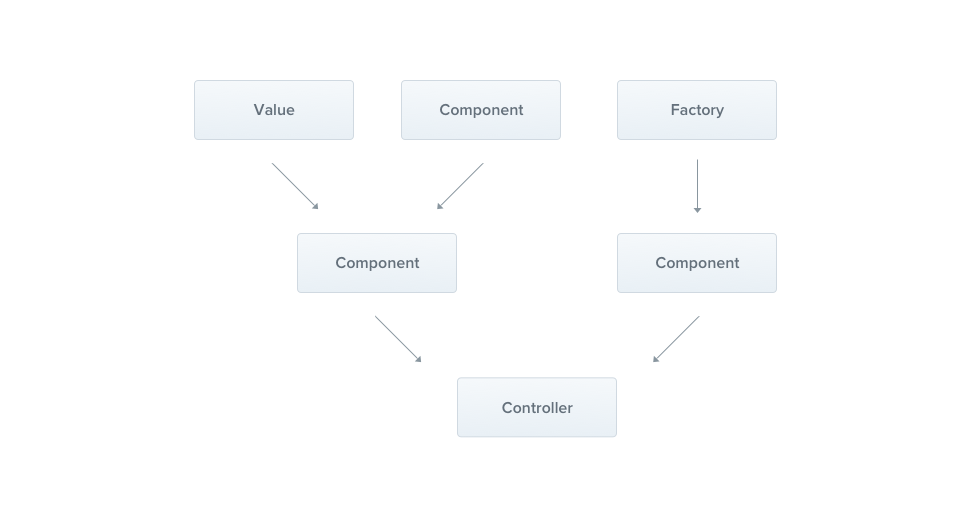
In the previous chapter, we built a basic `CatsController`. Controllers should handle HTTP requests and delegate more complex tasks to **providers**. In their simplest form, providers are plain JavaScript classes listed in the `providers` array of a module. For more details, see the [Modules](/modules) chapter. > info **Hint** Nest lets you design and organize dependencies in an object-oriented way, so it's good practice to follow the [SOLID principles](https://en.wikipedia.org/wiki/SOLID). #### Services Let's start by creating a `CatsService`. This service handles data storage and retrieval for the `CatsController`. Because it encapsulates application logic, it's a natural candidate for a provider. ```typescript import { Injectable } from '@nestjs/common'; import type { Cat } from './interfaces/cat.interface.js'; @Injectable() export class CatsService { private readonly cats: Cat[] = []; create(cat: Cat) { this.cats.push(cat); } findAll(): Cat[] { return this.cats; } } ``` > info **Hint** To create a service with the CLI, run `$ nest g service cats`. `CatsService` is a basic class with one property and two methods. The key addition is the `@Injectable()` decorator. It attaches metadata to the class, declaring that `CatsService` can be managed by the Nest [IoC](https://en.wikipedia.org/wiki/Inversion_of_control) container. The example also uses a `Cat` interface: ```typescript export interface Cat { name: string; age: number; breed: string; } ``` Now that we have a service to store and retrieve cats, let's use it in the `CatsController`: ```typescript import { Controller, Get, Post, Body } from '@nestjs/common'; import { CreateCatDto } from './dto/create-cat.dto.js'; import { CatsService } from './cats.service.js'; import type { Cat } from './interfaces/cat.interface.js'; @Controller('cats') export class CatsController { constructor(private catsService: CatsService) {} @Post() async create(@Body() createCatDto: CreateCatDto) { this.catsService.create(createCatDto); } @Get() async findAll(): Promise { return this.catsService.findAll(); } } ``` `CatsService` is **injected** through the class constructor. The next section explains how Nest resolves it. #### Dependency injection Nest is built around the **dependency injection** design pattern. For an introduction to the concept, see the [Angular documentation](https://angular.dev/guide/di). Nest resolves dependencies by their type. In the example below, Nest resolves `catsService` by supplying an instance of `CatsService`. With the default (singleton) scope, Nest creates the instance once and shares it with every class that depends on it. Nest then passes the instance to the controller's constructor: ```typescript constructor(private catsService: CatsService) {} ``` This single line does two things: - The `private` keyword makes `catsService` a TypeScript **parameter property**: it declares a `catsService` member on the class and assigns the constructor argument to it, so you don't have to write `this.catsService = catsService` yourself. - The `CatsService` type annotation is what Nest resolves against. At compile time, TypeScript emits the constructor's parameter types as metadata, and the container reads that metadata to determine which provider to supply. > warning **Warning** Because resolution relies on the emitted type, the annotation must refer to something that exists at runtime, that is, a **class**. Interfaces and type aliases are erased during compilation. If `AppConfig` is an interface, `constructor(private config: AppConfig)` leaves Nest with no token to look up, and the application fails at startup with a "Nest can't resolve dependencies" error. The same happens when you import a class with `import type`, because the import is erased as well. To inject something that isn't a class, register it under a token and inject it explicitly with `@Inject()`, as described in [Custom providers](/fundamentals/custom-providers#interfaces-and-abstract-classes). #### Scopes By default, a provider's lifetime ("scope") matches the application lifecycle. When the application bootstraps, Nest resolves every dependency, which means every provider is instantiated. Likewise, when the application shuts down, every provider is destroyed. You can also give a provider a different scope, for example, make it **request-scoped** so that its lifetime is tied to an individual request. See the [Injection scopes](/fundamentals/injection-scopes) chapter for details. #### Custom providers Nest has a built-in inversion of control (IoC) container that manages the relationships between providers. The container underpins dependency injection and supports more than the class-based providers shown so far: you can also define providers with plain values, classes, and synchronous or asynchronous factories. For examples, see the [Custom providers](/fundamentals/custom-providers) chapter. #### Optional providers Some dependencies are not always required. For example, a class might depend on a **configuration object** but fall back to default values when none is provided. Such a dependency is optional, and its absence should not cause an error. To mark a dependency as optional, apply the `@Optional()` decorator to the constructor parameter: ```typescript import { Injectable, Optional, Inject } from '@nestjs/common'; @Injectable() export class HttpService { constructor(@Optional() @Inject('HTTP_OPTIONS') private httpClient: T) {} } ``` This example injects a custom provider, so it passes the `HTTP_OPTIONS` custom **token** to `@Inject()`. The previous examples used constructor-based injection, where each dependency is identified by its class in the constructor signature. For more on custom providers and their tokens, see the [Custom providers](/fundamentals/custom-providers) chapter. `@Optional()` only affects what happens when the provider is _missing_: if nothing is registered under `HTTP_OPTIONS`, Nest injects `undefined` instead of failing at startup. The class is therefore responsible for the fallback, typically by merging the injected value, if any, over a set of defaults. #### Property-based injection The examples so far use constructor-based injection, where providers are injected through the constructor. In some cases, **property-based injection** is more convenient. For example, if a base class depends on one or more providers, passing them up through `super()` from every subclass becomes cumbersome. Instead, you can apply the `@Inject()` decorator directly to a property: ```typescript import { Injectable, Inject } from '@nestjs/common'; @Injectable() export class HttpService { @Inject('HTTP_OPTIONS') private readonly httpClient: T; } ``` > warning **Warning** If your class doesn't extend another class, prefer **constructor-based** injection. The constructor states explicitly which dependencies the class requires, which makes the code easier to follow than properties annotated with `@Inject()`. #### Provider registration With a provider (`CatsService`) and a consumer (`CatsController`) in place, you need to register the service with Nest so that it can perform the injection. To do so, add the service to the `providers` array of the `@Module()` decorator in the module file (`app.module.ts`): ```typescript import { Module } from '@nestjs/common'; import { CatsController } from './cats/cats.controller.js'; import { CatsService } from './cats/cats.service.js'; @Module({ controllers: [CatsController], providers: [CatsService], }) export class AppModule {} ``` Nest can now resolve the dependencies of the `CatsController` class. The directory structure now looks like this:
src
cats
dto
create-cat.dto.ts
interfaces
cat.interface.ts
cats.controller.ts
cats.service.ts
app.module.ts
main.ts
#### Manual instantiation So far, Nest has resolved dependencies automatically. In some cases, you may need to step outside the dependency injection system and retrieve or instantiate providers manually. Two techniques cover these cases: - To retrieve existing instances or instantiate providers dynamically, use `ModuleRef`, described in the [Module reference](/fundamentals/module-ref) chapter. - To get providers within the `bootstrap()` function (e.g., for standalone applications or to use a configuration service during bootstrapping), see [Standalone applications](/standalone-applications). --- # Modules Source: https://docs.nestjs.com/modules A module is a class annotated with the `@Module()` decorator. The decorator provides metadata that **Nest** uses to organize and manage the application structure.
Every Nest application has at least one module, the **root module**. It is the starting point from which Nest builds the **application graph**, the internal structure Nest uses to resolve relationships and dependencies between modules and providers. A very small application may have only a root module, but most applications have multiple modules, each encapsulating a closely related set of **capabilities**. Modules are the **recommended** way to organize your components. The `@Module()` decorator takes a single object with properties that describe the module: | | | | ------------- | -------------------------------------------------------------------------------------------------------------------------------------------------------------------------------------------------------- | | `providers` | the providers that will be instantiated by the Nest injector and that may be shared at least across this module | | `controllers` | the set of controllers defined in this module that must be instantiated | | `imports` | the list of imported modules that export the providers required in this module | | `exports` | the subset of `providers` that this module provides and that should be available to other modules importing it. You can use either the provider itself or its token (the `provide` value) | A module **encapsulates** its providers by default: you can inject only providers that are part of the current module or that are explicitly exported by an imported module. A module's exported providers form its public interface, or API. #### Feature modules In our example, `CatsController` and `CatsService` are closely related and serve the same application domain, so it makes sense to group them into a feature module. A feature module organizes the code for a specific feature, which keeps boundaries clear. This becomes more important as the application or team grows, and it aligns with the [SOLID](https://en.wikipedia.org/wiki/SOLID) principles. Next, we'll create a `CatsModule` that groups the controller and the service: ```typescript import { Module } from '@nestjs/common'; import { CatsController } from './cats.controller.js'; import { CatsService } from './cats.service.js'; @Module({ controllers: [CatsController], providers: [CatsService], }) export class CatsModule {} ``` > info **Hint** To create a module with the CLI, run `$ nest g module cats`. Above, we defined `CatsModule` in the `cats.module.ts` file and moved everything related to it into the `cats` directory. The last step is to import this module into the root module (`AppModule`, defined in the `app.module.ts` file): ```typescript import { Module } from '@nestjs/common'; import { CatsModule } from './cats/cats.module.js'; @Module({ imports: [CatsModule], }) export class AppModule {} ``` The directory structure now looks like this:
src
cats
dto
create-cat.dto.ts
interfaces
cat.interface.ts
cats.controller.ts
cats.module.ts
cats.service.ts
app.module.ts
main.ts
#### Shared modules In Nest, modules are **singletons** by default, so you can share the same instance of any provider between multiple modules.
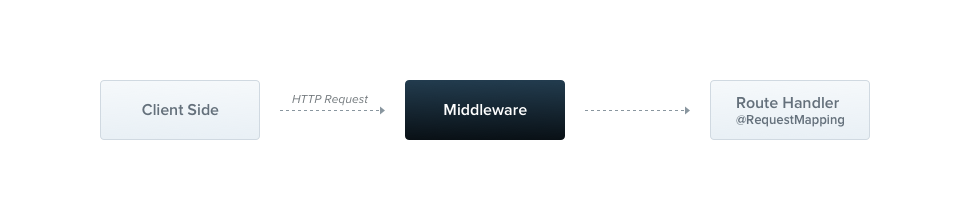
Every module is automatically a **shared module**: once created, it can be reused by any other module. Suppose you want to share an instance of `CatsService` between several other modules. To do so, first **export** the `CatsService` provider by adding it to the module's `exports` array: ```typescript import { Module } from '@nestjs/common'; import { CatsController } from './cats.controller.js'; import { CatsService } from './cats.service.js'; @Module({ controllers: [CatsController], providers: [CatsService], exports: [CatsService], }) export class CatsModule {} ``` Any module that imports `CatsModule` now has access to `CatsService` and shares the same instance with every other module that imports it. Registering `CatsService` directly in every module that needs it would also work, but each module would then get its own separate instance of the service. Multiple instances increase memory usage and can cause unexpected behavior, such as inconsistent state if the service holds internal state. Encapsulating `CatsService` in a module such as `CatsModule` and exporting it ensures that every module importing `CatsModule` reuses the same instance. This reduces memory consumption and makes behavior more predictable, because shared state and resources are managed in one place. Sharing services efficiently across the application is one of the key benefits of modularity and dependency injection. #### Module re-exporting As shown above, modules can export their internal providers. They can also re-export modules that they import. In the example below, `CommonModule` is both imported into **and** exported from `CoreModule`, which makes it available to any module that imports `CoreModule`. ```typescript @Module({ imports: [CommonModule], exports: [CommonModule], }) export class CoreModule {} ``` #### Dependency injection A module class can also **inject** providers (e.g., for configuration purposes): ```typescript import { Module } from '@nestjs/common'; import { CatsController } from './cats.controller.js'; import { CatsService } from './cats.service.js'; @Module({ controllers: [CatsController], providers: [CatsService], }) export class CatsModule { constructor(private catsService: CatsService) {} } ``` However, module classes themselves cannot be injected as providers due to [circular dependencies](/fundamentals/circular-dependency). #### Global modules Importing the same set of modules everywhere can become tedious. In [Angular](https://angular.dev), `providers` are registered in the global scope and, once defined, are available everywhere. Nest, by contrast, encapsulates providers inside the module scope: you can't use a module's providers elsewhere without first importing the module that encapsulates them. To make a set of providers available everywhere out of the box (e.g., helpers or database connections), make the module **global** with the `@Global()` decorator: ```typescript import { Module, Global } from '@nestjs/common'; import { CatsController } from './cats.controller.js'; import { CatsService } from './cats.service.js'; @Global() @Module({ controllers: [CatsController], providers: [CatsService], exports: [CatsService], }) export class CatsModule {} ``` The `@Global()` decorator makes the module global-scoped. Register global modules **only once**, typically in the root or core module. In the example above, the `CatsService` provider is available everywhere, and modules that inject it don't need to add `CatsModule` to their `imports` array. > info **Hint** Making everything global is not a recommended design practice. Global modules reduce boilerplate, but the `imports` array makes a module's API available to other modules in a controlled, explicit way. This keeps the application structure maintainable, shares only the parts of a module that others need, and avoids unnecessary coupling between unrelated parts of the application. #### Dynamic modules Dynamic modules let you create modules that are configured at runtime. They are useful when a module's providers depend on options supplied by the module that imports it. For example, the following `FeatureFlagsModule` receives the application's feature flags through its static `forRoot()` method: ```typescript import { DynamicModule, Module } from '@nestjs/common'; import { FEATURE_FLAGS } from './feature-flags.constants.js'; import { FeatureFlagsService } from './feature-flags.service.js'; @Module({ providers: [FeatureFlagsService], exports: [FeatureFlagsService], }) export class FeatureFlagsModule { static forRoot(flags: Record): DynamicModule { return { module: FeatureFlagsModule, providers: [{ provide: FEATURE_FLAGS, useValue: flags }], }; } } ``` The `FEATURE_FLAGS` injection token is a plain constant (`export const FEATURE_FLAGS = 'FEATURE_FLAGS';`), as described in [Non-class-based provider tokens](/fundamentals/custom-providers#non-class-based-provider-tokens). > info **Hint** The `forRoot()` method may return a dynamic module either synchronously or asynchronously (i.e., via a `Promise`). The properties returned by `forRoot()` **extend** (rather than override) the metadata defined in the `@Module()` decorator. The resulting module therefore has both the statically declared `FeatureFlagsService` and the dynamically registered `FEATURE_FLAGS` provider. Because they belong to the same module, the service can inject the flags: ```typescript import { Inject, Injectable } from '@nestjs/common'; import { FEATURE_FLAGS } from './feature-flags.constants.js'; @Injectable() export class FeatureFlagsService { constructor( @Inject(FEATURE_FLAGS) private readonly flags: Record, ) {} isEnabled(flag: string): boolean { return this.flags[flag] ?? false; } } ``` The module exports only `FeatureFlagsService`, so the flags themselves stay an implementation detail of the module. Import and configure the `FeatureFlagsModule` as follows: ```typescript import { Module } from '@nestjs/common'; import { FeatureFlagsModule } from './feature-flags/feature-flags.module.js'; @Module({ imports: [ FeatureFlagsModule.forRoot({ newCheckout: true, betaDashboard: false, }), ], }) export class AppModule {} ``` Only the module that imports `FeatureFlagsModule.forRoot()` can inject `FeatureFlagsService`. Calling `forRoot()` again in another module would create a second, separately configured instance. To share a single instance, configure the module once and re-export it. To re-export a dynamic module, list the module class in the `exports` array, without calling `forRoot()` again: ```typescript import { Module } from '@nestjs/common'; import { FeatureFlagsModule } from '../feature-flags/feature-flags.module.js'; @Module({ imports: [ FeatureFlagsModule.forRoot({ newCheckout: true, betaDashboard: false, }), ], exports: [FeatureFlagsModule], }) export class CoreModule {} ``` Every module that imports `CoreModule` can now inject `FeatureFlagsService`, and all of them share the same flags. Alternatively, to register a dynamic module in the global scope, set the `global` property to `true` in the object returned by `forRoot()`. `FeatureFlagsService` then becomes injectable everywhere, without importing any module: ```typescript return { global: true, module: FeatureFlagsModule, providers: [{ provide: FEATURE_FLAGS, useValue: flags }], }; ``` > warning **Warning** As mentioned above, making everything global **is not a good design decision**. Options known only at runtime, such as values read by `ConfigService`, call for an asynchronous variant of `forRoot()`. The [Dynamic modules](/fundamentals/dynamic-modules) chapter covers this and more. > info **Hint** To learn how to build highly customizable dynamic modules with `ConfigurableModuleBuilder`, see the [Configurable module builder](/fundamentals/dynamic-modules#configurable-module-builder) section. --- # Middleware Source: https://docs.nestjs.com/middleware Middleware is a function that is called **before** the route handler. Middleware functions have access to the [request](https://expressjs.com/en/4x/api.html#req) and [response](https://expressjs.com/en/4x/api.html#res) objects, and to the `next()` middleware function in the application's request-response cycle. The **next** middleware function is commonly denoted by a variable named `next`.
By default, Nest middleware is equivalent to [Express](https://expressjs.com/en/guide/using-middleware.html) middleware. The official Express documentation describes the capabilities of middleware as follows:
Middleware functions can perform the following tasks:
  • execute any code.
  • make changes to the request and the response objects.
  • end the request-response cycle.
  • call the next middleware function in the stack.
  • if the current middleware function does not end the request-response cycle, it must call next() to pass control to the next middleware function. Otherwise, the request will be left hanging.
You implement custom Nest middleware either as a function or as a class with the `@Injectable()` decorator. A class should implement the `NestMiddleware` interface, while a function has no special requirements. Let's start by implementing a simple middleware class. > warning **Warning** Express and Fastify handle middleware differently and provide different method signatures. See the [Performance (Fastify)](/http/performance#middleware) chapter for details. ```typescript import { Injectable, NestMiddleware } from '@nestjs/common'; import { Request, Response, NextFunction } from 'express'; @Injectable() export class LoggerMiddleware implements NestMiddleware { use(req: Request, res: Response, next: NextFunction) { console.log('Request...'); next(); } } ``` #### Dependency injection Nest middleware fully supports dependency injection. Like providers and controllers, middleware classes can **inject dependencies** that are available within the same module. As usual, dependencies are injected through the `constructor`. #### Applying middleware Middleware is not registered in the `@Module()` decorator. Instead, you set it up in the `configure()` method of the module class. Modules that include middleware must implement the `NestModule` interface. Let's set up the `LoggerMiddleware` at the `AppModule` level. ```typescript import { Module, NestModule, MiddlewareConsumer } from '@nestjs/common'; import { LoggerMiddleware } from './common/middleware/logger.middleware.js'; import { CatsModule } from './cats/cats.module.js'; @Module({ imports: [CatsModule], }) export class AppModule implements NestModule { configure(consumer: MiddlewareConsumer) { consumer .apply(LoggerMiddleware) .forRoutes('cats'); } } ``` In the example above, the `LoggerMiddleware` is applied to the `/cats` route handlers defined in the `CatsController`. To restrict middleware to a particular request method, pass an object containing the route `path` and the request `method` to the `forRoutes()` method. The example below imports the `RequestMethod` enum to reference the desired request method. ```typescript import { Module, NestModule, RequestMethod, MiddlewareConsumer } from '@nestjs/common'; import { LoggerMiddleware } from './common/middleware/logger.middleware.js'; import { CatsModule } from './cats/cats.module.js'; @Module({ imports: [CatsModule], }) export class AppModule implements NestModule { configure(consumer: MiddlewareConsumer) { consumer .apply(LoggerMiddleware) .forRoutes({ path: 'cats', method: RequestMethod.GET }); } } ``` > info **Hint** The `configure()` method can be asynchronous. Declare it with `async` to `await` the completion of an asynchronous operation inside the method body. > warning **Warning** With the Express adapter, Nest registers the `json` and `urlencoded` body parsers (`express.json()` and `express.urlencoded()`) by default. To customize these parsers through the `MiddlewareConsumer`, disable the defaults by setting the `bodyParser` option to `false` when creating the application with `NestFactory.create()`. #### Route wildcards Middleware also supports pattern-based routes. For example, the named wildcard (`*splat`) matches any combination of characters in a route. In the following example, the middleware runs for any route that starts with `abcd/`, regardless of how many characters follow. ```typescript forRoutes({ path: 'abcd/*splat', method: RequestMethod.ALL, }); ``` > info **Hint** `splat` is only the name of the wildcard parameter and has no special meaning. You can use any name, e.g., `*wildcard`. The `'abcd/*splat'` route path matches `abcd/1`, `abcd/123`, `abcd/abc`, and so on. String-based paths interpret the hyphen (`-`) and the dot (`.`) literally. However, `abcd/` with no additional characters does not match. To match it as well, wrap the wildcard in braces to make it optional: ```typescript forRoutes({ path: 'abcd/{*splat}', method: RequestMethod.ALL, }); ``` #### Middleware consumer The `MiddlewareConsumer` is a helper class that provides several built-in methods to manage middleware. All of them can be **chained** in the [fluent style](https://en.wikipedia.org/wiki/Fluent_interface). The `forRoutes()` method accepts a single string, multiple strings, a `RouteInfo` object, a controller class, or multiple controller classes. In most cases, you'll pass a comma-separated list of **controllers**. Below is an example with a single controller: ```typescript import { Module, NestModule, MiddlewareConsumer } from '@nestjs/common'; import { LoggerMiddleware } from './common/middleware/logger.middleware.js'; import { CatsModule } from './cats/cats.module.js'; import { CatsController } from './cats/cats.controller.js'; @Module({ imports: [CatsModule], }) export class AppModule implements NestModule { configure(consumer: MiddlewareConsumer) { consumer .apply(LoggerMiddleware) .forRoutes(CatsController); } } ``` > info **Hint** The `apply()` method accepts either a single middleware or multiple arguments to specify multiple middleware. #### Excluding routes To **exclude** certain routes from having middleware applied, use the `exclude()` method. It accepts a single string, multiple strings, or a `RouteInfo` object that identifies the routes to exclude: ```typescript consumer .apply(LoggerMiddleware) .exclude( { path: 'cats', method: RequestMethod.GET }, { path: 'cats', method: RequestMethod.POST }, 'cats/{*splat}', ) .forRoutes(CatsController); ``` With the example above, `LoggerMiddleware` is bound to all routes defined inside `CatsController` **except** those matching the three entries passed to the `exclude()` method. > info **Hint** The `exclude()` method supports wildcard parameters using the [path-to-regexp](https://github.com/pillarjs/path-to-regexp#parameters) package. #### Functional middleware The `LoggerMiddleware` class we've been using is minimal: it has no members, no additional methods, and no dependencies. Middleware like this can be defined as a plain function instead of a class. This type of middleware is called **functional middleware**. Let's convert the logger middleware from a class into a function to illustrate the difference: ```typescript import { Request, Response, NextFunction } from 'express'; export function logger(req: Request, res: Response, next: NextFunction) { console.log('Request...'); next(); } ``` Then use it within the `AppModule`: ```typescript consumer .apply(logger) .forRoutes(CatsController); ``` > info **Hint** Consider using **functional middleware** whenever your middleware doesn't need any dependencies. #### Multiple middleware To bind multiple middleware that execute sequentially, pass a comma-separated list to the `apply()` method: ```typescript consumer.apply(cors(), helmet(), logger).forRoutes(CatsController); ``` #### Global middleware To bind middleware to every registered route at once, use the `use()` method of the `INestApplication` instance: ```typescript const app = await NestFactory.create(AppModule); app.use(logger); await app.listen(process.env.PORT ?? 3000); ``` > info **Hint** Global middleware registered with `app.use()` cannot access the DI container, so use [functional middleware](middleware#functional-middleware) there. Alternatively, use a class middleware and bind it with `.forRoutes('*')` within the `AppModule` (or any other module). #### Error handling When middleware throws an exception, Nest's [exceptions layer](/exception-filters) catches it and sends an appropriate response, just as it does for exceptions thrown from a route handler. The recommended approach is to throw an `HttpException` (or a built-in subclass such as `UnauthorizedException`): ```typescript import { Injectable, NestMiddleware, UnauthorizedException, } from '@nestjs/common'; import { Request, Response, NextFunction } from 'express'; @Injectable() export class AuthMiddleware implements NestMiddleware { use(req: Request, res: Response, next: NextFunction) { if (!req.headers.authorization) { throw new UnauthorizedException(); } next(); } } ``` If the middleware is asynchronous, declare `use()` as `async` (or return a `Promise`) so that a rejected promise is forwarded to the exceptions layer: ```typescript @Injectable() export class AuthMiddleware implements NestMiddleware { constructor(private readonly authService: AuthService) {} async use(req: Request, res: Response, next: NextFunction) { const user = await this.authService.verify(req.headers.authorization); if (!user) { throw new UnauthorizedException(); } req['user'] = user; next(); } } ``` You can also pass the error to `next()`. This is useful when wrapping existing Express-style middleware that reports failures through the callback: ```typescript use(req: Request, res: Response, next: NextFunction) { if (!req.headers.authorization) { return next(new UnauthorizedException()); } next(); } ``` > warning **Warning** Because middleware runs before a route handler is selected, only **global** exception filters (registered with `app.useGlobalFilters()` or the `APP_FILTER` token) catch exceptions thrown from middleware. Method-scoped and controller-scoped filters are not invoked, and binding filters to a middleware class with `@UseFilters()` is not supported. > info **Hint** Middleware registered with `app.use()` is handled by the underlying HTTP platform (Express or Fastify), not by Nest's `MiddlewareModule`. Prefer throwing errors (or calling `next(err)`) from middleware bound with the `MiddlewareConsumer`, so that the exceptions layer can process them. --- # Exception filters Source: https://docs.nestjs.com/exception-filters Nest comes with a built-in **exceptions layer** that processes all unhandled exceptions across an application. When your application code does not handle an exception, this layer catches it and automatically sends an appropriate, user-friendly response.
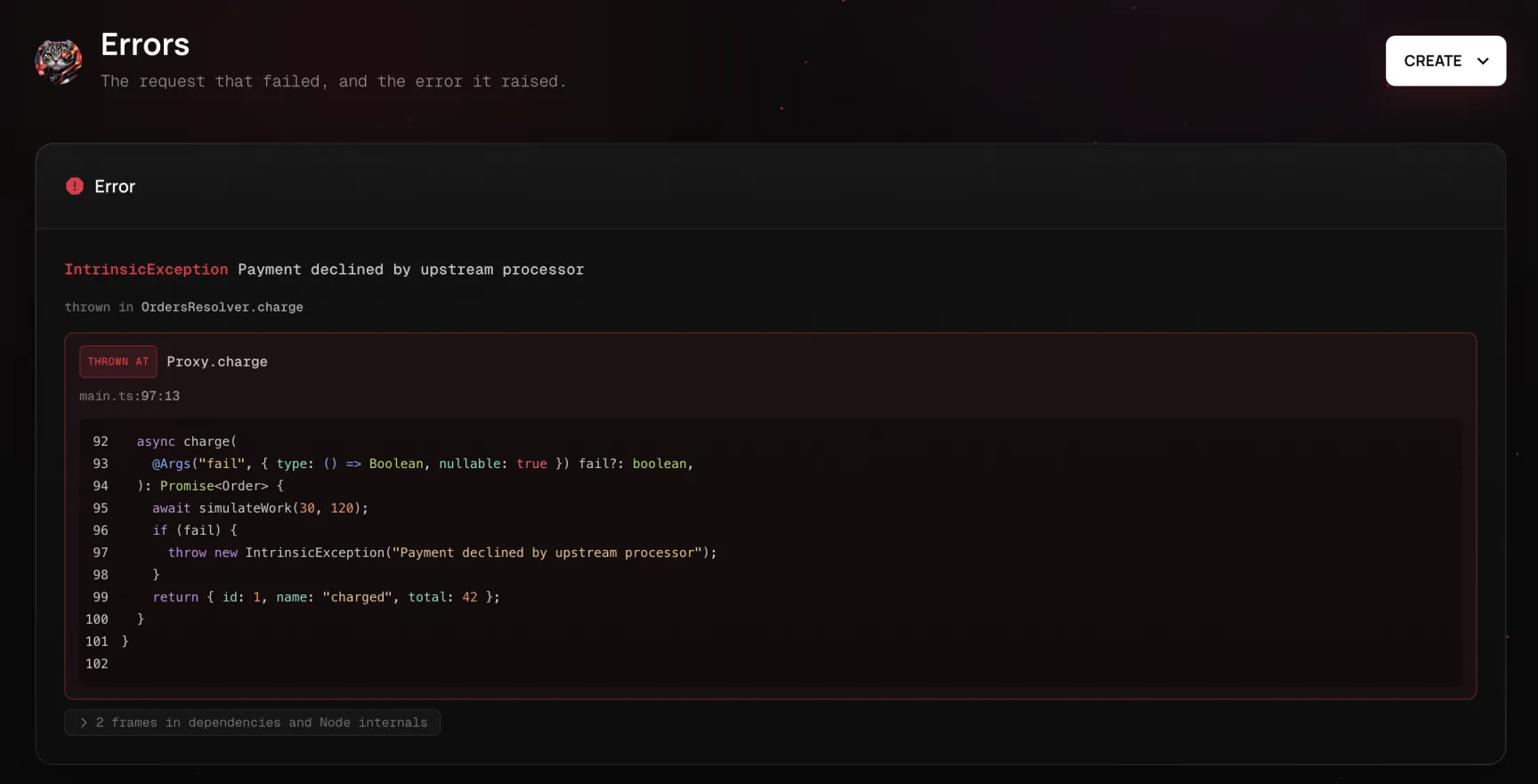
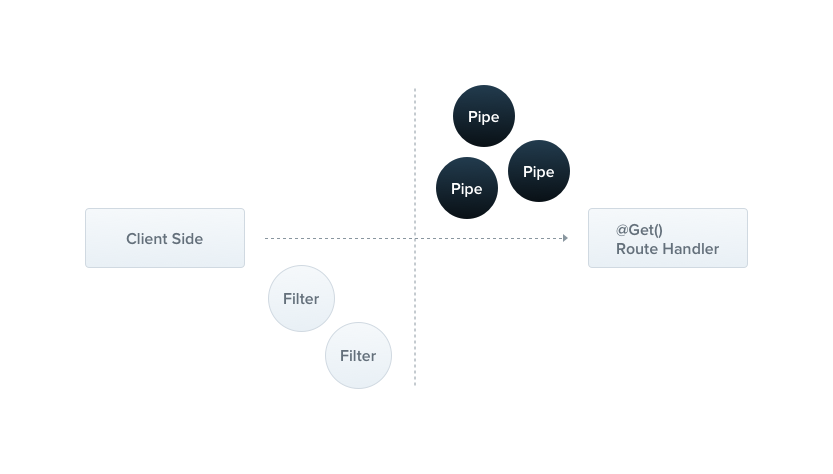
Out of the box, this is done by a built-in **global exception filter**, which handles exceptions of type `HttpException` (and its subclasses). When an exception is **unrecognized** (it is neither an `HttpException` nor a class that inherits from `HttpException`), the built-in exception filter generates the following default JSON response: ```json { "statusCode": 500, "message": "Internal server error" } ``` > info **Hint** The global exception filter partially supports the `http-errors` library. A thrown error that carries `statusCode` and `message` properties in the shape that library produces is sent back with those values, instead of the default `InternalServerErrorException` response for unrecognized exceptions. Starting with NestJS v12.2, if the error's `expose` property is `false`, the response carries the standard reason phrase for its status code (for example, `Bad Gateway`) instead of the error's message. `http-errors` sets `expose` to `false` for status codes of 500 and above, so pass `expose: true` to `createError()` when the message of a 5xx error is meant for the client. #### Throwing standard exceptions Nest provides a built-in `HttpException` class, exposed from the `@nestjs/common` package. For typical HTTP-based REST and GraphQL APIs, it's best practice to send standard HTTP response objects when certain error conditions occur. For example, the `CatsController` has a `findAll()` method (a `GET` route handler). Let's assume that this route handler throws an exception. To demonstrate this, we'll hard-code it as follows: ```typescript @Get() async findAll() { throw new HttpException('Forbidden', HttpStatus.FORBIDDEN); } ``` > info **Hint** `HttpStatus` is a helper enum imported from the `@nestjs/common` package. When the client calls this endpoint, the response looks like this: ```json { "statusCode": 403, "message": "Forbidden" } ``` The `HttpException` constructor takes two required arguments that determine the response: - The `response` argument defines the JSON response body. It can be a `string` or an `object`, as described below. - The `status` argument defines the [HTTP status code](https://developer.mozilla.org/en-US/docs/Web/HTTP/Status). By default, the JSON response body contains two properties: - `statusCode`: defaults to the HTTP status code provided in the `status` argument - `message`: a short description of the HTTP error based on the `status` To override only the message portion of the JSON response body, supply a string in the `response` argument. To override the entire JSON response body, pass an object in the `response` argument. Nest serializes the object and returns it as the JSON response body. > info **Hint** An `Error` instance passed as the `response` argument is not serialized into the response body. Nest sends the default `{{ '{' }} statusCode, message {{ '}' }}` body for the status instead, so the properties of the error are not exposed to the client. To keep the original error for logging, pass it as the `cause` instead. The second constructor argument, `status`, should be a valid HTTP status code. Best practice is to use the `HttpStatus` enum imported from `@nestjs/common`. An optional **third** constructor argument, `options`, can be used to provide an error [cause](https://nodejs.org/en/blog/release/v16.9.0/#error-cause). The `cause` object is not serialized into the response object, but it is useful for logging, as it provides information about the inner error that caused the `HttpException` to be thrown. Here's an example that overrides the entire response body and provides an error cause: ```typescript @Get() async findAll() { try { await this.service.findAll(); } catch (error) { throw new HttpException({ status: HttpStatus.FORBIDDEN, error: 'This is a custom message', }, HttpStatus.FORBIDDEN, { cause: error }); } } ``` The response then looks like this: ```json { "status": 403, "error": "This is a custom message" } ``` #### Exceptions logging By default, the exception filter does not log built-in exceptions such as `HttpException` (and any exceptions that inherit from it). These exceptions are treated as part of the normal application flow, so they don't appear in the console. The same applies to `WsException` and `RpcException` in their respective contexts. `HttpException` inherits from the `IntrinsicException` class, which is exported from the `@nestjs/common` package. The built-in exception filters never log instances of `IntrinsicException`, which is how they distinguish exceptions that are part of normal operation from those that are not. To log these exceptions, create a custom exception filter, as described in the [Exception filters](#exception-filters) section below. #### Tracking errors in production An exception filter decides what the *client* sees. On its own, it does not tell you that a `TypeError` started firing in `OrdersService` twelve minutes ago, on 4% of checkouts, only for customers whose cart contains a discounted item. Nor does it tell you which line threw. The usual approach is to log the stack trace and search for it later, which falls short: a stack trace in a log file points at compiled output (`/var/app/current/dist/orders/orders.service.js:35`), carries no source context, and does not tell you whether this is the first occurrence or the ten-thousandth. [NestJS Observe](https://www.observe.nestjs.com/ 'NestJS Observe') treats an unhandled error as a first-class object rather than a log line. Every error that reaches the exceptions layer is captured along with the request that caused it, and: - **The stack trace comes with source code.** The frame is resolved through your source maps back to `src/orders/orders.service.ts:35`, and the surrounding lines are shown inline, so you can read the failing code in the error card without cloning anything. - **Occurrences are grouped into defects.** Errors with the same class and stack shape collapse into one fingerprinted group with a count, first-seen and last-seen timestamps, and the release that introduced it. "New since v2.4.1" is a fact you read off the page rather than infer. - **The failure keeps its context.** The trace it belonged to, the user who hit it, the logs written during that request, and the spans that ran before the throw are all attached, so you can see what the request was doing when it failed.
Error card with source context
Because the error already carries its own code, you can hand it to a coding agent in one click: **Copy agent prompt** packages the error, the trimmed stack trace with source lines, the slow spans, and the surrounding logs into a self-contained prompt for Claude Code, Cursor, or any other tool that has your repository open. This complements the filters described in this chapter rather than replacing them: filters shape the response, while instrumentation records what happened on the way there. See [Error monitoring](/observability/error-monitoring) for everything the SDK captures about a failure, the [Observability](/observability/overview) chapter for setup, and [Dashboard](/observability/dashboard#issues) for turning a recurring error into a tracked issue that verifies its own fix. #### Custom exceptions In most cases, you won't need to write custom exceptions and can use the built-in Nest HTTP exceptions described in the next section. If you do need custom exceptions, it's good practice to create your own **exception hierarchy**, in which your custom exceptions inherit from the base `HttpException` class. Nest then recognizes your exceptions and automatically takes care of the error responses. Let's implement such a custom exception: ```typescript export class ForbiddenException extends HttpException { constructor() { super('Forbidden', HttpStatus.FORBIDDEN); } } ``` Since `ForbiddenException` extends the base `HttpException`, it works with the built-in exception handler, so we can use it inside the `findAll()` method. ```typescript @Get() async findAll() { throw new ForbiddenException(); } ``` #### Built-in HTTP exceptions Nest provides a set of standard exceptions that inherit from the base `HttpException`. They are exposed from the `@nestjs/common` package and represent many of the most common HTTP exceptions: - `BadRequestException` - `UnauthorizedException` - `NotFoundException` - `ForbiddenException` - `NotAcceptableException` - `RequestTimeoutException` - `ConflictException` - `GoneException` - `HttpVersionNotSupportedException` - `PayloadTooLargeException` - `UnsupportedMediaTypeException` - `UnprocessableEntityException` - `InternalServerErrorException` - `NotImplementedException` - `ImATeapotException` - `MethodNotAllowedException` - `MisdirectedException` - `BadGatewayException` - `ServiceUnavailableException` - `GatewayTimeoutException` - `PreconditionFailedException` All the built-in exceptions can also provide an error `cause` and an error description through the `options` parameter: ```typescript throw new BadRequestException('Something bad happened', { cause: new Error(), description: 'Some error description', }); ``` The response then looks like this: ```json { "message": "Something bad happened", "error": "Some error description", "statusCode": 400 } ``` #### Machine-readable error codes The `status` and `message` of an exception describe an error well enough for humans, but they are awkward for clients to branch on. Several distinct failures, such as an invalid email and a weak password, can all surface as `400 Bad Request`, which forces the client to parse the human-readable message string to tell them apart. To avoid that, pass an `errorCode` through the `options` parameter. It is a stable, machine-readable identifier that is serialized into the response body: ```typescript throw new BadRequestException('Password is too weak', { errorCode: 'WEAK_PASSWORD', }); ``` The response then carries the code alongside the usual fields: ```json { "message": "Password is too weak", "error": "Bad Request", "statusCode": 400, "errorCode": "WEAK_PASSWORD" } ``` `errorCode` is optional and can be combined with `cause` and `description`. It is also available on `HttpException` itself, so custom exceptions can set it too: ```typescript throw new HttpException( 'Forbidden', HttpStatus.FORBIDDEN, { errorCode: 'ACCOUNT_SUSPENDED' }, ); ``` > info **Hint** Unlike `cause`, which is intended for logging and is never serialized, `errorCode` is part of the response body and is meant to be consumed by clients. #### Exception filters The built-in exception filter handles many cases automatically, but you may want **full control** over the exceptions layer, e.g., to add logging or to use a different JSON schema based on dynamic factors. **Exception filters** are designed for exactly this purpose. They let you control the exact flow of execution and the content of the response sent back to the client. Let's create an exception filter that catches exceptions that are instances of the `HttpException` class and implements custom response logic for them. To do this, we need access to the underlying platform `Request` and `Response` objects. We'll use the `Request` object to extract the original `url` and include it in the response, and the `Response` object to take direct control of the response that is sent, using the `response.json()` method. ```typescript import { ExceptionFilter, Catch, ArgumentsHost, HttpException } from '@nestjs/common'; import { Request, Response } from 'express'; @Catch(HttpException) export class HttpExceptionFilter implements ExceptionFilter { catch(exception: HttpException, host: ArgumentsHost) { const ctx = host.switchToHttp(); const response = ctx.getResponse(); const request = ctx.getRequest(); const status = exception.getStatus(); response .status(status) .json({ statusCode: status, timestamp: new Date().toISOString(), path: request.url, }); } } ``` > info **Hint** All exception filters should implement the generic `ExceptionFilter` interface. This requires you to provide the `catch(exception: T, host: ArgumentsHost)` method with its indicated signature. `T` indicates the type of the exception. > warning **Warning** If you are using `@nestjs/platform-fastify`, use `response.send()` instead of `response.json()`, and import the corresponding types from `fastify`. The `@Catch(HttpException)` decorator binds the required metadata to the exception filter, telling Nest that this particular filter is looking for exceptions of type `HttpException` and nothing else. The `@Catch()` decorator accepts a single parameter or a comma-separated list, which lets you set up the filter for several types of exceptions at once. #### Arguments host Let's look at the parameters of the `catch()` method. The `exception` parameter is the exception object currently being processed. The `host` parameter is an `ArgumentsHost` object, a utility that gives you access to the arguments passed to the original handler, whatever context it was invoked in. In the code sample above, we use its helper methods to obtain the `Request` and `Response` objects of the request in which the exception originated. `ArgumentsHost` is covered in full in the [execution context chapter](/fundamentals/execution-context). The reason for this level of abstraction is that `ArgumentsHost` works in every context: the HTTP server context used here, but also microservices and WebSockets. The execution context chapter shows how to reach the underlying arguments for **any** context through the same object, which lets you write a single exception filter that operates across all of them. #### Binding filters Let's bind our new `HttpExceptionFilter` to the `create()` method of the `CatsController`. ```typescript @Post() @UseFilters(new HttpExceptionFilter()) async create(@Body() createCatDto: CreateCatDto) { throw new ForbiddenException(); } ``` > info **Hint** The `@UseFilters()` decorator is imported from the `@nestjs/common` package. Like the `@Catch()` decorator, `@UseFilters()` accepts a single filter instance or a comma-separated list of filter instances. Here, we created the `HttpExceptionFilter` instance in place. Alternatively, you can pass the class (instead of an instance), which leaves instantiation to the framework and enables **dependency injection**. ```typescript @Post() @UseFilters(HttpExceptionFilter) async create(@Body() createCatDto: CreateCatDto) { throw new ForbiddenException(); } ``` > info **Hint** Prefer binding filters by class instead of by instance when possible. This reduces **memory usage**, since Nest can reuse instances of the same class across your entire module. In the example above, the `HttpExceptionFilter` is applied only to the `create()` route handler, which makes it method-scoped. Exception filters can be scoped at different levels: method-scoped (a method of a controller, resolver, or gateway), controller-scoped, or global-scoped. For example, to set up a controller-scoped filter, do the following: ```typescript @Controller() @UseFilters(new HttpExceptionFilter()) export class CatsController {} ``` This sets up the `HttpExceptionFilter` for every route handler defined inside the `CatsController`. To create a global-scoped filter, do the following: ```typescript async function bootstrap() { const app = await NestFactory.create(AppModule); app.useGlobalFilters(new HttpExceptionFilter()); await app.listen(process.env.PORT ?? 3000); } await bootstrap(); ``` > warning **Warning** The `useGlobalFilters()` method does not set up filters for gateways or hybrid applications. Global-scoped filters are used across the whole application, for every controller and every route handler. In terms of dependency injection, global filters registered from outside of any module (with `useGlobalFilters()`, as in the example above) cannot inject dependencies, since this happens outside the context of any module. To solve this, you can register a global-scoped filter **directly from any module** using the following construction: ```typescript import { Module } from '@nestjs/common'; import { APP_FILTER } from '@nestjs/core'; @Module({ providers: [ { provide: APP_FILTER, useClass: HttpExceptionFilter, }, ], }) export class AppModule {} ``` > info **Hint** When you use this approach to perform dependency injection for the filter, the filter is global regardless of the module in which this construction is employed. Register it in the module where the filter (`HttpExceptionFilter` in the example above) is defined. Also, `useClass` is not the only way to register a custom provider. Learn more about [custom providers](/fundamentals/custom-providers). > info **Hint** Exceptions thrown from [middleware](/middleware#error-handling) are also processed by the exceptions layer. Because middleware runs before a route handler is selected, only **global** exception filters apply (`app.useGlobalFilters()` or `APP_FILTER`). Method-scoped and controller-scoped `@UseFilters()` bindings are not invoked. You can register as many filters as needed with this technique by adding each one to the `providers` array. #### Catch everything To catch **every** unhandled exception, regardless of its type, leave the `@Catch()` decorator's parameter list empty, i.e., `@Catch()`. The example below is platform-agnostic: it delivers the response through the [HTTP adapter](./faq/http-adapter) rather than using the platform-specific `Request` and `Response` objects directly, so the same filter works with both Express and Fastify. ```typescript import { ExceptionFilter, Catch, ArgumentsHost, HttpException, HttpStatus, } from '@nestjs/common'; import { HttpAdapterHost } from '@nestjs/core'; @Catch() export class CatchEverythingFilter implements ExceptionFilter { constructor(private readonly httpAdapterHost: HttpAdapterHost) {} catch(exception: unknown, host: ArgumentsHost): void { // In certain situations `httpAdapter` might not be available in the // constructor, so resolve it here. const { httpAdapter } = this.httpAdapterHost; const ctx = host.switchToHttp(); const httpStatus = exception instanceof HttpException ? exception.getStatus() : HttpStatus.INTERNAL_SERVER_ERROR; const responseBody = { statusCode: httpStatus, timestamp: new Date().toISOString(), path: httpAdapter.getRequestUrl(ctx.getRequest()), }; httpAdapter.reply(ctx.getResponse(), responseBody, httpStatus); } } ``` > warning **Warning** When combining a catch-everything filter with one bound to a specific exception type, declare the catch-everything filter **first**, so the more specific filter can still handle the type it is bound to. #### Inheritance Typically, you'll create fully customized exception filters tailored to your application's requirements. However, in some cases you may want to extend the built-in **global exception filter** and override its behavior only under certain conditions. To delegate exception processing to the base filter, extend `BaseExceptionFilter` and call the inherited `catch()` method. ```typescript import { Catch, ArgumentsHost } from '@nestjs/common'; import { BaseExceptionFilter } from '@nestjs/core'; @Catch() export class AllExceptionsFilter extends BaseExceptionFilter { catch(exception: unknown, host: ArgumentsHost) { super.catch(exception, host); } } ``` > warning **Warning** Method-scoped and controller-scoped filters that extend the `BaseExceptionFilter` should not be instantiated with `new`. Instead, let the framework instantiate them automatically. Global filters **can** extend the base filter, in one of two ways. The first is to pass the `HttpAdapter` reference to the constructor when instantiating the custom global filter: ```typescript async function bootstrap() { const app = await NestFactory.create(AppModule); const { httpAdapter } = app.get(HttpAdapterHost); app.useGlobalFilters(new AllExceptionsFilter(httpAdapter)); await app.listen(process.env.PORT ?? 3000); } await bootstrap(); ``` The second is to register the filter with the `APP_FILTER` token, as shown earlier. --- # Pipes Source: https://docs.nestjs.com/pipes A pipe is a class annotated with the `@Injectable()` decorator that implements the `PipeTransform` interface.
Pipes have two typical use cases: - **transformation**: transform input data to the desired form (e.g., from string to integer) - **validation**: evaluate input data and, if valid, pass it through unchanged; otherwise, throw an exception In both cases, pipes operate on the arguments being processed by a controller route handler. Nest interposes a pipe immediately before a method is invoked; the pipe receives the arguments destined for the method and operates on them. Any transformation or validation takes place at that point, after which the route handler is invoked with the (potentially) transformed arguments. Nest comes with a number of built-in pipes that you can use out of the box, and you can also build your own. This chapter introduces the built-in pipes and shows how to bind them to route handlers. It then walks through several custom pipes to show how to build one from scratch. > info **Hint** Pipes run inside the exceptions zone. An exception thrown by a pipe is handled by the exceptions layer (the global exception filter and any [exception filters](/exception-filters) applied to the current context). When a pipe throws an exception, the route handler is not executed. This makes pipes the recommended place to validate data that enters the application from external sources, at the system boundary. #### Built-in pipes Nest provides the following pipes out of the box, all exported from the `@nestjs/common` package: - `ValidationPipe` - `StandardSchemaValidationPipe` - `ParseIntPipe` - `ParseFloatPipe` - `ParseBoolPipe` - `ParseArrayPipe` - `ParseUUIDPipe` - `ParseEnumPipe` - `DefaultValuePipe` - `ParseFilePipe` - `ParseDatePipe` Let's start with `ParseIntPipe`. It is an example of the **transformation** use case: the pipe ensures that a route handler parameter is converted to a JavaScript integer, or throws an exception if the conversion fails. Later in this chapter, we'll build a simple custom implementation of `ParseIntPipe`. The techniques below also apply to the other built-in transformation pipes (`ParseBoolPipe`, `ParseFloatPipe`, `ParseEnumPipe`, `ParseArrayPipe`, `ParseDatePipe`, and `ParseUUIDPipe`), which this chapter refers to collectively as the `Parse*` pipes. #### Binding pipes To use a pipe, bind an instance of the pipe class to the appropriate context. In the `ParseIntPipe` example, we want to associate the pipe with a particular route handler method and make sure it runs before the method is called. The following construct does this; we refer to it as binding the pipe at the method parameter level: ```typescript @Get(':id') async findOne(@Param('id', ParseIntPipe) id: number) { return this.catsService.findOne(id); } ``` This guarantees one of two outcomes: either the parameter received by `findOne()` is a number (as `this.catsService.findOne()` expects), or an exception is thrown before the route handler is called. For example, suppose the route is called as follows: ```bash GET localhost:3000/abc ``` Nest throws an exception, which produces the following response: ```json { "statusCode": 400, "message": "Validation failed (numeric string is expected)", "error": "Bad Request" } ``` The exception prevents the body of the `findOne()` method from executing. In the example above, we pass a class (`ParseIntPipe`), not an instance. This leaves instantiation to the framework and enables dependency injection. As with guards and exception filters, you can instead pass an in-place instance, which is useful when you want to customize the built-in pipe's behavior by passing options: ```typescript @Get(':id') async findOne( @Param('id', new ParseIntPipe({ errorHttpStatusCode: HttpStatus.NOT_ACCEPTABLE })) id: number, ) { return this.catsService.findOne(id); } ``` The other transformation pipes (all of the **Parse\*** pipes) are bound the same way. They work with route parameters, query string parameters, and request body values. For example, with a query string parameter: ```typescript @Get() async findOne(@Query('id', ParseIntPipe) id: number) { return this.catsService.findOne(id); } ``` The following example uses `ParseUUIDPipe` to verify that a string parameter is a UUID: ```typescript @Get(':uuid') async findOne(@Param('uuid', new ParseUUIDPipe()) uuid: string) { return this.catsService.findOne(uuid); } ``` > info **Hint** By default, `ParseUUIDPipe` accepts a UUID of any version (versions 1 through 8, Nil, and Max UUIDs). To require a specific version, pass the `version` option (`'1'`, `'2'`, `'3'`, `'4'`, `'5'`, `'6'`, `'7'`, or `'8'`). Starting with NestJS v12.1.2, the `version` option also accepts these versions as numbers (for example, `7`), and `'all'` to accept any version, the same as leaving `version` out. The `UUIDVersion` type describes these values and is exported from `@nestjs/common`. Binding validation pipes works slightly differently; we cover it later in this chapter. > info **Hint** See [Validation techniques](/application/validation) for extensive examples of validation pipes. #### Custom pipes As mentioned, you can build your own pipes. Although Nest provides robust built-in `ParseIntPipe` and `ValidationPipe` implementations, let's build simple versions of each from scratch to see how custom pipes are constructed. We start with a simple `ValidationPipe`. Initially, it takes an input value and returns it unchanged, behaving like an identity function. ```typescript import { PipeTransform, Injectable, ArgumentMetadata } from '@nestjs/common'; @Injectable() export class ValidationPipe implements PipeTransform { transform(value: any, metadata: ArgumentMetadata) { return value; } } ``` > info **Hint** `PipeTransform` is a generic interface that every pipe must implement. `T` indicates the type of the input `value`, and `R` indicates the return type of the `transform()` method. Every pipe must implement the `transform()` method to fulfill the `PipeTransform` interface contract. This method has two parameters: - `value` - `metadata` The `value` parameter is the method argument currently being processed (before the route handler receives it), and `metadata` is that argument's metadata. The metadata object has the following properties: ```typescript export interface ArgumentMetadata { type: 'body' | 'query' | 'param' | 'custom'; metatype?: Type; data?: string; schema?: StandardSchemaV1; } ``` These properties describe the argument being processed:
type Indicates whether the argument is a body (@Body()), query (@Query()), param (@Param()), or custom parameter (see custom decorators).
metatype The metatype of the argument, for example, String. The value is undefined if you omit the type declaration in the route handler signature or use vanilla JavaScript.
data The string passed to the decorator, for example, @Body('string'). It's undefined if you don't pass a string to the decorator, as in @Body().
schema A Standard Schema compatible schema attached through parameter decorator options such as @Body({{ '{' }} schema {{ '}' }}) or @Param('id', {{ '{' }} schema {{ '}' }}). It's undefined if no schema is attached.
> warning **Warning** TypeScript interfaces disappear during transpilation. If a method parameter's type is declared as an interface instead of a class, the `metatype` value is `Object`. > info **Hint** The built-in `StandardSchemaValidationPipe` uses the `schema` field to validate arguments with any Standard Schema compatible library. Arguments without a schema pass through unchanged. #### Schema based validation > info **Hint** The following sections build validation pipes from scratch to show how pipes work. For schema-based validation in production, use the built-in `StandardSchemaValidationPipe` instead. It works with Zod, Valibot, ArkType, and any other [Standard Schema](https://standardschema.dev/) compatible library, and reads the schema you attach through the `schema` option of parameter decorators such as `@Body()` and `@Param()`. See [Schema-based validation](/application/validation#schema-based-validation) for details. Let's make our validation pipe more useful. Consider the `create()` method of the `CatsController`: we want to ensure that the POST body object is valid before running the service method. ```typescript @Post() async create(@Body() createCatDto: CreateCatDto) { this.catsService.create(createCatDto); } ``` The `createCatDto` body parameter is of type `CreateCatDto`: ```typescript export class CreateCatDto { name: string; age: number; breed: string; } ``` Every request to the `create()` method must contain a valid body, so we need to validate the three members of the `createCatDto` object. We could do this inside the route handler, but that would break the **single responsibility principle** (SRP). Another approach is to create a **validator class** and delegate the task to it. The disadvantage is that we would have to remember to call the validator at the beginning of each method. What about validation middleware? This could work, but it's not possible to create **generic middleware** that can be used in every context across the application. Middleware is unaware of the **execution context**, including the handler that will be called and its parameters. Pipes are designed for exactly this use case, so we will refine our validation pipe. #### Object schema validation There are several ways to validate objects in a clean, [DRY](https://en.wikipedia.org/wiki/Don%27t_repeat_yourself) way. One common approach is **schema-based** validation, which we use here. The [Zod](https://zod.dev/) library lets you define schemas with a readable API. Let's build a validation pipe that uses Zod schemas. Start by installing the required package: ```bash $ npm install --save zod ``` The class below takes a schema as a constructor argument and calls `schema.parse()`, which validates the incoming argument against that schema. As noted earlier, a **validation pipe** either returns the value or throws an exception. This pipe returns the value parsed by the schema, or throws a `BadRequestException` if validation fails. The next section shows how to supply the appropriate schema for a given route handler using the `@UsePipes()` decorator. This makes the validation pipe reusable across contexts, which is what we set out to do. ```typescript import { PipeTransform, ArgumentMetadata, BadRequestException } from '@nestjs/common'; import { ZodType } from 'zod'; export class ZodValidationPipe implements PipeTransform { constructor(private schema: ZodType) {} transform(value: unknown, metadata: ArgumentMetadata) { try { const parsedValue = this.schema.parse(value); return parsedValue; } catch (error) { throw new BadRequestException('Validation failed'); } } } ``` #### Binding validation pipes Earlier, we saw how to bind transformation pipes (such as `ParseIntPipe` and the rest of the `Parse*` pipes). Binding validation pipes is equally straightforward. In this case, we want to bind the pipe at the method level. To use the `ZodValidationPipe` in our example, we need to: 1. Create an instance of the `ZodValidationPipe` 2. Pass the context-specific Zod schema to the pipe's constructor 3. Bind the pipe to the method Here's an example Zod schema: ```typescript import { z } from 'zod'; export const createCatSchema = z.object({ name: z.string(), age: z.number(), breed: z.string(), }); export type CreateCatDto = z.infer; ``` Bind the pipe with the `@UsePipes()` decorator: ```typescript @Post() @UsePipes(new ZodValidationPipe(createCatSchema)) async create(@Body() createCatDto: CreateCatDto) { this.catsService.create(createCatDto); } ``` > info **Hint** The `@UsePipes()` decorator is imported from the `@nestjs/common` package. You can also bind the `ZodValidationPipe` to a specific parameter, alongside built-in pipes. The following example validates the `id` route parameter with `ParseIntPipe` and the request body with `ZodValidationPipe`: ```typescript @Put('/:id') async update( @Param('id', ParseIntPipe) id: number, @Body(new ZodValidationPipe(createCatSchema)) body: CreateCatDto ): Promise { this.catsService.update(id, body); } ``` > warning **Warning** The `zod` library requires the `strictNullChecks` compiler option to be enabled in your `tsconfig.json` file. #### Class validator > warning **Warning** The techniques in this section require TypeScript and are not available if your app is written in vanilla JavaScript. This section presents an alternative implementation of our validation technique. Nest works well with the [class-validator](https://github.com/typestack/class-validator) library, which provides decorator-based validation. Decorator-based validation pairs well with Nest's **pipe** capabilities, because a pipe has access to the `metatype` of the processed argument. Before we start, install the required packages: ```bash $ npm i --save class-validator class-transformer ``` Once these are installed, add a few decorators to the `CreateCatDto` class. This shows a significant advantage of the technique: the `CreateCatDto` class remains the single source of truth for the POST body object, so you don't need a separate validation class. ```typescript import { IsString, IsInt } from 'class-validator'; export class CreateCatDto { @IsString() name: string; @IsInt() age: number; @IsString() breed: string; } ``` > info **Hint** Read more about class-validator decorators in the [class-validator documentation](https://github.com/typestack/class-validator#usage). We can now create a `ValidationPipe` class that uses these decorators. ```typescript import { PipeTransform, Injectable, ArgumentMetadata, BadRequestException } from '@nestjs/common'; import { validate } from 'class-validator'; import { plainToInstance } from 'class-transformer'; @Injectable() export class ValidationPipe implements PipeTransform { async transform(value: any, { metatype }: ArgumentMetadata) { if (!metatype || !this.toValidate(metatype)) { return value; } const object = plainToInstance(metatype, value); const errors = await validate(object); if (errors.length > 0) { throw new BadRequestException('Validation failed'); } return value; } private toValidate(metatype: Function): boolean { const types: Function[] = [String, Boolean, Number, Array, Object]; return !types.includes(metatype); } } ``` > info **Hint** This pipe is intentionally basic. You don't have to build a generic validation pipe yourself: Nest provides a more capable `ValidationPipe` out of the box, described at the end of this section. > warning **Notice** The code above uses the [class-transformer](https://github.com/typestack/class-transformer) library, which is made by the same author as the **class-validator** library, so the two work well together. Let's go through this code. First, the `transform()` method is marked as `async`. This is possible because Nest supports both synchronous and **asynchronous** pipes. We make this method `async` because some class-validator validations [can be async](https://github.com/typestack/class-validator#custom-validation-classes) (they return promises). Next, we use destructuring to extract the `metatype` field from the `ArgumentMetadata` object. This is shorthand for receiving the full `ArgumentMetadata` and then assigning the `metatype` variable in a separate statement. The helper method `toValidate()` skips validation when the argument being processed is a native JavaScript type. Native types can't have validation decorators attached, so there's no reason to validate them. Next, we use the class-transformer function `plainToInstance()` to transform the plain JavaScript argument object into a typed object so that we can apply validation. This is necessary because the incoming POST body, when deserialized from the network request, does **not have any type information** (this is how the underlying platform, such as Express, works). Because class-validator relies on the validation decorators defined on the DTO earlier, we transform the incoming body into an instance of the decorated class rather than validating a plain object. Finally, because this is a **validation pipe**, it either returns the value unchanged or throws an exception. The last step is to bind the `ValidationPipe`. Pipes can be parameter-scoped, method-scoped, controller-scoped, or global-scoped. Earlier, we bound the Zod-based validation pipe at the method level with `@UsePipes()`. In the example below, we bind the pipe instance to the route handler's `@Body()` decorator so that the pipe validates the POST body. ```typescript @Post() async create( @Body(new ValidationPipe()) createCatDto: CreateCatDto, ) { this.catsService.create(createCatDto); } ``` Parameter-scoped pipes are useful when the validation logic concerns only one parameter. #### Global scoped pipes Because the `ValidationPipe` is designed to be as generic as possible, it is most useful as a **global-scoped** pipe, applied to every route handler across the entire application. ```typescript async function bootstrap() { const app = await NestFactory.create(AppModule); app.useGlobalPipes(new ValidationPipe()); await app.listen(process.env.PORT ?? 3000); } await bootstrap(); ``` > warning **Notice** In a hybrid application, `useGlobalPipes()` doesn't set up pipes for connected microservices by default (see [Hybrid application](/faq/hybrid-application) to change this behavior). In a standard (non-hybrid) microservice application, `useGlobalPipes()` does mount the pipes globally. Global pipes registered outside of any module (with `useGlobalPipes()`, as in the example above) cannot inject dependencies, because the binding happens outside the context of any module. To solve this, you can register a global pipe **directly from any module** using the following construction: ```typescript import { Module } from '@nestjs/common'; import { APP_PIPE } from '@nestjs/core'; @Module({ providers: [ { provide: APP_PIPE, useClass: ValidationPipe, }, ], }) export class AppModule {} ``` > info **Hint** When you use this approach to perform dependency injection for the pipe, the pipe is global regardless of the module in which you register it. Register it in the module where the pipe (`ValidationPipe` in the example above) is defined. `useClass` is not the only way to register a custom provider; learn more in [Custom providers](/fundamentals/custom-providers). #### The built-in ValidationPipe You don't have to build a generic validation pipe yourself: Nest provides `ValidationPipe` out of the box. The built-in `ValidationPipe` offers more options than the sample built in this chapter, which is kept basic to illustrate the mechanics of a custom pipe. For schema-based validation, Nest also provides the built-in `StandardSchemaValidationPipe`. See [Validation techniques](/application/validation) for full details and many examples. #### Transformation use case Validation isn't the only use case for custom pipes. As mentioned at the beginning of this chapter, a pipe can also **transform** input data to the desired format. This is possible because the value returned from the `transform()` method replaces the previous value of the argument. When is this useful? Sometimes the data passed from the client needs to be changed (for example, converted from a string to an integer) before the route handler can process it. Some required fields may also be missing, and you may want to apply default values. **Transformation pipes** perform these functions by interposing a processing function between the client request and the route handler. Here's a simple `ParseIntPipe` that parses a string into an integer. (As noted above, Nest has a more sophisticated built-in `ParseIntPipe`; this is a simple example of a custom transformation pipe.) ```typescript import { PipeTransform, Injectable, ArgumentMetadata, BadRequestException } from '@nestjs/common'; @Injectable() export class ParseIntPipe implements PipeTransform { transform(value: string, metadata: ArgumentMetadata): number { const val = parseInt(value, 10); if (isNaN(val)) { throw new BadRequestException('Validation failed'); } return val; } } ``` We can then bind this pipe to the selected parameter: ```typescript @Get(':id') async findOne(@Param('id', new ParseIntPipe()) id) { return this.catsService.findOne(id); } ``` Another useful transformation is to look up an **existing user** entity in the database using an ID supplied in the request: ```typescript @Get(':id') findOne(@Param('id', UserByIdPipe) userEntity: UserEntity) { return userEntity; } ``` We leave the implementation of this pipe to the reader. Like all other transformation pipes, it receives an input value (an `id`) and returns an output value (a `UserEntity` object). This makes your code more declarative and [DRY](https://en.wikipedia.org/wiki/Don%27t_repeat_yourself) by moving boilerplate out of the route handler and into a reusable pipe. #### Providing defaults By default, `Parse*` pipes expect a parameter's value to be defined and throw an exception when they receive `null` or `undefined` (unless you set their `optional` option to `true`). To let an endpoint handle missing query string parameters, provide a default value that is applied before the `Parse*` pipes operate on it. The `DefaultValuePipe` serves this purpose. Instantiate a `DefaultValuePipe` in the `@Query()` decorator before the relevant `Parse*` pipe, as shown below: ```typescript @Get() async findAll( @Query('activeOnly', new DefaultValuePipe(false), ParseBoolPipe) activeOnly: boolean, @Query('page', new DefaultValuePipe(0), ParseIntPipe) page: number, ) { return this.catsService.findAll({ activeOnly, page }); } ``` --- # Guards Source: https://docs.nestjs.com/guards A guard is a class annotated with the `@Injectable()` decorator that implements the `CanActivate` interface.
Guards have a **single responsibility**: they determine whether a given request will be handled by the route handler, based on conditions present at runtime (such as permissions, roles, or ACLs). This is often referred to as **authorization**. In traditional Express applications, authorization (and its close relative, **authentication**, with which it usually collaborates) has typically been handled by [middleware](/middleware). Middleware is a good fit for authentication, because tasks such as validating a token and attaching properties to the `request` object are not tied to a particular route context (and its metadata). Middleware, however, is context-blind by nature: it doesn't know which handler will be executed after it calls `next()`. **Guards**, on the other hand, have access to the `ExecutionContext` instance, so they know exactly what will be executed next. Like exception filters, pipes, and interceptors, guards let you interpose processing logic at exactly the right point in the request/response cycle, and do so declaratively. This helps keep your code DRY. > info **Hint** Guards are executed **after** all middleware, but **before** any interceptor or pipe. #### Authorization guard As mentioned, **authorization** is a common use case for guards, because specific routes should be available only when the caller (usually a specific authenticated user) has sufficient permissions. The `AuthGuard` we'll build now assumes an authenticated user, and therefore a token attached to the request headers. It extracts and validates the token, and uses the extracted information to determine whether the request can proceed. ```typescript import { Injectable, CanActivate, ExecutionContext } from '@nestjs/common'; import { Observable } from 'rxjs'; @Injectable() export class AuthGuard implements CanActivate { canActivate( context: ExecutionContext, ): boolean | Promise | Observable { const request = context.switchToHttp().getRequest(); return validateRequest(request); } } ``` > info **Hint** For a real-world example of an authentication mechanism, see the [authentication](/security/authentication) chapter. For a more sophisticated authorization example, see the [authorization](/security/authorization) chapter. The logic inside the `validateRequest()` function can be as simple or as sophisticated as needed. The point of this example is to show how guards fit into the request/response cycle. Every guard must implement a `canActivate()` method. It returns a boolean indicating whether the current request is allowed, either synchronously or asynchronously (via a `Promise` or an `Observable`). Nest uses the return value to decide what happens next: - if it returns `true`, the request is processed. - if it returns `false`, Nest denies the request. #### Execution context The `canActivate()` method takes a single argument, the `ExecutionContext` instance. `ExecutionContext` extends `ArgumentsHost`, which we covered in the exception filters chapter. The sample above uses the same helper methods defined on `ArgumentsHost` to get a reference to the `Request` object. See the **Arguments host** section of the [exception filters](/exception-filters#arguments-host) chapter for more on this topic. By extending `ArgumentsHost`, `ExecutionContext` adds several helper methods that provide additional details about the current execution process. These details help you build more generic guards that work across a broad set of controllers, methods, and execution contexts. See the [execution context](/fundamentals/execution-context) chapter to learn more about `ExecutionContext`. #### Role-based authentication Let's build a more functional guard that permits access only to users with a specific role. We'll start with a basic guard template and build on it in the following sections. For now, it allows all requests to proceed: ```typescript import { Injectable, CanActivate, ExecutionContext } from '@nestjs/common'; import { Observable } from 'rxjs'; @Injectable() export class RolesGuard implements CanActivate { canActivate( context: ExecutionContext, ): boolean | Promise | Observable { return true; } } ``` #### Binding guards Like pipes and exception filters, guards can be controller-scoped, method-scoped, or global-scoped. Below, we set up a controller-scoped guard using the `@UseGuards()` decorator. The decorator accepts a single guard or a comma-separated list of guards, so you can apply a whole set of guards with one declaration. ```typescript @Controller('cats') @UseGuards(RolesGuard) export class CatsController {} ``` > info **Hint** The `@UseGuards()` decorator is imported from the `@nestjs/common` package. Above, we passed the `RolesGuard` class (instead of an instance), leaving responsibility for instantiation to the framework and enabling dependency injection. As with pipes and exception filters, you can also pass an in-place instance: ```typescript @Controller('cats') @UseGuards(new RolesGuard()) export class CatsController {} ``` The construction above attaches the guard to every handler declared by this controller. To apply the guard to a single method only, use the `@UseGuards()` decorator at the **method level**. To set up a global guard, use the `useGlobalGuards()` method of the Nest application instance: ```typescript const app = await NestFactory.create(AppModule); app.useGlobalGuards(new RolesGuard()); ``` > warning **Notice** In a hybrid application, `useGlobalGuards()` doesn't set up guards for connected microservices by default (see [Hybrid application](/faq/hybrid-application) to change this behavior). In a standard (non-hybrid) microservice application, `useGlobalGuards()` does mount the guards globally. Global guards apply to every controller and every route handler in the application. However, a global guard registered outside of any module (with `useGlobalGuards()`, as in the example above) cannot inject dependencies, because the registration happens outside the context of any module. To solve this, register the guard directly from any module using the following construction: ```typescript import { Module } from '@nestjs/common'; import { APP_GUARD } from '@nestjs/core'; @Module({ providers: [ { provide: APP_GUARD, useClass: RolesGuard, }, ], }) export class AppModule {} ``` > info **Hint** When you use this approach to perform dependency injection for the guard, the guard is global regardless of the module in which you register it. We recommend registering it in the module where the guard (`RolesGuard` in the example above) is defined. Also, `useClass` is not the only way to register a custom provider. See [Custom providers](/fundamentals/custom-providers) to learn more. > info **Hint** You can register the `APP_GUARD` token multiple times (in the same or different modules); every registered guard runs for each request, in registration order. `APP_GUARD` (like the other `APP_*` tokens) is a pseudo-provider that the framework consumes during bootstrap: it cannot be retrieved later with `app.get()` or injected elsewhere. #### Setting roles per handler Our `RolesGuard` works, but it isn't very smart yet: it doesn't take advantage of the most important guard feature, the [execution context](/fundamentals/execution-context). It doesn't know about roles, or which roles are allowed for each handler. The `CatsController`, for example, could have different permission schemes for different routes. Some routes might be available only to admin users, while others are open to everyone. How can we match roles to routes in a flexible and reusable way? This is where **custom metadata** comes into play (see [Reflection and metadata](/fundamentals/execution-context#reflection-and-metadata)). Nest lets you attach custom **metadata** to route handlers, either through decorators created with the static `Reflector.createDecorator()` method or through the built-in `@SetMetadata()` decorator. For example, let's create a `@Roles()` decorator with the `Reflector.createDecorator()` method that attaches the metadata to the handler. `Reflector` is provided by the framework out of the box and exported from the `@nestjs/core` package. ```ts import { Reflector } from '@nestjs/core'; export const Roles = Reflector.createDecorator(); ``` The `Roles` decorator is a function that takes a single argument of type `string[]`. To use this decorator, annotate the handler with it: ```typescript @Post() @Roles(['admin']) async create(@Body() createCatDto: CreateCatDto) { this.catsService.create(createCatDto); } ``` Here we've attached the `Roles` decorator metadata to the `create()` method, indicating that only users with the `admin` role should be allowed to access this route. Alternatively, instead of using the `Reflector.createDecorator()` method, you can use the built-in `@SetMetadata()` decorator. See the [low-level approach](/fundamentals/execution-context#low-level-approach) to learn more. #### Putting it all together Let's now tie this together with our `RolesGuard`. Currently, it returns `true` in all cases, allowing every request to proceed. We want to make the return value conditional, based on comparing the **roles assigned to the current user** with the roles required by the route being processed. To access the route's role(s) (custom metadata), we use the `Reflector` class again, as follows: ```typescript import { Injectable, CanActivate, ExecutionContext } from '@nestjs/common'; import { Reflector } from '@nestjs/core'; import { Roles } from './roles.decorator.js'; @Injectable() export class RolesGuard implements CanActivate { constructor(private reflector: Reflector) {} canActivate(context: ExecutionContext): boolean { const roles = this.reflector.get(Roles, context.getHandler()); if (!roles) { return true; } const request = context.switchToHttp().getRequest(); const user = request.user; return matchRoles(roles, user.roles); } } ``` > info **Hint** In Node.js applications, it's common practice to attach the authorized user to the `request` object. The sample above therefore assumes that `request.user` contains the user instance and its roles. In your app, you will probably make that association in a custom **authentication guard** (or middleware). See the [authentication](/security/authentication) chapter for more information on this topic. > warning **Warning** The `matchRoles()` function is not provided by Nest. Its logic can be as simple or as sophisticated as your application requires; the point of this example is to show how guards fit into the request/response cycle. See the [Reflection and metadata](/fundamentals/execution-context#reflection-and-metadata) section of the **Execution context** chapter for more details on using `Reflector` in a context-sensitive way. When a user with insufficient privileges requests an endpoint, Nest automatically returns the following response: ```json { "statusCode": 403, "message": "Forbidden resource", "error": "Forbidden" } ``` Behind the scenes, when a guard returns `false`, the framework throws a `ForbiddenException`. To return a different error response, throw your own exception instead. For example: ```typescript throw new UnauthorizedException(); ``` Any exception thrown by a guard is handled by the [exceptions layer](/exception-filters) (the global exception filter and any exception filters applied to the current context). > info **Hint** For a real-world example of how to implement authorization, see the [authorization](/security/authorization) chapter. --- # Interceptors Source: https://docs.nestjs.com/interceptors An interceptor is a class annotated with the `@Injectable()` decorator that implements the `NestInterceptor` interface.
Interceptors offer a set of capabilities inspired by the [Aspect Oriented Programming](https://en.wikipedia.org/wiki/Aspect-oriented_programming) (AOP) technique. They make it possible to: - bind extra logic before or after method execution - transform the result returned from a function - transform the exception thrown from a function - extend the basic function behavior - completely override a function depending on specific conditions (e.g., for caching purposes) #### Basics Each interceptor implements the `intercept()` method, which takes two arguments. The first is the `ExecutionContext` instance (exactly the same object as for [guards](/guards)). `ExecutionContext` extends `ArgumentsHost`, which we covered in the exception filters chapter. There, we saw that it's a wrapper around the arguments passed to the original handler, and that it contains different argument arrays depending on the type of application. See the [exception filters](/exception-filters#arguments-host) chapter for more on this topic. #### Execution context By extending `ArgumentsHost`, `ExecutionContext` adds several helper methods that provide additional details about the current execution process. These details help you build more generic interceptors that work across a broad set of controllers, methods, and execution contexts. See the [execution context](/fundamentals/execution-context) chapter to learn more about `ExecutionContext`. #### Call handler The second argument is a `CallHandler`. The `CallHandler` interface exposes a `handle()` method, which you use to invoke the route handler method at some point in your interceptor. If you don't call `handle()` in your implementation of the `intercept()` method, the route handler method won't be executed at all. This means that the `intercept()` method effectively **wraps** the request/response stream. As a result, you can implement custom logic **both before and after** the execution of the final route handler. Running code **before** the handler is straightforward: place it before the `handle()` call. To act on what happens afterward, use the `Observable` that `handle()` returns: you can apply [RxJS](https://github.com/ReactiveX/rxjs) operators to it to further manipulate the response. In Aspect Oriented Programming terminology, the invocation of the route handler (i.e., calling `handle()`) is called a [Pointcut](https://en.wikipedia.org/wiki/Pointcut), indicating that it's the point at which our additional logic is inserted. Consider, for example, an incoming `POST /cats` request. This request is destined for the `create()` handler defined inside `CatsController`. If an interceptor that doesn't call `handle()` is invoked anywhere along the way, the `create()` method won't be executed. Once `handle()` is called and the `Observable` it returns is subscribed to (Nest subscribes to the stream your `intercept()` method returns), the `create()` handler is triggered. As the handler's result flows through the stream, you can apply additional operations to it before the final result is returned to the caller. #### Aspect interception The first use case we'll look at is using an interceptor to log user interaction (e.g., storing user calls, asynchronously dispatching events, or calculating a timestamp). The following example shows a simple `LoggingInterceptor`: ```typescript import { Injectable, NestInterceptor, ExecutionContext, CallHandler } from '@nestjs/common'; import { Observable } from 'rxjs'; import { tap } from 'rxjs/operators'; @Injectable() export class LoggingInterceptor implements NestInterceptor { intercept(context: ExecutionContext, next: CallHandler): Observable { console.log('Before...'); const now = Date.now(); return next .handle() .pipe( tap(() => console.log(`After... ${Date.now() - now}ms`)), ); } } ``` > info **Hint** `NestInterceptor` is a generic interface in which `T` is the type of the values emitted by the `Observable` that `next.handle()` returns (the response stream), and `R` is the type of the values emitted by the `Observable` that `intercept()` returns. > warning **Notice** Interceptors, like controllers, providers, guards, and so on, can **inject dependencies** through their `constructor`. Since `handle()` returns an RxJS `Observable`, you can choose from a wide range of operators to manipulate the stream. The example above uses the `tap()` operator, which calls our logging function when the stream emits the route handler's result, without otherwise interfering with the response cycle. Note that this function is not called if the route handler throws; to run logic in that case as well, pass an observer object with an `error` callback to `tap()`, or use the `finalize()` operator. > info **Hint** Timing a handler by hand, as above, is a minimal version of what an APM does. [NestJS Observe](https://www.observe.nestjs.com/ 'NestJS Observe') records the same measurement for every controller, provider, and queue consumer, with no interceptor to write or bind. It also records the time each one spent on its own, with everything it awaited subtracted out. See the [Observability](/observability/overview) chapter. #### Binding interceptors To set up the interceptor, use the `@UseInterceptors()` decorator. Like [pipes](/pipes) and [guards](/guards), interceptors can be controller-scoped, method-scoped, or global-scoped. ```typescript @UseInterceptors(LoggingInterceptor) export class CatsController {} ``` > info **Hint** The `@UseInterceptors()` decorator is imported from the `@nestjs/common` package. With the construction above, each route handler defined in `CatsController` uses `LoggingInterceptor`. When a client calls the `GET /cats` endpoint, you'll see the following in standard output: ```typescript Before... After... 1ms ``` Note that we passed the `LoggingInterceptor` class (instead of an instance), leaving responsibility for instantiation to the framework and enabling dependency injection. As with pipes, guards, and exception filters, you can also pass an in-place instance: ```typescript @UseInterceptors(new LoggingInterceptor()) export class CatsController {} ``` The construction above attaches the interceptor to every handler declared by this controller. To restrict the interceptor to a single method, apply the decorator at the **method level**. To set up a global interceptor, use the `useGlobalInterceptors()` method of the Nest application instance: ```typescript const app = await NestFactory.create(AppModule); app.useGlobalInterceptors(new LoggingInterceptor()); ``` Global interceptors apply to every controller and every route handler in the application. However, a global interceptor registered outside of any module (with `useGlobalInterceptors()`, as in the example above) cannot inject dependencies, because the registration happens outside the context of any module. To solve this, register the interceptor **directly from any module** using the following construction: ```typescript import { Module } from '@nestjs/common'; import { APP_INTERCEPTOR } from '@nestjs/core'; @Module({ providers: [ { provide: APP_INTERCEPTOR, useClass: LoggingInterceptor, }, ], }) export class AppModule {} ``` > info **Hint** When you use this approach to perform dependency injection for the interceptor, the interceptor is global regardless of the module in which you register it. We recommend registering it in the module where the interceptor (`LoggingInterceptor` in the example above) is defined. Also, `useClass` is not the only way to register a custom provider. See [Custom providers](/fundamentals/custom-providers) to learn more. #### Response mapping The stream returned by `handle()` contains the value **returned** from the route handler, so you can transform it with RxJS's `map()` operator. > warning **Warning** Response mapping doesn't work with the library-specific response strategy, i.e., when a route handler injects the response object with `@Res()` and sends the response itself. To combine the two, enable the `passthrough` option (see [Library-specific approach](/controllers#library-specific-approach)). Let's create a `TransformInterceptor` that modifies each response in a trivial way to demonstrate the process. It uses RxJS's `map()` operator to assign the response object to the `data` property of a newly created object, and returns the new object to the client. ```typescript import { Injectable, NestInterceptor, ExecutionContext, CallHandler } from '@nestjs/common'; import { Observable } from 'rxjs'; import { map } from 'rxjs/operators'; export interface Response { data: T; } @Injectable() export class TransformInterceptor implements NestInterceptor> { intercept(context: ExecutionContext, next: CallHandler): Observable> { return next.handle().pipe(map(data => ({ data }))); } } ``` > info **Hint** The `intercept()` method can be synchronous or asynchronous. Declare it `async` if you need to await something before returning the stream. With this interceptor bound, a `GET /cats` request whose route handler returns an empty array `[]` produces the following response: ```json { "data": [] } ``` Interceptors are well suited to building reusable solutions for requirements that span the entire application. For example, imagine you need to replace every `null` response value with an empty string `''`. You can do this with one line of code, and bind the interceptor globally so that every registered handler uses it automatically. ```typescript import { Injectable, NestInterceptor, ExecutionContext, CallHandler } from '@nestjs/common'; import { Observable } from 'rxjs'; import { map } from 'rxjs/operators'; @Injectable() export class ExcludeNullInterceptor implements NestInterceptor { intercept(context: ExecutionContext, next: CallHandler): Observable { return next .handle() .pipe(map(value => value === null ? '' : value )); } } ``` #### Exception mapping Another use case is overriding thrown exceptions with RxJS's `catchError()` operator: ```typescript import { Injectable, NestInterceptor, ExecutionContext, BadGatewayException, CallHandler, } from '@nestjs/common'; import { Observable, throwError } from 'rxjs'; import { catchError } from 'rxjs/operators'; @Injectable() export class ErrorsInterceptor implements NestInterceptor { intercept(context: ExecutionContext, next: CallHandler): Observable { return next .handle() .pipe( catchError(err => throwError(() => new BadGatewayException())), ); } } ``` #### Stream overriding Sometimes you may want to skip calling the handler entirely and return a different value instead. A typical example is a cache that improves response time. Let's look at a simple **cache interceptor** that returns its response from a cache. A realistic implementation would also need to consider factors such as TTL, cache invalidation, and cache size, which are beyond the scope of this discussion. The following basic example demonstrates the main concept. ```typescript import { Injectable, NestInterceptor, ExecutionContext, CallHandler } from '@nestjs/common'; import { Observable, of } from 'rxjs'; @Injectable() export class CacheInterceptor implements NestInterceptor { intercept(context: ExecutionContext, next: CallHandler): Observable { const isCached = true; if (isCached) { return of([]); } return next.handle(); } } ``` Our `CacheInterceptor` has a hardcoded `isCached` variable and a hardcoded response `[]`. The key point is that it returns a new stream, created by RxJS's `of()` function, so the route handler **won't be called** at all. When someone calls an endpoint that uses `CacheInterceptor`, the response (a hardcoded, empty array) is returned immediately. To build a generic solution, use `Reflector` together with a custom decorator, as described in the [guards](/guards) chapter. #### More operators Manipulating the stream with RxJS operators opens up many possibilities. Consider another common use case: handling **timeouts** on route requests. If an endpoint doesn't return anything within a given period, you want to terminate the request with an error response. The following construction enables this: ```typescript import { Injectable, NestInterceptor, ExecutionContext, CallHandler, RequestTimeoutException } from '@nestjs/common'; import { Observable, throwError, TimeoutError } from 'rxjs'; import { catchError, timeout } from 'rxjs/operators'; @Injectable() export class TimeoutInterceptor implements NestInterceptor { intercept(context: ExecutionContext, next: CallHandler): Observable { return next.handle().pipe( timeout(5000), catchError(err => { if (err instanceof TimeoutError) { return throwError(() => new RequestTimeoutException()); } return throwError(() => err); }), ); } } ``` If the route handler doesn't emit a result within 5 seconds, `timeout()` fails the stream with a `TimeoutError`, which the interceptor maps to a `RequestTimeoutException`. Unsubscribing from the handler's stream doesn't abort work the handler has already started (such as a pending database query), so add custom logic before throwing `RequestTimeoutException` if you need to release resources. --- # Custom decorators Source: https://docs.nestjs.com/custom-decorators Nest is built around a language feature called **decorators**. Decorators are well established in many programming languages but are still relatively new to JavaScript. For a deeper look at how decorators work, see [this article](https://medium.com/google-developers/exploring-es7-decorators-76ecb65fb841). Here's a simple definition:
An ES2016 decorator is an expression which returns a function and can take a target, name and property descriptor as arguments. You apply it by prefixing the decorator with an @ character and placing this at the very top of what you are trying to decorate. Decorators can be defined for either a class, a method or a property.
#### Param decorators Nest provides a set of **param decorators** that you can use in HTTP route handlers. The following table lists them along with the plain Express (or Fastify) objects they represent:
@Request(), @Req() req
@Response(), @Res() res
@Next() next
@Session() req.session
@Param(param?: string) req.params / req.params[param]
@Body(param?: string) req.body / req.body[param]
@Query(param?: string) req.query / req.query[param]
@Headers(param?: string) req.headers / req.headers[param]
@Ip() req.ip
@HostParam(param?: string) req.hosts / req.hosts[param]
You can also create your own **custom decorators**. To see why this is useful, consider a common pattern in Node.js applications: properties are attached to the **request** object and then extracted manually in each route handler, with code like the following: ```typescript const user = req.user; ``` To make your code more readable and transparent, you can create a `@User()` decorator and reuse it across all of your controllers: ```typescript import { createParamDecorator, ExecutionContext } from '@nestjs/common'; export const User = createParamDecorator( (data: unknown, ctx: ExecutionContext) => { const request = ctx.switchToHttp().getRequest(); return request.user; }, ); ``` You can then use it wherever you need it: ```typescript @Get() async findOne(@User() user: UserEntity) { console.log(user); } ``` #### Passing data When the behavior of your decorator depends on some condition, use the `data` parameter to pass an argument to the decorator's factory function. One use case is a custom decorator that extracts a property from the request object by key. Suppose, for example, that your [authentication layer](/security/authentication#read-the-current-user) validates requests and attaches a user entity to the request object. The user entity for an authenticated request might look like this: ```json { "id": 101, "firstName": "Alan", "lastName": "Turing", "email": "alan@email.com", "roles": ["admin"] } ``` Let's define a decorator that takes a property name as a key and returns the associated value if it exists (or `undefined` if it doesn't, or if the `user` object has not been created): ```typescript import { createParamDecorator, ExecutionContext } from '@nestjs/common'; export const User = createParamDecorator( (data: string, ctx: ExecutionContext) => { const request = ctx.switchToHttp().getRequest(); const user = request.user; return data ? user?.[data] : user; }, ); ``` You can then access a particular property through the `@User()` decorator in the controller: ```typescript @Get() async findOne(@User('firstName') firstName: string) { console.log(`Hello ${firstName}`); } ``` You can use the same decorator with different keys to access different properties. If the `user` object is deep or complex, this keeps route handler implementations simpler and more readable. > info **Hint** `createParamDecorator()` is generic, so you can enforce type safety explicitly, e.g., `createParamDecorator((data, ctx) => ...)`. Alternatively, specify a parameter type in the factory function, e.g., `createParamDecorator((data: string, ctx) => ...)`. If you omit both, `data` is typed as `any`. #### Working with pipes Nest treats custom param decorators the same way as the built-in ones (`@Body()`, `@Param()`, and `@Query()`). This means pipes also run for parameters annotated with custom decorators (in our examples, the `user` argument). You can also apply a pipe directly to the custom decorator: ```typescript @Get() async findOne( @User(new ValidationPipe({ validateCustomDecorators: true })) user: UserEntity, ) { console.log(user); } ``` > info **Hint** By default, `ValidationPipe` does not validate arguments annotated with custom decorators. That's why the example above sets the `validateCustomDecorators` option to `true`. Custom decorators also accept the `schema` option of the built-in parameter decorators. Pass a [Standard Schema](https://standardschema.dev/) compatible schema, such as a Zod schema, and a `StandardSchemaValidationPipe` with the `validateCustomDecorators` option enabled validates the decorator's value against it: ```typescript @Get() async findOne(@User('email', { schema: z.email() }) email: string) { console.log(email); } ``` See [Validating custom decorators](/application/validation#validating-custom-decorators) for details. #### Decorator composition Nest provides the `applyDecorators()` helper to compose multiple decorators. For example, suppose you want to combine all authentication-related decorators into a single decorator: ```typescript import { applyDecorators, SetMetadata, UseGuards } from '@nestjs/common'; import { ApiBearerAuth, ApiUnauthorizedResponse } from '@nestjs/swagger'; export function Auth(...roles: Role[]) { return applyDecorators( SetMetadata('roles', roles), UseGuards(AuthGuard, RolesGuard), ApiBearerAuth(), ApiUnauthorizedResponse({ description: 'Unauthorized' }), ); } ``` You can then use this custom `@Auth()` decorator as follows: ```typescript @Get('users') @Auth('admin') findAllUsers() {} ``` This applies all four decorators with a single declaration. > warning **Warning** The `@ApiHideProperty()` decorator from the `@nestjs/swagger` package is not composable and does not work correctly with the `applyDecorators()` function. --- # Custom providers Source: https://docs.nestjs.com/fundamentals/custom-providers Earlier chapters touched on various aspects of **dependency injection (DI)** and how Nest uses it. One example is [constructor-based](/providers#dependency-injection) dependency injection, which injects instances (often service providers) into classes. Dependency injection is built into the Nest core at a fundamental level. So far, we've explored only one main pattern. As your application grows more complex, you may need the full feature set of the DI system, so this chapter explores it in more detail. #### DI fundamentals Dependency injection is an [inversion of control (IoC)](https://en.wikipedia.org/wiki/Inversion_of_control) technique in which you delegate the instantiation of dependencies to the IoC container (in our case, the NestJS runtime system) instead of instantiating them imperatively in your own code. Let's examine what happens in this example from the [Providers](/providers) chapter. First, we define a provider. The `@Injectable()` decorator marks the `CatsService` class as a provider. ```typescript import { Injectable } from '@nestjs/common'; import type { Cat } from './interfaces/cat.interface.js'; @Injectable() export class CatsService { private readonly cats: Cat[] = []; findAll(): Cat[] { return this.cats; } } ``` Then we request that Nest inject the provider into our controller class: ```typescript import { Controller, Get } from '@nestjs/common'; import { CatsService } from './cats.service.js'; import type { Cat } from './interfaces/cat.interface.js'; @Controller('cats') export class CatsController { constructor(private catsService: CatsService) {} @Get() async findAll(): Promise { return this.catsService.findAll(); } } ``` Finally, we register the provider with the Nest IoC container: ```typescript import { Module } from '@nestjs/common'; import { CatsController } from './cats/cats.controller.js'; import { CatsService } from './cats/cats.service.js'; @Module({ controllers: [CatsController], providers: [CatsService], }) export class AppModule {} ``` Three key steps make this work: 1. In `cats.service.ts`, the `@Injectable()` decorator declares `CatsService` as a class that the Nest IoC container can manage. 2. In `cats.controller.ts`, `CatsController` declares a dependency on the `CatsService` token with constructor injection: ```typescript constructor(private catsService: CatsService) ``` 3. In `app.module.ts`, we associate the token `CatsService` with the class `CatsService` from the `cats.service.ts` file. The Standard providers section below shows exactly how this association (also called _registration_) occurs. When the Nest IoC container instantiates a `CatsController`, it first looks for any dependencies\*. When it finds the `CatsService` dependency, it looks up the `CatsService` token, which returns the `CatsService` class, per the registration step (#3 above). Assuming `SINGLETON` scope (the default), Nest then either creates an instance of `CatsService`, caches it, and returns it, or, if an instance is already cached, returns the existing one. \*This explanation is simplified to illustrate the point. In reality, analyzing the code for dependencies is a sophisticated process that happens during application bootstrapping. One key property is that dependency analysis (or "creating the dependency graph") is **transitive**: in the example above, if `CatsService` itself had dependencies, those would be resolved too. The dependency graph ensures that dependencies are resolved in the correct order, essentially "bottom up". This mechanism relieves you from having to manage complex dependency graphs yourself. #### Standard providers Let's take a closer look at the `@Module()` decorator. In `app.module`, we declare: ```typescript @Module({ controllers: [CatsController], providers: [CatsService], }) ``` The `providers` property takes an array of providers. So far, we've supplied those providers as a list of class names. In fact, the syntax `providers: [CatsService]` is shorthand for the more complete syntax: ```typescript providers: [ { provide: CatsService, useClass: CatsService, }, ]; ``` This explicit construction shows the registration process: it associates the token `CatsService` with the class `CatsService`. The shorthand notation is a convenience for the most common use case, where the token is used to request an instance of the class with the same name. #### Custom providers Sometimes your requirements go beyond what _standard providers_ offer. For example: - You want to create a custom instance instead of having Nest instantiate (or return a cached instance of) a class. - You want to reuse an existing class in a second dependency. - You want to override a class with a mock version for testing. Nest lets you define custom providers to handle these cases, and offers several ways to define them. The following sections walk through each one. > info **Hint** If you run into problems with dependency resolution, set the `NEST_DEBUG` environment variable to get extra dependency resolution logs during startup. #### Value providers: `useValue` The `useValue` syntax is useful for injecting a constant value, putting an external library into the Nest container, or replacing a real implementation with a mock object. For example, suppose you want Nest to use a mock `CatsService` for testing purposes: ```typescript import { CatsService } from './cats.service.js'; const mockCatsService = { /* mock implementation ... */ }; @Module({ imports: [CatsModule], providers: [ { provide: CatsService, useValue: mockCatsService, }, ], }) export class AppModule {} ``` In this example, the `CatsService` token resolves to the `mockCatsService` mock object. `useValue` requires a value, in this case a literal object that has the same interface as the `CatsService` class it replaces. Because of TypeScript's [structural typing](https://www.typescriptlang.org/docs/handbook/type-compatibility.html), you can use any object with a compatible interface, including a literal object or a class instance created with `new`. #### Non-class-based provider tokens So far, we've used class names as our provider tokens (the value of the `provide` property in a provider listed in the `providers` array). This matches the standard pattern used with [constructor-based injection](/providers#dependency-injection), where the token is also a class name. (See DI fundamentals for a refresher on tokens.) Sometimes you need the flexibility to use strings or symbols as DI tokens. For example: ```typescript import { connection } from './connection.js'; @Module({ providers: [ { provide: 'CONNECTION', useValue: connection, }, ], }) export class AppModule {} ``` In this example, we associate a string-valued token (`'CONNECTION'`) with a pre-existing `connection` object imported from an external file. > warning **Notice** Besides strings, you can also use JavaScript [symbols](https://developer.mozilla.org/en-US/docs/Web/JavaScript/Reference/Global_Objects/Symbol) or TypeScript [enums](https://www.typescriptlang.org/docs/handbook/enums.html) as token values. The standard [constructor-based injection](/providers#dependency-injection) pattern **requires** the dependency to be declared with a class name. The `'CONNECTION'` custom provider, however, uses a string-valued token. To inject such a provider, use the `@Inject()` decorator, which takes a single argument: the token. ```typescript @Injectable() export class CatsRepository { constructor(@Inject('CONNECTION') connection: Connection) {} } ``` > info **Hint** The `@Inject()` decorator is imported from the `@nestjs/common` package. The examples above use the string `'CONNECTION'` directly for illustration. For clean code organization, define tokens in a separate file, such as `constants.ts`, and import them where needed, as you would with symbols or enums. #### Interfaces and abstract classes TypeScript types and interfaces are erased during compilation, so Nest can't reference them at runtime. An interface can describe the shape of a dependency, but it can't serve as a DI token by itself. Because Nest resolves providers by runtime tokens, use a string or `Symbol` token when registering a provider for an interface: ```typescript export interface LoggerService { log(message: string): void; } export const LOGGER_SERVICE = Symbol('LOGGER_SERVICE'); @Injectable() export class PinoLoggerService implements LoggerService { log(message: string) { // implementation details } } @Module({ providers: [ { provide: LOGGER_SERVICE, useClass: PinoLoggerService, }, ], }) export class AppModule {} ``` To inject this provider, pass that token to the `@Inject()` decorator: ```typescript @Injectable() export class CatsService { constructor( @Inject(LOGGER_SERVICE) private readonly logger: LoggerService, ) {} } ``` Abstract classes, unlike interfaces, exist at runtime. You can use an abstract class as both the TypeScript contract and the DI token: ```typescript export abstract class LoggerService { abstract log(message: string): void; } @Injectable() export class PinoLoggerService implements LoggerService { log(message: string) { // implementation details } } @Module({ providers: [ { provide: LoggerService, useClass: PinoLoggerService, }, ], }) export class AppModule {} ``` With an abstract class token, constructor-based injection uses the abstract class type directly and doesn't require `@Inject()`: ```typescript @Injectable() export class CatsService { constructor(private readonly logger: LoggerService) {} } ``` Use string or `Symbol` tokens when the runtime DI token should be decoupled from a class. `Symbol` tokens are especially useful for libraries and larger applications: each symbol has a unique runtime identity, which avoids the accidental collisions that can occur when unrelated providers use the same string token. When using a symbol token, export it from a shared file and reuse the same symbol instance wherever the provider is registered and injected. Use an abstract class when one artifact should act as both the contract and the runtime token, and you prefer simpler constructor injection. A plain interface remains a good choice when the type is used only for compile-time checking and no DI token is needed. #### Class providers: `useClass` The `useClass` syntax lets you dynamically determine the class that a token resolves to. For example, suppose we have an abstract (or default) `ConfigService` class, and we want Nest to provide a different implementation of the configuration service depending on the current environment. The following code implements this strategy: ```typescript const configServiceProvider = { provide: ConfigService, useClass: process.env.NODE_ENV === 'development' ? DevelopmentConfigService : ProductionConfigService, }; @Module({ providers: [configServiceProvider], }) export class AppModule {} ``` Two details in this sample are worth noting. First, we define `configServiceProvider` as a literal object, then pass it in the module decorator's `providers` property. This is only code organization; it is functionally equivalent to the examples used so far in this chapter. Second, we use the `ConfigService` class name as the token. For any class that depends on `ConfigService`, Nest injects an instance of the provided class (`DevelopmentConfigService` or `ProductionConfigService`), overriding any default implementation that may have been declared elsewhere (e.g., a `ConfigService` declared with an `@Injectable()` decorator). #### Factory providers: `useFactory` The `useFactory` syntax lets you create providers **dynamically**. The provider's value is whatever the factory function returns. The factory function can be as simple or as complex as needed. A simple factory may not depend on any other providers. A more complex factory can inject the providers it needs to compute its result. For the latter case, the factory provider syntax has a pair of related mechanisms: 1. The factory function can accept (optional) arguments. 2. The (optional) `inject` property accepts an array of providers that Nest resolves and passes as arguments to the factory function during instantiation. These providers can also be marked as optional. The two lists are correlated: Nest passes the instances from the `inject` list to the factory function as arguments, in the same order. The example below demonstrates this. ```typescript const connectionProvider = { provide: 'CONNECTION', useFactory: (optionsProvider: MyOptionsProvider, optionalProvider?: string) => { const options = optionsProvider.get(); return new DatabaseConnection(options); }, inject: [MyOptionsProvider, { token: 'SomeOptionalProvider', optional: true }], // \______________/ \__________________/ // This provider The provider with this token // is mandatory. can resolve to `undefined`. }; @Module({ providers: [ connectionProvider, MyOptionsProvider, // class-based provider // { provide: 'SomeOptionalProvider', useValue: 'anything' }, ], }) export class AppModule {} ``` #### Alias providers: `useExisting` The `useExisting` syntax lets you create aliases for existing providers, which gives you two ways to access the same provider. In the example below, the (string-based) token `'AliasedLoggerService'` is an alias for the (class-based) token `LoggerService`. Assume we have two different dependencies, one on `'AliasedLoggerService'` and one on `LoggerService`. If both dependencies are specified with `SINGLETON` scope, they both resolve to the same instance. ```typescript @Injectable() class LoggerService { /* implementation details */ } const loggerAliasProvider = { provide: 'AliasedLoggerService', useExisting: LoggerService, }; @Module({ providers: [LoggerService, loggerAliasProvider], }) export class AppModule {} ``` #### Non-service based providers Providers often supply services, but they aren't limited to that. A provider can supply **any** value. For example, a provider can supply a configuration object based on the current environment: ```typescript const configFactory = { provide: 'CONFIG', useFactory: () => { return process.env.NODE_ENV === 'development' ? devConfig : prodConfig; }, }; @Module({ providers: [configFactory], }) export class AppModule {} ``` #### Export custom provider Like any provider, a custom provider is scoped to its declaring module. To make it visible to other modules, you must export it, using either its token or the full provider object. The following example exports the provider by its token: ```typescript const connectionFactory = { provide: 'CONNECTION', useFactory: (optionsProvider: OptionsProvider) => { const options = optionsProvider.get(); return new DatabaseConnection(options); }, inject: [OptionsProvider], }; @Module({ providers: [connectionFactory], exports: ['CONNECTION'], }) export class AppModule {} ``` Alternatively, export the full provider object: ```typescript const connectionFactory = { provide: 'CONNECTION', useFactory: (optionsProvider: OptionsProvider) => { const options = optionsProvider.get(); return new DatabaseConnection(options); }, inject: [OptionsProvider], }; @Module({ providers: [connectionFactory], exports: [connectionFactory], }) export class AppModule {} ``` --- # Asynchronous providers Source: https://docs.nestjs.com/fundamentals/async-providers Sometimes the application start should be delayed until one or more **asynchronous tasks** complete. For example, you may not want to start accepting requests until the connection to the database has been established. Asynchronous providers let you do this. To create one, use `async/await` with the `useFactory` syntax. The factory returns a `Promise`, and the factory function can `await` asynchronous tasks. Nest awaits resolution of the promise before instantiating any class that depends on (injects) such a provider. ```typescript { provide: 'ASYNC_CONNECTION', useFactory: async () => { const connection = await createConnection(options); return connection; }, } ``` > info **Hint** Learn more about the custom provider syntax in the [custom providers](/fundamentals/custom-providers) chapter. #### Injection Asynchronous providers are injected into other components by their tokens, like any other provider. In the example above, you would use `@Inject('ASYNC_CONNECTION')`. --- # Dynamic modules Source: https://docs.nestjs.com/fundamentals/dynamic-modules The [Modules chapter](/modules) covers the basics of Nest modules and includes a brief introduction to [dynamic modules](/modules#dynamic-modules). This chapter expands on the subject: what dynamic modules are, how to build them, and when to use them. #### Introduction Most code examples in the **Overview** section of the documentation use regular, or static, modules. Modules define groups of components, such as [providers](/providers) and [controllers](/controllers), that fit together as a modular part of an application. They provide an execution context, or scope, for these components. For example, providers defined in a module are visible to other members of the module without being exported. When a provider needs to be visible outside of a module, it is first exported from its host module, and then imported into its consuming module. Consider a familiar example. First, a `UsersModule` provides and exports a `UsersService`. `UsersModule` is the **host** module for `UsersService`. ```typescript import { Module } from '@nestjs/common'; import { UsersService } from './users.service.js'; @Module({ providers: [UsersService], exports: [UsersService], }) export class UsersModule {} ``` Next, an `AuthModule` imports `UsersModule`, which makes `UsersModule`'s exported providers available inside `AuthModule`: ```typescript import { Module } from '@nestjs/common'; import { AuthService } from './auth.service.js'; import { UsersModule } from '../users/users.module.js'; @Module({ imports: [UsersModule], providers: [AuthService], exports: [AuthService], }) export class AuthModule {} ``` These constructs allow us to inject `UsersService` into, for example, the `AuthService` hosted in `AuthModule`: ```typescript import { Injectable } from '@nestjs/common'; import { UsersService } from '../users/users.service.js'; @Injectable() export class AuthService { constructor(private readonly usersService: UsersService) {} /* Implementation that makes use of this.usersService */ } ``` We'll refer to this as **static** module binding. All the information Nest needs to wire the modules together is declared in the host and consuming modules. Nest makes `UsersService` available inside `AuthModule` by: 1. Instantiating `UsersModule`, including transitively importing the modules that `UsersModule` itself consumes, and transitively resolving any dependencies (see [Custom providers](/fundamentals/custom-providers)). 2. Instantiating `AuthModule`, and making `UsersModule`'s exported providers available to components in `AuthModule` (as if they had been declared in `AuthModule`). 3. Injecting an instance of `UsersService` into `AuthService`. #### Dynamic module use case With static module binding, the consuming module has no way to **influence** how the providers of the host module are configured. This matters for general-purpose modules that need to behave differently for each consumer, much like a "plugin" that requires some configuration before it can be used. As an example, consider a module that generates the public identifiers of your entities. Identifiers that start with a type prefix, such as `usr_` for users and `ord_` for orders, tell you at a glance what kind of entity they refer to. The generation logic is the same for every entity, and only the prefix differs. With static binding, an `IdGeneratorModule` could provide only one generator, configured one way for every module that imports it. What we need instead is for `UsersModule` and `OrdersModule` to each import the module with their own prefix. This is where **dynamic modules** come into play. A dynamic module provides an API for importing one module into another and customizing the properties and behavior of that module at the time it is imported. #### Dynamic module example It's helpful to start from how the module looks from the consuming module's perspective, and then work backwards. A static import leaves no room to pass a prefix: ```typescript import { Module } from '@nestjs/common'; import { IdGeneratorModule } from '../id-generator/id-generator.module.js'; import { UsersService } from './users.service.js'; @Module({ imports: [IdGeneratorModule], providers: [UsersService], }) export class UsersModule {} ``` A dynamic import, on the other hand, passes an options object. Compare the `imports` arrays of the two examples: ```typescript import { Module } from '@nestjs/common'; import { IdGeneratorModule } from '../id-generator/id-generator.module.js'; import { UsersService } from './users.service.js'; @Module({ imports: [IdGeneratorModule.register({ prefix: 'usr' })], providers: [UsersService], }) export class UsersModule {} ``` Let's look at the moving parts of the dynamic example: 1. `IdGeneratorModule` is a normal class, so it must have a **static method** called `register()`. The method is static because it's called on the class, not on an **instance** of the class. The method can have any name, but by convention it's called `register()`, `forRoot()`, or `forFeature()` (see [Community guidelines](#community-guidelines)). 2. We define the `register()` method ourselves, so it can accept any arguments we like. Typically, as here, it accepts an options object. 3. The value returned by `register()` appears in the `imports` array, alongside module classes, so it must be something Nest can treat as a module. In fact, `register()` returns a `DynamicModule`. A dynamic module is a module created at runtime. It has exactly the same properties as the metadata of a static module, plus one additional property called `module`. Here's a sample static module declaration, for comparison: ```typescript @Module({ imports: [DogsModule], controllers: [CatsController], providers: [CatsService], exports: [CatsService], }) ``` A dynamic module is an object with the same properties, plus the `module` property, which references the module class itself. > info **Hint** For a dynamic module, all properties of the module options object are optional **except** `module`. The job of the static `register()` method is therefore to return an object that implements the `DynamicModule` interface. Calling it provides a module to the `imports` array, much like listing a module class does in the static case. The difference is that the module's properties are specified programmatically instead of being fixed in the `@Module()` decorator. Two more details complete the picture: 1. The `imports` array of the `@Module()` decorator accepts not only module classes (e.g., `imports: [UsersModule]`), but also the dynamic modules returned by static methods (e.g., `imports: [IdGeneratorModule.register(...)]`). 2. A dynamic module can itself import other modules. If it depends on providers from other modules, list them in its optional `imports` property, exactly as you would in the `@Module()` decorator of a static module. With this in mind, here's a first version of the dynamic `IdGeneratorModule`: ```typescript import { DynamicModule, Module } from '@nestjs/common'; import { IdGenerator } from './id-generator.js'; @Module({}) export class IdGeneratorModule { static register(): DynamicModule { return { module: IdGeneratorModule, providers: [IdGenerator], exports: [IdGenerator], }; } } ``` Calling `IdGeneratorModule.register()` returns a `DynamicModule` object whose properties are essentially the same as those that, until now, we've provided as metadata through the `@Module()` decorator. > info **Hint** Import `DynamicModule` from `@nestjs/common`. This module isn't configurable yet, though. Let's address that next. #### Module configuration The consuming module passes the options to `register()`, as shown above. The question is how to get them to the component that needs them. `IdGeneratorModule` hosts and exports an injectable service, `IdGenerator`, and it's `IdGenerator` that needs the prefix. For now, the service hard-codes it: ```typescript import { Injectable } from '@nestjs/common'; import { randomUUID } from 'node:crypto'; @Injectable() export class IdGenerator { generate(): string { const options = { prefix: 'usr' }; return `${options.prefix}_${randomUUID()}`; } } ``` Our remaining task is to pass the `options` object from the `register()` method to `IdGenerator`, and we'll use _dependency injection_ to do it. This is the key point: `IdGeneratorModule` provides `IdGenerator`, and `IdGenerator` depends on an `options` object that is supplied only at runtime. So, at runtime, we first bind the `options` object to the Nest IoC container, and then let Nest inject it into `IdGenerator`. As the **Custom providers** chapter explains, providers can [be any value](/fundamentals/custom-providers#non-service-based-providers), not only services, so a plain `options` object works too. First, describe the options with an interface, and define an injection token for them. A token defined as a constant (or a `Symbol`) in a separate file can be imported wherever it's needed: ```typescript export interface IdGeneratorModuleOptions { prefix: string; } export const ID_GENERATOR_OPTIONS = 'ID_GENERATOR_OPTIONS'; ``` Next, bind the options object to the IoC container in the static `register()` method. We are constructing a module dynamically, and one of the properties of a module is its list of providers, so we define the options object as a provider. Pay attention to the `providers` array: ```typescript import { DynamicModule, Module } from '@nestjs/common'; import { IdGenerator } from './id-generator.js'; import { ID_GENERATOR_OPTIONS, IdGeneratorModuleOptions, } from './id-generator.interfaces.js'; @Module({}) export class IdGeneratorModule { static register(options: IdGeneratorModuleOptions): DynamicModule { return { module: IdGeneratorModule, providers: [ { provide: ID_GENERATOR_OPTIONS, useValue: options, }, IdGenerator, ], exports: [IdGenerator], }; } } ``` Now inject the options into `IdGenerator`. A provider registered with a non-class token is injected with the `@Inject()` decorator, as described in [Non-class-based provider tokens](/fundamentals/custom-providers#non-class-based-provider-tokens): ```typescript import { Inject, Injectable } from '@nestjs/common'; import { randomUUID } from 'node:crypto'; import { ID_GENERATOR_OPTIONS, type IdGeneratorModuleOptions, } from './id-generator.interfaces.js'; @Injectable() export class IdGenerator { constructor( @Inject(ID_GENERATOR_OPTIONS) private readonly options: IdGeneratorModuleOptions, ) {} generate(): string { return `${this.options.prefix}_${randomUUID()}`; } } ``` With that in place, each consuming module configures its own generator: ```typescript @Module({ imports: [IdGeneratorModule.register({ prefix: 'usr' })], providers: [UsersService], }) export class UsersModule {} @Module({ imports: [IdGeneratorModule.register({ prefix: 'ord' })], providers: [OrdersService], }) export class OrdersModule {} ``` `UsersService` and `OrdersService` both inject `IdGenerator`, but each receives its own instance, configured by the module that imported it: user identifiers start with `usr_`, and order identifiers with `ord_`. A working example is available in the [dynamic modules sample](https://github.com/nestjs/nest/tree/master/sample/25-dynamic-modules) on GitHub. #### Community guidelines You may have seen methods like `forRoot()`, `register()`, and `forFeature()` in some of the `@nestjs/` packages, and wondered how they differ. There is no hard rule, but the `@nestjs/` packages follow these guidelines: - `register()` configures a dynamic module for use only by the calling module, as our `IdGeneratorModule` does. For example, with `@nestjs/http-client`, `HttpClientModule.register({{ '{' }} baseUrl: 'someUrl' {{ '}' }})` configures an HTTP client for the calling module. Another module can call `HttpClientModule.register({{ '{' }} baseUrl: 'somewhere else' {{ '}' }})` to get a differently configured client. You can do this in as many modules as you want. - `forRoot()` configures a dynamic module once and reuses that configuration in multiple places (possibly without the consumers being aware of it). This is why an application has one `GraphQLModule.forRoot()`, one `TypeOrmModule.forRoot()`, and so on. - `forFeature()` uses the configuration set up by `forRoot()`, but modifies some of it for the needs of the calling module (e.g., which repositories the module has access to, or the context a logger should use). Each of these usually has an asynchronous counterpart, `registerAsync()`, `forRootAsync()`, and `forFeatureAsync()`, which means the same thing, but resolves the configuration through Nest's dependency injection. #### Configurable module builder Manually creating highly configurable dynamic modules that also expose asynchronous methods (`registerAsync()`, `forRootAsync()`, etc.) is complicated, especially for newcomers. To simplify this, Nest provides the `ConfigurableModuleBuilder` class, which constructs a module "blueprint" in a few lines of code. As an example, let's convert the `IdGeneratorModule` above to use the `ConfigurableModuleBuilder`. It keeps the `IdGeneratorModuleOptions` interface, but the builder generates the injection token, so the `ID_GENERATOR_OPTIONS` constant is no longer needed. Create a new file alongside `id-generator.module.ts`, named `id-generator.module-definition.ts`, and use the `ConfigurableModuleBuilder` to construct the `IdGeneratorModule` definition: ```typescript import { ConfigurableModuleBuilder } from '@nestjs/common'; import type { IdGeneratorModuleOptions } from './id-generator.interfaces.js'; export const { ConfigurableModuleClass, MODULE_OPTIONS_TOKEN } = new ConfigurableModuleBuilder().build(); ``` Next, change `id-generator.module.ts` to extend the generated `ConfigurableModuleClass`: ```typescript import { Module } from '@nestjs/common'; import { IdGenerator } from './id-generator.js'; import { ConfigurableModuleClass } from './id-generator.module-definition.js'; @Module({ providers: [IdGenerator], exports: [IdGenerator], }) export class IdGeneratorModule extends ConfigurableModuleClass {} ``` As with any dynamic module, the metadata returned by the generated methods extends the metadata in the `@Module()` decorator, so `IdGenerator` is provided and exported alongside the generated options provider. Finally, update `IdGenerator` to inject the generated options provider instead of the `ID_GENERATOR_OPTIONS` token: ```typescript import { Inject, Injectable } from '@nestjs/common'; import { randomUUID } from 'node:crypto'; import type { IdGeneratorModuleOptions } from './id-generator.interfaces.js'; import { MODULE_OPTIONS_TOKEN } from './id-generator.module-definition.js'; @Injectable() export class IdGenerator { constructor( @Inject(MODULE_OPTIONS_TOKEN) private readonly options: IdGeneratorModuleOptions, ) {} generate(): string { return `${this.options.prefix}_${randomUUID()}`; } } ``` Extending `ConfigurableModuleClass` gives `IdGeneratorModule` not only the `register()` method (as the manual implementation did), but also `registerAsync()`, which lets consumers configure the module asynchronously. For example, the following factory reads the prefix with the `ConfigService` from [`@nestjs/config`](/application/configuration): ```typescript import { Module } from '@nestjs/common'; import { ConfigModule, ConfigService } from '@nestjs/config'; import { IdGeneratorModule } from '../id-generator/id-generator.module.js'; import { UsersService } from './users.service.js'; @Module({ imports: [ IdGeneratorModule.registerAsync({ imports: [ConfigModule], useFactory: (configService: ConfigService) => ({ prefix: configService.getOrThrow('USER_ID_PREFIX'), }), inject: [ConfigService], }), ], providers: [UsersService], }) export class UsersModule {} ``` The `registerAsync()` method takes an object with the following properties: ```typescript { /** * Modules whose exported providers the factory, class, or existing * provider depends on. */ imports?: ModuleMetadata['imports']; /** * Function returning options (or a Promise resolving to options) to configure the * module. */ useFactory?: (...args: any[]) => Promise | ModuleOptions; /** * Dependencies that a Factory may inject. */ inject?: FactoryProvider['inject']; /** * Injection token resolving to a class that will be instantiated as a provider. * The class must implement the corresponding interface. */ useClass?: Type< ConfigurableModuleOptionsFactory >; /** * Injection token resolving to an existing provider. The provider must implement * the corresponding interface. */ useExisting?: Type< ConfigurableModuleOptionsFactory >; /** * List of parent module's providers that will be filtered to only provide necessary * providers for the 'inject' array. */ provideInjectionTokensFrom?: Provider[]; } ``` Let's go through these properties one by one: - `imports` - modules to import into the dynamic module, so that the factory, class, or existing provider can inject their exported providers. The example above imports `ConfigModule` to inject `ConfigService`. - `useFactory` - a function that returns the options object. It can be either synchronous or asynchronous. To inject dependencies into the factory function, use the `inject` property. The example above uses this variant. - `inject` - an array of dependencies to inject into the factory function. The order of the dependencies must match the order of the factory function's parameters. - `useClass` - a class to instantiate as a provider. The class must implement the corresponding interface, which by default means providing a `create()` method that returns the options object. See [Custom options factory class](#custom-options-factory-class) below. - `useExisting` - a variant of `useClass` that reuses an existing provider instead of instructing Nest to create a new instance of the class. The provider must implement the same interface as a `useClass` class (and so must provide the `create()` method, unless you change the method name, as described in [Custom options factory class](#custom-options-factory-class) below). - `provideInjectionTokensFrom` - used together with `useFactory` (or `useExisting`) and `inject`: a list of providers from which Nest picks the ones listed in `inject` and registers them in the dynamic module. This is useful when a module passes its own options on to a nested module that it configures asynchronously. Always choose exactly one of `useFactory`, `useClass`, and `useExisting`, as they are mutually exclusive. #### Custom method key By default, `ConfigurableModuleClass` provides the `register()` method and its `registerAsync()` counterpart. To use a different method name, use the `ConfigurableModuleBuilder#setClassMethodName` method. For example, if your module is meant to be configured once for the entire application, the [community guidelines](#community-guidelines) suggest `forRoot()`: ```typescript export const { ConfigurableModuleClass, MODULE_OPTIONS_TOKEN } = new ConfigurableModuleBuilder() .setClassMethodName('forRoot') .build(); ``` This instructs `ConfigurableModuleBuilder` to generate a class that exposes `forRoot()` and `forRootAsync()` instead: ```typescript @Module({ imports: [ IdGeneratorModule.forRoot({ prefix: 'id' }), // <-- note "forRoot" instead of "register" // or alternatively: // IdGeneratorModule.forRootAsync({ // useFactory: () => ({ prefix: 'id' }), // inject: [...any extra dependencies...], // }), ], }) export class AppModule {} ``` #### Custom options factory class Because the `registerAsync()` method (or `forRootAsync()`, or any other name, depending on the configuration) lets consumers pass a provider definition that resolves to the module options, a consumer can also supply a class that constructs the options object: ```typescript @Module({ imports: [ IdGeneratorModule.registerAsync({ useClass: IdGeneratorConfigService, }), ], }) export class UsersModule {} ``` By default, this class must provide a `create()` method that returns the module options. The `ConfigurableModuleOptionsFactory` interface, exported from `@nestjs/common`, describes this contract: ```typescript import { ConfigurableModuleOptionsFactory, Injectable } from '@nestjs/common'; import type { IdGeneratorModuleOptions } from '../id-generator/id-generator.interfaces.js'; @Injectable() export class IdGeneratorConfigService implements ConfigurableModuleOptionsFactory { create(): IdGeneratorModuleOptions { return { prefix: 'usr' }; } } ``` If your library follows a different naming convention, instruct `ConfigurableModuleBuilder` to expect a different method, for example, `createIdGeneratorOptions`, with the `ConfigurableModuleBuilder#setFactoryMethodName` method: ```typescript export const { ConfigurableModuleClass, MODULE_OPTIONS_TOKEN } = new ConfigurableModuleBuilder() .setFactoryMethodName('createIdGeneratorOptions') .build(); ``` Now the `IdGeneratorConfigService` class must expose the `createIdGeneratorOptions()` method instead of `create()`: ```typescript @Module({ imports: [ IdGeneratorModule.registerAsync({ useClass: IdGeneratorConfigService, // <-- this class must provide the "createIdGeneratorOptions" method }), ], }) export class UsersModule {} ``` #### Extra options In some cases, a module needs extra options that determine how it behaves, but that shouldn't be included in the `MODULE_OPTIONS_TOKEN` provider, because they are irrelevant to the providers registered within the module. A good example is an `isGlobal` flag: `IdGenerator` doesn't need to know whether its host module is registered as a global module. For such options, use the `ConfigurableModuleBuilder#setExtras` method: ```typescript export const { ConfigurableModuleClass, MODULE_OPTIONS_TOKEN } = new ConfigurableModuleBuilder() .setExtras( { isGlobal: false, }, (definition, extras) => ({ ...definition, global: extras.isGlobal, }), ) .build(); ``` The first argument passed to the `setExtras` method is an object with the default values of the extra properties. The second argument is a function that receives the auto-generated module definition (with `providers`, `exports`, etc.) and the `extras` object, which holds the extra properties (either specified by the consumer or the defaults). The function returns the modified module definition. In this example, the `extras.isGlobal` property is assigned to the `global` property of the module definition, which determines whether the module is global (see [Dynamic modules](/modules#dynamic-modules) in the Modules chapter). Now, when importing this module, consumers can pass the additional `isGlobal` flag. For example, an application that uses one prefix for all of its identifiers can register the module once, globally: ```typescript @Module({ imports: [ IdGeneratorModule.register({ isGlobal: true, prefix: 'id', }), ], }) export class AppModule {} ``` However, since `isGlobal` is declared as an extra property, it isn't part of the options object provided by `MODULE_OPTIONS_TOKEN`: ```typescript @Injectable() export class IdGenerator { constructor( @Inject(MODULE_OPTIONS_TOKEN) private readonly options: IdGeneratorModuleOptions, ) { // "options" object will not have the "isGlobal" property // ... } } ``` #### Extending auto-generated methods The auto-generated static methods (`register()`, `registerAsync()`, etc.) can be extended if needed, as follows: ```typescript import { DynamicModule, Module } from '@nestjs/common'; import { IdGenerator } from './id-generator.js'; import { ASYNC_OPTIONS_TYPE, ConfigurableModuleClass, OPTIONS_TYPE, } from './id-generator.module-definition.js'; @Module({ providers: [IdGenerator], exports: [IdGenerator], }) export class IdGeneratorModule extends ConfigurableModuleClass { static register(options: typeof OPTIONS_TYPE): DynamicModule { return { // your custom logic here ...super.register(options), }; } static registerAsync(options: typeof ASYNC_OPTIONS_TYPE): DynamicModule { return { // your custom logic here ...super.registerAsync(options), }; } } ``` Note the `OPTIONS_TYPE` and `ASYNC_OPTIONS_TYPE` types, which must be exported from the module definition file: ```typescript export const { ConfigurableModuleClass, MODULE_OPTIONS_TOKEN, OPTIONS_TYPE, ASYNC_OPTIONS_TYPE, } = new ConfigurableModuleBuilder().build(); ``` --- # Injection scopes Source: https://docs.nestjs.com/fundamentals/injection-scopes If you come from a different programming language background, you might be surprised to learn that in Nest, almost everything is shared across incoming requests: a connection pool to the database, singleton services with global state, and so on. Node.js doesn't follow the multi-threaded stateless request/response model, in which every request is processed by a separate thread. Using singleton instances is therefore fully **safe** in Nest applications. However, there are edge cases where a request-based lifetime is the desired behavior, e.g., per-request caching in GraphQL applications, request tracking, and multi-tenancy. Injection scopes let you obtain the provider lifetime you need. #### Provider scope A provider can have any of the following scopes:
DEFAULT A single instance of the provider is shared across the entire application. The instance lifetime is tied directly to the application lifecycle. Once the application has bootstrapped, all singleton providers have been instantiated. Singleton scope is the default.
REQUEST A new instance of the provider is created exclusively for each incoming request. The instance is garbage-collected after the request has been processed.
TRANSIENT Transient providers are not shared across consumers. Each consumer that injects a transient provider receives a new, dedicated instance.
> info **Hint** Singleton scope is **recommended** for most use cases. Sharing providers across consumers and across requests means that an instance can be cached, and its initialization occurs only once, during application startup. #### Usage Specify injection scope by passing the `scope` property to the `@Injectable()` decorator options object: ```typescript import { Injectable, Scope } from '@nestjs/common'; @Injectable({ scope: Scope.REQUEST }) export class CatsService {} ``` Similarly, for [custom providers](/fundamentals/custom-providers), set the `scope` property in the long-hand form of the provider registration: ```typescript { provide: 'CACHE_MANAGER', useClass: CacheManager, scope: Scope.TRANSIENT, } ``` > info **Hint** Import the `Scope` enum from `@nestjs/common`. Singleton scope is the default and doesn't need to be declared. If you want to declare a provider as singleton-scoped explicitly, use the `Scope.DEFAULT` value for the `scope` property. > info **Hint** Starting with NestJS v12, WebSocket gateways support request-scoped providers. The scope is tied to the socket connection, not to a single message. See [Request-scoped gateways](/websockets/gateways#request-scoped-gateways). > warning **Notice** Some providers must act as singletons and should not use request-scoped providers, like [_Passport strategies_](/recipes/passport#request-scoped-strategies) or _Cron controllers_. #### Controller scope Controllers can also have a scope, which applies to all route handlers declared in that controller. Like provider scope, the scope of a controller declares its lifetime. For a request-scoped controller, a new instance is created for each inbound request and garbage-collected once the request has been processed. Declare controller scope with the `scope` property of the `ControllerOptions` object: ```typescript @Controller({ path: 'cats', scope: Scope.REQUEST, }) export class CatsController {} ``` #### Scope hierarchy The `REQUEST` scope bubbles up the injection chain. A controller that depends on a request-scoped provider is itself request-scoped. Consider the following dependency graph: `CatsController <- CatsService <- CatsRepository`. If `CatsService` is request-scoped (and the others are default singletons), `CatsController` becomes request-scoped, because it depends on the injected service. `CatsRepository`, which doesn't depend on `CatsService`, remains singleton-scoped. Transient-scoped dependencies don't follow that pattern. If a singleton-scoped `DogsService` injects a transient `LoggerService` provider, it receives a fresh instance of it. However, `DogsService` stays singleton-scoped, so injecting it anywhere does _not_ resolve to a new instance of `DogsService`. If you want that behavior, explicitly mark `DogsService` as `TRANSIENT` as well. #### Request provider In an HTTP server-based application (e.g., using `@nestjs/platform-express` or `@nestjs/platform-fastify`), you may want to access a reference to the original request object when using request-scoped providers. To do so, inject the `REQUEST` object. The `REQUEST` provider is inherently request-scoped, so you don't need to specify the `REQUEST` scope explicitly when using it (if you do, it is disregarded). Any provider that relies on a request-scoped provider automatically adopts request scope, and this behavior cannot be changed. ```typescript import { Injectable, Scope, Inject } from '@nestjs/common'; import { REQUEST } from '@nestjs/core'; import { Request } from 'express'; @Injectable({ scope: Scope.REQUEST }) export class CatsService { constructor(@Inject(REQUEST) private request: Request) {} } ``` Because of underlying platform and protocol differences, you access the inbound request slightly differently in microservice or GraphQL applications. In [GraphQL](/graphql/quick-start) applications, inject `CONTEXT` instead of `REQUEST`: ```typescript import { Injectable, Scope, Inject } from '@nestjs/common'; import { CONTEXT } from '@nestjs/graphql'; @Injectable({ scope: Scope.REQUEST }) export class CatsService { constructor(@Inject(CONTEXT) private context) {} } ``` Then configure your `context` value (in the `GraphQLModule`) to contain `request` as a property. #### Inquirer provider To get the class in which a provider was constructed, e.g., in logging or metrics providers, inject the `INQUIRER` token: ```typescript import { Inject, Injectable, Scope } from '@nestjs/common'; import { INQUIRER } from '@nestjs/core'; @Injectable({ scope: Scope.TRANSIENT }) export class HelloService { constructor(@Inject(INQUIRER) private parentClass: object) {} sayHello(message: string) { console.log(`${this.parentClass?.constructor?.name}: ${message}`); } } ``` Then use it as follows: ```typescript import { Injectable } from '@nestjs/common'; import { HelloService } from './hello.service.js'; @Injectable() export class AppService { constructor(private helloService: HelloService) {} getRoot(): string { this.helloService.sayHello('My name is getRoot'); return 'Hello world!'; } } ``` In the example above, when `AppService#getRoot` is called, `"AppService: My name is getRoot"` is logged to the console. #### Performance Request-scoped providers affect application performance. Although Nest caches as much metadata as possible, it still has to create an instance of your class on each request, which slows down your average response time and overall benchmark results. Unless a provider must be request-scoped, we strongly recommend using the default singleton scope. > info **Hint** A properly designed application that uses request-scoped providers should not see latency increase by more than ~5%. Many providers are request-scoped only to read a value that belongs to the current request: the authenticated user, the tenant, or a locale. For that, a per-request store based on `AsyncLocalStorage` keeps every provider a singleton and works the same way in HTTP handlers, microservice message handlers, and queue jobs. If your application uses [NestJS Observe](/observability/overview), it already keeps such a store for every request, message, and job it instruments: write to it with `TracerService.setAttribute()` and read from anywhere downstream with `getAttribute()`, with no scope changes and no store of your own to maintain. See [Async local storage](/recipes/async-local-storage#nestjs-observe) for details and the alternatives. #### Durable providers As mentioned in the previous section, request-scoped providers may increase latency, because having at least one request-scoped provider (injected into the controller instance, or deeper, into one of its providers) makes the controller request-scoped as well. The controller must then be recreated (instantiated) for each individual request and garbage-collected afterward. For, say, 30k requests in parallel, there are 30k ephemeral instances of the controller (and its request-scoped providers). If a common provider that most providers depend on (think of a database connection or a logger service) is request-scoped, all of those providers automatically become request-scoped as well. This can pose a challenge in **multi-tenant applications**, especially those with a central request-scoped "data source" provider that reads headers or a token from the request object and, based on their values, retrieves the corresponding database connection or schema for that tenant. For instance, suppose your application is used by 10 different customers. Each customer has its **own dedicated data source**, and you want to make sure customer A can never reach customer B's database. One way to achieve this is to declare a request-scoped "data source" provider that determines the "current customer" from the request object and retrieves the corresponding database. This approach turns your application into a multi-tenant application in a few minutes. Its major downside is that a large part of your application's components likely rely on the "data source" provider, so they implicitly become request-scoped, which degrades your application's performance. With only 10 customers, you could instead have 10 individual [DI sub-trees](/fundamentals/module-ref#resolving-scoped-providers), one per customer, rather than recreating each tree per request. If your providers don't rely on any property that's truly unique to each request (e.g., a request UUID), but on specific attributes that let you aggregate (classify) requests, there's no reason to _recreate the DI sub-tree_ on every incoming request. This is where **durable providers** come in. Before flagging providers as durable, you must register a **strategy** that tells Nest what those "common request attributes" are, and provides the logic that groups requests, i.e., associates them with their corresponding DI sub-trees. ```typescript import { HostComponentInfo, ContextId, ContextIdFactory, ContextIdStrategy, } from '@nestjs/core'; import { Request } from 'express'; const tenants = new Map(); export class AggregateByTenantContextIdStrategy implements ContextIdStrategy { attach(contextId: ContextId, request: Request) { const tenantId = request.headers['x-tenant-id'] as string; let tenantSubTreeId: ContextId; if (tenants.has(tenantId)) { tenantSubTreeId = tenants.get(tenantId); } else { tenantSubTreeId = ContextIdFactory.create(); tenants.set(tenantId, tenantSubTreeId); } // If tree is not durable, return the original "contextId" object return (info: HostComponentInfo) => info.isTreeDurable ? tenantSubTreeId : contextId; } } ``` > info **Hint** Like request scope, durability bubbles up the injection chain. If A depends on B, which is flagged as `durable`, A implicitly becomes durable too, provided that all of A's other request-scoped dependencies are durable as well (and unless A is explicitly declared with `Scope.REQUEST` and `durable: false`). > warning **Warning** This strategy is not ideal for applications with a large number of tenants. The value returned from the `attach` method tells Nest which context identifier to use for a given host. In this case, we specify that `tenantSubTreeId` should be used instead of the original, auto-generated `contextId` object when the host component (e.g., a request-scoped controller) is flagged as durable (you'll learn how to mark providers as durable below). Also, in the example above, **no payload** is registered (the payload being the `REQUEST`/`CONTEXT` provider that represents the "root", i.e., the parent of the sub-tree). To register the payload for a durable tree, use the following construction instead: ```typescript // The return of `AggregateByTenantContextIdStrategy#attach` method: return { resolve: (info: HostComponentInfo) => info.isTreeDurable ? tenantSubTreeId : contextId, payload: { tenantId }, }; ``` Now, whenever you inject the `REQUEST` provider (or `CONTEXT` for GraphQL applications) with `@Inject(REQUEST)`/`@Inject(CONTEXT)`, the `payload` object is injected (consisting of a single property, `tenantId`, in this case). With this strategy in place, register it anywhere in your code (it applies globally), e.g., in the `main.ts` file: ```typescript ContextIdFactory.apply(new AggregateByTenantContextIdStrategy()); ``` > info **Hint** The `ContextIdFactory` class is imported from the `@nestjs/core` package. As long as the registration occurs before any request hits your application, everything works as intended. Finally, to turn a regular provider into a durable provider, set the `durable` flag to `true` and change its scope to `Scope.REQUEST`. Nest reads the `durable` flag only on providers explicitly declared with `Scope.REQUEST`; a provider that is request-scoped only implicitly (through its dependencies) derives its durability from those dependencies, as described in the hint above. ```typescript import { Injectable, Scope } from '@nestjs/common'; @Injectable({ scope: Scope.REQUEST, durable: true }) export class CatsService {} ``` Similarly, for [custom providers](/fundamentals/custom-providers), set the `durable` property in the long-hand form of the provider registration: ```typescript { provide: 'foobar', useFactory: () => { ... }, scope: Scope.REQUEST, durable: true, } ``` --- # Circular dependency Source: https://docs.nestjs.com/fundamentals/circular-dependency A circular dependency occurs when two classes depend on each other. For example, class A needs class B, and class B also needs class A. Circular dependencies can arise in Nest between modules and between providers. Avoid circular dependencies where possible, but you can't always do so. In such cases, Nest lets you resolve circular dependencies between providers in two ways: with **forward referencing**, or by using the **ModuleRef** class to retrieve a provider instance from the DI container. This chapter describes both techniques, as well as how to resolve circular dependencies between modules. > warning **Warning** A circular dependency can also be caused by using "barrel files" (`index.ts` files) to group imports. Avoid barrel files for module and provider classes. In particular, don't use a barrel file to import files within the same directory as the barrel file, i.e., `cats/cats.controller` should not import `cats` to import the `cats/cats.service` file. For more details, see [this GitHub issue on barrel files and circular dependencies](https://github.com/nestjs/nest/issues/1181#issuecomment-430197191). #### Forward reference A **forward reference**, created with the `forwardRef()` utility function, lets Nest reference classes that aren't defined yet. For example, if `CatsService` and `CommonService` depend on each other, both sides of the relationship can use `@Inject()` and the `forwardRef()` utility to resolve the circular dependency. Otherwise, Nest won't instantiate them, because not all of the essential metadata will be available. Here's an example: ```typescript @Injectable() export class CatsService { constructor( @Inject(forwardRef(() => CommonService)) private commonService: CommonService, ) {} } ``` > info **Hint** The `forwardRef()` function is imported from the `@nestjs/common` package. That covers one side of the relationship. Now do the same with `CommonService`: ```typescript @Injectable() export class CommonService { constructor( @Inject(forwardRef(() => CatsService)) private catsService: CatsService, ) {} } ``` > warning **Warning** The order of instantiation is indeterminate. Make sure your code does not depend on which constructor is called first. Circular dependencies that depend on providers with `Scope.REQUEST` can lead to undefined dependencies. See [this GitHub issue on request-scoped circular dependencies](https://github.com/nestjs/nest/issues/5778) for more information. #### ModuleRef class alternative An alternative to `forwardRef()` is to refactor your code and use the `ModuleRef` class to retrieve a provider on one side of the (otherwise) circular relationship. Learn more about the `ModuleRef` utility class in the [module reference](/fundamentals/module-ref) chapter. #### Module forward reference To resolve circular dependencies between modules, use the same `forwardRef()` utility function on both sides of the module association. For example: ```typescript @Module({ imports: [forwardRef(() => CatsModule)], }) export class CommonModule {} ``` That covers one side of the relationship. Now do the same with `CatsModule`: ```typescript @Module({ imports: [forwardRef(() => CommonModule)], }) export class CatsModule {} ``` --- # Module reference Source: https://docs.nestjs.com/fundamentals/module-ref Nest provides the `ModuleRef` class to navigate the internal list of providers and obtain a reference to any provider, using its injection token as a lookup key. `ModuleRef` also lets you dynamically instantiate both static and scoped providers. Inject `ModuleRef` into a class like any other dependency: ```typescript @Injectable() export class CatsService { constructor(private moduleRef: ModuleRef) {} } ``` > info **Hint** The `ModuleRef` class is imported from the `@nestjs/core` package. #### Retrieving instances The `ModuleRef` instance (hereafter referred to as the **module reference**) has a `get()` method. By default, this method uses an injection token or class name to return a provider, controller, or injectable (e.g., a guard or interceptor) that was registered and instantiated in the *current module*. If the instance is not found, an exception is thrown. ```typescript @Injectable() export class CatsService implements OnModuleInit { private service: Service; constructor(private moduleRef: ModuleRef) {} onModuleInit() { this.service = this.moduleRef.get(Service); } } ``` > warning **Warning** You can't retrieve scoped providers (transient or request-scoped, including providers that are implicitly request-scoped through their dependencies) with the `get()` method. Instead, use the technique described in Resolving scoped providers below. Learn how to control scopes in the [injection scopes](/fundamentals/injection-scopes) chapter. To retrieve a provider from the global context (for example, if the provider was registered in a different module), pass the `{{ '{' }} strict: false {{ '}' }}` option as the second argument to `get()`. ```typescript this.moduleRef.get(Service, { strict: false }); ``` #### Resolving scoped providers To dynamically resolve a scoped provider (transient or request-scoped), use the `resolve()` method, passing the provider's injection token as an argument. ```typescript @Injectable() export class CatsService implements OnModuleInit { private transientService: TransientService; constructor(private moduleRef: ModuleRef) {} async onModuleInit() { this.transientService = await this.moduleRef.resolve(TransientService); } } ``` The `resolve()` method returns a unique instance of the provider from its own **DI container sub-tree**. Each sub-tree has a unique **context identifier**, so if you call this method more than once and compare the instance references, you'll see that they are not equal. ```typescript @Injectable() export class CatsService implements OnModuleInit { constructor(private moduleRef: ModuleRef) {} async onModuleInit() { const transientServices = await Promise.all([ this.moduleRef.resolve(TransientService), this.moduleRef.resolve(TransientService), ]); console.log(transientServices[0] === transientServices[1]); // false } } ``` To get a single instance across multiple `resolve()` calls, and ensure they share the same generated DI container sub-tree, pass a context identifier to the `resolve()` method. Use the `ContextIdFactory` class to generate a context identifier: its `create()` method returns a new unique identifier. ```typescript @Injectable() export class CatsService implements OnModuleInit { constructor(private moduleRef: ModuleRef) {} async onModuleInit() { const contextId = ContextIdFactory.create(); const transientServices = await Promise.all([ this.moduleRef.resolve(TransientService, contextId), this.moduleRef.resolve(TransientService, contextId), ]); console.log(transientServices[0] === transientServices[1]); // true } } ``` > info **Hint** The `ContextIdFactory` class is imported from the `@nestjs/core` package. #### Registering `REQUEST` provider Manually generated context identifiers (created with `ContextIdFactory.create()`) represent DI sub-trees in which the `REQUEST` provider is `undefined`, because these sub-trees are not instantiated and managed by the Nest dependency injection system. To register a custom `REQUEST` object for a manually created DI sub-tree, use the `ModuleRef#registerRequestByContextId()` method: ```typescript const contextId = ContextIdFactory.create(); this.moduleRef.registerRequestByContextId(/* YOUR_REQUEST_OBJECT */, contextId); ``` #### Getting current sub-tree Occasionally, you may want to resolve an instance of a request-scoped provider within a **request context**. Suppose `CatsService` is request-scoped, and you want to resolve the `CatsRepository` instance, which is also a request-scoped provider. To share the same DI container sub-tree, you must obtain the current context identifier instead of generating a new one (e.g., with the `ContextIdFactory.create()` function, as shown above). To obtain the current context identifier, start by injecting the request object with the `@Inject()` decorator: ```typescript @Injectable() export class CatsService { constructor( @Inject(REQUEST) private request: Record, ) {} } ``` > info **Hint** Learn more about the request provider in the [Request provider](/fundamentals/injection-scopes#request-provider) section of the injection scopes chapter. Now use the `getByRequest()` method of the `ContextIdFactory` class to get the context identifier associated with the request object, and pass it to the `resolve()` call: ```typescript const contextId = ContextIdFactory.getByRequest(this.request); const catsRepository = await this.moduleRef.resolve(CatsRepository, contextId); ``` #### Instantiating custom classes dynamically To dynamically instantiate a class that **wasn't previously registered** as a **provider**, use the module reference's `create()` method: ```typescript @Injectable() export class CatsService implements OnModuleInit { private catsFactory: CatsFactory; constructor(private moduleRef: ModuleRef) {} async onModuleInit() { this.catsFactory = await this.moduleRef.create(CatsFactory); } } ``` This technique lets you conditionally instantiate different classes outside of the framework container. --- # Lazy-loading modules Source: https://docs.nestjs.com/fundamentals/lazy-loading-modules By default, modules are eagerly loaded: as soon as the application loads, so do all the modules, whether or not they are immediately needed. This is fine for most applications, but it can become a bottleneck for apps and workers running in a **serverless environment**, where startup latency ("cold start") is crucial. Lazy loading can decrease bootstrap time by loading only the modules required by a specific serverless function invocation. You can also load other modules asynchronously once the serverless function is "warm", to further speed up bootstrap time for subsequent calls (deferred module registration). > info **Hint** If you're familiar with the **[Angular](https://angular.dev/)** framework, you might have seen the term "[lazy-loading modules](https://angular.dev/guide/ngmodules/lazy-loading#lazy-loading-basics)" before. This technique is **functionally different** in Nest, so think of it as an entirely different feature that happens to share a similar name. > warning **Warning** [Lifecycle hook methods](/fundamentals/lifecycle-events) are not invoked in lazy loaded modules and services. #### Getting started To load modules on demand, Nest provides the `LazyModuleLoader` class, which you inject into a class like any other dependency: ```typescript @Injectable() export class CatsService { constructor(private lazyModuleLoader: LazyModuleLoader) {} } ``` > info **Hint** The `LazyModuleLoader` class is imported from the `@nestjs/core` package. Alternatively, you can obtain a reference to the `LazyModuleLoader` provider from within your application bootstrap file (`main.ts`): ```typescript // "app" represents a Nest application instance const lazyModuleLoader = app.get(LazyModuleLoader); ``` With this in place, you can load any module using the following construction: ```typescript const { LazyModule } = await import('./lazy.module.js'); const moduleRef = await this.lazyModuleLoader.load(() => LazyModule); ``` > info **Hint** Lazy loaded modules are **cached** on the first `LazyModuleLoader#load` method invocation. Each subsequent attempt to load `LazyModule` is therefore **very fast** and returns a cached instance instead of loading the module again. > > ```bash > Load "LazyModule" attempt: 1 > time: 2.379ms > Load "LazyModule" attempt: 2 > time: 0.294ms > Load "LazyModule" attempt: 3 > time: 0.303ms > ``` > > Also, lazy loaded modules share the same module graph as the modules eagerly loaded on application bootstrap, as well as any other lazy modules registered later in your app. Here, `lazy.module.ts` is a TypeScript file that exports a **regular Nest module** (no extra changes are required). The `LazyModuleLoader#load` method returns the [module reference](/fundamentals/module-ref) (of `LazyModule`), which lets you navigate the internal list of providers and obtain a reference to any provider, using its injection token as a lookup key. > info **Hint** The `load()` method accepts an optional second argument, an options object. Set its `logger` property to `false` to suppress the logs Nest generates while loading the module. For example, suppose we have a `LazyModule` with the following definition: ```typescript @Module({ providers: [LazyService], exports: [LazyService], }) export class LazyModule {} ``` > info **Hint** Lazy loaded modules cannot be registered as **global modules**, because they are registered lazily, on demand, after all the statically registered modules have been instantiated. Likewise, registered **global enhancers** (guards, interceptors, etc.) **will not work** properly either. With this, we can obtain a reference to the `LazyService` provider: ```typescript const { LazyModule } = await import('./lazy.module.js'); const moduleRef = await this.lazyModuleLoader.load(() => LazyModule); const { LazyService } = await import('./lazy.service.js'); const lazyService = moduleRef.get(LazyService); ``` > warning **Warning** If you use **webpack**, update your `tsconfig.json` file: set `compilerOptions.module` to `"esnext"` and add the `compilerOptions.moduleResolution` property with `"node"` as its value: > > ```json > { > "compilerOptions": { > "module": "esnext", > "moduleResolution": "node", > ... > } > } > ``` > > With these options set, you can use webpack's [code splitting](https://webpack.js.org/guides/code-splitting/) feature. #### Lazy loading controllers, gateways, and resolvers Because controllers (or resolvers, in GraphQL applications) in Nest represent sets of routes, paths, or topics (or queries and mutations), you **cannot lazy load them** using the `LazyModuleLoader` class. > error **Warning** Controllers, [resolvers](/graphql/resolvers), and [gateways](/websockets/gateways) registered inside lazy loaded modules will not behave as expected. Similarly, you cannot register middleware (by implementing the `NestModule` interface's `configure()` method with the `MiddlewareConsumer`) on demand. For example, suppose you're building a REST API (HTTP application) with Fastify under the hood (using the `@nestjs/platform-fastify` package). Fastify doesn't let you register routes after the application is ready and listening. So even if Nest analyzed the route mappings registered in the module's controllers, the lazy loaded routes would not be accessible, because there is no way to register them at runtime. Likewise, some transport strategies provided by the `@nestjs/microservices` package (including Kafka, gRPC, and RabbitMQ) must subscribe to specific topics or channels before the connection is established. Once your application starts listening to messages, the framework can't subscribe to new topics. Finally, the `@nestjs/graphql` package, with the code first approach enabled, generates the GraphQL schema on the fly based on metadata. This requires all classes to be loaded beforehand; otherwise, it can't create a valid schema. #### Common use-cases Lazy loaded modules are most common when a worker, cron job, lambda or other serverless function, or webhook must trigger different services (different logic) based on its input arguments (route path, date, query parameters, etc.). Lazy loading modules makes less sense for monolithic applications, where startup time is largely irrelevant. --- # Execution context Source: https://docs.nestjs.com/fundamentals/execution-context Nest provides several utility classes that help you write applications that function across multiple application contexts (e.g., HTTP server-based, microservices, and WebSockets application contexts). These utilities provide information about the current execution context, which you can use to build generic [guards](/guards), [filters](/exception-filters), and [interceptors](/interceptors) that work across a broad set of controllers, methods, and execution contexts. This chapter covers two such classes: `ArgumentsHost` and `ExecutionContext`. #### ArgumentsHost class The `ArgumentsHost` class provides methods for retrieving the arguments being passed to a handler. It lets you choose the appropriate context (e.g., HTTP, RPC (microservice), or WebSockets) to retrieve the arguments from. The framework provides an instance of `ArgumentsHost`, typically referenced as a `host` parameter, in places where you may want to access it. For example, the `catch()` method of an [exception filter](/exception-filters#arguments-host) is called with an `ArgumentsHost` instance. `ArgumentsHost` acts as an abstraction over a handler's arguments. For example, in HTTP server applications (when `@nestjs/platform-express` is used), the `host` object encapsulates Express's `[request, response, next]` array, where `request` is the request object, `response` is the response object, and `next` is a function that controls the application's request-response cycle. For [GraphQL](/graphql/quick-start) applications, on the other hand, the `host` object contains the `[root, args, context, info]` array. #### Current application context When you build generic [guards](/guards), [filters](/exception-filters), and [interceptors](/interceptors) that are meant to run across multiple application contexts, you need a way to determine the type of application your method is currently running in. Use the `getType()` method of `ArgumentsHost` for this. It returns `'http'`, `'rpc'`, or `'ws'` out of the box, and packages such as `@nestjs/graphql` add their own types: ```typescript if (host.getType() === 'http') { // do something that is only important in the context of regular HTTP requests (REST) } else if (host.getType() === 'rpc') { // do something that is only important in the context of microservice requests } else if (host.getType() === 'graphql') { // do something that is only important in the context of GraphQL requests } ``` > info **Hint** The `GqlContextType` type is imported from the `@nestjs/graphql` package. With the application type available, you can write more generic components, as shown below. #### Host handler arguments One way to retrieve the array of arguments being passed to the handler is the host object's `getArgs()` method: ```typescript const [req, res, next] = host.getArgs(); ``` You can pluck a particular argument by index using the `getArgByIndex()` method: ```typescript const request = host.getArgByIndex(0); const response = host.getArgByIndex(1); ``` These examples retrieve the request and response objects by index, which is not typically recommended, because it couples the application to a particular execution context. Instead, you can make your code more robust and reusable by using one of the `host` object's utility methods to switch to the appropriate application context. The context switch utility methods are shown below. ```typescript /** * Switch context to RPC. */ switchToRpc(): RpcArgumentsHost; /** * Switch context to HTTP. */ switchToHttp(): HttpArgumentsHost; /** * Switch context to WebSockets. */ switchToWs(): WsArgumentsHost; ``` Let's rewrite the previous example using the `switchToHttp()` method. The `host.switchToHttp()` helper call returns an `HttpArgumentsHost` object that is appropriate for the HTTP application context. The `HttpArgumentsHost` object has two useful methods for extracting the desired objects. The example also passes Express types as type arguments, so the methods return natively typed Express objects: ```typescript const ctx = host.switchToHttp(); const request = ctx.getRequest(); const response = ctx.getResponse(); ``` Similarly, `WsArgumentsHost` and `RpcArgumentsHost` have methods that return the appropriate objects in the WebSockets and microservices contexts. Here are the methods of `WsArgumentsHost`: ```typescript export interface WsArgumentsHost { /** * Returns the data object. */ getData(): T; /** * Returns the client object. */ getClient(): T; } ``` And here are the methods of `RpcArgumentsHost`: ```typescript export interface RpcArgumentsHost { /** * Returns the data object. */ getData(): T; /** * Returns the context object. */ getContext(): T; } ``` #### ExecutionContext class `ExecutionContext` extends `ArgumentsHost`, providing additional details about the current execution process. Like `ArgumentsHost`, Nest provides an instance of `ExecutionContext` in places where you may need it, such as the `canActivate()` method of a [guard](/guards#execution-context) and the `intercept()` method of an [interceptor](/interceptors#execution-context). It provides the following methods: ```typescript export interface ExecutionContext extends ArgumentsHost { /** * Returns the type of the controller class which the current handler belongs to. */ getClass(): Type; /** * Returns a reference to the handler (method) that will be invoked next in the * request pipeline. */ getHandler(): Function; } ``` The `getHandler()` method returns a reference to the handler about to be invoked. The `getClass()` method returns the type of the controller class that this handler belongs to. For example, in an HTTP context, if the currently processed request is a `POST` request bound to the `create()` method on `CatsController`, `getHandler()` returns a reference to the `create()` method, and `getClass()` returns the `CatsController` **class** (not an instance). ```typescript const methodKey = ctx.getHandler().name; // "create" const className = ctx.getClass().name; // "CatsController" ``` Access to both the current class and the handler method provides great flexibility. Most importantly, it lets you read, from within guards or interceptors, the metadata set by decorators created with `Reflector#createDecorator` or by the built-in `@SetMetadata()` decorator. The following sections cover this use case. #### Reflection and metadata Nest lets you attach **custom metadata** to route handlers through decorators created with the `Reflector#createDecorator` method, or with the built-in `@SetMetadata()` decorator. This section compares the two approaches and shows how to access the metadata from within a guard or interceptor. To create strongly typed decorators with `Reflector#createDecorator`, specify the type argument. For example, let's create a `Roles` decorator that takes an array of strings as an argument. ```ts import { Reflector } from '@nestjs/core'; export const Roles = Reflector.createDecorator(); ``` The `Roles` decorator here is a function that takes a single argument of type `string[]`. To use this decorator, annotate the handler with it: ```typescript @Post() @Roles(['admin']) async create(@Body() createCatDto: CreateCatDto) { this.catsService.create(createCatDto); } ``` This attaches the `Roles` decorator metadata to the `create()` method, indicating that only users with the `admin` role should be allowed to access this route. To access the route's role(s) (custom metadata), use the `Reflector` helper class again. `Reflector` can be injected into a class in the normal way: ```typescript @Injectable() export class RolesGuard { constructor(private reflector: Reflector) {} } ``` > info **Hint** The `Reflector` class is imported from the `@nestjs/core` package. Now, to read the handler metadata, use the `get()` method: ```typescript const roles = this.reflector.get(Roles, context.getHandler()); ``` The `Reflector#get` method takes two arguments: a decorator reference and a **context** (decorator target) to retrieve the metadata from. In this example, the specified **decorator** is `Roles` (see the `roles.decorator.ts` file above). The context is provided by the call to `context.getHandler()`, which extracts the metadata for the currently processed route handler. Remember, `getHandler()` gives you a **reference** to the route handler function. Alternatively, you can apply metadata at the controller level, so that it applies to all routes in the controller class. ```typescript @Roles(['admin']) @Controller('cats') export class CatsController {} ``` In this case, to extract controller metadata, pass `context.getClass()` as the second argument (to provide the controller class as the context for metadata extraction) instead of `context.getHandler()`: ```typescript const roles = this.reflector.get(Roles, context.getClass()); ``` Because metadata can be provided at multiple levels, you may need to extract and merge metadata from several contexts. The `Reflector` class provides two utility methods for this. They extract **both** controller and method metadata at once, and combine them in different ways. Consider the following scenario, where you've supplied `Roles` metadata at both levels. ```typescript @Roles(['user']) @Controller('cats') export class CatsController { @Post() @Roles(['admin']) async create(@Body() createCatDto: CreateCatDto) { this.catsService.create(createCatDto); } } ``` If your intent is to specify `'user'` as the default role and override it selectively for certain methods, use the `getAllAndOverride()` method. It returns the first defined value, checking the targets in the order you pass them: ```typescript const roles = this.reflector.getAllAndOverride(Roles, [context.getHandler(), context.getClass()]); ``` A guard with this code, running in the context of the `create()` method with the metadata above, results in `roles` containing `['admin']`. To get the metadata from both levels and merge it (this method merges both arrays and objects), use the `getAllAndMerge()` method: ```typescript const roles = this.reflector.getAllAndMerge(Roles, [context.getHandler(), context.getClass()]); ``` This results in `roles` containing `['admin', 'user']` (values are concatenated in the order of the targets). For both of these methods, you pass the decorator reference (or metadata key) as the first argument, and an array of metadata target contexts (i.e., calls to the `getHandler()` and/or `getClass()` methods) as the second argument. #### Low-level approach As mentioned earlier, instead of using `Reflector#createDecorator`, you can use the built-in `@SetMetadata()` decorator to attach metadata to a handler. ```typescript @Post() @SetMetadata('roles', ['admin']) async create(@Body() createCatDto: CreateCatDto) { this.catsService.create(createCatDto); } ``` > info **Hint** The `@SetMetadata()` decorator is imported from the `@nestjs/common` package. The construction above attaches the `roles` metadata (`roles` is the metadata key and `['admin']` is the associated value) to the `create()` method. While this works, it's not good practice to use `@SetMetadata()` directly in your routes. Instead, create your own decorators, as shown below: ```typescript import { SetMetadata } from '@nestjs/common'; export const Roles = (...roles: string[]) => SetMetadata('roles', roles); ``` This approach is cleaner and more readable, and resembles the `Reflector#createDecorator` approach. The difference is that with `@SetMetadata()` you have more control over the metadata key and value, and you can create decorators that take more than one argument. With the custom `@Roles()` decorator in place, you can use it to decorate the `create()` method. ```typescript @Post() @Roles('admin') async create(@Body() createCatDto: CreateCatDto) { this.catsService.create(createCatDto); } ``` To access the route's role(s) (custom metadata), use the `Reflector` helper class again: ```typescript @Injectable() export class RolesGuard { constructor(private reflector: Reflector) {} } ``` > info **Hint** The `Reflector` class is imported from the `@nestjs/core` package. Now, to read the handler metadata, use the `get()` method. ```typescript const roles = this.reflector.get('roles', context.getHandler()); ``` Here, instead of a decorator reference, you pass the metadata **key** (in this case, `'roles'`) as the first argument. Everything else remains the same as in the `Reflector#createDecorator` example. --- # Lifecycle events Source: https://docs.nestjs.com/fundamentals/lifecycle-events A Nest application, as well as every application element, has a lifecycle managed by Nest. Nest provides **lifecycle hooks** that give you visibility into key lifecycle events and let you act (run registered code on your modules, providers, or controllers) when they occur. #### Lifecycle sequence The following diagram depicts the sequence of key application lifecycle events, from the time the application is bootstrapped until the Node.js process exits. The overall lifecycle divides into three phases: **initializing**, **running**, and **terminating**. With this lifecycle in mind, you can plan for the appropriate initialization of modules and services, manage active connections, and gracefully shut down your application when it receives a termination signal.
#### Lifecycle events Lifecycle events happen during application bootstrapping and shutdown. Nest calls registered lifecycle hook methods on modules, providers, and controllers at each of the following lifecycle events (**shutdown hooks** must be enabled first, as described in [Application shutdown](/fundamentals/lifecycle-events#application-shutdown)). As shown in the diagram above, Nest also calls the appropriate underlying methods to begin and stop listening for connections. In the following table, `onModuleInit()` and `onApplicationBootstrap()` are triggered only when the application is initialized: when you call `app.init()` or `app.listen()` explicitly, or when you create a standalone application with `NestFactory.createApplicationContext()`, which initializes it for you. The `onModuleDestroy()`, `beforeApplicationShutdown()`, and `onApplicationShutdown()` hooks are triggered only when you call `app.close()` explicitly, or when the process receives a system signal (such as `SIGTERM`) and you have called `enableShutdownHooks()` at application bootstrap (see [Application shutdown](/fundamentals/lifecycle-events#application-shutdown) below). | Lifecycle hook method | Lifecycle event triggering the hook method call | | ------------------------------- | ----------------------------------------------------------------------------------------------------------------------------------------------------------------------------------------------------------------- | | `onModuleInit()` | Called once the host module's dependencies have been resolved. | | `onApplicationBootstrap()` | Called once all modules have been initialized, but before listening for connections. | | `onModuleDestroy()`\* | Called after a termination signal (e.g., `SIGTERM`) has been received. | | `beforeApplicationShutdown()`\* | Called after all `onModuleDestroy()` handlers have completed (Promises resolved or rejected);
once complete (Promises resolved or rejected), all existing connections will be closed (`app.close()` called). | | `onApplicationShutdown()`\* | Called after connections close, as the last step of `app.close()`. | \* For these events, if you're not calling `app.close()` explicitly, you must opt in to make them work with system signals such as `SIGTERM`. See [Application shutdown](/fundamentals/lifecycle-events#application-shutdown) below. > warning **Warning** The lifecycle hooks listed above are not triggered for **request-scoped** classes. Request-scoped classes are not tied to the application lifecycle, and their lifespan is unpredictable. They are created exclusively for each request and garbage-collected after the response is sent. > info **Hint** Nest calls `onModuleInit()` and `onApplicationBootstrap()` module by module, ordered by each module's distance from the root module in the import graph: the most deeply imported modules (and global modules) go first, and the root module goes last. Each module's hooks are awaited before Nest moves on to the next module. The shutdown hooks run in the reverse order. #### Usage Each lifecycle hook is represented by an interface. Interfaces are technically optional because they do not exist after TypeScript compilation. Nonetheless, it's good practice to use them to benefit from strong typing and editor tooling. To register a lifecycle hook, implement the appropriate interface. For example, to register a method to be called during module initialization on a particular class (e.g., a controller, provider, or module), implement the `OnModuleInit` interface by supplying an `onModuleInit()` method: ```typescript import { Injectable, OnModuleInit } from '@nestjs/common'; @Injectable() export class UsersService implements OnModuleInit { onModuleInit() { console.log(`The module has been initialized.`); } } ``` #### Asynchronous initialization Both the `OnModuleInit` and `OnApplicationBootstrap` hooks let you defer the application initialization process. Return a `Promise`, or mark the method as `async` and `await` the completion of an asynchronous operation in the method body. ```typescript async onModuleInit(): Promise { await this.fetch(); } ``` #### Application shutdown The `onModuleDestroy()`, `beforeApplicationShutdown()`, and `onApplicationShutdown()` hooks are called in the terminating phase, in response to an explicit call to `app.close()` or, if you opted in, upon receipt of system signals such as `SIGTERM`. This feature is often used with [Kubernetes](https://kubernetes.io/) to manage container lifecycles, with [Heroku](https://www.heroku.com/) dynos, and with similar services. Shutdown hook listeners consume system resources, so they are disabled by default. To use shutdown hooks, you **must enable listeners** by calling `enableShutdownHooks()`: ```typescript import { NestFactory } from '@nestjs/core'; import { AppModule } from './app.module.js'; async function bootstrap() { const app = await NestFactory.create(AppModule); // Starts listening for shutdown hooks app.enableShutdownHooks(); await app.listen(process.env.PORT ?? 3000); } await bootstrap(); ``` > warning **Warning** Due to inherent platform limitations, NestJS has limited support for application shutdown hooks on Windows. You can expect `SIGINT` to work, as well as `SIGBREAK` and, to some extent, `SIGHUP`. However, `SIGTERM` never works on Windows, because killing a process in the Task Manager is unconditional (there is no way for an application to detect or prevent it). To learn more about how `SIGINT`, `SIGBREAK`, and other signals are handled on Windows, see the [libuv signal handling documentation](https://docs.libuv.org/en/v1.x/signal.html) and the Node.js documentation on [signal events](https://nodejs.org/api/process.html#process_signal_events). > info **Hint** `enableShutdownHooks()` consumes memory by starting listeners. When you run multiple Nest apps in a single Node.js process (e.g., during parallel test runs), Node.js may warn about too many listeners. For this reason, shutdown hooks are not enabled by default. Keep this in mind when running multiple instances in a single Node.js process. When the application receives a termination signal, it calls any registered `onModuleDestroy()`, `beforeApplicationShutdown()`, and `onApplicationShutdown()` methods, in that order. `beforeApplicationShutdown()` and `onApplicationShutdown()` receive the corresponding signal as their first parameter (`onModuleDestroy()` takes no arguments). If a registered method returns a promise, Nest doesn't continue the sequence until the promise is resolved or rejected. ```typescript @Injectable() class UsersService implements OnApplicationShutdown { onApplicationShutdown(signal: string) { console.log(signal); // e.g., "SIGINT" } } ``` > info **Hint** Calling `app.close()` doesn't terminate the Node.js process. It only runs the shutdown sequence (the `onModuleDestroy()`, `beforeApplicationShutdown()`, and `onApplicationShutdown()` hooks, plus closing the underlying server). If there are active intervals, long-running background tasks, and so on, the process won't exit on its own. --- # Discovery service Source: https://docs.nestjs.com/fundamentals/discovery-service The `DiscoveryService`, provided by the `@nestjs/core` package, lets you dynamically inspect and retrieve providers, controllers, and their metadata within a NestJS application. This is particularly useful when building plugins, decorators, or advanced features that rely on runtime introspection, and lets you build more flexible, modular architectures with automated, dynamic behavior. #### Getting started Before using `DiscoveryService`, import the `DiscoveryModule` into the module where you intend to use it. This makes the service available for dependency injection: ```typescript import { Module } from '@nestjs/common'; import { DiscoveryModule } from '@nestjs/core'; import { ExampleService } from './example.service.js'; @Module({ imports: [DiscoveryModule], providers: [ExampleService], }) export class ExampleModule {} ``` Once the module is set up, you can inject `DiscoveryService` into any provider that needs dynamic discovery: ```typescript @Injectable() export class ExampleService { constructor(private readonly discoveryService: DiscoveryService) {} } ``` #### Discovering providers and controllers A key capability of `DiscoveryService` is retrieving all registered providers in the application, which is useful for dynamically processing providers based on specific conditions. The following snippet retrieves all providers: ```typescript const providers = this.discoveryService.getProviders(); console.log(providers); ``` Each returned object is an `InstanceWrapper`, which holds information such as the provider's instance, token, and class (`metatype`). Similarly, to retrieve all registered controllers within the application, use: ```typescript const controllers = this.discoveryService.getControllers(); console.log(controllers); ``` This is useful when controllers need to be processed dynamically, e.g., for analytics tracking or automatic registration mechanisms. Both methods accept an optional options object. Pass an `include` array of module classes to limit discovery to those modules: ```typescript const providers = this.discoveryService.getProviders({ include: [CatsModule], }); ``` #### Extracting metadata Beyond discovering providers and controllers, `DiscoveryService` also retrieves metadata attached to these components. This is particularly valuable when working with custom decorators that store metadata at runtime. For example, consider a custom decorator used to tag providers with specific metadata: ```typescript import { DiscoveryService } from '@nestjs/core'; export const FeatureFlag = DiscoveryService.createDecorator(); ``` Applying this decorator to a service stores metadata that can later be queried: ```typescript import { Injectable } from '@nestjs/common'; import { FeatureFlag } from './custom-metadata.decorator.js'; @Injectable() @FeatureFlag('experimental') export class CustomService {} ``` Once metadata is attached to providers this way, you can use `DiscoveryService` to filter providers based on the assigned metadata. The following snippet retrieves a provider tagged with a specific metadata value: ```typescript const providers = this.discoveryService.getProviders(); const [provider] = providers.filter( (item) => this.discoveryService.getMetadataByDecorator(FeatureFlag, item) === 'experimental', ); console.log( 'Providers with the "experimental" feature flag metadata:', provider, ); ``` Decorators created with `DiscoveryService.createDecorator()` also register the classes they decorate, so you can retrieve only those classes by passing the decorator's `KEY` as the `metadataKey` option, instead of filtering all providers yourself: ```typescript const providers = this.discoveryService.getProviders({ metadataKey: FeatureFlag.KEY, }); ``` The same decorator can also be applied to methods. To read method-level metadata, pass the method name as the third argument to `getMetadataByDecorator()`. #### Conclusion `DiscoveryService` enables runtime introspection in NestJS applications. By discovering providers, controllers, and their metadata dynamically, it serves as a building block for extensible frameworks, plugins, and automation-driven features, whether you need to scan and process providers, extract metadata for further processing, or build modular architectures. --- # Platform agnosticism Source: https://docs.nestjs.com/fundamentals/platform-agnosticism Nest is a platform-agnostic framework. You can develop **reusable logical parts** and use them across different types of applications. For example, most components can be reused without change across different underlying HTTP server frameworks (e.g., Express and Fastify), and even across different _types_ of applications (e.g., HTTP servers, microservices with different transport layers, and WebSockets). #### Build once, use everywhere The **Overview** section of the documentation primarily shows coding techniques using HTTP server frameworks (e.g., apps providing a REST API or an MVC-style server-side rendered app). However, all those building blocks can be used on top of different transport layers ([microservices](/microservices/basics) or [WebSockets](/websockets/gateways)). Nest also comes with a dedicated [GraphQL](/graphql/quick-start) module. You can use GraphQL as your API layer interchangeably with a REST API. In addition, the [application context](/application-context) feature lets you build any kind of Node.js application on top of Nest, including cron jobs and CLI apps. Nest aims to be a full-fledged platform for Node.js apps that brings a higher level of modularity and reusability to your applications. Build once, use everywhere. --- # Testing Source: https://docs.nestjs.com/fundamentals/testing Automated testing is an essential part of any serious software development effort. Automation makes it easy to repeat individual tests or test suites quickly during development, which helps ensure that releases meet quality and performance goals. It increases coverage, gives developers a faster feedback loop, and ensures that tests run at critical points in the development lifecycle, such as source control check-in, feature integration, and version release. These tests span a variety of types, including unit tests, end-to-end (e2e) tests, and integration tests. While the benefits are clear, setting them up can be tedious. Nest promotes development best practices, including effective testing, and includes the following features to help developers and teams build and automate tests. Nest: - automatically scaffolds default unit tests for components and e2e tests for applications - provides default tooling (such as a test runner that builds an isolated module/application loader) - provides integration with [Vitest](https://vitest.dev/) and [Supertest](https://github.com/visionmedia/supertest) while remaining agnostic to testing tools - makes the Nest dependency injection system available in the testing environment, so you can mock components without extra setup You can use any **testing framework** you like, because Nest doesn't force any specific tooling. Replace the elements you need (such as the test runner), and you still benefit from Nest's ready-made testing facilities. > info **Hint** Newly generated projects use Vitest by default. The testing APIs exposed by Nest don't depend on a specific runner, so the same patterns work with other tools as well. #### Installation To get started, install the required package: ```bash $ npm i --save-dev @nestjs/testing ``` #### Unit testing The following example tests two classes, `CatsController` and `CatsService`, with [Vitest](https://vitest.dev/). Vitest serves as the test runner and also provides assertion functions and test-double utilities for mocking, spying, and stubbing. This basic test instantiates the classes manually and checks that the controller and service fulfill their API contract. ```typescript import { vi } from 'vitest'; import { CatsController } from './cats.controller.js'; import { CatsService } from './cats.service.js'; describe('CatsController', () => { let catsController: CatsController; let catsService: CatsService; beforeEach(() => { catsService = new CatsService(); catsController = new CatsController(catsService); }); describe('findAll', () => { it('should return an array of cats', async () => { const result = ['test']; vi.spyOn(catsService, 'findAll').mockImplementation(() => result); expect(await catsController.findAll()).toBe(result); }); }); }); ``` > info **Hint** Keep your test files near the classes they test. Test files should have a `.spec` or `.test` suffix. Because the sample above is trivial, it doesn't test anything Nest-specific. It doesn't even use dependency injection (it passes an instance of `CatsService` to `catsController` directly). This form of testing, where you manually instantiate the classes being tested, is often called **isolated testing**, because it is independent of the framework. The following sections introduce more advanced capabilities that help you test applications that make more extensive use of Nest features. #### Testing utilities The `@nestjs/testing` package provides a set of utilities for a more robust testing process. Let's rewrite the previous example using the built-in `Test` class: ```typescript import { vi } from 'vitest'; import { Test } from '@nestjs/testing'; import { CatsController } from './cats.controller.js'; import { CatsService } from './cats.service.js'; describe('CatsController', () => { let catsController: CatsController; let catsService: CatsService; beforeEach(async () => { const moduleRef = await Test.createTestingModule({ controllers: [CatsController], providers: [CatsService], }).compile(); catsService = moduleRef.get(CatsService); catsController = moduleRef.get(CatsController); }); describe('findAll', () => { it('should return an array of cats', async () => { const result = ['test']; vi.spyOn(catsService, 'findAll').mockImplementation(() => result); expect(await catsController.findAll()).toBe(result); }); }); }); ``` The `Test` class provides an application execution context that essentially mocks the full Nest runtime, but gives you hooks for managing class instances, including mocking and overriding. Its `createTestingModule()` method takes a module metadata object as its argument (the same object you pass to the `@Module()` decorator) and returns a `TestingModuleBuilder` instance, which in turn provides a few methods. For unit tests, the important one is `compile()`. It bootstraps a module with its dependencies (similar to the way an application is bootstrapped in the conventional `main.ts` file using `NestFactory.create()`), and returns a `TestingModule` that is ready for testing. > info **Hint** The `compile()` method is **asynchronous**, so you have to await it. Once the module is compiled, you can retrieve any **static** instance it declares (controllers and providers) using the `get()` method. `TestingModule` exposes the same instance-resolution API as the [module reference](/fundamentals/module-ref) class, including the ability to dynamically resolve scoped providers (transient or request-scoped). Use the `resolve()` method for this (the `get()` method can only retrieve static instances). ```typescript const moduleRef = await Test.createTestingModule({ controllers: [CatsController], providers: [CatsService], }).compile(); catsService = await moduleRef.resolve(CatsService); ``` > warning **Warning** The `resolve()` method returns a unique instance of the provider from its own **DI container sub-tree**. Each sub-tree has a unique context identifier. If you call this method more than once and compare the instance references, you'll see that they are not equal. > info **Hint** Learn more about its features in the [module reference](/fundamentals/module-ref) chapter. Instead of using the production version of a provider, you can override it with a [custom provider](/fundamentals/custom-providers) for testing purposes. For example, you can mock a database service instead of connecting to a live database. Overrides are covered in the [end-to-end testing](/fundamentals/testing#end-to-end-testing) section, but they're available for unit tests as well. #### Auto mocking Nest also lets you define a mock factory to apply to all of your missing dependencies. This is useful when a class has a large number of dependencies and mocking all of them would take a lot of time and setup. To use this feature, chain the `useMocker()` method onto `createTestingModule()`, passing a factory for your dependency mocks. The factory receives an optional token (any token that is valid for a Nest provider) and returns a mock implementation. The example below creates a specific mock for `CatsService` using `vi.fn()`. ```typescript import { vi } from 'vitest'; describe('CatsController', () => { let controller: CatsController; beforeEach(async () => { const moduleRef = await Test.createTestingModule({ controllers: [CatsController], }) .useMocker((token) => { const results = ['test1', 'test2']; if (token === CatsService) { return { findAll: vi.fn().mockResolvedValue(results) }; } }) .compile(); controller = moduleRef.get(CatsController); }); }); ``` You can retrieve these mocks from the testing container as you would custom providers, e.g., `moduleRef.get(CatsService)`. > info **Hint** You can also pass a reusable mock factory helper directly to `useMocker()` when you want to share test doubles across suites. > info **Hint** `REQUEST` and `INQUIRER` providers cannot be auto-mocked, because they're already predefined in the context. However, you can _overwrite_ them using the custom provider syntax or the `overrideProvider()` method. #### End-to-end testing Unlike unit testing, which focuses on individual modules and classes, end-to-end (e2e) testing covers the interaction of classes and modules at a more aggregate level, closer to the kind of interaction that end users have with the production system. As an application grows, it becomes hard to manually test the end-to-end behavior of each API endpoint. Automated end-to-end tests help ensure that the overall behavior of the system is correct and meets project requirements. E2e tests use a configuration similar to the one covered in **unit testing**. In addition, Nest makes it easy to use the [Supertest](https://github.com/visionmedia/supertest) library to simulate HTTP requests. ```typescript import request from 'supertest'; import { Test } from '@nestjs/testing'; import { CatsModule } from '../../src/cats/cats.module.js'; import { CatsService } from '../../src/cats/cats.service.js'; import { INestApplication } from '@nestjs/common'; describe('Cats', () => { let app: INestApplication; let catsService = { findAll: () => ['test'] }; beforeAll(async () => { const moduleRef = await Test.createTestingModule({ imports: [CatsModule], }) .overrideProvider(CatsService) .useValue(catsService) .compile(); app = moduleRef.createNestApplication(); await app.init(); }); it(`/GET cats`, () => { return request(app.getHttpServer()) .get('/cats') .expect(200) .expect({ data: catsService.findAll(), }); }); afterAll(async () => { await app.close(); }); }); ``` > info **Hint** If you use [Fastify](/http/performance) as your HTTP adapter, it requires a slightly different configuration and has built-in testing capabilities: > > ```ts > let app: NestFastifyApplication; > > beforeAll(async () => { > app = moduleRef.createNestApplication( > new FastifyAdapter(), > ); > > await app.init(); > await app.getHttpAdapter().getInstance().ready(); > }); > > it(`/GET cats`, () => { > return app > .inject({ > method: 'GET', > url: '/cats', > }) > .then((result) => { > expect(result.statusCode).toEqual(200); > expect(result.payload).toEqual(/* expectedPayload */); > }); > }); > > afterAll(async () => { > await app.close(); > }); > ``` This example builds on the concepts described earlier. In addition to the `compile()` method, it uses the `createNestApplication()` method to instantiate a full Nest runtime environment. One caveat: when your application is compiled with the `compile()` method, `HttpAdapterHost#httpAdapter` is still undefined, because no HTTP adapter or server has been created during the compilation phase. If your test requires the `httpAdapter`, use the `createNestApplication()` method to create the application instance, or refactor your project to avoid this dependency while the dependency graph is initialized. Let's break down the example. The test saves a reference to the running app in the `app` variable, so it can use it to simulate HTTP requests. HTTP requests are simulated with the `request()` function from Supertest. To route these requests to the running Nest app, the test passes `request()` a reference to the HTTP listener that underlies Nest (which, in turn, may be provided by the Express platform). Hence the construction `request(app.getHttpServer())`. The call to `request()` returns a wrapped HTTP server, connected to the Nest app, which exposes methods to simulate an actual HTTP request. For example, `request(...).get('/cats')` initiates a request to the Nest app that is identical to an **actual** `GET /cats` HTTP request coming in over the network. The example also provides an alternate (test-double) implementation of `CatsService` that returns a hard-coded value the test can check for. Use `overrideProvider()` to provide such an alternate implementation. Similarly, Nest provides the `overrideModule()`, `overrideGuard()`, `overrideInterceptor()`, `overrideFilter()`, and `overridePipe()` methods to override modules, guards, interceptors, filters, and pipes, respectively. Each of the override methods (except `overrideModule()`) returns an object with three methods that mirror those described for [custom providers](/fundamentals/custom-providers): - `useClass`: you supply a class that is instantiated to provide the instance that overrides the object (provider, guard, etc.). - `useValue`: you supply an instance that overrides the object. - `useFactory`: you supply an object with a `factory` function that returns an instance that overrides the object, and an optional `inject` array listing the providers to pass to that function. `overrideModule()`, on the other hand, returns an object with the `useModule()` method, which you use to supply a module that overrides the original module: ```typescript const moduleRef = await Test.createTestingModule({ imports: [AppModule], }) .overrideModule(CatsModule) .useModule(AlternateCatsModule) .compile(); ``` Each of these methods, in turn, returns the `TestingModuleBuilder` instance, so you can chain them with other methods in the [fluent style](https://en.wikipedia.org/wiki/Fluent_interface). Call `compile()` at the end of the chain to make Nest instantiate and initialize the module. You may also want to provide a custom logger when the tests run (for example, on a CI server). Use the `setLogger()` method and pass an object that fulfills the `LoggerService` interface to tell the `TestingModuleBuilder` how to log during tests (by default, only "error" logs are written to the console). The compiled module has several useful methods, as described in the following table:
createNestApplication() Creates and returns a Nest application (INestApplication instance) based on the given module. Note that you must manually initialize the application using the init() method.
createNestMicroservice() Creates and returns a Nest microservice (INestMicroservice instance) based on the given module.
get() Retrieves a static instance of a controller or provider (including guards, filters, etc.) available in the application context. Works like the same method of the module reference class.
resolve() Retrieves a dynamically created scoped instance (request or transient) of a controller or provider (including guards, filters, etc.) available in the application context. Works like the same method of the module reference class.
select() Navigates through the module's dependency graph; can be used to retrieve a specific instance from the selected module (used along with strict mode (strict: true) in the get() method).
> info **Hint** Keep your e2e test files inside the `test` directory. Test files should have an `.e2e-spec` suffix. #### Overriding globally registered enhancers If you have a globally registered guard (or pipe, interceptor, or filter), you need to take a few more steps to override that enhancer. To recap, the original registration looks like this: ```typescript providers: [ { provide: APP_GUARD, useClass: JwtAuthGuard, }, ], ``` This registers the guard as a "multi" provider through the `APP_*` token. To be able to replace `JwtAuthGuard` here, the registration needs to use an existing provider in this slot: ```typescript providers: [ { provide: APP_GUARD, useExisting: JwtAuthGuard, // ^^^^^^^^ notice the use of 'useExisting' instead of 'useClass' }, JwtAuthGuard, ], ``` > info **Hint** Change `useClass` to `useExisting` to reference a registered provider instead of having Nest instantiate it behind the token. `JwtAuthGuard` is now visible to Nest as a regular provider that can be overridden when creating the `TestingModule`: ```typescript const moduleRef = await Test.createTestingModule({ imports: [AppModule], }) .overrideProvider(JwtAuthGuard) .useClass(MockAuthGuard) .compile(); ``` All your tests now use `MockAuthGuard` on every request. #### Testing request-scoped instances [Request-scoped](/fundamentals/injection-scopes) providers are created uniquely for each incoming **request**, and the instance is garbage-collected after the request has been processed. This poses a problem, because you can't access a dependency injection sub-tree generated specifically for a tested request. As shown in the sections above, the `resolve()` method retrieves a dynamically instantiated class. Also, as described in [resolving scoped providers](/fundamentals/module-ref#resolving-scoped-providers), you can pass a unique context identifier to control the lifecycle of a DI container sub-tree. You can combine the two in a testing context. The strategy is to generate a context identifier beforehand and force Nest to use this particular ID to create a sub-tree for all incoming requests. This way, you can retrieve the instances created for a tested request. To accomplish this, use `vi.spyOn()` on the `ContextIdFactory`: ```typescript const contextId = ContextIdFactory.create(); vi .spyOn(ContextIdFactory, 'getByRequest') .mockImplementation(() => contextId); ``` You can now use the `contextId` to access a single generated DI container sub-tree for any subsequent request. ```typescript catsService = await moduleRef.resolve(CatsService, contextId); ``` --- # Configuration Source: https://docs.nestjs.com/application/configuration Applications often run in different **environments**, and each environment needs its own configuration settings. For example, the local environment typically relies on database credentials that are valid only for the local database instance, while the production environment uses a separate set of credentials. Since configuration variables change between environments, best practice is to [store configuration variables](https://12factor.net/config) in the environment. Externally defined environment variables are visible inside Node.js through the `process.env` global. You could handle multiple environments by setting the environment variables separately in each one. This quickly gets unwieldy, especially in development and testing environments, where these values need to be easy to mock or change. In Node.js applications, it's common to represent each environment with a `.env` file that holds key-value pairs. Running an app in a different environment is then a matter of swapping in the correct `.env` file. A good way to apply this technique in Nest is to create a `ConfigModule` that exposes a `ConfigService`, which loads the appropriate `.env` file. You can write such a module yourself, but for convenience, Nest provides the `@nestjs/config` package. This chapter covers that package. #### Installation To get started, install the required dependency: ```bash $ npm i --save @nestjs/config ``` > info **Hint** The `@nestjs/config` package internally uses [dotenv](https://github.com/motdotla/dotenv). > warning **Note** `@nestjs/config` requires TypeScript 4.1 or later. #### Getting started Once the installation is complete, import the `ConfigModule`. Typically, you import it into the root `AppModule` and control its behavior with the `.forRoot()` static method. During this step, environment variable key/value pairs are parsed and resolved. Later, you'll see several options for accessing the `ConfigService` class of the `ConfigModule` in other feature modules. ```typescript import { Module } from '@nestjs/common'; import { ConfigModule } from '@nestjs/config'; @Module({ imports: [ConfigModule.forRoot()], }) export class AppModule {} ``` This code loads and parses a `.env` file from the default location (the directory the process is started from, typically the project root), merges the key/value pairs from the `.env` file with the environment variables assigned to `process.env`, and stores the result in a private structure that you can access through the `ConfigService`. The `forRoot()` method registers the `ConfigService` provider, which provides a `get()` method for reading these parsed and merged configuration variables. Since `@nestjs/config` relies on [dotenv](https://github.com/motdotla/dotenv), it uses that package's rules for resolving conflicts in environment variable names. When a key exists both in the runtime environment (e.g., set through a shell export like `export DATABASE_USER=test`) and in a `.env` file, the runtime environment variable takes precedence. To let values from the `.env` file win instead, set the `override` option to `true`. A sample `.env` file looks like this: ```json DATABASE_USER=test DATABASE_PASSWORD=test ``` If you need some environment variables to be available before the `ConfigModule` is loaded and the Nest application is bootstrapped (for example, to pass the microservice configuration to the `NestFactory#createMicroservice()` method), use the `--env-file` option of the Nest CLI. It specifies the path to a `.env` file to load before the application starts. The CLI passes the file to the Node.js `--env-file` flag; see the [Node.js documentation](https://nodejs.org/dist/v20.18.1/docs/api/cli.html#--env-fileconfig) for details. ```bash $ nest start --env-file .env ``` #### Custom env file path By default, the package looks for a `.env` file in the current working directory (typically the root directory of the application). To specify another path for the `.env` file, set the `envFilePath` property of the optional options object you pass to `forRoot()`, as follows: ```typescript ConfigModule.forRoot({ envFilePath: '.development.env', }); ``` You can also specify multiple paths for `.env` files: ```typescript ConfigModule.forRoot({ envFilePath: ['.env.development.local', '.env.development'], }); ``` If a variable is found in multiple files, the first one takes precedence. #### Disable env variables loading If you don't want to load the `.env` file and only want to access environment variables from the runtime environment (e.g., set through shell exports like `export DATABASE_USER=test`), set the `ignoreEnvFile` property of the options object to `true`: ```typescript ConfigModule.forRoot({ ignoreEnvFile: true, }); ``` #### Native `.env` support Node.js can load a `.env` file by itself, with the `--env-file` flag (the `nest start --env-file` option shown above relies on it) or with the `process.loadEnvFile()` method. To let Node.js load the file and keep using `ConfigModule` for everything else, set `ignoreEnvFile` to `true` as shown above, so that the module reads only `process.env`: ```bash $ node --env-file=.env dist/main.js ``` Since the variables are already in `process.env` when `forRoot()` runs, validation, `ConfigService#get()`, and `registerAs()` factories work as usual. `ConfigModule` treats these variables as predefined, though, so they're validated only while `validatePredefined` keeps its default value of `true`. A variable that is already set in the runtime environment always wins over the file (there's no equivalent of the `override` option), and with several `--env-file` flags, the last file takes precedence, which is the opposite of `envFilePath`. `process.loadEnvFile()` must run before `AppModule` is imported, because `forRoot()` reads `process.env` while the `app.module` file is being evaluated. A call in the body of `main.ts` comes too late, so put it in a separate file and import that file first: ```typescript import './load-env.js'; // contains only process.loadEnvFile() import { NestFactory } from '@nestjs/core'; import { AppModule } from './app.module.js'; ``` Alternatively, keep `ConfigModule` in charge of loading the files (`envFilePath`, `override`, and so on) and replace only the parser through the `parser` option. The parser receives the contents of each file as a `Buffer` and returns the key/value pairs (the default is `dotenv.parse`). Since `util.parseEnv()` accepts only a string, convert the buffer first: ```typescript import { parseEnv } from 'node:util'; ConfigModule.forRoot({ parser: (buf) => parseEnv(buf.toString()), }); ``` > warning **Warning** The Node.js parser behind these APIs isn't fully compatible with dotenv. For example, a UTF-8 BOM ends up in the first key name, a quote inside a quoted value ends the value (`'it's here'` becomes `it`), and a value made only of spaces swallows the next line, so the variable defined there is lost. Its behavior has also changed across Node.js 20.x and 22.x minor releases. Node.js doesn't expand variables, and `parseEnv()` returns the keys sorted by name, so don't combine the `parser` option with [`expandVariables`](/application/configuration#expandable-variables): a reference to a variable whose name sorts later resolves as if that variable weren't set. #### Use module globally To use `ConfigModule` in other modules, you need to import it (as with any Nest module). Alternatively, declare it as a [global module](/modules#global-modules) by setting the `isGlobal` property of the options object to `true`, as shown below. In that case, once `ConfigModule` is loaded in the root module (e.g., `AppModule`), you don't need to import it in other modules. ```typescript ConfigModule.forRoot({ isGlobal: true, }); ``` #### Custom configuration files For more complex projects, you can use custom configuration files that return nested configuration objects. This lets you group related configuration settings by function (e.g., database-related settings) and store them in individual files, so you can manage them independently. A custom configuration file exports a factory function that returns a configuration object. The configuration object can be any arbitrarily nested plain JavaScript object. Inside the factory, the `process.env` object contains the fully resolved environment variable key/value pairs (with the `.env` file and externally defined variables resolved and merged as described in [Getting started](/application/configuration#getting-started)). Since you control the returned configuration object, you can add any logic you need to cast values to the appropriate type, set default values, and so on. For example: ```typescript export default () => ({ port: parseInt(process.env.PORT ?? '', 10) || 3000, database: { host: process.env.DATABASE_HOST, port: parseInt(process.env.DATABASE_PORT ?? '', 10) || 5432 } }); ``` Load this file with the `load` property of the options object you pass to the `ConfigModule.forRoot()` method: ```typescript import configuration from './config/configuration.js'; @Module({ imports: [ ConfigModule.forRoot({ load: [configuration], }), ], }) export class AppModule {} ``` > info **Hint** The value assigned to the `load` property is an array, so you can load multiple configuration files (e.g., `load: [databaseConfig, authConfig]`). Custom configuration files also let you load configuration from other formats, such as YAML. Here is an example of a configuration in YAML format: ```yaml http: host: 'localhost' port: 8080 db: postgres: url: 'localhost' port: 5432 database: 'yaml-db' sqlite: database: 'sqlite.db' ``` To read and parse YAML files, you can use the `js-yaml` package: ```bash $ npm i js-yaml $ npm i -D @types/js-yaml ``` Once the package is installed, use the `yaml#load` function to load the YAML file created above: ```typescript import { readFileSync } from 'node:fs'; import { join } from 'node:path'; import yaml from 'js-yaml'; const YAML_CONFIG_FILENAME = 'config.yaml'; export default () => { return yaml.load( readFileSync(join(import.meta.dirname, YAML_CONFIG_FILENAME), 'utf8'), ) as Record; }; ``` > warning **Note** The Nest CLI doesn't automatically copy your "assets" (non-TS files) to the `dist` folder during the build process. To make sure that your YAML files are copied, specify them in the `compilerOptions#assets` object in the `nest-cli.json` file. As an example, if the `config` folder is at the same level as the `src` folder, add `compilerOptions#assets` with the value `"assets": [{{ '{' }}"include": "../config/*.yaml", "outDir": "./dist/config"{{ '}' }}]`. See [Assets](/cli/monorepo#assets) for details. Configuration files aren't validated automatically, even if you use the `validationSchema` option of the `ConfigModule` (it only applies to environment variables). If you need validation or want to apply transformations, handle them in the factory function, where you have full control over the configuration object. For example, to ensure that the port is within a certain range, add a validation step to the factory function: ```typescript export default () => { const config = yaml.load( readFileSync(join(import.meta.dirname, YAML_CONFIG_FILENAME), 'utf8'), ) as Record; if (config.http.port < 1024 || config.http.port > 49151) { throw new Error('HTTP port must be between 1024 and 49151'); } return config; }; ``` Now, if the port is outside the specified range, the application throws an error during startup. #### Using the `ConfigService` To access configuration values, first inject `ConfigService`. As with any provider, you need to import its containing module, the `ConfigModule`, into the module that uses it (unless you set the `isGlobal` property of the options object passed to `ConfigModule.forRoot()` to `true`). Import it into a feature module as shown below: ```typescript @Module({ imports: [ConfigModule], // ... }) ``` Then inject it through the constructor: ```typescript constructor(private configService: ConfigService) {} ``` > info **Hint** Import `ConfigService` from the `@nestjs/config` package. Then use it in your class: ```typescript // get an environment variable const dbUser = this.configService.get('DATABASE_USER'); // get a custom configuration value const dbHost = this.configService.get('database.host'); ``` As shown above, use the `configService.get()` method to get a simple environment variable by passing the variable name. You can pass a type argument as a TypeScript type hint (e.g., `get(...)`). The `get()` method can also traverse a nested custom configuration object (created with a [custom configuration file](/application/configuration#custom-configuration-files)), as shown in the second example. You can also get the whole nested custom configuration object using an interface as the type hint: ```typescript interface DatabaseConfig { host: string; port: number; } const dbConfig = this.configService.get('database'); // you can now use `dbConfig.port` and `dbConfig.host` const port = dbConfig.port; ``` The `get()` method also takes an optional second argument that defines a default value, returned when the key doesn't exist: ```typescript // use "localhost" when "database.host" is not defined const dbHost = this.configService.get('database.host', 'localhost'); ``` If a value is required, use the `getOrThrow()` method instead. It accepts the same arguments as `get()`, but throws an error if the resolved value is `undefined`, and its return type excludes `undefined`: ```typescript // throws if "DATABASE_USER" is not defined const dbUser = this.configService.getOrThrow('DATABASE_USER'); ``` `ConfigService` has two optional generics (type arguments). The first one helps prevent accessing a configuration property that doesn't exist: ```typescript interface EnvironmentVariables { PORT: number; TIMEOUT: string; } // somewhere in the code constructor(private configService: ConfigService) { const port = this.configService.get('PORT', { infer: true }); // TypeScript Error: this is invalid as the URL property is not defined in EnvironmentVariables const url = this.configService.get('URL', { infer: true }); } ``` With the `infer` property set to `true`, the `ConfigService#get` method infers the property type from the interface. For example, `port` is typed as `number`, since `PORT` has a `number` type in the `EnvironmentVariables` interface (with the `strictNullChecks` compiler option enabled, the type is `number | undefined`). With the `infer` feature, you can also infer the type of a nested custom configuration object's property, even when using dot notation: ```typescript constructor(private configService: ConfigService<{ database: { host: string } }>) { const dbHost = this.configService.get('database.host', { infer: true })!; // typeof dbHost === "string" | // +--> non-null assertion operator } ``` The second generic relies on the first one. It acts as a type assertion that removes the `undefined` type that the `ConfigService` methods can return when `strictNullChecks` is enabled. For instance: ```typescript // ... constructor(private configService: ConfigService<{ PORT: number }, true>) { // ^^^^ const port = this.configService.get('PORT', { infer: true }); // ^^^ The type of port is 'number', so you don't need TS type assertions } ``` > info **Hint** To make the `ConfigService#get` method ignore `process.env` variables and retrieve values only from custom configuration files (and from validated environment variables, if you use validation), set the `skipProcessEnv` option to `true` in the options object passed to `ConfigModule.forRoot()`. #### Configuration namespaces The `ConfigModule` lets you define and load multiple custom configuration files, as shown in [Custom configuration files](/application/configuration#custom-configuration-files) above. You can manage complex configuration hierarchies with nested configuration objects, as shown in that section. Alternatively, you can return a "namespaced" configuration object with the `registerAs()` function, as follows: ```typescript export default registerAs('database', () => ({ host: process.env.DATABASE_HOST, port: process.env.DATABASE_PORT || 5432 })); ``` As with custom configuration files, inside your `registerAs()` factory function, the `process.env` object contains the fully resolved environment variable key/value pairs (with the `.env` file and externally defined variables resolved and merged as described in [Getting started](/application/configuration#getting-started)). > info **Hint** The `registerAs()` function is exported from the `@nestjs/config` package. Load a namespaced configuration with the `load` property of the `forRoot()` method's options object, in the same way you load a custom configuration file: ```typescript import databaseConfig from './config/database.config.js'; @Module({ imports: [ ConfigModule.forRoot({ load: [databaseConfig], }), ], }) export class AppModule {} ``` To get the `host` value from the `database` namespace, use dot notation. Use `'database'` as the prefix of the property name. It corresponds to the name of the namespace (passed as the first argument to the `registerAs()` function): ```typescript const dbHost = this.configService.get('database.host'); ``` Alternatively, you can inject the `database` namespace directly, which gives you strong typing: ```typescript constructor( @Inject(databaseConfig.KEY) private dbConfig: ConfigType, ) {} ``` > info **Hint** The `ConfigType` type is exported from the `@nestjs/config` package. #### Namespaced configurations in modules To use a namespaced configuration as the configuration object of another module in your application, use the `.asProvider()` method of the configuration object. This method converts your namespaced configuration into a provider definition that you can pass to the `forRootAsync()` method (or equivalent) of the module you want to configure: ```typescript import databaseConfig from './config/database.config.js'; @Module({ imports: [ TypeOrmModule.forRootAsync(databaseConfig.asProvider()), ], }) ``` To understand how the `.asProvider()` method works, look at its return value: ```typescript // Return value of the .asProvider() method { imports: [ConfigModule.forFeature(databaseConfig)], useFactory: (configuration: ConfigType) => configuration, inject: [databaseConfig.KEY] } ``` This structure lets you plug namespaced configurations into other modules without writing repetitive boilerplate code, which keeps your application organized and modular. #### Cache environment variables Accessing `process.env` can be slow. To improve the performance of the `ConfigService#get` method for variables stored in `process.env`, set the `cache` property of the options object passed to `ConfigModule.forRoot()`: ```typescript ConfigModule.forRoot({ cache: true, }); ``` #### Partial registration So far, we've processed configuration files in the root module (e.g., `AppModule`) with the `forRoot()` method. In a more complex project structure, you may have feature-specific configuration files located in several different directories. Rather than loading all these files in the root module, you can use a feature of the `@nestjs/config` package called **partial registration**, which references only the configuration files associated with each feature module. Use the `forFeature()` static method within a feature module to perform partial registration, as follows: ```typescript import databaseConfig from './config/database.config.js'; @Module({ imports: [ConfigModule.forFeature(databaseConfig)], }) export class DatabaseModule {} ``` > warning **Warning** In some circumstances, you may need to access properties loaded through partial registration in the `onModuleInit()` hook rather than in a constructor. This is because the `forFeature()` method runs during module initialization, and the order of module initialization is indeterminate. If you access values loaded this way by another module in a constructor, the module that the configuration depends on may not have initialized yet. The `onModuleInit()` method runs only after all the modules it depends on have been initialized, so this technique is safe. #### Schema validation It's standard practice to throw an exception during application startup if required environment variables haven't been provided or don't meet certain validation rules. The `@nestjs/config` package supports two ways to do this: - A [Standard Schema](https://standardschema.dev/)-compatible schema passed through the `validationSchema` option. Any library that implements the specification works, such as [Zod](https://zod.dev/), [Valibot](https://valibot.dev/), and [ArkType](https://arktype.io/). - A custom `validate()` function that takes the environment variables as input. Install the validation library of your choice. This example uses Zod: ```bash $ npm install --save zod ``` Now define a validation schema and pass it through the `validationSchema` property of the options object passed to `forRoot()`, as shown below: ```typescript import { z } from 'zod'; @Module({ imports: [ ConfigModule.forRoot({ validationSchema: z.object({ NODE_ENV: z .enum(['development', 'production', 'test', 'provision']) .default('development'), PORT: z.coerce.number().default(3000), }), }), ], }) export class AppModule {} ``` This schema sets default values for `NODE_ENV` and `PORT`, which are used if you don't provide these variables in the environment (`.env` file or process environment). To require a variable instead, leave it without a default. The validation step then throws an exception during bootstrap if the variable is missing. Environment variables always arrive as strings, which is why `PORT` uses `z.coerce.number()`. `ConfigService` serves the values returned by the schema, so coercions and transformations declared in the schema apply to the configuration your application reads. Variables that the schema doesn't declare remain available through `ConfigService` as well. By default, unknown environment variables (the many unrelated entries that `process.env` always carries, such as `PATH` and `HOME`) don't trigger a validation exception, and every failing variable is reported rather than only the first. Each validation error is formatted as `PATH: message`, and the errors are joined by newlines. You can forward library-specific options through the `validationOptions` key. Because the option is typed against the Standard Schema specification, library-specific settings go under `libraryOptions`: ```typescript import { z } from 'zod'; @Module({ imports: [ ConfigModule.forRoot({ validationSchema: z.object({ NODE_ENV: z .enum(['development', 'production', 'test', 'provision']) .default('development'), PORT: z.coerce.number().default(3000), }), validationOptions: { libraryOptions: { // options specific to your validation library }, }, }), ], }) export class AppModule {} ``` > info **Hint** Joi is still supported, but it requires **Joi v18 or later**, which implements the Standard Schema specification. Pass `Joi.object({{ '{' }} ... })` to `validationSchema` as before, and put Joi settings such as `allowUnknown` and `abortEarly` under `validationOptions.libraryOptions`. For Joi schemas, `@nestjs/config` keeps its historical defaults of `allowUnknown: true` and `abortEarly: false`, and merges the options you pass on top of them. For new projects, we recommend a modern Standard Schema library such as Zod instead. > info **Hint** To disable validation of predefined environment variables, set the `validatePredefined` property to `false` in the options object passed to `forRoot()`. Predefined environment variables are process variables (`process.env` variables) that were set before the module was imported. For example, if you start your application with `PORT=3000 node main.js`, then `PORT` is a predefined environment variable. #### Custom validate function Alternatively, you can specify a **synchronous** `validate` function. It takes an object containing the environment variables (from the `.env` file and the process) and returns an object containing the validated environment variables, so you can convert or modify them if needed. If the function throws an error, the application doesn't bootstrap. This example uses the `class-transformer` and `class-validator` packages. First, define: - a class with validation constraints, - a validate function that makes use of the `plainToInstance` and `validateSync` functions. ```typescript import { plainToInstance } from 'class-transformer'; import { IsEnum, IsNumber, Max, Min, validateSync } from 'class-validator'; enum Environment { Development = "development", Production = "production", Test = "test", Provision = "provision", } class EnvironmentVariables { @IsEnum(Environment) NODE_ENV: Environment; @IsNumber() @Min(0) @Max(65535) PORT: number; } export function validate(config: Record) { const validatedConfig = plainToInstance( EnvironmentVariables, config, { enableImplicitConversion: true }, ); const errors = validateSync(validatedConfig, { skipMissingProperties: false }); if (errors.length > 0) { throw new Error(errors.toString()); } return validatedConfig; } ``` With this in place, pass the `validate` function as a configuration option of the `ConfigModule`: ```typescript import { validate } from './env.validation.js'; @Module({ imports: [ ConfigModule.forRoot({ validate, }), ], }) export class AppModule {} ``` #### Custom getter functions `ConfigService` defines a generic `get()` method that retrieves a configuration value by key. You can also add getter functions for a more natural coding style: ```typescript @Injectable() export class ApiConfigService { constructor(private configService: ConfigService) {} get isAuthEnabled(): boolean { return this.configService.get('AUTH_ENABLED') === 'true'; } } ``` > info **Hint** This example assumes that `AUTH_ENABLED` is a string. If your validation schema converts it to a boolean, `get()` returns the converted value, so return `this.configService.get('AUTH_ENABLED')` directly instead of comparing it with `'true'`. Now you can use the getter function as follows: ```typescript @Injectable() export class AppService { constructor(apiConfigService: ApiConfigService) { if (apiConfigService.isAuthEnabled) { // Authentication is enabled } } } ``` #### Environment variables loaded hook If a module configuration depends on environment variables loaded from the `.env` file, use the `ConfigModule.envVariablesLoaded` hook to ensure that the file has been loaded before you read the `process.env` object: ```typescript export async function getStorageModule() { await ConfigModule.envVariablesLoaded; return process.env.STORAGE === 'S3' ? S3StorageModule : DefaultStorageModule; } ``` This construction guarantees that all configuration variables are loaded once the `ConfigModule.envVariablesLoaded` promise resolves. #### Conditional module configuration Sometimes you may want to load a module conditionally and specify the condition in an environment variable. The `@nestjs/config` package provides a `ConditionalModule` for this purpose. ```typescript @Module({ imports: [ ConfigModule.forRoot(), ConditionalModule.registerWhen(FooModule, 'USE_FOO'), ], }) export class AppModule {} ``` This module loads the `FooModule` unless the `USE_FOO` environment variable is set to `false` (case-insensitive). If the variable isn't defined, `FooModule` is loaded. You can also pass a custom condition: a function that receives the `process.env` reference and returns a boolean: ```typescript @Module({ imports: [ ConfigModule.forRoot(), ConditionalModule.registerWhen( FooBarModule, (env: NodeJS.ProcessEnv) => !!env['foo'] && !!env['bar'], ), ], }) export class AppModule {} ``` When you use the `ConditionalModule`, make sure the `ConfigModule` is also loaded in the application, so that the `ConfigModule.envVariablesLoaded` hook resolves. If the hook doesn't resolve within 5 seconds (or within the timeout, in milliseconds, set through the `timeout` property of the third `options` argument of the `registerWhen()` method), the `ConditionalModule` throws an error and Nest aborts starting the application. #### Expandable variables The `@nestjs/config` package supports environment variable expansion. With this technique, you can create nested environment variables, where one variable is referenced within the definition of another. For example: ```json APP_URL=mywebsite.com SUPPORT_EMAIL=support@${APP_URL} ``` With this construction, the variable `SUPPORT_EMAIL` resolves to `'support@mywebsite.com'`. The `${{ '{' }}...{{ '}' }}` syntax triggers resolving the value of the variable `APP_URL` inside the definition of `SUPPORT_EMAIL`. > info **Hint** For this feature, the `@nestjs/config` package internally uses [dotenv-expand](https://github.com/motdotla/dotenv-expand). Enable environment variable expansion with the `expandVariables` property of the options object passed to `ConfigModule.forRoot()`, as shown below. Instead of `true`, you can also pass an object with options for `dotenv-expand`. ```typescript @Module({ imports: [ ConfigModule.forRoot({ // ... expandVariables: true, }), ], }) export class AppModule {} ``` #### Using in the `main.ts` Although the configuration is stored in a service, you can still use it in the `main.ts` file, for example, to read variables such as the application port or the CORS host. To access it, use the `app.get()` method with the service class: ```typescript const configService = app.get(ConfigService); ``` You can then use it as usual, by calling the `get()` method with the configuration key: ```typescript const port = configService.get('PORT'); ``` --- # Validation Source: https://docs.nestjs.com/application/validation Validate every piece of data a web application receives before acting on it. Nest provides several pipes that validate incoming requests automatically: - `ValidationPipe` validates classes decorated with [class-validator](https://github.com/typestack/class-validator) rules. - `StandardSchemaValidationPipe` validates schemas written with [Zod](https://zod.dev/), [Valibot](https://valibot.dev/), [ArkType](https://arktype.io/), or any other [Standard Schema](https://standardschema.dev/) compatible library. - `ParseIntPipe`, `ParseBoolPipe`, `ParseArrayPipe`, and `ParseUUIDPipe` validate and convert individual values. #### Overview The [Pipes](/pipes) chapter explains how pipes work and how to bind them to parameters, route handlers, controllers, or the whole application. This chapter builds on it and covers real-world use of the two validation pipes. The pipes differ in where the validation rules live: - With `ValidationPipe`, rules are decorators on a **DTO class**, and the class is also the parameter's TypeScript type. This approach integrates with the [mapped types](#mapped-types) utilities and with the Swagger CLI plugin. - With `StandardSchemaValidationPipe`, rules are a **schema object**, and the parameter's TypeScript type is inferred from the schema. Schemas compose with the methods of their library, and no class or reflection metadata is involved. Both pipes can be registered at the same time. `ValidationPipe` only validates parameters typed with a class, and `StandardSchemaValidationPipe` only validates parameters that declare a schema, so you can adopt schemas incrementally in an existing application. #### Using the built-in ValidationPipe To begin using it, first install the required dependencies. ```bash $ npm i --save class-validator class-transformer ``` > info **Hint** The `ValidationPipe` is exported from the `@nestjs/common` package. Because this pipe uses the [`class-validator`](https://github.com/typestack/class-validator) and [`class-transformer`](https://github.com/typestack/class-transformer) libraries, it supports many options. Pass them in a configuration object to the pipe's constructor. The pipe's own options are: ```typescript export interface ValidationPipeOptions extends ValidatorOptions { transform?: boolean; disableErrorMessages?: boolean; exceptionFactory?: (errors: ValidationError[]) => any; errorFormat?: 'list' | 'grouped'; } ``` In addition to these, all `class-validator` options (inherited from the `ValidatorOptions` interface) are available:
Option Type Description
enableDebugMessages boolean If set to true, validator will print extra warning messages to the console when something is not right.
skipUndefinedProperties boolean If set to true then validator will skip validation of all properties that are undefined in the validating object.
skipNullProperties boolean If set to true then validator will skip validation of all properties that are null in the validating object.
skipMissingProperties boolean If set to true then validator will skip validation of all properties that are null or undefined in the validating object.
whitelist boolean If set to true, validator will strip validated (returned) object of any properties that do not use any validation decorators.
forbidNonWhitelisted boolean If set to true, instead of stripping non-whitelisted properties validator will throw an exception.
forbidUnknownValues boolean If set to true, attempts to validate unknown objects fail immediately.
disableErrorMessages boolean If set to true, validation errors will not be returned to the client.
errorHttpStatusCode number This setting allows you to specify which exception type will be used in case of an error. By default it throws BadRequestException.
exceptionFactory Function Takes an array of the validation errors and returns an exception object to be thrown.
groups string[] Groups to be used during validation of the object.
always boolean Set default for always option of decorators. Default can be overridden in decorator options.
strictGroups boolean If groups is not given or is empty, ignore decorators with at least one group.
dismissDefaultMessages boolean If set to true, the validation will not use default messages. Error message always will be undefined if its not explicitly set.
validationError.target boolean Indicates if target should be exposed in ValidationError.
validationError.value boolean Indicates if validated value should be exposed in ValidationError.
stopAtFirstError boolean When set to true, validation of the given property will stop after encountering the first error. Defaults to false.
errorFormat 'list' | 'grouped' Specifies the format of validation error messages. 'list' (default) returns an array of error message strings. 'grouped' returns an object with property paths as keys and arrays of unmodified error messages as values, preserving custom validation messages without prepending parent path prefixes.
> info **Notice** Find more information about the `class-validator` package in its [repository](https://github.com/typestack/class-validator). #### Auto-validation Start by binding `ValidationPipe` at the application level, so that every endpoint is protected from receiving invalid data. ```typescript async function bootstrap() { const app = await NestFactory.create(AppModule); app.useGlobalPipes(new ValidationPipe()); await app.listen(process.env.PORT ?? 3000); } await bootstrap(); ``` To test the pipe, create a basic endpoint: ```typescript @Post() create(@Body() createUserDto: CreateUserDto) { return 'This action adds a new user'; } ``` > info **Hint** TypeScript does not emit metadata for **generics or interfaces**, so `ValidationPipe` cannot validate DTOs declared with them. Use concrete classes for your DTOs. > info **Hint** Don't import DTOs with a type-only import, because type-only imports are erased at runtime. Write `import {{ '{' }} CreateUserDto {{ '}' }}` instead of `import type {{ '{' }} CreateUserDto {{ '}' }}`. Next, add validation rules to the `CreateUserDto` with the decorators provided by the `class-validator` package (see the [full list](https://github.com/typestack/class-validator#validation-decorators)). Every route that uses `CreateUserDto` then enforces these rules. ```typescript import { IsEmail, IsNotEmpty } from 'class-validator'; export class CreateUserDto { @IsEmail() email: string; @IsNotEmpty() password: string; } ``` With these rules in place, a request whose body contains an invalid `email` property receives a `400 Bad Request` response with the following body: ```json { "statusCode": 400, "error": "Bad Request", "message": ["email must be an email"] } ``` `ValidationPipe` validates other parts of the request as well. For example, to accept only numeric values for the `:id` path parameter, use the following construct: ```typescript @Get(':id') findOne(@Param() params: FindOneParams) { return 'This action returns a user'; } ``` Like a DTO, `FindOneParams` is a class that defines validation rules with `class-validator`: ```typescript import { IsNumberString } from 'class-validator'; export class FindOneParams { @IsNumberString() id: string; } ``` #### Disable detailed errors Error messages explain what was wrong with a request, but some production environments prefer not to expose them. To disable detailed errors, pass an options object to the `ValidationPipe`: ```typescript app.useGlobalPipes( new ValidationPipe({ disableErrorMessages: true, }), ); ``` As a result, the response body no longer contains detailed error messages. #### Stripping properties `ValidationPipe` can also filter out properties that the route handler should not receive. When you **whitelist** the acceptable properties, any property not included in the whitelist is stripped from the resulting object. For example, if the handler expects `email` and `password`, but a request also includes an `age` property, `age` is removed from the resulting DTO. To enable this behavior, set `whitelist` to `true`. ```typescript app.useGlobalPipes( new ValidationPipe({ whitelist: true, }), ); ``` With this option enabled, properties without any decorator in the validation class are removed. Alternatively, you can reject requests that contain non-whitelisted properties with an error response. To do so, set `forbidNonWhitelisted` to `true` in addition to `whitelist`. #### Transform payload objects Payloads arrive over the network as plain JavaScript objects. `ValidationPipe` can transform them into instances of their DTO classes. To enable auto-transformation, set `transform` to `true`. You can do this at the method level: ```typescript @Post() @UsePipes(new ValidationPipe({ transform: true })) async create(@Body() createCatDto: CreateCatDto) { this.catsService.create(createCatDto); } ``` To enable this behavior globally, set the option on a global pipe: ```typescript app.useGlobalPipes( new ValidationPipe({ transform: true, }), ); ``` With auto-transformation enabled, `ValidationPipe` also converts primitive types. In the following example, the `findOne()` method takes the `id` path parameter as an argument: ```typescript @Get(':id') findOne(@Param('id') id: number) { console.log(typeof id === 'number'); // true return 'This action returns a user'; } ``` Path parameters and query parameters always arrive as strings. Because the method signature declares `id` as a `number`, `ValidationPipe` converts the string identifier to a number. #### Explicit conversion The previous section showed how `ValidationPipe` implicitly converts query and path parameters based on their declared types. That conversion requires auto-transformation to be enabled. With auto-transformation disabled, you can convert values explicitly with `ParseIntPipe` or `ParseBoolPipe`. There is no `ParseStringPipe`, because path and query parameters are already strings. ```typescript @Get(':id') findOne( @Param('id', ParseIntPipe) id: number, @Query('sort', ParseBoolPipe) sort: boolean, ) { console.log(typeof id === 'number'); // true console.log(typeof sort === 'boolean'); // true return 'This action returns a user'; } ``` > info **Hint** The `ParseIntPipe` and `ParseBoolPipe` are exported from the `@nestjs/common` package. #### Mapped types Features such as **CRUD** (Create/Read/Update/Delete) often need several variants of a base type. Nest provides utility functions that perform these type transformations. > warning **Warning** If your application uses the `@nestjs/swagger` package, see [this chapter](/openapi/mapped-types) for more information about mapped types. Likewise, if you use the `@nestjs/graphql` package, see [this chapter](/graphql/mapped-types). Both packages rely heavily on type metadata, so they export their own versions of these utilities. Importing them from `@nestjs/mapped-types` instead of `@nestjs/swagger` or `@nestjs/graphql` can cause undocumented side effects. Input validation types (DTOs) often come in **create** and **update** variants of the same type: the **create** variant requires all fields, while the **update** variant makes them optional. The mapped types utilities derive such variants without repeating the property declarations or their validation decorators. Consider the following **create** type: ```typescript export class CreateCatDto { name: string; age: number; breed: string; } ``` > info **Hint** `PartialType()`, `PickType()`, `OmitType()`, and `IntersectionType()` are imported from the `@nestjs/mapped-types` package. The `PartialType()` function returns a type (class) with all the properties of the input type set to optional: ```typescript export class UpdateCatDto extends PartialType(CreateCatDto) {} ``` The `PickType()` function constructs a type from a subset of the input type's properties: ```typescript export class UpdateCatAgeDto extends PickType(CreateCatDto, ['age'] as const) {} ``` The `OmitType()` function constructs a type with every property of the input type **except** the listed ones. The second argument is an array of property names: ```typescript export class UpdateCatDto extends OmitType(CreateCatDto, ['name'] as const) {} ``` The `IntersectionType()` function combines the properties of two types into one new type (class). For example, given an additional type: ```typescript export class AdditionalCatInfo { color: string; } ``` The following type contains the properties of both: ```typescript export class UpdateCatDto extends IntersectionType( CreateCatDto, AdditionalCatInfo, ) {} ``` The type mapping utility functions are composable. For example, the following type has all of the properties of `CreateCatDto` except `name`, all set to optional: ```typescript export class UpdateCatDto extends PartialType( OmitType(CreateCatDto, ['name'] as const), ) {} ``` #### Parsing and validating arrays TypeScript does not emit metadata for generic types such as arrays, so `ValidationPipe` cannot validate the elements of an array parameter. In the following code, the elements of `createUserDtos` are not validated: ```typescript @Post() createBulk(@Body() createUserDtos: CreateUserDto[]) { return 'This action adds new users'; } ``` To validate the array, create a dedicated class with a property that wraps the array, or use the `ParseArrayPipe`: ```typescript @Post() createBulk( @Body(new ParseArrayPipe({ items: CreateUserDto })) createUserDtos: CreateUserDto[], ) { return 'This action adds new users'; } ``` `ParseArrayPipe` is also useful for parsing query parameters. Consider a `findByIds()` method that returns users based on identifiers passed in the query string: ```typescript @Get() findByIds( @Query('ids', new ParseArrayPipe({ items: Number, separator: ',' })) ids: number[], ) { return 'This action returns users by ids'; } ``` This construction parses and validates the query parameters of a request such as the following: ```bash GET /?ids=1,2,3 ``` #### Schema-based validation The `StandardSchemaValidationPipe` validates values against schemas instead of decorated classes. It accepts any schema that implements the [Standard Schema](https://standardschema.dev/) specification, which includes [Zod](https://zod.dev/), [Valibot](https://valibot.dev/), and [ArkType](https://arktype.io/). The schema is the single source of truth for a payload: it validates the value at runtime, and its inferred type is the handler parameter's TypeScript type. The examples in this section use Zod. ```bash $ npm i --save zod ``` Define a schema and infer the DTO type from it: ```typescript import { z } from 'zod'; export const createUserSchema = z.object({ email: z.email(), password: z.string().min(8), displayName: z.string().max(50).optional(), }); export type CreateUserDto = z.infer; ``` Next, bind the pipe at the application level: ```typescript import { StandardSchemaValidationPipe } from '@nestjs/common'; import { NestFactory } from '@nestjs/core'; import { AppModule } from './app.module.js'; async function bootstrap() { const app = await NestFactory.create(AppModule); app.useGlobalPipes(new StandardSchemaValidationPipe()); await app.listen(process.env.PORT ?? 3000); } await bootstrap(); ``` Then attach the schema to a parameter with the `schema` option of the parameter decorator: ```typescript @Post() create(@Body({ schema: createUserSchema }) createUserDto: CreateUserDto) { return this.usersService.create(createUserDto); } ``` The pipe validates only the parameters that declare a schema and passes every other value through unchanged, so binding it globally is safe. If the request body doesn't match the schema, the application responds with `400 Bad Request`. Each message is prefixed with the path of the invalid property: ```json { "statusCode": 400, "error": "Bad Request", "message": [ "email: Invalid email address", "password: Too small: expected string to have >=8 characters" ] } ``` The `schema` option is supported by `@Body()`, `@Query()`, and `@Param()`, as well as by `@MessageBody()` in [gateways](/websockets/gateways) and `@Payload()` in [microservices](/microservices/basics). Pass it as the only argument to validate the whole object, or after a property name to validate a single value: ```typescript @Post('invitations') invite(@Body('email', { schema: z.email() }) email: string) { return this.usersService.invite(email); } ``` #### Coercion and transformation Path parameters and query parameters always arrive as strings. Coercing schemas, such as `z.coerce.number()`, convert them before validating: ```typescript @Get(':id') findOne(@Param('id', { schema: z.coerce.number().int().positive() }) id: number) { return this.usersService.findOne(id); } ``` Schemas can also apply defaults and transformations. The following schema describes the query string of a paginated list: ```typescript import { z } from 'zod'; export const listUsersQuerySchema = z.object({ page: z.coerce.number().int().min(1).default(1), limit: z.coerce.number().int().min(1).max(100).default(20), search: z.string().trim().optional(), }); export type ListUsersQuery = z.infer; ``` ```typescript @Get() findAll(@Query({ schema: listUsersQuerySchema }) query: ListUsersQuery) { return this.usersService.findAll(query); } ``` For the request `GET /users?page=2&search=%20kamil%20`, the handler receives `page` as the number `2`, `limit` as the default `20`, and `search` as the trimmed string `'kamil'`. By default, the pipe passes the schema's **output** to the handler, so coercion, defaults, and transformations take effect. To validate the value but pass the original input through unchanged, set `transform` to `false`. In that case, type the parameter with the schema's input type (`z.input` in Zod). #### Unknown properties How a schema treats properties it doesn't declare is decided by the schema itself, not by the pipe. In Zod: - `z.object()` strips unknown properties, like the `whitelist` option of `ValidationPipe`. - `z.strictObject()` rejects them, like the `forbidNonWhitelisted` option. The error message is `Unrecognized key: "age"`. - `z.looseObject()` keeps them. #### Deriving schemas The [mapped types](#mapped-types) utilities derive new DTO classes from existing ones. With schemas, the library's own methods serve the same purpose: ```typescript import { z } from 'zod'; import { createUserSchema } from './create-user.dto.js'; // All properties optional, like PartialType() export const updateUserSchema = createUserSchema.partial(); // Only the listed properties, like PickType() export const changeEmailSchema = createUserSchema.pick({ email: true }); // Every property except the listed ones, like OmitType() export const publicProfileSchema = createUserSchema.omit({ password: true }); // Additional properties, like IntersectionType() export const createAdminSchema = createUserSchema.extend({ role: z.enum(['admin', 'editor']), }); export type UpdateUserDto = z.infer; ``` Arrays need no special handling either. Wrap the item schema in `z.array()`, and every element is validated: ```typescript @Post('bulk') createBulk( @Body({ schema: z.array(createUserSchema) }) createUserDtos: CreateUserDto[], ) { return this.usersService.createMany(createUserDtos); } ``` A message for an invalid element is prefixed with its index, e.g., `1.email: Invalid email address`. #### Validating custom decorators Parameter decorators created with [`createParamDecorator()`](/custom-decorators) accept the `schema` option too. For example, the following decorator extracts a tenant identifier from a request header: ```typescript import { createParamDecorator, ExecutionContext } from '@nestjs/common'; export const TenantId = createParamDecorator( (data: unknown, ctx: ExecutionContext) => ctx.switchToHttp().getRequest().headers['x-tenant-id'], ); ``` ```typescript @Get() findAll(@TenantId({ schema: z.uuid() }) tenantId: string) { return this.projectsService.findAll(tenantId); } ``` The pipe skips custom decorators unless you enable the `validateCustomDecorators` option: ```typescript app.useGlobalPipes( new StandardSchemaValidationPipe({ validateCustomDecorators: true, }), ); ``` #### Schema validation options The `StandardSchemaValidationPipe` constructor accepts the following options:
Option Type Description
transform boolean If true, the handler receives the value produced by the schema. If false, it receives the original input after successful validation. Default: true.
validateCustomDecorators boolean If true, parameters of custom decorators created with createParamDecorator() are validated as well. Default: false.
validateOptions Record<string, unknown> Options forwarded to the schema's ~standard.validate() method, for libraries that support them.
errorHttpStatusCode number The HTTP status code of the exception thrown when validation fails. Default: 400.
exceptionFactory Function Receives the array of validation issues and returns the exception to throw.
Use `exceptionFactory` to change the shape of the error response. Each issue has a `message` and, for nested values, a `path` whose segments are either property keys or objects with a `key` property: ```typescript app.useGlobalPipes( new StandardSchemaValidationPipe({ exceptionFactory: (issues) => new UnprocessableEntityException({ message: 'Validation failed', errors: issues.map((issue) => ({ path: issue.path ?.map((segment) => (typeof segment === 'object' ? segment.key : segment)) .join('.'), message: issue.message, })), }), }), ); ``` With this factory, an invalid request produces a `422 Unprocessable Entity` response: ```json { "message": "Validation failed", "errors": [ { "path": "email", "message": "Invalid email address" }, { "path": "password", "message": "Too small: expected string to have >=8 characters" } ] } ``` #### Other schema libraries Nothing in the pipe is specific to Zod. The same `schema` option accepts a Valibot schema: ```typescript import * as v from 'valibot'; export const createUserSchema = v.object({ email: v.pipe(v.string(), v.email()), password: v.pipe(v.string(), v.minLength(8)), }); export type CreateUserDto = v.InferOutput; ``` Or an ArkType schema: ```typescript import { type } from 'arktype'; export const createUserSchema = type({ email: 'string.email', password: 'string >= 8', }); export type CreateUserDto = typeof createUserSchema.infer; ``` Error messages come from the library, so their wording differs between libraries. > info **Hint** The same schemas can describe your API in the OpenAPI document. See [Standard Schema (Zod, Valibot)](/openapi/introduction#standard-schema-zod-valibot) in the OpenAPI chapter. A working example is available [here](https://github.com/nestjs/nest/tree/master/sample/35-zod-validation). #### WebSockets and Microservices While this chapter shows examples using HTTP applications (e.g., Express or Fastify), both `ValidationPipe` and `StandardSchemaValidationPipe` work the same for WebSockets and microservices, regardless of the transport. By default, both throw an HTTP exception when validation fails. To report errors in a way the transport understands, return a `WsException` or an `RpcException` from the `exceptionFactory` option: ```typescript new StandardSchemaValidationPipe({ exceptionFactory: (issues) => new WsException(issues.map((issue) => issue.message)), }); ``` #### Learn more Read more about custom validators, error messages, and available decorators in the [class-validator](https://github.com/typestack/class-validator) repository. For schema libraries, see the [Zod](https://zod.dev/), [Valibot](https://valibot.dev/), and [ArkType](https://arktype.io/) documentation, and the list of [Standard Schema compatible libraries](https://standardschema.dev/schema#what-schema-libraries-implement-the-spec). --- # Serialization Source: https://docs.nestjs.com/application/serialization Serialization happens before objects are returned in a network response. It is the right place to define rules for transforming and sanitizing the data sent to the client. For example, sensitive data such as passwords must always be excluded from the response, and some properties may need further transformation, such as returning only a subset of an entity's properties. Performing these transformations manually in every handler is tedious and error-prone, and makes it hard to be sure that every case is covered. #### Overview Nest provides two built-in interceptors that apply these rules declaratively: - `ClassSerializerInterceptor` uses the [class-transformer](https://github.com/typestack/class-transformer) package. It takes the value returned by a route handler and applies the `instanceToPlain()` function to it, which honors the `class-transformer` decorators declared on the entity or DTO class. The first part of this chapter covers this approach. - `StandardSchemaSerializerInterceptor` validates and transforms responses with a schema written in [Zod](https://zod.dev/), [Valibot](https://valibot.dev/), [ArkType](https://arktype.io/), or any other [Standard Schema](https://standardschema.dev/) compatible library. See [Schema-based serialization](#schema-based-serialization). > info **Hint** Neither interceptor serializes [StreamableFile](/http/file-upload#streaming-files) responses. #### Exclude properties Suppose you want to exclude the `password` property of a user entity from every response. Annotate the entity as follows: ```typescript import { Exclude } from 'class-transformer'; export class UserEntity { id: number; firstName: string; lastName: string; @Exclude() password: string; constructor(partial: Partial) { Object.assign(this, partial); } } ``` Now consider a controller with a route handler that returns an instance of this class: ```typescript @UseInterceptors(ClassSerializerInterceptor) @Get() findOne(): UserEntity { return new UserEntity({ id: 1, firstName: 'John', lastName: 'Doe', password: 'password', }); } ``` > warning **Warning** The handler must return an instance of the class. A plain JavaScript object, such as `{{ '{' }} user: new UserEntity() {{ '}' }}`, is not serialized correctly. To serialize plain objects, see [Transform plain objects](#transform-plain-objects). > info **Hint** The `ClassSerializerInterceptor` is imported from `@nestjs/common`. When this endpoint is requested, the client receives the following response: ```json { "id": 1, "firstName": "John", "lastName": "Doe" } ``` The interceptor can also be bound application-wide (see [Binding interceptors](/interceptors#binding-interceptors)). Together, the interceptor and the entity class declaration ensure that **every** route handler that returns a `UserEntity` omits the `password` property, which enforces this rule in one place. #### Expose properties Use the `@Expose()` decorator to provide alias names for properties, or to compute a property value with a function (similar to a **getter**), as shown below. ```typescript @Expose() get fullName(): string { return `${this.firstName} ${this.lastName}`; } ``` #### Transform Use the `@Transform()` decorator for additional data transformation. For example, the following construct returns the `name` property of the `RoleEntity` instead of the whole object. ```typescript @Transform(({ value }) => value.name) role: RoleEntity; ``` #### Pass options To override the default behavior of the transformation functions, pass options to the `@SerializeOptions()` decorator. ```typescript @SerializeOptions({ excludePrefixes: ['_'], }) @Get() findOne(): UserEntity { return new UserEntity(); } ``` > info **Hint** The `@SerializeOptions()` decorator is imported from `@nestjs/common`. Options passed to `@SerializeOptions()` are forwarded as the second argument of the underlying `instanceToPlain()` function. In this example, all properties that begin with the `_` prefix are excluded. #### Transform plain objects The `type` option of `@SerializeOptions()` converts responses into instances of the specified class before they are serialized, so the class's `class-transformer` decorators apply even when the handler returns a plain object. This removes the need to instantiate the class or call `plainToInstance()` in every handler. In the example below, both conditional branches return plain JavaScript objects, which are converted into `UserEntity` instances with the relevant decorators applied: ```typescript @UseInterceptors(ClassSerializerInterceptor) @SerializeOptions({ type: UserEntity }) @Get() findOne(@Query('id', ParseIntPipe) id: number): UserEntity { if (id === 1) { return { id: 1, firstName: 'John', lastName: 'Doe', password: 'password', }; } return { id: 2, firstName: 'Kamil', lastName: 'Mysliwiec', password: 'password2', }; } ``` > info **Hint** Declaring the handler's return type lets TypeScript check that the returned plain object matches the shape of the DTO or entity. The `plainToInstance()` function doesn't provide this type checking, so a mismatched object can go unnoticed. > warning **Warning** The response is shaped by the `type` class, not by the class of the returned value. A value that isn't an instance of the `type` class, such as an instance of another entity, is converted like a plain object: the decorators of its own class, such as `@Exclude()`, are ignored, and properties that the `type` class doesn't declare are copied unchanged. To send only the properties of the `type` class, decorate each of them with `@Expose()` and add `excludeExtraneousValues: true` to the options of the same `@SerializeOptions()` decorator. #### Schema-based serialization The `StandardSchemaSerializerInterceptor` shapes responses with a schema instead of class decorators. The schema describes exactly what leaves the API: the interceptor runs the value returned by the route handler through the schema and sends the schema's output to the client. It accepts any schema that implements the [Standard Schema](https://standardschema.dev/) specification. The examples in this section use Zod. Because `z.object()` strips properties the schema doesn't declare, a response schema is also an allowlist. The following schema guarantees that a user's `password` is never sent, even when the service returns the full database row: ```typescript import { z } from 'zod'; export const userResponseSchema = z.object({ id: z.number(), firstName: z.string(), lastName: z.string(), }); export type UserResponse = z.infer; ``` Bind the interceptor and select the schema with the `schema` option of the `@SerializeOptions()` decorator: ```typescript import { Controller, Get, Param, ParseIntPipe, SerializeOptions, StandardSchemaSerializerInterceptor, UseInterceptors, } from '@nestjs/common'; import { userResponseSchema } from './user-response.schema.js'; import { UsersService } from './users.service.js'; @Controller('users') @UseInterceptors(StandardSchemaSerializerInterceptor) export class UsersController { constructor(private readonly usersService: UsersService) {} @Get(':id') @SerializeOptions({ schema: userResponseSchema }) findOne(@Param('id', ParseIntPipe) id: number) { return this.usersService.findOne(id); } @Get() @SerializeOptions({ schema: userResponseSchema }) findAll() { return this.usersService.findAll(); } } ``` The service returns user records that include a `password` property, but the client receives only the declared properties: ```json { "id": 1, "firstName": "John", "lastName": "Doe" } ``` When a handler returns an array, as `findAll()` does, the interceptor applies the schema to **each element**. Pass the schema of a single item, not an array schema. `null`, `undefined`, primitive values, and `StreamableFile` responses are sent unchanged, as are responses of handlers without a schema. #### Transforming responses with schemas Schema transformations cover what `@Expose()` and `@Transform()` do for classes. The following schema adds a computed `fullName` property and replaces the nested `role` object with its name: ```typescript import { z } from 'zod'; export const userResponseSchema = z .object({ id: z.number(), firstName: z.string(), lastName: z.string(), role: z.object({ id: z.number(), name: z.string() }), }) .transform((user) => ({ id: user.id, fullName: `${user.firstName} ${user.lastName}`, role: user.role.name, })); ``` For a user with the `admin` role, the client receives: ```json { "id": 1, "fullName": "John Doe", "role": "admin" } ``` The same schema written with Valibot uses `v.pipe()` and `v.transform()`: ```typescript import * as v from 'valibot'; export const userResponseSchema = v.pipe( v.object({ id: v.number(), firstName: v.string(), lastName: v.string(), role: v.object({ id: v.number(), name: v.string() }), }), v.transform((user) => ({ id: user.id, fullName: `${user.firstName} ${user.lastName}`, role: user.role.name, })), ); ``` #### Binding the schema serializer `@SerializeOptions()` can decorate a controller class as well as a route handler. A schema set on the class applies to all of its handlers, and a schema set on a handler takes precedence: ```typescript @Controller('users') @UseInterceptors(StandardSchemaSerializerInterceptor) @SerializeOptions({ schema: userResponseSchema }) export class UsersController {} ``` To bind the interceptor application-wide, pass it the `Reflector` instance, which the interceptor uses to read the `@SerializeOptions()` metadata: ```typescript const app = await NestFactory.create(AppModule); app.useGlobalInterceptors( new StandardSchemaSerializerInterceptor(app.get(Reflector)), ); ``` Alternatively, register it with the `APP_INTERCEPTOR` token, as described in [Binding interceptors](/interceptors#binding-interceptors), and Nest injects the `Reflector` for you. Handlers without a schema are not affected by the global interceptor. The interceptor constructor also accepts default options, which apply when neither the handler nor its controller sets a schema:
schema The default schema used when @SerializeOptions() doesn't provide one.
validateOptions Options forwarded to the schema's ~standard.validate() method, for libraries that support them. A handler can override them with the validateOptions option of @SerializeOptions().
#### Serialization errors A response that doesn't match its schema, such as a record with a missing or mistyped property, indicates a bug on the server, not a problem with the request. In that case, the interceptor throws an error that lists the schema's issues, and the client receives a `500 Internal Server Error` response instead of partially serialized data. The error message, including the issues, is logged by the default exception filter. A working example that uses Valibot is available [here](https://github.com/nestjs/nest/tree/master/sample/36-valibot-serializer). #### Example A working example of the `ClassSerializerInterceptor` is available [here](https://github.com/nestjs/nest/tree/master/sample/21-serializer). #### WebSockets and Microservices While this chapter shows examples using HTTP applications (e.g., Express or Fastify), both `ClassSerializerInterceptor` and `StandardSchemaSerializerInterceptor` work the same for WebSockets and microservices, regardless of the transport. #### Learn more Read more about available decorators and options in the [class-transformer](https://github.com/typestack/class-transformer) repository. For schema libraries, see the [Zod](https://zod.dev/), [Valibot](https://valibot.dev/), and [ArkType](https://arktype.io/) documentation. --- # Logging Source: https://docs.nestjs.com/application/logger Nest comes with a built-in logger that is used during application bootstrapping and in several other circumstances, such as displaying caught exceptions (i.e., system logging). This functionality is provided by the `Logger` class in the `@nestjs/common` package. You can fully control the behavior of the logging system, including any of the following: - disable logging entirely - specify the level of detail (e.g., display errors, warnings, debug information, etc.) - configure the formatting of log messages (raw, JSON, colorized, etc.) - override the timestamp in the default logger (e.g., use the ISO 8601 standard as the date format) - completely override the default logger - customize the default logger by extending it - use dependency injection to simplify composing and testing your application You can also use the built-in logger, or create your own custom implementation, to log your own application-level events and messages. The built-in logger is not only a development convenience. Combined with [JSON output](#json-logging), [structured logging params](#structured-logging-params), and the trace id that [NestJS Observe](#correlating-logs-with-requests) attaches to every line written during a request, it covers what most production applications need from a logger: one machine-readable record per line on stdout, queryable fields, log levels, and a way to tie each line back to the request that wrote it. Container platforms and log aggregators (CloudWatch, Cloud Logging, Datadog, Loki, Elasticsearch, and so on) ingest that output as-is, with no extra dependency in your application. The [Logging in production](#logging-in-production) section below shows the full setup. Reach for a dedicated library such as [Pino](https://github.com/pinojs/pino) or [Winston](https://github.com/winstonjs/winston) when you need something the built-in logger deliberately leaves out: writing to files or other transports from inside the process, field redaction, or the last bit of throughput on very log-heavy services. See [Use external logger](#use-external-logger). #### Basic customization To disable logging, set the `logger` property to `false` in the (optional) Nest application options object, passed as the second argument to the `NestFactory.create()` method. ```typescript const app = await NestFactory.create(AppModule, { logger: false, }); await app.listen(process.env.PORT ?? 3000); ``` To enable specific log levels, set the `logger` property to an array of strings specifying the log levels to display, as follows: ```typescript const app = await NestFactory.create(AppModule, { logger: ['error', 'warn'], }); await app.listen(process.env.PORT ?? 3000); ``` Values in the array can be any combination of `'log'`, `'fatal'`, `'error'`, `'warn'`, `'debug'`, and `'verbose'`. > info **Hint** Log levels cascade from the most severe level in the array: every level at least as severe as that one is enabled too. `['log']` therefore also enables `'warn'`, `'error'`, and `'fatal'`. Less severe levels are enabled only if they are listed, so `['debug', 'error']` enables `'debug'`, `'error'`, and `'fatal'`, but not `'log'` or `'warn'`. To enable a level and everything more severe than it, build the array with `filterLogLevels()` instead of listing the levels by hand. It takes a string, which makes it a good fit for an environment variable: ```typescript import { filterLogLevels } from '@nestjs/common'; const app = await NestFactory.create(AppModule, { logger: filterLogLevels(process.env.LOG_LEVEL ?? '>=warn'), // ['warn', 'error', 'fatal'] }); ``` Besides `'>=warn'`, it accepts `'>warn'` (more severe than `warn` only), a comma-separated list such as `'log,error'`, or a single level. An empty or unrecognized string returns all levels, and an unknown level after `>` or `>=` throws. To change the levels after the application has been created (for example, once your configuration has loaded), pass an array of levels to `app.useLogger()`. Nest hands it to the current logger's `setLogLevels()` method: ```typescript app.useLogger(['error', 'warn']); ``` To disable colorized output, pass a `ConsoleLogger` instance with the `colors` property set to `false` as the value of the `logger` property: ```typescript const app = await NestFactory.create(AppModule, { logger: new ConsoleLogger({ colors: false, }), }); ``` Colors are also off by default when the `NO_COLOR` environment variable is set to any non-empty value. To configure a prefix for each log message, pass a `ConsoleLogger` instance with the `prefix` property set: ```typescript const app = await NestFactory.create(AppModule, { logger: new ConsoleLogger({ prefix: 'MyApp', // Default is "Nest" }), }); ``` The following table lists all available options: | Option | Description | Default | | ----------------- | ---------------------------------------------------------------------------------------------------------------------------------------------------------------------------------------------------------------------------------------------------------------------------------------------------------------------------------------------------- | ---------------------------------------------- | | `logLevels` | Enabled log levels. | `['log', 'fatal', 'error', 'warn', 'debug', 'verbose']` | | `timestamp` | If enabled, will print timestamp (time difference) between current and previous log message. Note: This option is not used when `json` is enabled. | `false` | | `prefix` | A prefix to be used for each log message. Note: This option is not used when `json` is enabled. | `Nest` | | `json` | If enabled, will print the log message in JSON format. | `false` | | `colors` | If enabled, will print the log message in color. | `true` (`false` if `json` is enabled or `NO_COLOR` is set) | | `context` | The context of the logger. | `undefined` | | `forceConsole` | If enabled, will use `console.log`/`console.error` instead of `process.stdout.write`/`process.stderr.write`. Useful in test environments, such as Jest, that buffer console calls. | `false` | | `compact` | If enabled, will print the log message in a single line, even if it is an object with multiple properties. If set to a number, the most n inner elements are united on a single line as long as all properties fit into breakLength. Short array elements are also grouped together. | `false` (`true` if `json` is enabled) | | `maxArrayLength` | Specifies the maximum number of Array, TypedArray, Map, Set, WeakMap, and WeakSet elements to include when formatting. Set to null or Infinity to show all elements. Set to 0 or negative to show no elements. Ignored when `json` is enabled, colors are disabled, and `compact` is set to true as it produces a parseable JSON output. | `100` | | `maxStringLength` | Specifies the maximum number of characters to include when formatting. Set to null or Infinity to show all elements. Set to 0 or negative to show no characters. Ignored when `json` is enabled, colors are disabled, and `compact` is set to true as it produces a parseable JSON output. | `10000` | | `sorted` | If enabled, will sort keys while formatting objects. Can also be a custom sorting function. Ignored when `json` is enabled, colors are disabled, and `compact` is set to true as it produces a parseable JSON output. | `false` | | `depth` | Specifies the number of times to recurse while formatting object. This is useful for inspecting large objects. To recurse up to the maximum call stack size pass Infinity or null. Ignored when `json` is enabled, colors are disabled, and `compact` is set to true as it produces a parseable JSON output. | `5` | | `showHidden` | If true, object's non-enumerable symbols and properties are included in the formatted result. WeakMap and WeakSet entries are also included as well as user defined prototype properties | `false` | | `breakLength` | The length at which input values are split across multiple lines. Set to Infinity to format the input as a single line (in combination with "compact" set to true). Ignored when `json` is enabled, colors are disabled, and `compact` is set to true as it produces a parseable JSON output. | `Infinity` when `compact` is enabled, or when colors are off and `compact` isn't explicitly `false`; `80` otherwise | #### JSON logging JSON logging is essential for application observability and for integration with log management systems. To enable it, create a `ConsoleLogger` instance with its `json` property set to `true`, and pass it as the value of the `logger` property when creating the application instance: ```typescript const app = await NestFactory.create(AppModule, { logger: new ConsoleLogger({ json: true, }), }); ``` This configuration outputs logs in a structured JSON format, which makes it easier to integrate with external systems such as log aggregators and cloud platforms. For example, platforms like **AWS ECS** (Elastic Container Service) natively support JSON logs, enabling features like: - **Log filtering**: narrow down logs based on fields like log level, timestamp, or custom metadata. - **Search and analysis**: use query tools to analyze and track trends in your application's behavior. If you're using [NestJS Mau](https://mau.nestjs.com), JSON logging also lets you view logs in a well-organized, structured format, which is especially useful for debugging and performance monitoring. > info **Note** When `json` is set to `true`, the `ConsoleLogger` defaults `colors` to `false` and `compact` to `true`. With those two values, each entry is serialized with `JSON.stringify()`, so the output is valid JSON, free of formatting artifacts. For development, you can explicitly set `colors` to `true` (or `compact` to `false`). Entries are then rendered with Node's `util.inspect()`, which is easier to read during local debugging but is no longer strict JSON. When JSON logging is enabled, the log output looks like this (on a single line): ```json { "level": "log", "pid": 19096, "timestamp": 1607370779834, "message": "Starting Nest application...", "context": "NestFactory" } ``` Each entry has the following fields: - `level`: the log level. - `pid`: the process id. - `timestamp`: when the entry was written, in milliseconds since the Unix epoch. The `timestamp` and `prefix` options, and a [custom timestamp format](#extend-built-in-logger), apply to text output only. - `message`: the message, as passed to the logger. - `context`: the logger context, when there is one. - `stack`: the stack trace passed to `error()`, when there is one. - `params`: the [structured logging params](#structured-logging-params), when any were passed. As in text mode, `error` entries are written to stderr and all other levels to stdout. #### Structured logging params Log messages often need to carry metadata: a user id, a request duration, a correlation id. Starting with NestJS v12, plain objects passed **after** the first message argument are treated as structured params and attached to the same log entry instead of being emitted as separate log records. ```typescript const logger = new Logger('UserService'); logger.log('User created', { userId: 1, email: 'foo@bar.com' }); ``` In text mode, the params are appended inline to the same formatted line: ```plaintext [Nest] 3785 - 02/26/2026, 10:04:41 AM LOG [UserService] User created { userId: 1, email: 'foo@bar.com' } ``` When several plain objects are passed, they are merged into a single set of params: ```typescript logger.log('Request handled', { method: 'GET' }, { path: '/api', duration: 42 }); ``` ```plaintext [Nest] 3785 - 02/26/2026, 10:04:41 AM LOG [UserService] Request handled { method: 'GET', path: '/api', duration: 42 } ``` In JSON mode, params are nested under a `params` key by default: ```json { "level": "log", "pid": 3785, "timestamp": 1772089691769, "message": "User created", "context": "UserService", "params": { "userId": 1, "email": "foo@bar.com" } } ``` To spread them into the root of the JSON object instead (which some log aggregators prefer), enable `flattenParams`: ```typescript new ConsoleLogger({ json: true, flattenParams: true }); ``` ```json { "level": "log", "pid": 3785, "timestamp": 1772089691769, "message": "User created", "context": "UserService", "userId": 1, "email": "foo@bar.com" } ``` The relevant `ConsoleLogger` options are: | Option | Description | Default | | ------------------ | ------------------------------------------------------------------------------------------------------------- | ------- | | `structuredParams` | If enabled, plain objects logged after the message are attached to the same entry as params. | `true` | | `flattenParams` | If enabled, params are spread into the root of the JSON record instead of nested under `params`. A param whose key the record already uses (such as `message` or `level`) is dropped. JSON mode only; requires `structuredParams`. | `false` | > info **Hint** Only **plain objects** are treated as params. Arrays, strings, numbers, class instances, and `null` are still logged as separate messages (a string passed as the *last* argument is still treated as the context), and a plain object passed as the *first* argument is still treated as the message itself. Set `structuredParams: false` to restore the pre-v12 behavior. #### Logging in production Put together, JSON output and structured params give you production-grade logs from the built-in logger alone: ```typescript // main.ts const app = await NestFactory.create(AppModule, { logger: new ConsoleLogger({ json: true, logLevels: ['log', 'warn', 'error', 'fatal'], }), }); ``` ```typescript // orders.service.ts @Injectable() export class OrdersService { private readonly logger = new Logger(OrdersService.name); async capture(order: Order) { // ... this.logger.log('Payment captured', { orderId: order.id, amount: order.total }); } } ``` With [NestJS Observe](#correlating-logs-with-requests) installed, each line written during a request also carries that request's trace id, without changing a single log call: ```json {"level":"log","pid":66803,"timestamp":1789978166281,"message":"Payment captured","context":"OrdersService","params":{"orderId":"ord_8f2a","amount":4200},"traceId":"0199a3f2-7c1e-7b40-9d2a-5e8f1c3b7a64"} ``` That single line is filterable by level and context, queryable by `orderId`, and joinable to every other line from the same request, which is the job most teams install a third-party logger to do. Write logs to stdout like this and let the platform (Docker, Kubernetes, ECS, Cloud Run, and so on) collect and ship them. That keeps rotation, buffering, and delivery out of your application process. > info **Hint** Set `flattenParams: true` if your aggregator indexes top-level fields only, so `orderId` becomes a root-level field instead of `params.orderId`. #### Using the logger for application logging You can combine several of the techniques above to provide consistent behavior and formatting across both Nest system logging and your own application event/message logging. A good practice is to instantiate the `Logger` class from `@nestjs/common` in each of your services, supplying the service name as the `context` argument of the `Logger` constructor: ```typescript import { Logger, Injectable } from '@nestjs/common'; @Injectable() class MyService { private readonly logger = new Logger(MyService.name); doSomething() { this.logger.log('Doing something...'); } } ``` In the default logger implementation, `context` is printed in square brackets, like `NestFactory` in the example below: ```bash [Nest] 19096 - 12/08/2019, 7:12:59 AM LOG [NestFactory] Starting Nest application... ``` If a message is expensive to build, pass a function that returns it instead. In the default text format, the built-in `ConsoleLogger` calls the function only when the level is enabled, so a disabled `debug` line costs nothing: ```typescript this.logger.debug(() => `Cache state: ${JSON.stringify(this.cache.dump())}`); ``` If you supply a custom logger via `app.useLogger()`, Nest uses it internally, and calls made through `Logger` instances are delegated to it. Your code remains implementation agnostic, and you can substitute the default logger with your own by calling `app.useLogger()`. For example, if you follow the steps in the Dependency injection section below and call `app.useLogger(app.get(MyLogger))`, subsequent calls to `this.logger.log()` from `MyService` result in calls to the `log()` method of the `MyLogger` instance. This is suitable for most cases. If you need more customization (like adding and calling custom methods), see the Injecting a custom logger section. #### Logs with timestamps To print a timestamp difference for every logged message, pass the optional `timestamp: true` setting when creating the logger instance: ```typescript import { Logger, Injectable } from '@nestjs/common'; @Injectable() class MyService { private readonly logger = new Logger(MyService.name, { timestamp: true }); doSomething() { this.logger.log('Doing something with timestamp here ->'); } } ``` This will produce output in the following format: ```bash [Nest] 19096 - 04/19/2024, 7:12:59 AM LOG [MyService] Doing something with timestamp here -> +5ms ``` Note the `+5ms` at the end of the line. It is the time elapsed since the previous line written by any `ConsoleLogger` in the process, not only by this logger. #### Custom implementation You can provide a custom logger implementation for Nest to use for system logging by setting the `logger` property to an object that fulfills the `LoggerService` interface. For example, you can tell Nest to use the global JavaScript `console` object (which implements the `LoggerService` interface), as follows: ```typescript const app = await NestFactory.create(AppModule, { logger: console, }); await app.listen(process.env.PORT ?? 3000); ``` To implement your own custom logger, implement each of the methods of the `LoggerService` interface, as shown below: ```typescript import { LoggerService, LogLevel, Injectable } from '@nestjs/common'; @Injectable() export class MyLogger implements LoggerService { /** * Write a 'log' level log. */ log(message: any, ...optionalParams: any[]) {} /** * Write a 'fatal' level log. */ fatal(message: any, ...optionalParams: any[]) {} /** * Write an 'error' level log. */ error(message: any, ...optionalParams: any[]) {} /** * Write a 'warn' level log. */ warn(message: any, ...optionalParams: any[]) {} /** * Write a 'debug' level log. */ debug?(message: any, ...optionalParams: any[]) {} /** * Write a 'verbose' level log. */ verbose?(message: any, ...optionalParams: any[]) {} /** * Set the enabled log levels. Called by `app.useLogger()` * when it's given an array of levels. */ setLogLevels?(levels: LogLevel[]) {} } ``` You can then supply an instance of `MyLogger` via the `logger` property of the Nest application options object: ```typescript const app = await NestFactory.create(AppModule, { logger: new MyLogger(), }); await app.listen(process.env.PORT ?? 3000); ``` This technique, while simple, doesn't use dependency injection for the `MyLogger` class. This can pose challenges, particularly for testing, and limits the reusability of `MyLogger`. For a better solution, see the Dependency injection section below. #### Extend built-in logger Rather than writing a logger from scratch, you may be able to meet your needs by extending the built-in `ConsoleLogger` class and overriding selected behavior of the default implementation: ```typescript import { ConsoleLogger } from '@nestjs/common'; export class MyLogger extends ConsoleLogger { error(message: any, stack?: string, context?: string) { // add your tailored logic here super.error(...arguments); } } ``` The same approach changes the timestamp format. For example, to print ISO 8601 timestamps instead of the locale-formatted date, override the protected `getTimestamp()` method: ```typescript import { ConsoleLogger } from '@nestjs/common'; export class IsoTimestampLogger extends ConsoleLogger { protected getTimestamp() { return new Date().toISOString(); } } ``` ```bash [Nest] 19096 - 2026-09-28T06:46:17.869Z LOG [NestFactory] Starting Nest application... ``` This applies to text output only. With [JSON logging](#json-logging), the `timestamp` field is always milliseconds since the Unix epoch. You can use such an extended logger in your feature modules as described in the Using the logger for application logging section above. You can tell Nest to use your extended logger for system logging by passing an instance of it via the `logger` property of the application options object (as shown in the Custom implementation section above), or by using the technique shown in the Dependency injection section below. If you do so, call `super`, as shown in the sample code above, to delegate the log method call to the parent (built-in) class so that Nest can rely on the built-in features it expects. #### Dependency injection For more advanced logging functionality, take advantage of dependency injection. For example, you may want to inject a `ConfigService` into your logger to customize it, and in turn inject your custom logger into other controllers and/or providers. To enable dependency injection for your custom logger, create a class that implements `LoggerService` and register that class as a provider in a module. For example, you can: 1. Define a `MyLogger` class that either extends the built-in `ConsoleLogger` or completely overrides it, as shown in the previous sections. Be sure to implement the `LoggerService` interface. 2. Create a `LoggerModule` as shown below, and provide `MyLogger` from that module. ```typescript import { Module } from '@nestjs/common'; import { MyLogger } from './my-logger.service.js'; @Module({ providers: [MyLogger], exports: [MyLogger], }) export class LoggerModule {} ``` With this construct, your custom logger is available to any other module. Because your `MyLogger` class is part of a module, it can use dependency injection (for example, to inject a `ConfigService`). One more step is needed for Nest to use this custom logger for system logging (e.g., for bootstrapping and error handling). Because application instantiation (`NestFactory.create()`) happens outside the context of any module, it doesn't participate in the normal dependency injection phase of initialization. So you must ensure that at least one application module imports the `LoggerModule`, which triggers Nest to instantiate a singleton instance of the `MyLogger` class. You can then instruct Nest to use the same singleton instance of `MyLogger` with the following construction: ```typescript const app = await NestFactory.create(AppModule, { bufferLogs: true, }); app.useLogger(app.get(MyLogger)); await app.listen(process.env.PORT ?? 3000); ``` > info **Note** In the example above, `bufferLogs` is set to `true` so that all logs are held in a buffer until a custom logger (`MyLogger` in this case) is attached. With `autoFlushLogs` enabled (the default), Nest flushes the buffer on its own: an HTTP application (or microservice) flushes it when it starts listening in `app.listen()`, and a standalone [application context](/standalone-applications) flushes it when you call `app.useLogger()`. If initialization fails, Nest flushes it right away. When Nest can't create a provider (for example, because its factory throws), it falls back to the original `ConsoleLogger` to print the buffer and the error. When a lifecycle hook such as `onModuleInit()` rejects, Nest prints the buffer through the logger you attached (or through the original one, if none is attached yet) but doesn't log the error: the call that started initialization, such as `app.listen()`, rejects with it. Set `autoFlushLogs` to `false` to flush the buffer yourself with `app.flushLogs()` (or the static `Logger.flush()`). Here, the `get()` method of the `NestApplication` instance retrieves the singleton instance of `MyLogger`. This technique is essentially a way to "inject" a logger instance for use by Nest. The `app.get()` call depends on that instance first being instantiated through a module import, as described above. You can also inject this `MyLogger` provider into your feature classes, ensuring consistent logging behavior across both Nest system logging and application logging. See Using the logger for application logging and Injecting a custom logger below for more information. > warning **Warning** If a provider factory or a lifecycle hook calls `process.exit()` itself (for example, after a failed connection check), or a startup step never settles (such as a connection that keeps retrying), nothing in the buffer is printed, not even when you stop the process with `Ctrl+C`. Throw an error instead, so that initialization fails and Nest flushes the buffer. When startup logs must always be visible, even if the process exits or stalls, don't buffer them: pass a logger instance as the `logger` option of `NestFactory.create()`, as shown in [Custom implementation](#custom-implementation), so that Nest hands each line to it as soon as it is logged. That instance is created outside the dependency injection system, so it can't inject providers such as `ConfigService`. #### Injecting a custom logger To start, extend the built-in logger with code like the following. The `scope` option, supplied as configuration metadata for the `ConsoleLogger` subclass, specifies a [transient](/fundamentals/injection-scopes) scope so that each consumer gets its own logger instance. This is important because each module sets a unique context on its logger via `setContext()` — with a singleton, that call would overwrite the context across the entire app. In this example, we do not extend the individual `ConsoleLogger` methods (like `log()`, `warn()`, etc.), though you may choose to do so. ```typescript import { Injectable, Scope, ConsoleLogger } from '@nestjs/common'; @Injectable({ scope: Scope.TRANSIENT }) export class MyLogger extends ConsoleLogger { customLog() { this.log('Please feed the cat!'); } } ``` Next, create a `LoggerModule` with a construction like this: ```typescript import { Module } from '@nestjs/common'; import { MyLogger } from './my-logger.service.js'; @Module({ providers: [MyLogger], exports: [MyLogger], }) export class LoggerModule {} ``` Next, import the `LoggerModule` into your feature module. Because `MyLogger` extends `ConsoleLogger`, you can use its `setContext()` method and start using the context-aware custom logger, like this: ```typescript import { Injectable } from '@nestjs/common'; import { MyLogger } from './my-logger.service.js'; @Injectable() export class CatsService { private readonly cats: Cat[] = []; constructor(private myLogger: MyLogger) { // Due to transient scope, CatsService has its own unique instance of MyLogger, // so setting context here will not affect other instances in other services this.myLogger.setContext('CatsService'); } findAll(): Cat[] { // You can call all the default methods this.myLogger.warn('About to return cats!'); // And your custom methods this.myLogger.customLog(); return this.cats; } } ``` `MyLogger` inherits the rest of the `ConsoleLogger` API too: `resetContext()` restores the context passed to the constructor, and `isLevelEnabled('debug')` tells you whether a level is currently enabled, so you can skip preparing data for a line that would be discarded. Finally, instruct Nest to use an instance of the custom logger in your `main.ts` file, as shown below. This example doesn't customize the logger behavior (by overriding `ConsoleLogger` methods like `log()`, `warn()`, etc.), so this step isn't strictly needed here. It **is** needed if you add custom logic to those methods and want Nest to use the same implementation. ```typescript const app = await NestFactory.create(AppModule, { bufferLogs: true, }); app.useLogger(new MyLogger()); await app.listen(process.env.PORT ?? 3000); ``` > info **Hint** Alternatively, instead of setting `bufferLogs` to `true`, you could temporarily disable the logger with the `logger: false` option. Be aware that if you pass `logger: false` to `NestFactory.create()`, nothing is logged until you call `useLogger()`, so you may miss important initialization errors. If you don't mind some initial messages being logged with the default logger, omit the `logger: false` option. #### Correlating logs with requests Centralizing logs solves storage, not investigation. Once every instance ships to the same place, the hard part becomes reconstructing a *single* request out of thousands of interleaved lines. That is why so much production debugging is really the work of inventing a correlation id, threading it through every log call, and hoping nothing on the path forgot to pass it along. [NestJS Observe](https://www.observe.nestjs.com/ 'NestJS Observe') removes that bookkeeping. Turn on `forwardLogs` and every line written through Nest's `Logger` is captured with the trace it was written in already attached: ```typescript ObserveModule.forRoot({ serviceId: 'orders-api', forwardLogs: true, }); ``` You keep calling `this.logger.log()` with an `orderId` param exactly as before: no correlation id to generate, no context object to thread through your service layer. On an execution page, the logs for that one request are then placed on the trace's own clock, each line sitting next to the span that was in flight when it was written, so "the retry warning fired *before* the timeout, not after" is something you can see instead of infer from timestamps across three log streams. Structured logging params carry through as well, so `orderId` stays a queryable field rather than being flattened into the message text. Log lines are also alertable in their own right, for example: "tell me when `payment declined` appears more than 10 times in 15 minutes". If you would rather keep log content in your own aggregator, you do not have to forward anything. Even with `forwardLogs` off, the SDK augments `ConsoleLogger` so every line written during a request carries that request's trace id: at the end of the line in the default format (` Trace ID: `, after the message), and as a `traceId` field with [JSON logging](#json-logging) enabled: ```json {"level":"log","pid":66803,"timestamp":1789978166281,"message":"Payment captured","context":"OrdersService","traceId":"0199a3f2-7c1e-7b40-9d2a-5e8f1c3b7a64"} ``` That id is enough to jump from a line in your existing stack to the full trace in the dashboard. It is on by default and controlled by the `attachTraceIdToLogs` option (see [Trace correlation](/observability/sdk#trace-correlation)). Lines written outside a request (during bootstrap, for example) are left as they are. The augmentation applies to Nest's built-in `ConsoleLogger` only, so if you replace it with an [external logger](#use-external-logger), read the id yourself with `TracerService.currentTraceId()`. See the [SDK reference](/observability/sdk#logs) for forwarding and its redaction settings. The trace id is not the only thing that lives for the length of a request. The SDK keeps an `AsyncLocalStorage` store for every request, job, and message it instruments, and `TracerService` exposes it through `setAttribute()` and `getAttribute()`. That is the natural place for the user or tenant a request is acting for, readable from anywhere downstream without threading it through every call. See [Request-scoped attributes](/observability/manual-instrumentation#request-scoped-attributes), and the [Async local storage](/recipes/async-local-storage) recipe for how it compares to a store you set up yourself. #### Use external logger As [Logging in production](#logging-in-production) shows, the built-in logger already covers structured, centralized logging for most applications. Some requirements still call for a dedicated library such as [Pino](https://github.com/pinojs/pino) or [Winston](https://github.com/winstonjs/winston): multiple in-process transports (files, syslog, HTTP), redaction of sensitive fields, custom serializers, or the lowest possible overhead on services that log at very high volume. As with any standard Node.js application, you can take full advantage of such modules in Nest: implement the `LoggerService` interface as described in [Custom implementation](#custom-implementation), or use a community integration. --- # Events Source: https://docs.nestjs.com/application/events The [Event Emitter](https://www.npmjs.com/package/@nestjs/event-emitter) package (`@nestjs/event-emitter`) provides an observer implementation that lets you subscribe to and listen for events that occur in your application. Events are a good way to decouple different parts of your application, since a single event can have multiple listeners that don't depend on each other. `EventEmitterModule` internally uses the [eventemitter2](https://github.com/EventEmitter2/EventEmitter2) package. #### Getting started First, install the required package: ```shell $ npm i --save @nestjs/event-emitter ``` Once the installation is complete, import the `EventEmitterModule` into the root `AppModule` and call its `forRoot()` static method, as shown below: ```typescript import { Module } from '@nestjs/common'; import { EventEmitterModule } from '@nestjs/event-emitter'; @Module({ imports: [ EventEmitterModule.forRoot() ], }) export class AppModule {} ``` The `.forRoot()` call initializes the event emitter and registers any declarative event listeners that exist within your app. Registration happens in the `onApplicationBootstrap` lifecycle hook, which ensures that all modules have loaded and declared their event listeners. The module is registered as a [global module](/modules#global-modules) by default, so you can inject the event emitter anywhere without importing `EventEmitterModule` again. To change this, set the `global` option to `false`. To configure the underlying `EventEmitter2` instance, pass a configuration object to the `.forRoot()` method, as follows: ```typescript EventEmitterModule.forRoot({ // set this to `true` to use wildcards wildcard: false, // the delimiter used to segment namespaces delimiter: '.', // set this to `true` if you want to emit the newListener event newListener: false, // set this to `true` if you want to emit the removeListener event removeListener: false, // the maximum amount of listeners that can be assigned to an event maxListeners: 10, // show event name in memory leak message when more than maximum amount of listeners is assigned verboseMemoryLeak: false, // disable throwing uncaughtException if an error event is emitted and it has no listeners ignoreErrors: false, }); ``` #### Dispatching events To dispatch (i.e., fire) an event, first inject `EventEmitter2` through the constructor: ```typescript constructor(private eventEmitter: EventEmitter2) {} ``` > info **Hint** Import `EventEmitter2` from the `@nestjs/event-emitter` package. Then use it in the class as follows: ```typescript this.eventEmitter.emit( 'order.created', new OrderCreatedEvent({ orderId: 1, payload: {}, }), ); ``` #### Listening to events To declare an event listener, decorate the method that handles the event with the `@OnEvent()` decorator, as follows: ```typescript @OnEvent('order.created') handleOrderCreatedEvent(payload: OrderCreatedEvent) { // handle and process "OrderCreatedEvent" event } ``` > info **Hint** If an event listener belongs to a [request-scoped](/fundamentals/injection-scopes) provider, Nest creates a new instance of that provider for every event it handles. The event payload takes the place of the request object, so injecting `REQUEST` in that provider gives you the payload. If the payload you emit is the incoming request object itself (or carries its context ID), set the `inheritRequestContextId` option of `forRoot()` to `true` so that the listener reuses that request's DI sub-tree instead of creating a new one. The first argument can be a `string` or a `symbol` for a simple event emitter, and a `string | symbol | Array` for a wildcard emitter. The optional second argument is a listener options object: ```typescript export type OnEventOptions = OnOptions & { /** * If "true", prepends (instead of appends) the given listener to the array of listeners. * * @see https://github.com/EventEmitter2/EventEmitter2#emitterprependlistenerevent-listener-options * * @default false */ prependListener?: boolean; /** * If "true", errors thrown by the onEvent callback are logged instead of rethrown. If "false", they are rethrown. * * @default true */ suppressErrors?: boolean; }; ``` > info **Hint** To learn more about the `OnOptions` object, see the [`eventemitter2` documentation](https://github.com/EventEmitter2/EventEmitter2#emitteronevent-listener-options-objectboolean). For example, the following listener runs asynchronously: ```typescript @OnEvent('order.created', { async: true }) handleOrderCreatedEvent(payload: OrderCreatedEvent) { // handle and process "OrderCreatedEvent" event } ``` To use namespaces and wildcards, pass the `wildcard` option to the `EventEmitterModule#forRoot()` method. When namespaces and wildcards are enabled, events can be either delimiter-separated strings (`foo.bar`) or arrays (`['foo', 'bar']`). You can configure the delimiter with the `delimiter` option. With namespaces enabled, you can subscribe to events using a wildcard: ```typescript @OnEvent('order.*') handleOrderEvents(payload: OrderCreatedEvent | OrderRemovedEvent | OrderUpdatedEvent) { // handle and process an event } ``` A single wildcard matches exactly one segment. For example, `order.*` matches the events `order.created` and `order.shipped`, but not `order.delayed.out_of_stock`. To listen to such events, use the multi-level wildcard pattern (i.e., `**`), described in the [EventEmitter2 documentation on multi-level wildcards](https://github.com/EventEmitter2/EventEmitter2#multi-level-wildcards). With this pattern, you can, for example, create an event listener that catches all events: ```typescript @OnEvent('**') handleEverything(payload: any) { // handle and process an event } ``` > info **Hint** The `EventEmitter2` class provides several useful methods for interacting with events, such as `waitFor()` and `onAny()`. See the [EventEmitter2 documentation](https://github.com/EventEmitter2/EventEmitter2) for details. #### Preventing event loss Events emitted before or during the `onApplicationBootstrap` lifecycle hook (for example, from constructors or `onModuleInit()` methods) may be missed, because the listeners might not be registered yet. To avoid this, use the `waitUntilReady()` method of `EventEmitterReadinessWatcher` (exported from `@nestjs/event-emitter`). It returns a promise that resolves once all listeners have been registered. Call it in the `onApplicationBootstrap` lifecycle hook of your provider before emitting events: ```typescript await this.eventEmitterReadinessWatcher.waitUntilReady(); this.eventEmitter.emit( 'order.created', new OrderCreatedEvent({ orderId: 1, payload: {} }), ); ``` > info **Note** This is only necessary for events emitted before the `onApplicationBootstrap` lifecycle hook completes. #### Example A working example is available in the [event emitter sample](https://github.com/nestjs/nest/tree/master/sample/30-event-emitter). --- # Task scheduling Source: https://docs.nestjs.com/application/task-scheduling Task scheduling lets you run arbitrary code (methods or functions) at a fixed date and time, at recurring intervals, or once after a specified delay. In the Linux world, this is often handled at the OS level by tools like [cron](https://en.wikipedia.org/wiki/Cron). For Node.js apps, several packages emulate cron-like functionality. Nest provides the `@nestjs/schedule` package, which integrates with the popular Node.js [cron](https://github.com/kelektiv/node-cron) package. This chapter covers the `@nestjs/schedule` package. #### Installation To begin using it, install the required dependencies. ```bash $ npm install --save @nestjs/schedule ``` To activate job scheduling, import the `ScheduleModule` into the root `AppModule` and call the `forRoot()` static method, as shown below: ```typescript import { Module } from '@nestjs/common'; import { ScheduleModule } from '@nestjs/schedule'; @Module({ imports: [ ScheduleModule.forRoot() ], }) export class AppModule {} ``` The `forRoot()` call initializes the scheduler and registers any declarative cron jobs, timeouts, and intervals that exist within your app. The scheduled jobs start in the `onApplicationBootstrap` lifecycle hook, which ensures that all modules have loaded and declared their scheduled jobs. > warning **Warning** Call `forRoot()` in one module only. Each additional import registers every `@Cron()`, `@Interval()` and `@Timeout()` handler in your app again, so importing it in three modules makes each job run three times. #### Declarative cron jobs A cron job schedules an arbitrary function (method call) to run automatically. Cron jobs can run: - Once, at a specified date and time. - On a recurring basis. Recurring jobs can run at a specified instant within a specified interval (e.g., once per hour, once per week, once every 5 minutes). Declare a cron job by applying the `@Cron()` decorator to the method that contains the code to execute, as follows: ```typescript import { Injectable, Logger } from '@nestjs/common'; import { Cron } from '@nestjs/schedule'; @Injectable() export class TasksService { private readonly logger = new Logger(TasksService.name); @Cron('45 * * * * *') handleCron() { this.logger.debug('Called when the current second is 45'); } } ``` In this example, the `handleCron()` method is called each time the current second is `45`. In other words, the method runs once per minute, at the 45-second mark. The `@Cron()` decorator supports the following standard [cron patterns](http://crontab.org/): - Asterisks (e.g., `*`) - Ranges and lists (e.g., `1-3,5`) - Steps (e.g., `*/2`) In the example above, we passed `45 * * * * *` to the decorator. The following key shows how each position in the cron pattern string is interpreted:

* * * * * *
| | | | | |
| | | | | day of week
| | | | months
| | | day of month
| | hours
| minutes
seconds (optional)
Some sample cron patterns are:
* * * * * * every second
45 * * * * * every minute, on the 45th second
0 10 * * * * every hour, at the start of the 10th minute
0 */30 9-17 * * * every 30 minutes between 9am and 5pm
0 30 11 * * 1-5 Monday to Friday at 11:30am
The `@nestjs/schedule` package provides the `CronExpression` enum with commonly used cron patterns. You can use this enum as follows: ```typescript import { Injectable, Logger } from '@nestjs/common'; import { Cron, CronExpression } from '@nestjs/schedule'; @Injectable() export class TasksService { private readonly logger = new Logger(TasksService.name); @Cron(CronExpression.EVERY_30_SECONDS) handleCron() { this.logger.debug('Called every 30 seconds'); } } ``` In this example, the `handleCron()` method is called every `30` seconds. Every method annotated with `@Cron()` is automatically wrapped in a `try-catch` block, so if an exception occurs, it's logged to the console. Alternatively, you can supply a JavaScript `Date` object to the `@Cron()` decorator. This causes the job to execute exactly once, at the specified date. > info **Hint** Use JavaScript date arithmetic to schedule jobs relative to the current date. For example, `@Cron(new Date(Date.now() + 10 * 1000))` schedules a job to run 10 seconds after the app starts. You can also supply additional options as the second parameter to the `@Cron()` decorator.
name Lets you access and control a cron job after it's been declared.
timeZone Specifies the time zone for the execution. This modifies the actual time relative to your time zone. If the time zone is invalid, an error is thrown. You can check all available time zones on the Moment Timezone website.
utcOffset Specifies the offset of your time zone instead of using the timeZone option. Don't combine it with timeZone.
waitForCompletion If true, no additional instances of the cron job run until the current onTick callback completes. Any new scheduled executions that occur while the current cron job is running are skipped entirely.
disabled If true, the job is not executed at all (defaults to false).
```typescript import { Injectable } from '@nestjs/common'; import { Cron, CronExpression } from '@nestjs/schedule'; @Injectable() export class NotificationService { @Cron('* * 0 * * *', { name: 'notifications', timeZone: 'Europe/Paris', }) triggerNotifications() {} } ``` With the dynamic API, you can access and control a cron job after it's been declared, or create a cron job dynamically (with its cron pattern defined at runtime). To access a declarative cron job via the API, you must associate the job with a name by passing the `name` property in the options object (the decorator's optional second argument). #### Declarative intervals To declare that a method should run at a specified (recurring) interval, prefix the method definition with the `@Interval()` decorator. Pass the interval value to the decorator as a number in milliseconds, as shown below: ```typescript @Interval(10000) handleInterval() { this.logger.debug('Called every 10 seconds'); } ``` > info **Hint** This mechanism uses the JavaScript `setInterval()` function under the hood. You can also use a cron job to schedule recurring jobs. To control your declarative interval from outside the declaring class via the dynamic API, associate the interval with a name using the following construction: ```typescript @Interval('notifications', 2500) handleInterval() {} ``` Every method annotated with `@Interval()` is automatically wrapped in a `try-catch` block, so if an exception occurs, it's logged to the console. The dynamic API also enables **creating** dynamic intervals, where the interval's properties are defined at runtime, and **listing and deleting** them. #### Declarative timeouts To declare that a method should run once after a specified timeout, prefix the method definition with the `@Timeout()` decorator. Pass the time offset from application startup (in milliseconds) to the decorator, as shown below: ```typescript @Timeout(5000) handleTimeout() { this.logger.debug('Called once after 5 seconds'); } ``` > info **Hint** This mechanism uses the JavaScript `setTimeout()` function under the hood. Every method annotated with `@Timeout()` is automatically wrapped in a `try-catch` block, so if an exception occurs, it's logged to the console. To control your declarative timeout from outside the declaring class via the dynamic API, associate the timeout with a name using the following construction: ```typescript @Timeout('notifications', 2500) handleTimeout() {} ``` The dynamic API also enables **creating** dynamic timeouts, where the timeout's properties are defined at runtime, and **listing and deleting** them. #### Dynamic schedule module API The `@nestjs/schedule` module provides a dynamic API for managing declarative cron jobs, timeouts, and intervals. The API also lets you create and manage **dynamic** cron jobs, timeouts, and intervals, whose properties are defined at runtime. #### Dynamic cron jobs Obtain a reference to a `CronJob` instance by name from anywhere in your code using the `SchedulerRegistry` API. First, inject `SchedulerRegistry` using standard constructor injection: ```typescript constructor(private schedulerRegistry: SchedulerRegistry) {} ``` > info **Hint** Import the `SchedulerRegistry` from the `@nestjs/schedule` package. Then use it in a class. Assume a cron job was created with the following declaration: ```typescript @Cron('* * 8 * * *', { name: 'notifications', }) triggerNotifications() {} ``` Access this job using the following: ```typescript const job = this.schedulerRegistry.getCronJob('notifications'); job.stop(); console.log(job.lastDate()); ``` The `getCronJob()` method returns the named cron job. The returned `CronJob` object has the following methods: - `stop()` - stops a job that is scheduled to run. - `start()` - restarts a job that has been stopped. - `setTime(time: CronTime)` - stops a job, sets a new time for it, and then starts it. - `lastDate()` - returns a JavaScript `Date` representing the last execution of the job, or `null` if it hasn't run yet. - `nextDate()` - returns a `DateTime` representation of the date when the next execution of the job is scheduled. - `nextDates(count: number)` - returns an array (of size `count`) of `DateTime` representations for the next set of dates that will trigger job execution. `count` defaults to 0, which returns an empty array. > info **Hint** Call `toJSDate()` on a `DateTime` object (a [Luxon](https://moment.github.io/luxon/) type) to convert it to the equivalent JavaScript `Date`. **Create** a new cron job dynamically using the `SchedulerRegistry#addCronJob` method, as follows: ```typescript addCronJob(name: string, seconds: string) { const job = new CronJob(`${seconds} * * * * *`, () => { this.logger.warn(`time (${seconds}) for job ${name} to run!`); }); this.schedulerRegistry.addCronJob(name, job); job.start(); this.logger.warn( `job ${name} added for each minute at ${seconds} seconds!`, ); } ``` This code uses the `CronJob` class from the `cron` package to create the cron job. The `CronJob` constructor takes a cron pattern (like the `@Cron()` decorator) as its first argument, and a callback to execute when the cron timer fires as its second argument. The `SchedulerRegistry#addCronJob` method takes two arguments: a name for the `CronJob`, and the `CronJob` object itself. > warning **Warning** Remember to inject the `SchedulerRegistry` before accessing it. Import `CronJob` from the `cron` package. **Delete** a named cron job using the `SchedulerRegistry#deleteCronJob` method, as follows: ```typescript deleteCron(name: string) { this.schedulerRegistry.deleteCronJob(name); this.logger.warn(`job ${name} deleted!`); } ``` **List** all cron jobs using the `SchedulerRegistry#getCronJobs` method, as follows: ```typescript getCrons() { const jobs = this.schedulerRegistry.getCronJobs(); jobs.forEach((value, key, map) => { let next; try { next = value.nextDate().toJSDate(); } catch (e) { next = 'error: next fire date is in the past!'; } this.logger.log(`job: ${key} -> next: ${next}`); }); } ``` The `getCronJobs()` method returns a `Map`. This code iterates over the map and calls the `nextDate()` method of each `CronJob`. In the `CronJob` API, `nextDate()` throws an exception if a job has already fired and has no future firing date. #### Dynamic intervals Obtain a reference to an interval with the `SchedulerRegistry#getInterval` method. As above, inject `SchedulerRegistry` using standard constructor injection: ```typescript constructor(private schedulerRegistry: SchedulerRegistry) {} ``` Then use it as follows: ```typescript const interval = this.schedulerRegistry.getInterval('notifications'); clearInterval(interval); ``` **Create** a new interval dynamically using the `SchedulerRegistry#addInterval` method, as follows: ```typescript addInterval(name: string, milliseconds: number) { const callback = () => { this.logger.warn(`Interval ${name} executing at time (${milliseconds})!`); }; const interval = setInterval(callback, milliseconds); this.schedulerRegistry.addInterval(name, interval); } ``` This code creates a standard JavaScript interval, then passes it to the `SchedulerRegistry#addInterval` method. That method takes two arguments: a name for the interval, and the interval itself. **Delete** a named interval using the `SchedulerRegistry#deleteInterval` method, as follows: ```typescript deleteInterval(name: string) { this.schedulerRegistry.deleteInterval(name); this.logger.warn(`Interval ${name} deleted!`); } ``` **List** the names of all intervals using the `SchedulerRegistry#getIntervals` method, as follows: ```typescript getIntervals() { const intervals = this.schedulerRegistry.getIntervals(); intervals.forEach(key => this.logger.log(`Interval: ${key}`)); } ``` #### Dynamic timeouts Obtain a reference to a timeout with the `SchedulerRegistry#getTimeout` method. As above, inject `SchedulerRegistry` using standard constructor injection: ```typescript constructor(private readonly schedulerRegistry: SchedulerRegistry) {} ``` Then use it as follows: ```typescript const timeout = this.schedulerRegistry.getTimeout('notifications'); clearTimeout(timeout); ``` **Create** a new timeout dynamically using the `SchedulerRegistry#addTimeout` method, as follows: ```typescript addTimeout(name: string, milliseconds: number) { const callback = () => { this.logger.warn(`Timeout ${name} executing after (${milliseconds})!`); }; const timeout = setTimeout(callback, milliseconds); this.schedulerRegistry.addTimeout(name, timeout); } ``` This code creates a standard JavaScript timeout, then passes it to the `SchedulerRegistry#addTimeout` method. That method takes two arguments: a name for the timeout, and the timeout itself. **Delete** a named timeout using the `SchedulerRegistry#deleteTimeout` method, as follows: ```typescript deleteTimeout(name: string) { this.schedulerRegistry.deleteTimeout(name); this.logger.warn(`Timeout ${name} deleted!`); } ``` **List** the names of all timeouts using the `SchedulerRegistry#getTimeouts` method, as follows: ```typescript getTimeouts() { const timeouts = this.schedulerRegistry.getTimeouts(); timeouts.forEach(key => this.logger.log(`Timeout: ${key}`)); } ``` #### Running on several instances The scheduler runs every job in every process of your application. With three instances behind a load balancer, a job scheduled with `@Cron('0 2 * * *')` runs three times a night: three invoice exports, three batches of reminder emails. To run a job on one instance per tick, add `@OnOneInstance()` from [`@nestjs/locks`](/reliability/locks) next to its `@Cron()`, `@Interval()` or `@Timeout()` decorator: ```typescript import { Injectable } from '@nestjs/common'; import { OnOneInstance } from '@nestjs/locks'; import { Cron } from '@nestjs/schedule'; @Injectable() export class InvoicesJob { @Cron('0 2 * * *') @OnOneInstance({ key: 'invoices:nightly-export' }) async exportInvoices() { // ... } } ``` The instances coordinate through a lock store they share, such as your PostgreSQL database or Redis. The first instance to fire the job takes a lease on it and keeps renewing it while it's up, and the other instances skip their ticks instead of queuing them. If the owner stops, another instance takes the job over at its next tick. A job that can take longer than its interval also gets `@WithoutOverlapping()`, which skips a tick while the previous run is still going. [Distributed locks](/reliability/locks) shows how to register the module and the store. #### Knowing a cron job actually ran A scheduled job that throws is a problem you will hear about. A scheduled job that silently *stops being scheduled* (the process crashed, the container was descheduled, a deploy shipped a `@Cron()` expression with a typo) is a problem nobody hears about until the report it generates is missing. This is the failure mode cron monitoring exists for, and [NestJS Observe](https://www.observe.nestjs.com/ 'NestJS Observe') covers it without a third-party ping service or a heartbeat URL for the job to call on its way out. Scheduled runs are reported as **jobs**, alongside queue consumers, each with its duration, outcome, and failure reason. A **job silence** alert rule fires when a named job hasn't reported within a tolerance you set, anywhere from 2 minutes to 7 days: *"alert me if `daily-invoices` has not reported in the last 26 hours"*. Two details make this practical rather than noisy. A scope that has never reported anything doesn't fire, so you can add the rule before the job ships without being paged for something that isn't integrated yet. And rules carry a recurring mute schedule, so a job that legitimately doesn't run at weekends doesn't wake anyone on Saturday. A handler that needs to report its own progress can inject `TracerService` and record spans or custom metrics from inside the run. Metrics in particular aren't tied to a trace, so they can be reported from cron jobs and lifecycle hooks alike. See [Manual instrumentation](/observability/manual-instrumentation) for that, and the [Observability](/observability/overview) chapter for setup. #### Example A working example is available in the [27-scheduling sample](https://github.com/nestjs/nest/tree/master/sample/27-scheduling). --- # Queues Source: https://docs.nestjs.com/application/queues Queues are a design pattern that helps you deal with common application scaling and performance challenges. Some examples of problems that queues can help you solve are: - Smooth out processing peaks. For example, if users can initiate resource-intensive tasks at arbitrary times, you can add these tasks to a queue instead of performing them synchronously. Worker processes then pull tasks from the queue in a controlled manner. As the application grows, you can add queue consumers to scale up back-end task handling. - Break up monolithic tasks that may otherwise block the Node.js event loop. For example, if a user request requires CPU-intensive work like audio transcoding, you can delegate this task to other processes, so user-facing processes remain responsive. - Provide a reliable communication channel across services. For example, you can queue tasks (jobs) in one process or service and consume them in another. By listening for status events, any process or service can be notified of completion, errors, or other state changes in the job lifecycle. When queue producers or consumers fail, their state is preserved, and task handling can resume automatically when nodes restart. Nest provides the `@nestjs/bullmq` package for BullMQ integration and the `@nestjs/bull` package for Bull integration. Both packages wrap their respective libraries, which are developed by the same team. Bull is in maintenance mode (the team only fixes bugs), while BullMQ is actively developed and offers a modern TypeScript implementation with a different set of features. If Bull meets your requirements, it remains a reliable, battle-tested choice. Both BullMQ and Bull use [Redis](https://redis.io/) to persist job data, so you need a running Redis instance. Because they are Redis-backed, your queue architecture can be fully distributed and platform-independent. For example, you can run some queue producers, consumers, and listeners in Nest on one or more nodes, and other producers, consumers, and listeners on other Node.js platforms on other network nodes. This chapter covers the `@nestjs/bullmq` and `@nestjs/bull` packages. For more background and implementation details, see the [BullMQ documentation](https://docs.bullmq.io/) and the [Bull reference](https://github.com/OptimalBits/bull/blob/master/REFERENCE.md). #### BullMQ installation To begin using BullMQ, install the required dependencies. ```bash $ npm install --save @nestjs/bullmq bullmq ``` Once the installation process is complete, import the `BullModule` into the root `AppModule`. ```typescript import { Module } from '@nestjs/common'; import { BullModule } from '@nestjs/bullmq'; @Module({ imports: [ BullModule.forRoot({ connection: { host: 'localhost', port: 6379, }, }), ], }) export class AppModule {} ``` The `forRoot()` method registers a `bullmq` configuration object that all queues registered in the application use (unless specified otherwise). The following are a few of the configuration properties: - `connection: ConnectionOptions` - Options to configure the Redis connection. See [Connections](https://docs.bullmq.io/guide/connections) for more information. - `prefix: string` - Prefix for all queue keys (defaults to `bull`). - `defaultJobOptions: DefaultJobOptions` - Default settings for new jobs. See [DefaultJobOptions](https://docs.bullmq.io/api/interfaces/v6.DefaultJobOptions.html) for more information. These don't take effect for jobs added through a `FlowProducer`; see [bullmq#1034](https://github.com/taskforcesh/bullmq/issues/1034) for an explanation. - `settings: AdvancedRepeatOptions` - Advanced settings for repeatable jobs. These should usually not be changed. See [AdvancedRepeatOptions](https://docs.bullmq.io/api/interfaces/v6.AdvancedRepeatOptions.html) for more information. - `extraOptions` - Extra options for module initialization. See [Manual registration](/application/queues#manual-registration). All options are optional. Apart from `extraOptions`, they are passed directly to the BullMQ `Queue` constructor. See the [QueueOptions API reference](https://docs.bullmq.io/api/interfaces/v6.QueueOptions.html) for the complete list. To register a queue, import the `BullModule.registerQueue()` dynamic module, as follows: ```typescript BullModule.registerQueue({ name: 'audio', }); ``` > info **Hint** Create multiple queues by passing multiple configuration objects (as separate arguments) to the `registerQueue()` method. The `registerQueue()` method instantiates and/or registers queues. Queues are shared across modules and processes that connect to the same underlying Redis database with the same credentials. Each queue is identified by its `name` property. The queue name serves both as an injection token (for injecting the queue into controllers and providers) and as an argument to decorators that associate consumer classes and listeners with queues. You can also override some of the preconfigured options for a specific queue, as follows: ```typescript BullModule.registerQueue({ name: 'audio', connection: { port: 6380, }, }); ``` BullMQ also supports parent-child relationships between jobs. This enables flows, where jobs are the nodes of trees of arbitrary depth. See [Flows](https://docs.bullmq.io/guide/flows) in the BullMQ documentation to learn more. To register a flow producer, use the `registerFlowProducer()` method: ```typescript BullModule.registerFlowProducer({ name: 'flowProducerName', }); ``` Because jobs are persisted in Redis, each time a named queue is instantiated (e.g., when an app starts or restarts), it attempts to process any old jobs left over from a previous unfinished session. Each queue can have one or many producers, consumers, and listeners. Consumers retrieve jobs from the queue in a specific order: FIFO (the default), LIFO, or according to priorities. The job options section explains how to control the processing order. #### Named configurations If your queues connect to multiple Redis instances, you can use a technique called **named configurations**. This feature lets you register several configurations under specified keys, which you can then refer to in the queue options. For example, assuming you have an additional Redis instance (apart from the default one) used by a few queues in your application, you can register its configuration as follows: ```typescript BullModule.forRoot('alternative-config', { connection: { port: 6381, }, }); ``` In the example above, `'alternative-config'` is a configuration key (it can be any string). You can now point to this configuration in the `registerQueue()` options object: ```typescript BullModule.registerQueue({ configKey: 'alternative-config', name: 'video', }); ``` #### Producers Job producers add jobs to queues. Producers are typically application services (Nest [providers](/providers)). To add jobs to a queue, first inject the queue into the service: ```typescript import { Injectable } from '@nestjs/common'; import { Queue } from 'bullmq'; import { InjectQueue } from '@nestjs/bullmq'; @Injectable() export class AudioService { constructor(@InjectQueue('audio') private audioQueue: Queue) {} } ``` > info **Hint** The `@InjectQueue()` decorator identifies the queue by its name, as provided in the `registerQueue()` method call (e.g., `'audio'`). Now, add a job by calling the queue's `add()` method, passing a job name and a user-defined data object. Job data must be serializable, because jobs are stored in Redis. The shape of the data is arbitrary; use it to represent the semantics of your job. The name lets a consumer tell different kinds of jobs apart. ```typescript const job = await this.audioQueue.add('transcode', { foo: 'bar', }); ``` #### Job options Jobs can have additional options associated with them. Pass an options object as the third argument of the `Queue.add()` method, after the job data. Some of the job options are: - `priority`: `number` - Priority value, from 0 to 2,097,151. `0` (the default) means no explicit priority; jobs without a priority are processed before prioritized jobs, and among prioritized jobs, lower numbers are processed first. Using priorities has a slight impact on performance, so use them only when required. - `delay`: `number` - Time (in milliseconds) to wait until this job can be processed. For accurate delays, workers and producers should have their clocks synchronized. - `attempts`: `number` - The total number of attempts to try the job until it completes (defaults to 1). - `backoff`: `number | BackoffOptions` - Backoff setting for automatic retries if the job fails. See [BackoffOptions](https://docs.bullmq.io/api/interfaces/v6.BackoffOptions.html). - `lifo`: `boolean` - If `true`, adds the job to the right end of the queue instead of the left (default `false`). - `jobId`: `string` - Overrides the job ID. By default, the job ID is a unique integer. If you use this option, it's up to you to ensure the ID is unique. A job with an ID that already exists is not added. - `removeOnComplete`: `boolean | number | KeepJobs` - If `true`, removes the job when it successfully completes. A number specifies how many jobs to keep, and a `KeepJobs` object specifies a maximum age and/or count. By default, the job is kept in the completed set. - `removeOnFail`: `boolean | number | KeepJobs` - If `true`, removes the job when it fails after all attempts. A number or `KeepJobs` object works as for `removeOnComplete`. By default, the job is kept in the failed set. - `stackTraceLimit`: `number` - Limits the number of stack trace lines recorded for a failed job. > info **Hint** BullMQ no longer accepts a `repeat` option in `Queue.add()`. To run a job repeatedly (e.g., on a cron pattern), create a job scheduler with the `Queue#upsertJobScheduler()` method. See [Job Schedulers](https://docs.bullmq.io/guide/job-schedulers) in the BullMQ documentation. Here are a few examples of customizing jobs with job options. To delay the start of a job, use the `delay` property. ```typescript const job = await this.audioQueue.add( 'transcode', { foo: 'bar', }, { delay: 3000 }, // 3 seconds delayed ); ``` To add a job to the right end of the queue (i.e., process it as **LIFO**, Last In First Out), set the `lifo` property to `true`. ```typescript const job = await this.audioQueue.add( 'transcode', { foo: 'bar', }, { lifo: true }, ); ``` To prioritize a job, use the `priority` property. ```typescript const job = await this.audioQueue.add( 'transcode', { foo: 'bar', }, { priority: 2 }, ); ``` For the full list of options, see the [JobsOptions](https://docs.bullmq.io/api/types/v6.JobsOptions.html) and [BaseJobOptions](https://docs.bullmq.io/api/interfaces/v6.BaseJobOptions.html) API references. #### Consumers A consumer is a **class** defining methods that process jobs added to the queue, listen for events on the queue, or both. Declare a consumer class using the `@Processor()` decorator as follows: ```typescript import { Processor } from '@nestjs/bullmq'; @Processor('audio') export class AudioConsumer {} ``` > info **Hint** Consumers must be registered as `providers` so the `@nestjs/bullmq` package can pick them up. The decorator's string argument (e.g., `'audio'`) is the name of the queue to associate with the class. The consumer class must extend `WorkerHost` and implement its `process()` method: ```typescript import { Processor, WorkerHost } from '@nestjs/bullmq'; import { Job } from 'bullmq'; @Processor('audio') export class AudioConsumer extends WorkerHost { async process(job: Job): Promise { let progress = 0; for (let i = 0; i < 100; i++) { await doSomething(job.data); progress += 1; await job.updateProgress(progress); } return {}; } } ``` The `process()` method is called whenever the worker is idle and there are jobs to process in the queue. It receives the `job` object as its only argument. The value it returns is stored in the job object and can be accessed later, for example, in a listener for the `completed` event. `Job` objects have multiple methods that allow you to interact with their state. For example, the code above uses the `updateProgress()` method to update the job's progress. See the [Job API reference](https://docs.bullmq.io/api/classes/v6.Job.html) for the complete list. In Bull, you could designate that a job handler method handles **only** jobs of a certain type (jobs with a specific `name`) by passing that `name` to the `@Process()` decorator, as shown below. > warning **Warning** This doesn't work with BullMQ. Read on for the BullMQ approach. ```typescript @Process('transcode') async transcode(job: Job) { ... } ``` BullMQ doesn't support this behavior, because it caused confusion. Instead, use a `switch` statement on the job name to call different services or logic for each kind of job: ```typescript import { Processor, WorkerHost } from '@nestjs/bullmq'; import { Job } from 'bullmq'; @Processor('audio') export class AudioConsumer extends WorkerHost { async process(job: Job): Promise { switch (job.name) { case 'transcode': { let progress = 0; for (let i = 0; i < 100; i++) { await doSomething(job.data); progress += 1; await job.updateProgress(progress); } return {}; } case 'concatenate': { await doSomeLogic2(); break; } } } } ``` This is covered in the [named processor](https://docs.bullmq.io/patterns/named-processor) section of the BullMQ documentation. #### Request-scoped consumers When a consumer is flagged as request-scoped (see [injection scopes](/fundamentals/injection-scopes#provider-scope)), a new instance of the class is created exclusively for each job. The instance is garbage-collected after the job completes. ```typescript @Processor({ name: 'audio', scope: Scope.REQUEST, }) ``` Because request-scoped consumer classes are instantiated dynamically and scoped to a single job, you can inject the current job through the constructor using the `JOB_REF` token. ```typescript constructor(@Inject(JOB_REF) jobRef: Job) { console.log(jobRef); } ``` > info **Hint** The `JOB_REF` token is imported from the `@nestjs/bullmq` package. #### Event listeners BullMQ emits a set of events when queue and/or job state changes occur. You can subscribe to these events at the worker level using the `@OnWorkerEvent(event)` decorator, or at the queue level with a dedicated listener class and the `@OnQueueEvent(event)` decorator. Worker events must be declared within a consumer class (i.e., within a class decorated with the `@Processor()` decorator). To listen for an event, use the `@OnWorkerEvent(event)` decorator with the event you want to handle. For example, to listen to the event emitted when a job enters the active state in the `audio` queue, use the following construct: ```typescript import { Processor, WorkerHost, OnWorkerEvent } from '@nestjs/bullmq'; import { Job } from 'bullmq'; @Processor('audio') export class AudioConsumer extends WorkerHost { @OnWorkerEvent('active') onActive(job: Job) { console.log( `Processing job ${job.id} of type ${job.name} with data ${job.data}...`, ); } // ... } ``` The complete list of worker events and their arguments is available as the properties of the [WorkerListener](https://docs.bullmq.io/api/interfaces/v6.WorkerListener.html) interface. Queue event listeners must use the `@QueueEventsListener(queue)` decorator and extend the `QueueEventsHost` class provided by `@nestjs/bullmq`. To listen for an event, use the `@OnQueueEvent(event)` decorator with the event you want to handle. For example, to listen to the event emitted when a job enters the active state in the `audio` queue, use the following construct: ```typescript import { QueueEventsHost, QueueEventsListener, OnQueueEvent, } from '@nestjs/bullmq'; @QueueEventsListener('audio') export class AudioEventsListener extends QueueEventsHost { @OnQueueEvent('active') onActive(job: { jobId: string; prev?: string }) { console.log(`Processing job ${job.jobId}...`); } // ... } ``` > info **Hint** Queue event listeners must be registered as `providers` so the `@nestjs/bullmq` package can pick them up. The complete list of queue events and their arguments is available as the properties of the [QueueEventsListener](https://docs.bullmq.io/api/interfaces/v6.QueueEventsListener.html) interface. #### Queue management Queues have an API for management functions such as pausing and resuming, and retrieving the count of jobs in various states. See the [Queue API reference](https://docs.bullmq.io/api/classes/v6.Queue.html) for the full API. Invoke these methods directly on the `Queue` object, as shown in the pause and resume examples below. Pause a queue with the `pause()` method. A paused queue doesn't process new jobs until it's resumed, but jobs already being processed continue until they finish. ```typescript await audioQueue.pause(); ``` To resume a paused queue, use the `resume()` method, as follows: ```typescript await audioQueue.resume(); ``` #### Observing queues in production Queues fail in ways that HTTP endpoints don't. A job doesn't return a status code to an impatient user. It retries quietly, three times, with backoff, and the only symptom is that something downstream never happened. The two questions that matter are therefore *"is this queue keeping up?"* and *"did that job run at all?"*, and the consumer's own logs can't answer either of them. [NestJS Observe](https://www.observe.nestjs.com/ 'NestJS Observe') instruments queue consumers automatically, the same way it instruments controllers: `@Processor()` classes and their handlers are recognized as jobs, so no manual span wiring is needed: - **Queue wait time is measured separately from execution time.** A job that takes 200 ms to run but sat in the queue for four minutes is a capacity problem, not a slow handler. The two numbers are reported side by side, so you can tell which one you have. - **Attempts and failure reasons are recorded per run.** You see that a job succeeded on attempt 3 rather than seeing only the success, which is usually the difference between "fine" and "quietly degrading". - **Silence is alertable.** A *job silence* rule fires when a named job hasn't reported for longer than a tolerance you choose. That's how you find out that the nightly billing consumer stopped running on the night it stops, rather than at the end of the month. Failed jobs carry the same error card as failed requests: the resolved stack trace with source lines, the logs written during the run, and the waterfall of what the job did before it threw. See the [Observability](/observability/overview) chapter for setup. #### Separate processes Job handlers can also run in a separate (forked) process (see [Sandboxed processors](https://docs.bullmq.io/guide/workers/sandboxed-processors) in the BullMQ documentation). This has several advantages: - The process is sandboxed, so if it crashes, the worker isn't affected. - You can run blocking code without affecting the queue (jobs don't stall). - Better utilization of multi-core CPUs. - Fewer connections to Redis. ```typescript import { Module } from '@nestjs/common'; import { BullModule } from '@nestjs/bullmq'; import { join } from 'node:path'; @Module({ imports: [ BullModule.registerQueue({ name: 'audio', processors: [join(import.meta.dirname, 'processor.js')], }), ], }) export class AppModule {} ``` > warning **Warning** Because your function runs in a forked process, dependency injection (and the IoC container) isn't available. Your processor function must contain (or create) all instances of the external dependencies it needs. #### Async configuration You may want to pass `bullmq` options asynchronously instead of statically. In this case, use the `forRootAsync()` method, which provides several ways to handle async configuration. Likewise, to pass queue options asynchronously, use the `registerQueueAsync()` method. One approach is to use a factory function: ```typescript BullModule.forRootAsync({ useFactory: () => ({ connection: { host: 'localhost', port: 6379, }, }), }); ``` The factory behaves like any other [asynchronous provider](/fundamentals/async-providers) (e.g., it can be `async` and can inject dependencies through `inject`). ```typescript BullModule.forRootAsync({ imports: [ConfigModule], useFactory: async (configService: ConfigService) => ({ connection: { host: configService.get('QUEUE_HOST'), port: configService.get('QUEUE_PORT'), }, }), inject: [ConfigService], }); ``` Alternatively, you can use the `useClass` syntax: ```typescript BullModule.forRootAsync({ useClass: BullConfigService, }); ``` The construction above instantiates `BullConfigService` inside `BullModule` and uses it to provide an options object by calling `createSharedConfiguration()`. This means `BullConfigService` has to implement the `SharedBullConfigurationFactory` interface, as shown below: ```typescript @Injectable() class BullConfigService implements SharedBullConfigurationFactory { createSharedConfiguration(): BullRootModuleOptions { return { connection: { host: 'localhost', port: 6379, }, }; } } ``` To reuse a provider imported from a different module instead of creating `BullConfigService` inside `BullModule`, use the `useExisting` syntax. ```typescript BullModule.forRootAsync({ imports: [ConfigModule], useExisting: ConfigService, }); ``` This construction works the same as `useClass` with one critical difference: `BullModule` looks up imported modules to reuse an existing `ConfigService` instead of instantiating a new one. Likewise, to pass queue options asynchronously, use the `registerQueueAsync()` method. Specify the `name` attribute outside the factory function. ```typescript BullModule.registerQueueAsync({ name: 'audio', useFactory: () => ({ connection: { host: 'localhost', port: 6379, }, }), }); ``` #### Manual registration By default, `BullModule` automatically registers BullMQ components (queues, processors, and event listener services) in the `onModuleInit` lifecycle hook. In some cases, this behavior isn't what you want. To prevent automatic registration, enable `manualRegistration` in `BullModule`: ```typescript BullModule.forRoot({ extraOptions: { manualRegistration: true, }, }); ``` To register these components manually, inject `BullRegistrar` and call its `register()` method, ideally within the `onModuleInit()` or `onApplicationBootstrap()` lifecycle hook. ```typescript import { Injectable, OnModuleInit } from '@nestjs/common'; import { BullRegistrar } from '@nestjs/bullmq'; @Injectable() export class AudioService implements OnModuleInit { constructor(private bullRegistrar: BullRegistrar) {} onModuleInit() { if (yourConditionHere) { this.bullRegistrar.register(); } } } ``` Until you call `BullRegistrar#register()`, no BullMQ components work, which means no jobs are processed. #### Bull installation > info **Note** If you use BullMQ, skip this section and the ones that follow. To begin using Bull, install the required dependencies. ```bash $ npm install --save @nestjs/bull bull ``` Once the installation process is complete, import the `BullModule` into the root `AppModule`. ```typescript import { Module } from '@nestjs/common'; import { BullModule } from '@nestjs/bull'; @Module({ imports: [ BullModule.forRoot({ redis: { host: 'localhost', port: 6379, }, }), ], }) export class AppModule {} ``` The `forRoot()` method registers a `bull` configuration object that all queues registered in the application use (unless specified otherwise). A configuration object consists of the following properties (all optional): - `limiter: RateLimiter` - Options to control the rate at which the queue's jobs are processed. See [RateLimiter](https://github.com/OptimalBits/bull/blob/master/REFERENCE.md#queue) for more information. - `redis: RedisOpts` - Options to configure the Redis connection. See [RedisOpts](https://github.com/OptimalBits/bull/blob/master/REFERENCE.md#queue) for more information. - `prefix: string` - Prefix for all queue keys. - `defaultJobOptions: JobOpts` - Options to control the default settings for new jobs. See [JobOpts](https://github.com/OptimalBits/bull/blob/master/REFERENCE.md#queueadd) for more information. - `settings: AdvancedSettings` - Advanced queue configuration settings. These should usually not be changed. See [AdvancedSettings](https://github.com/OptimalBits/bull/blob/master/REFERENCE.md#queue) for more information. These options are passed directly to the Bull `Queue` constructor. See the [Queue section of the Bull reference](https://github.com/OptimalBits/bull/blob/master/REFERENCE.md#queue) for details. To register a queue, import the `BullModule.registerQueue()` dynamic module, as follows: ```typescript BullModule.registerQueue({ name: 'audio', }); ``` > info **Hint** Create multiple queues by passing multiple configuration objects (as separate arguments) to the `registerQueue()` method. The `registerQueue()` method instantiates and/or registers queues. Queues are shared across modules and processes that connect to the same underlying Redis database with the same credentials. Each queue is identified by its `name` property. The queue name serves both as an injection token (for injecting the queue into controllers and providers) and as an argument to decorators that associate consumer classes and listeners with queues. You can also override some of the preconfigured options for a specific queue, as follows: ```typescript BullModule.registerQueue({ name: 'audio', redis: { port: 6380, }, }); ``` Because jobs are persisted in Redis, each time a named queue is instantiated (e.g., when an app starts or restarts), it attempts to process any old jobs left over from a previous unfinished session. Each queue can have one or many producers, consumers, and listeners. Consumers retrieve jobs from the queue in a specific order: FIFO (the default), LIFO, or according to priorities. The job options section explains how to control the processing order. #### Named configurations If your queues connect to multiple Redis instances, you can use a technique called **named configurations**. This feature lets you register several configurations under specified keys, which you can then refer to in the queue options. For example, assuming you have an additional Redis instance (apart from the default one) used by a few queues in your application, you can register its configuration as follows: ```typescript BullModule.forRoot('alternative-config', { redis: { port: 6381, }, }); ``` In the example above, `'alternative-config'` is a configuration key (it can be any string). You can now point to this configuration in the `registerQueue()` options object: ```typescript BullModule.registerQueue({ configKey: 'alternative-config', name: 'video', }); ``` #### Producers Job producers add jobs to queues. Producers are typically application services (Nest [providers](/providers)). To add jobs to a queue, first inject the queue into the service: ```typescript import { Injectable } from '@nestjs/common'; import { Queue } from 'bull'; import { InjectQueue } from '@nestjs/bull'; @Injectable() export class AudioService { constructor(@InjectQueue('audio') private audioQueue: Queue) {} } ``` > info **Hint** The `@InjectQueue()` decorator identifies the queue by its name, as provided in the `registerQueue()` method call (e.g., `'audio'`). Now, add a job by calling the queue's `add()` method, passing a user-defined data object. Job data must be serializable, because jobs are stored in Redis. The shape of the data is arbitrary; use it to represent the semantics of your job. ```typescript const job = await this.audioQueue.add({ foo: 'bar', }); ``` #### Named jobs Jobs can have names. This lets you create specialized consumers that only process jobs with a given name. ```typescript const job = await this.audioQueue.add('transcode', { foo: 'bar', }); ``` > warning **Warning** When using named jobs, you must create a processor for each unique name added to a queue, or the queue reports that a processor for the given job is missing. See consumers for more information on consuming named jobs. #### Job options Jobs can have additional options associated with them. Pass an options object after the job data in the `Queue.add()` method. The job options are: - `priority`: `number` - Optional priority value. Ranges from 1 (highest priority) to MAX_INT (lowest priority). Using priorities has a slight impact on performance, so use them with caution. - `delay`: `number` - Time (in milliseconds) to wait until this job can be processed. For accurate delays, both server and clients should have their clocks synchronized. - `attempts`: `number` - The total number of attempts to try the job until it completes. - `repeat`: `RepeatOpts` - Repeats the job according to a cron specification. See [RepeatOpts](https://github.com/OptimalBits/bull/blob/master/REFERENCE.md#queueadd). - `backoff`: `number | BackoffOpts` - Backoff setting for automatic retries if the job fails. See [BackoffOpts](https://github.com/OptimalBits/bull/blob/master/REFERENCE.md#queueadd). - `lifo`: `boolean` - If `true`, adds the job to the right end of the queue instead of the left (default `false`). - `timeout`: `number` - The number of milliseconds after which the job fails with a timeout error. - `jobId`: `number | string` - Overrides the job ID. By default, the job ID is a unique integer. If you use this option, it's up to you to ensure the ID is unique. A job with an ID that already exists is not added. - `removeOnComplete`: `boolean | number` - If `true`, removes the job when it successfully completes. A number specifies how many jobs to keep. By default, the job is kept in the completed set. - `removeOnFail`: `boolean | number` - If `true`, removes the job when it fails after all attempts. A number specifies how many jobs to keep. By default, the job is kept in the failed set. - `stackTraceLimit`: `number` - Limits the number of stack trace lines recorded for a failed job. Here are a few examples of customizing jobs with job options. To delay the start of a job, use the `delay` property. ```typescript const job = await this.audioQueue.add( { foo: 'bar', }, { delay: 3000 }, // 3 seconds delayed ); ``` To add a job to the right end of the queue (i.e., process it as **LIFO**, Last In First Out), set the `lifo` property to `true`. ```typescript const job = await this.audioQueue.add( { foo: 'bar', }, { lifo: true }, ); ``` To prioritize a job, use the `priority` property. ```typescript const job = await this.audioQueue.add( { foo: 'bar', }, { priority: 2 }, ); ``` #### Consumers A consumer is a **class** defining methods that process jobs added to the queue, listen for events on the queue, or both. Declare a consumer class using the `@Processor()` decorator as follows: ```typescript import { Processor } from '@nestjs/bull'; @Processor('audio') export class AudioConsumer {} ``` > info **Hint** Consumers must be registered as `providers` so the `@nestjs/bull` package can pick them up. The decorator's string argument (e.g., `'audio'`) is the name of the queue to associate with the class methods. Within a consumer class, declare job handlers by decorating handler methods with the `@Process()` decorator. ```typescript import { Processor, Process } from '@nestjs/bull'; import { Job } from 'bull'; @Processor('audio') export class AudioConsumer { @Process() async transcode(job: Job) { let progress = 0; for (let i = 0; i < 100; i++) { await doSomething(job.data); progress += 1; await job.progress(progress); } return {}; } } ``` The decorated method (e.g., `transcode()`) is called whenever the worker is idle and there are jobs to process in the queue. It receives the `job` object as its only argument. The value it returns is stored in the job object and can be accessed later, for example, in a listener for the `completed` event. `Job` objects have multiple methods that allow you to interact with their state. For example, the code above uses the `progress()` method to update the job's progress. See the [Job section of the Bull reference](https://github.com/OptimalBits/bull/blob/master/REFERENCE.md#job) for the complete `Job` API. You can designate that a job handler method handles **only** jobs of a certain type (jobs with a specific `name`) by passing that `name` to the `@Process()` decorator, as shown below. A consumer class can have multiple `@Process()` handlers, one for each job type (`name`). When you use named jobs, make sure there is a handler for each name. ```typescript @Process('transcode') async transcode(job: Job) { ... } ``` > warning **Warning** When you define multiple consumers for the same queue, the `concurrency` option in `@Process({{ '{' }} concurrency: 1 {{ '}' }})` doesn't take effect. The minimum `concurrency` matches the number of consumers defined. This applies even if the `@Process()` handlers use different names to handle named jobs. #### Request-scoped consumers When a consumer is flagged as request-scoped (see [injection scopes](/fundamentals/injection-scopes#provider-scope)), a new instance of the class is created exclusively for each job. The instance is garbage-collected after the job completes. ```typescript @Processor({ name: 'audio', scope: Scope.REQUEST, }) ``` Because request-scoped consumer classes are instantiated dynamically and scoped to a single job, you can inject the current job through the constructor using the `JOB_REF` token. ```typescript constructor(@Inject(JOB_REF) jobRef: Job) { console.log(jobRef); } ``` > info **Hint** The `JOB_REF` token is imported from the `@nestjs/bull` package. #### Event listeners Bull emits a set of events when queue and/or job state changes occur. The `@nestjs/bull` package exports a set of decorators that let you subscribe to a core set of standard events. Event listeners must be declared within a consumer class (i.e., within a class decorated with the `@Processor()` decorator). To listen for an event, use one of the decorators in the table below to declare a handler for the event. For example, to listen to the event emitted when a job enters the active state in the `audio` queue, use the following construct: ```typescript import { Processor, Process, OnQueueActive } from '@nestjs/bull'; import { Job } from 'bull'; @Processor('audio') export class AudioConsumer { @OnQueueActive() onActive(job: Job) { console.log( `Processing job ${job.id} of type ${job.name} with data ${job.data}...`, ); } ... ``` Because Bull operates in a distributed (multi-node) environment, it defines the concept of event locality. Events may be triggered either entirely within a single process, or on shared queues from different processes. A **local** event is produced when an action or state change is triggered on a queue in the local process. In other words, when your event producers and consumers are local to a single process, all events happening on queues are local. When a queue is shared across multiple processes, **global** events come into play. For a listener in one process to receive an event notification triggered by another process, it must register for a global event. Event handlers are invoked whenever their corresponding event is emitted. Each handler is called with the signature shown in the table below, which provides access to information relevant to the event. One key difference between local and global event handler signatures is discussed below the table.
Local event listeners Global event listeners Handler method signature / When fired
@OnQueueError()@OnGlobalQueueError()handler(error: Error) - An error occurred. error contains the triggering error.
@OnQueueWaiting()@OnGlobalQueueWaiting()handler(jobId: number | string) - A job is waiting to be processed as soon as a worker is idle. jobId contains the ID of the job that has entered this state.
@OnQueueActive()@OnGlobalQueueActive()handler(job: Job) - Job job has started.
@OnQueueStalled()@OnGlobalQueueStalled()handler(job: Job) - Job job has been marked as stalled. This is useful for debugging job workers that crash or pause the event loop.
@OnQueueProgress()@OnGlobalQueueProgress()handler(job: Job, progress: number) - Job job's progress was updated to value progress.
@OnQueueCompleted()@OnGlobalQueueCompleted()handler(job: Job, result: any) - Job job successfully completed with a result result.
@OnQueueFailed()@OnGlobalQueueFailed()handler(job: Job, err: Error) - Job job failed with reason err.
@OnQueuePaused()@OnGlobalQueuePaused()handler() - The queue has been paused.
@OnQueueResumed()@OnGlobalQueueResumed()handler() - The queue has been resumed.
@OnQueueCleaned()@OnGlobalQueueCleaned()handler(jobs: Job[], type: string) - Old jobs have been cleaned from the queue. jobs is an array of cleaned jobs, and type is the type of jobs cleaned.
@OnQueueDrained()@OnGlobalQueueDrained()handler() - Emitted whenever the queue has processed all the waiting jobs (even if some delayed jobs are not yet processed).
@OnQueueRemoved()@OnGlobalQueueRemoved()handler(job: Job) - Job job was successfully removed.
When listening for global events, the method signatures can differ slightly from their local counterparts. Specifically, any handler that receives a `job` object in the local version receives a `jobId` (`number | string`) in the global version instead. To get a reference to the actual `job` object in such a case, use the `Queue#getJob()` method. This call returns a promise, so declare the handler `async` and await it. For example: ```typescript @OnGlobalQueueCompleted() async onGlobalCompleted(jobId: number, result: any) { const job = await this.immediateQueue.getJob(jobId); console.log('(Global) on completed: job ', job.id, ' -> result: ', result); } ``` > info **Hint** To access the `Queue` object (to make a `getJob()` call), you must inject it. The queue must also be registered in the module where you inject it. In addition to the specific event listener decorators, you can use the generic `@OnQueueEvent()` decorator in combination with either the `BullQueueEvents` or `BullQueueGlobalEvents` enum. See the [Events section of the Bull reference](https://github.com/OptimalBits/bull/blob/master/REFERENCE.md#events) to learn more about events. #### Queue management Queues have an API for management functions such as pausing and resuming, and retrieving the count of jobs in various states. See the [Queue section of the Bull reference](https://github.com/OptimalBits/bull/blob/master/REFERENCE.md#queue) for the full API. Invoke these methods directly on the `Queue` object, as shown in the pause and resume examples below. Pause a queue with the `pause()` method. A paused queue doesn't process new jobs until it's resumed, but jobs already being processed continue until they finish. ```typescript await audioQueue.pause(); ``` To resume a paused queue, use the `resume()` method, as follows: ```typescript await audioQueue.resume(); ``` #### Separate processes Job handlers can also run in a separate (forked) process (see [Separate processes](https://github.com/OptimalBits/bull#separate-processes) in the Bull documentation). This has several advantages: - The process is sandboxed, so if it crashes, the worker isn't affected. - You can run blocking code without affecting the queue (jobs don't stall). - Better utilization of multi-core CPUs. - Fewer connections to Redis. ```ts import { Module } from '@nestjs/common'; import { BullModule } from '@nestjs/bull'; import { join } from 'node:path'; @Module({ imports: [ BullModule.registerQueue({ name: 'audio', processors: [join(import.meta.dirname, 'processor.js')], }), ], }) export class AppModule {} ``` Because your function runs in a forked process, dependency injection (and the IoC container) isn't available. Your processor function must contain (or create) all instances of the external dependencies it needs. ```ts import { Job, DoneCallback } from 'bull'; export default function (job: Job, cb: DoneCallback) { console.log(`[${process.pid}] ${JSON.stringify(job.data)}`); cb(null, 'It works'); } ``` #### Async configuration You may want to pass `bull` options asynchronously instead of statically. In this case, use the `forRootAsync()` method, which provides several ways to handle async configuration. One approach is to use a factory function: ```typescript BullModule.forRootAsync({ useFactory: () => ({ redis: { host: 'localhost', port: 6379, }, }), }); ``` The factory behaves like any other [asynchronous provider](/fundamentals/async-providers) (e.g., it can be `async` and can inject dependencies through `inject`). ```typescript BullModule.forRootAsync({ imports: [ConfigModule], useFactory: async (configService: ConfigService) => ({ redis: { host: configService.get('QUEUE_HOST'), port: configService.get('QUEUE_PORT'), }, }), inject: [ConfigService], }); ``` Alternatively, you can use the `useClass` syntax: ```typescript BullModule.forRootAsync({ useClass: BullConfigService, }); ``` The construction above instantiates `BullConfigService` inside `BullModule` and uses it to provide an options object by calling `createSharedConfiguration()`. This means `BullConfigService` has to implement the `SharedBullConfigurationFactory` interface, as shown below: ```typescript @Injectable() class BullConfigService implements SharedBullConfigurationFactory { createSharedConfiguration(): BullRootModuleOptions { return { redis: { host: 'localhost', port: 6379, }, }; } } ``` To reuse a provider imported from a different module instead of creating `BullConfigService` inside `BullModule`, use the `useExisting` syntax. ```typescript BullModule.forRootAsync({ imports: [ConfigModule], useExisting: ConfigService, }); ``` This construction works the same as `useClass` with one critical difference: `BullModule` looks up imported modules to reuse an existing `ConfigService` instead of instantiating a new one. Likewise, to pass queue options asynchronously, use the `registerQueueAsync()` method. Specify the `name` attribute outside the factory function. ```typescript BullModule.registerQueueAsync({ name: 'audio', useFactory: () => ({ redis: { host: 'localhost', port: 6379, }, }), }); ``` #### Example A working example is available in the [26-queues sample](https://github.com/nestjs/nest/tree/master/sample/26-queues). --- # HTTP client Source: https://docs.nestjs.com/application/http-client Most applications call other services over HTTP. The `@nestjs/http-client` package provides a client for this, built on the `fetch` API that ships with Node.js. It adds what `fetch` leaves out: base URLs, default headers, JSON bodies, path and query parameters, typed responses, timeouts, retries, interceptors, and named clients. You configure it as a Nest module and inject it like any other provider. The package has no dependencies besides `@nestjs/common` and `@nestjs/core`. Every method returns a Promise, so you `await` requests and handle failures with `try`/`catch`. If you prefer Observables, see [Working with RxJS](/application/http-client#working-with-rxjs). > info **Hint** This package replaces the Axios-based `HttpModule` from `@nestjs/axios`, which this chapter used to describe. `@nestjs/axios` remains available. See [Migrating from @nestjs/axios](/application/http-client#migrating-from-nestjsaxios) to switch. #### Installation To get started, install the package: ```bash $ npm i --save @nestjs/http-client ``` #### Getting started Import `HttpClientModule` into the module that makes the requests, and register a client with the `register()` method: ```typescript import { Module } from '@nestjs/common'; import { HttpClientModule } from '@nestjs/http-client'; import { CatsService } from './cats.service.js'; @Module({ imports: [ HttpClientModule.register({ baseUrl: 'https://api.example.com/v1', timeout: '5s', }), ], providers: [CatsService], }) export class CatsModule {} ``` Then inject the `HttpClient` class: ```typescript import { Injectable } from '@nestjs/common'; import { HttpClient } from '@nestjs/http-client'; import type { Cat } from './interfaces/cat.interface.js'; @Injectable() export class CatsService { constructor(private readonly http: HttpClient) {} async findAll(): Promise { const { data } = await this.http.get('/cats'); return data; } } ``` The request goes to `https://api.example.com/v1/cats`. A relative URL is appended to `baseUrl` with exactly one `/` between them, so the `/v1` prefix is kept (unlike `new URL('/cats', base)`, which would drop it). A client without a `baseUrl` requires absolute URLs. Like other `register()` methods, each call creates a client for the module that imports it. To make a client injectable in every module, set `isGlobal: true`. #### Named clients An application usually talks to several upstream services, each with its own base URL, credentials, and timeouts. Give each client a `name`: ```typescript @Module({ imports: [ HttpClientModule.register({ name: 'github', baseUrl: 'https://api.github.com', headers: { accept: 'application/vnd.github+json' }, }), ], providers: [ReposService], }) export class ReposModule {} ``` and inject it with the `@InjectHttpClient()` decorator: ```typescript @Injectable() export class ReposService { constructor(@InjectHttpClient('github') private readonly github: HttpClient) {} } ``` A client registered without a name is the default client, injected as `HttpClient`. The `getHttpClientToken(name)` function returns the injection token of a client, which is useful in tests and custom providers. #### Application-wide defaults Settings that every client shares, such as a `user-agent` header, a timeout, a retry policy, or a logging interceptor, go into `HttpClientModule.forRoot()`. Import it once, in the root module. It is always global: ```typescript @Module({ imports: [ HttpClientModule.forRoot({ headers: { 'user-agent': 'cats-service/1.0' }, timeout: '10s', }), CatsModule, ReposModule, ], }) export class AppModule {} ``` `forRoot()` doesn't register a client itself, and it doesn't take a `baseUrl`. Each client's own settings win over its defaults, with three exceptions: headers are merged (set a header to `null` in a client to remove a default), retry settings are merged field by field, and the `forRoot()` interceptors run before the client's own. #### Async configuration To build a client's options from other providers, such as the `ConfigService` from the [configuration](/application/configuration#getting-started) chapter, use `registerAsync()`: ```typescript import { Module } from '@nestjs/common'; import { ConfigModule, ConfigService } from '@nestjs/config'; import { HttpClientModule, type Duration } from '@nestjs/http-client'; import { ReposService } from './repos.service.js'; @Module({ imports: [ HttpClientModule.registerAsync({ name: 'github', imports: [ConfigModule], inject: [ConfigService], useFactory: (config: ConfigService) => ({ baseUrl: config.getOrThrow('GITHUB_API_URL'), headers: { authorization: `Bearer ${config.getOrThrow('GITHUB_TOKEN')}` }, timeout: config.get('GITHUB_TIMEOUT', '5s'), }), }), ], providers: [ReposService], }) export class ReposModule {} ``` The factory can be `async`. It returns the same options as `register()`, typed `HttpClientFactoryOptions`, except for `name`, `isGlobal`, `imports`, and interceptor classes: Nest needs those to build the module, before the factory runs, so they go next to `useFactory`. A factory that returns one of them stops the application at startup. Instead of a factory, you can pass a class that implements the `HttpClientOptionsFactory` interface. Nest instantiates it inside the client's module and calls its `createHttpClientOptions()` method: ```typescript @Injectable() export class GithubClientConfig implements HttpClientOptionsFactory { constructor(private readonly config: ConfigService) {} createHttpClientOptions(): HttpClientFactoryOptions { return { baseUrl: this.config.getOrThrow('GITHUB_API_URL') }; } } ``` ```typescript HttpClientModule.registerAsync({ name: 'github', imports: [ConfigModule], useClass: GithubClientConfig, }); ``` To reuse a provider that already exists instead of creating a private copy, pass `useExisting: GithubClientConfig`, with the module that exports it in `imports`. `forRootAsync()` works the same way. Its `useClass` or `useExisting` class implements `HttpClientModuleOptionsFactory`, with a `createHttpClientModuleOptions()` method. #### Making requests A client has a method for each HTTP verb: `get()`, `post()`, `put()`, `patch()`, `delete()`, `head()`, and `options()`. Each one takes a URL and an optional options object, and resolves to an `HttpResponse`. The `request()` method takes the verb as the `method` option. ```typescript @Injectable() export class ReposService { constructor(@InjectHttpClient('github') private readonly github: HttpClient) {} async findAll(org: string): Promise { const { data } = await this.github.get('/orgs/:org/repos', { params: { org }, query: { type: 'public', sort: 'updated', topic: ['nest', 'typescript'] }, }); return data; } async createIssue(owner: string, repo: string, issue: CreateIssueDto): Promise { const { data } = await this.github.post('/repos/:owner/:repo/issues', { params: { owner, repo }, json: issue, }); return data; } } ``` The options mirror what a Nest controller reads from a request: - `params` fills the `:name` segments of the path, URI-encoded. A segment without a value throws, even when `params` is omitted, and so does a key that matches no segment, or a value that would move the request to another endpoint (an empty string, `.`, or `..`). - `query` is an object or a `URLSearchParams` instance, appended to any query already in the URL. Arrays repeat the key (`topic=nest&topic=typescript`), `Date` values become ISO strings, and `null` and `undefined` values are skipped. The first request above goes to `https://api.github.com/orgs/nestjs/repos?type=public&sort=updated&topic=nest&topic=typescript`. - `json` is serialized with `JSON.stringify()`, and sets the `content-type: application/json` header unless you set one. - `body` is passed to `fetch` as is: a string, `Buffer`, `FormData`, `URLSearchParams`, `Blob`, a web or Node.js stream, or an async iterable. Pass either `json` or `body`, not both. A `GET` or `HEAD` request with a body throws before anything is sent. - `headers` is merged over the client's headers. A `null` value removes a header. - `timeout`, `retry`, `signal`, `throwOnHttpError`, `redirect`, and `dispatcher` override the client's settings for one request, and are covered below. - `context` is a free-form object that [interceptors](/application/http-client#interceptors) can read. The type argument, such as `Repo[]`, describes `data`. Nothing checks it at runtime, so validate responses from APIs you don't control. The `responseType` option controls how the body is read: | `responseType` | `data` | | --- | --- | | `'auto'` (default) | Parsed JSON when the `content-type` is JSON (including `+json` types), otherwise a string. `undefined` when the body is empty, for `204` and `205` responses, and for `HEAD` requests. A `304` response throws by default, like any non-2xx; with `throwOnHttpError: false`, its `data` is `undefined`. | | `'json'` | Parsed JSON, whatever the content type. | | `'text'` | A string. | | `'arrayBuffer'` | An `ArrayBuffer`. | | `'stream'` | A Node.js `Readable`. See [Streaming responses](/application/http-client#streaming-responses). | | `'response'` | The web `Response`, with its body unread. | The type of `data` follows `responseType`, so `responseType: 'text'` resolves to `HttpResponse`. A successful response whose body isn't valid JSON, although it was expected to be, rejects with an `HttpParseError`. The response object has the following shape: ```typescript interface HttpResponse { status: number; statusText: string; ok: boolean; headers: Headers; // a web Headers object: headers.get('etag') data: T; url: string; // the final URL, after redirects request: HttpRequest; // the request that was sent, after interceptors ran } ``` #### Timeouts and cancellation `fetch` has no timeout of its own, apart from the 5-minute limits of undici, the HTTP client inside Node.js. Set a `timeout` on each client, either in milliseconds or as a duration string such as `'500ms'`, `'5s'`, or `'2m'`. An invalid value fails at startup, with an error that names the option. `0` means no timeout, which is the default. The timeout applies to **each attempt**, not to the whole call. It covers the attempt's interceptors and reading the response body. For `responseType: 'stream'` and `'response'`, it stops once the headers arrive, so a long download isn't cut off. When it elapses, the attempt fails with an `HttpTimeoutError`, and the request is retried like after any other [transient failure](/application/http-client#retries). To cancel a request, pass an `AbortSignal` as the `signal` option. It is combined with the timeout. A cancelled request rejects with the signal's `reason`, as `fetch` does, and is never retried, even while it waits between two attempts. Because of retries, a call can take up to `attempts × timeout`, plus the waits between attempts. To put a limit on the whole call, pass a deadline as the signal: ```typescript const { data } = await this.github.get('/repos/:owner/:repo', { params: { owner, repo }, signal: AbortSignal.timeout(10_000), }); ``` The deadline rejects with a `DOMException` named `TimeoutError`, which `toHttpException()` maps to `504 Gateway Timeout`, like an `HttpTimeoutError`. To combine it with another signal, use `AbortSignal.any([signal, AbortSignal.timeout(10_000)])`. #### Retries Retries are **on by default**. Without any configuration, a client makes up to 3 attempts for `GET`, `HEAD`, `OPTIONS`, `PUT`, and `DELETE`, the methods that HTTP defines as idempotent. It retries after: - connection errors, such as a refused or reset connection (including a reset while the body is read), - per-attempt timeouts, - `408`, `429`, `500`, `502`, `503`, and `504` responses. Between attempts, the client waits with exponential backoff and full jitter: a random delay of up to 200 ms after the first attempt, up to 400 ms after the second, and so on, capped at 30 seconds. A `Retry-After` response header, in seconds or as an HTTP date, replaces the backoff. When it asks for more than the cap, the client doesn't wait at all, and returns (or throws) the `429` or `503` response right away. A request whose body is a stream is never retried, because the first attempt consumed it. The `retry` option takes a number of attempts, `false` for a single attempt, or an object: ```typescript HttpClientModule.register({ name: 'github', baseUrl: 'https://api.github.com', retry: { attempts: 4, // in total, including the first request backoff: { delay: '500ms', factor: 2, maxDelay: '5s', jitter: 'full' }, retryIf: (error, attempt) => !(error instanceof HttpNetworkError), methods: ['GET', 'HEAD', 'OPTIONS', 'PUT', 'DELETE'], statusCodes: [408, 429, 500, 502, 503, 504], }, }), ``` Every field you omit keeps its default. `backoff` can also be a function that receives the number of the attempt that failed and its error, and returns a duration. `jitter` can be `'full'`, `'equal'` (at least half of the computed delay), or `'none'`. `retryIf` is only asked about failures the client would retry anyway, so it can narrow the defaults but not widen them; use `methods` and `statusCodes` for that. It receives the `HttpResponseError` (with its `body`), `HttpTimeoutError`, or `HttpNetworkError` of the attempt that failed. Retry settings are layered: `forRoot()`, then the client, then the request. Each layer overrides only the fields it sets, and a later layer can turn retries back on after an earlier `false`. `methods` and `statusCodes`, however, **replace** the default lists instead of adding to them. `POST` and `PATCH` aren't retried, because repeating them could, for example, charge a customer twice. When the upstream API supports idempotency keys, send one and opt in for that request: ```typescript const { data } = await this.payments.post('/charges', { json: charge, headers: { 'idempotency-key': `charge-${order.id}` }, retry: { methods: ['POST'] }, }); ``` The key identifies the operation, so every attempt sends the same one, and the upstream returns the original result instead of creating a second charge. Setting `methods: ['POST']` on the client instead would also stop `GET` retries, since the list replaces the default one. > warning **Warning** Retries multiply along a chain of services. If service A calls B, B calls C, and every hop makes 3 attempts, one failing request to C turns into 9 calls to C, which arrive exactly when C is already struggling. Retry at one layer only, usually the service that calls the external dependency, and set `retry: false` on clients that call your own services. #### Handling errors A request rejects with one of the following errors, all of which extend the `HttpClientError` class: | Error | When | Fields | | --- | --- | --- | | `HttpResponseError` | The upstream answered with a non-2xx status. | `status`, `statusText`, `headers`, `body` (parsed JSON, otherwise text), `method`, `url` | | `HttpTimeoutError` | The `timeout` elapsed on the last attempt. | `timeoutMs`, `method`, `url` | | `HttpNetworkError` | The connection failed: DNS, a refused or reset connection, TLS, or a redirect the client refused (to another origin, or with `redirect: 'error'`). | `cause` (for example, with `cause.code` set to `ECONNREFUSED`), `method`, `url` | | `HttpParseError` | A successful response isn't valid JSON, although it was expected to be. | `status`, `statusText`, `headers`, `body` (the raw text), `method`, `url` | A cancelled request rejects with the signal's reason, and errors thrown by interceptors propagate unchanged. A request the client refuses to send, such as one with an invalid `params` value, rejects with a `TypeError`. To receive non-2xx responses as values instead, set `throwOnHttpError: false` on the client or on a request, and check `ok` or `status` yourself. If one of these errors escapes a route handler, Nest answers `500 Internal Server Error`. For your API's callers, though, a failing upstream is usually a `502 Bad Gateway`, and one that doesn't answer in time is a `504 Gateway Timeout`. The `toHttpException()` function maps the errors accordingly: | Error | Becomes | | --- | --- | | `HttpResponseError` | `502 Bad Gateway`, or the upstream status and body when the status is listed in `forward` | | `HttpTimeoutError`, or the `TimeoutError` of an `AbortSignal.timeout()` deadline | `504 Gateway Timeout` | | `HttpNetworkError`, `HttpParseError` | `502 Bad Gateway` | | Anything else, including an `HttpException` | Returned unchanged, so Nest handles it as usual | ```typescript async findOne(owner: string, repo: string): Promise { try { const { data } = await this.github.get('/repos/:owner/:repo', { params: { owner, repo }, }); return data; } catch (error) { if (error instanceof HttpResponseError && error.status === 404) { throw new NotFoundException(`Repository ${owner}/${repo} not found`); } throw toHttpException(error); } } ``` By default, the upstream body isn't passed on to the caller, since it may describe the upstream's internals. To pass selected statuses through with their body, such as a `422` whose body tells the caller what to fix, use `toHttpException(error, options)` with `forward` set to `[422]`, or to `true` for every status. The original error is kept as the exception's `cause`. Nest's built-in exception filter [doesn't log](/exception-filters#exceptions-logging) an `HttpException`, so a `502` or `504` would leave no trace. `toHttpException()` therefore logs every failure that it turns into a `5xx`, with the `HttpClient` context: ```text ERROR [HttpClient] GET https://api.github.com/repos/nestjs/nest failed with 503 Service Unavailable; answering 502 Bad Gateway ``` Set the `log` option to `false` when something else, such as your own exception filter, already logs upstream failures. Instead of mapping errors in every service, you can let them leave the handler unchanged and map them in an [exception filter](/exception-filters#binding-filters). This keeps call sites free of `try`/`catch`, and interceptors further out still see the original error: ```typescript import { ArgumentsHost, Catch } from '@nestjs/common'; import { BaseExceptionFilter } from '@nestjs/core'; import { HttpClientError, toHttpException } from '@nestjs/http-client'; @Catch(HttpClientError) export class HttpClientErrorFilter extends BaseExceptionFilter { catch(error: HttpClientError, host: ArgumentsHost) { super.catch(toHttpException(error), host); } } ``` An `AbortSignal.timeout()` deadline isn't an `HttpClientError`, so add `DOMException` to `@Catch()` if you use deadlines. `toHttpException()` returns an `HttpException`, so in a microservice or WebSocket handler, convert the errors to an `RpcException` or `WsException` yourself. > info **Hint** Error messages and objects end up in logs, so the client keeps secrets out of them. A message never includes the response body, and the URL in it has its query values masked, as in `GET https://api.example.com/users?email=***`. The `url`, `headers`, and `body` fields are non-enumerable: your code can read them, but loggers and `JSON.stringify()` leave them out. #### Interceptors An interceptor wraps every request a client sends. It receives the request and a `next` function that sends it, and returns the resulting web `Response`. The simplest form is a function: ```typescript import type { HttpClientInterceptorFn } from '@nestjs/http-client'; export function apiKeyInterceptor(apiKey: string): HttpClientInterceptorFn { return (request, next) => { request.headers.set('x-api-key', apiKey); return next(request); }; } ``` The `HttpRequest` object holds the `method`, the `url` (a `URL` instance), the `headers` (a `Headers` instance), the `body`, the `signal`, the `attempt` number, and the request's `context`. You can change it in place, or pass a modified copy to `next()`. Interceptors see the response **before** the status check, so a `4xx` or `5xx` response reaches them too. An interceptor must return what `next()` resolves to, or a `Response` of its own. When an interceptor needs other providers, write it as a class that implements the `HttpClientInterceptor` interface: ```typescript import { Injectable } from '@nestjs/common'; import type { HttpClientInterceptor, HttpHandler, HttpRequest } from '@nestjs/http-client'; import { GithubTokenService } from './github-token.service.js'; @Injectable() export class GithubAuthInterceptor implements HttpClientInterceptor { constructor(private readonly tokens: GithubTokenService) {} async intercept(request: HttpRequest, next: HttpHandler): Promise { request.headers.set('authorization', `Bearer ${await this.tokens.getToken()}`); return next(request); } } ``` Pass interceptors in the `interceptors` array of `register()` or `forRoot()`, or next to `useFactory` in the async variants: ```typescript @Module({ imports: [ HttpClientModule.register({ name: 'github', baseUrl: 'https://api.github.com', interceptors: [GithubAuthInterceptor], }), ], providers: [GithubTokenService, GithubAuthInterceptor, ReposService], }) export class ReposModule {} ``` Nest resolves interceptor classes when the application initializes, so an interceptor may even depend on a service that injects the same client. If the class is a provider anywhere in the application, as `GithubAuthInterceptor` is above, that instance is used. Otherwise, Nest creates it inside the client's own module, which sees global providers and the modules you pass in the `imports` option of `register()`. An async factory may also return interceptors in its options, but only functions and instances, such as `apiKeyInterceptor(config.getOrThrow('API_KEY'))`. Interceptors run in the order they are listed, the first one outermost, and the `forRoot()` interceptors run before the client's own. They run **once per attempt**, so a retry gets a fresh token, and `request.attempt` tells them which attempt it is. When an attempt fails, `next()` rejects with an `HttpNetworkError` or `HttpTimeoutError`, or with the abort reason. This makes an interceptor a good place to log upstream traffic: ```typescript import { Injectable, Logger } from '@nestjs/common'; import type { HttpClientInterceptor, HttpHandler, HttpRequest } from '@nestjs/http-client'; @Injectable() export class HttpLoggingInterceptor implements HttpClientInterceptor { private readonly logger = new Logger('HttpClient'); async intercept(request: HttpRequest, next: HttpHandler): Promise { const target = `${request.method} ${request.url.origin}${request.url.pathname}`; const start = performance.now(); try { const response = await next(request); const ms = Math.round(performance.now() - start); this.logger.log(`${target} ${response.status} ${ms}ms (attempt ${request.attempt})`); return response; } catch (error) { this.logger.warn(`${target} failed: ${(error as Error).name} (attempt ${request.attempt})`); throw error; } } } ``` Registered with `HttpClientModule.forRoot()` and `interceptors: [HttpLoggingInterceptor]`, it logs the requests of every client. It logs the path without the query string, which often carries personal data or keys. > info **Hint** For tracing, you don't need an interceptor. [NestJS Observe](/observability/distributed-tracing#http-to-http) records every outbound `fetch` call as a span, and propagates the trace id to other Nest services. #### Streaming responses To pass a large response through without buffering it in memory, set `responseType: 'stream'`. The `data` is a Node.js `Readable`, which you can return from a route handler in a [`StreamableFile`](/http/file-upload#streaming-files): ```typescript @Get(':id/pdf') async download(@Param('id') id: string): Promise { const { data, headers } = await this.billing.get('/invoices/:id/pdf', { params: { id }, responseType: 'stream', }); return new StreamableFile(data, { type: headers.get('content-type') ?? 'application/pdf', }); } ``` The timeout stops once the headers arrive, while cancelling the `signal` still stops the download. A non-2xx response is read and thrown as an `HttpResponseError`, as usual. Don't pass the upstream's `content-length` header on as the `length` option: `fetch` decompresses gzip and brotli bodies, so the stream can be longer than the header says. For the web `ReadableStream`, use `responseType: 'response'` and read `data.body`. #### Proxies, TLS, and redirects Node.js's `fetch` runs on undici, whose default dispatcher keeps a pool of keep-alive connections, so the common case needs no configuration. To change the pool size, route through a proxy, or use custom TLS settings (a private CA, or client certificates), pass an undici dispatcher as the `dispatcher` option: ```typescript import { readFileSync } from 'node:fs'; import { Agent } from 'undici'; @Module({ imports: [ HttpClientModule.register({ name: 'partner', baseUrl: 'https://partner.example.com', dispatcher: new Agent({ connections: 20, connect: { ca: readFileSync('certs/partner-ca.pem'), cert: readFileSync('certs/client.pem'), key: readFileSync('certs/client-key.pem'), }, }), }), ], }) export class PartnerModule {} ``` For a proxy, pass `new ProxyAgent('http://proxy.internal:3128')`. Node.js doesn't expose these classes from a built-in module, so install the `undici` package yourself (`@nestjs/http-client` doesn't depend on it), preferably with the major version that your Node.js release bundles. A Node.js `http.Agent`, which Axios accepts as `httpsAgent`, doesn't work with `fetch`, and fails to compile. To route every client through the proxy from the `HTTP_PROXY`, `HTTPS_PROXY`, and `NO_PROXY` environment variables instead, start Node.js with `--use-env-proxy` (or set `NODE_USE_ENV_PROXY=1`) on a release that supports it. The `redirect` option controls how `3xx` responses are handled. A client with a `baseUrl` follows redirects on its own origin only, and fails one to another host with an `HttpNetworkError`, since its headers carry that upstream's credentials (see [Security](/application/http-client#security)). A client without a `baseUrl` lets `fetch` follow redirects anywhere, dropping the `authorization` and `cookie` headers when the origin changes, but not others. Set `redirect` to `'follow'` to follow redirects anywhere with a `baseUrl` too, for an API that intentionally redirects to another host, to `'error'` to fail on every redirect, or to `'manual'` to receive `3xx` responses as they are. A `3xx` response isn't a success, so combine `'manual'` with `throwOnHttpError: false` to read its `location` header. #### Security The client guards against a few common mistakes: - **A client with a `baseUrl` only sends requests to its origin.** An absolute URL on the same origin, such as a pagination link, works, but one on another host throws before anything is sent. A redirect to another host fails too, before the request is repeated there. The client's headers and interceptors carry that upstream's credentials, and a URL taken from user input or from an upstream response must not receive them. Use a client without a `baseUrl` to call arbitrary hosts, or `redirect: 'follow'` for an API that redirects to another host on purpose. - **Path parameters are encoded.** Put request values in `params` and `query` instead of building the path with string interpolation. They are URI-encoded, and a `params` value such as `..` throws instead of moving the request to another endpoint. - **Credentials in URLs are refused.** A `baseUrl` or request URL such as `https://user:pass@example.com` throws. Send credentials in the `authorization` header instead. A header value with a line break throws, without quoting the value in the message. - **Errors are safe to log**, as described in [Handling errors](/application/http-client#handling-errors). #### Testing A stub `fetch` is the easiest way to test code that calls an external API. Pass it to `HttpClientModule.forRoot()`, and every client uses it, while keeping its base URL, headers, retry policy, and interceptors. The stub only has to return a standard `Response`: ```typescript import { Test } from '@nestjs/testing'; import { HttpClientModule } from '@nestjs/http-client'; import { vi } from 'vitest'; import { ReposModule } from './repos.module.js'; import { ReposService } from './repos.service.js'; describe('ReposService', () => { const fetch = vi.fn(); let repos: ReposService; beforeEach(async () => { fetch.mockReset(); const moduleRef = await Test.createTestingModule({ imports: [HttpClientModule.forRoot({ fetch }), ReposModule], }).compile(); await moduleRef.init(); repos = moduleRef.get(ReposService); }); it('lists the public repositories of an organization', async () => { fetch.mockResolvedValueOnce(Response.json([{ name: 'nest' }])); await expect(repos.findAll('nestjs')).resolves.toEqual([{ name: 'nest' }]); const [url] = fetch.mock.calls[0]; expect(String(url)).toBe( 'https://api.github.com/orgs/nestjs/repos?type=public&sort=updated&topic=nest&topic=typescript', ); }); it('retries a 503', async () => { fetch .mockResolvedValueOnce(new Response(null, { status: 503 })) .mockResolvedValueOnce(Response.json([])); await expect(repos.findAll('nestjs')).resolves.toEqual([]); expect(fetch).toHaveBeenCalledTimes(2); }); }); ``` Give every call its own `Response`, as `mockResolvedValueOnce()` does above: a response body can be read only once, so `mockResolvedValue()` would hand an already-read response to a retry. A client that sets its own `fetch` option keeps it, since a client's settings win over the `forRoot()` defaults. A client without one calls `globalThis.fetch` on every request, so `vi.stubGlobal('fetch', stub)` works too. For an end-to-end test of an application that already calls `forRoot()`, override its options instead. This replaces every `forRoot()` option, except the interceptors passed directly to `forRoot()` or next to `useFactory`, which keep running: ```typescript const moduleRef = await Test.createTestingModule({ imports: [AppModule] }) .overrideProvider(HTTP_CLIENT_MODULE_OPTIONS) .useValue({ fetch }) .compile(); ``` To keep HTTP out of a test entirely, replace the client itself with `overrideProvider(getHttpClientToken('github'))`. Outside of Nest, for example in a script, create a client with `new HttpClient(options)`. #### Working with RxJS To compose a request with RxJS operators, wrap it in an Observable. `defer()` starts the request when the Observable is subscribed to, while `from()` starts it immediately: ```typescript import { defer } from 'rxjs'; const cats$ = defer(() => this.http.get('/cats')); ``` Neither one cancels the request on unsubscribe. When you need that, for example with `switchMap()`, connect unsubscription to an `AbortController`: ```typescript import { Observable } from 'rxjs'; function fromRequest(send: (signal: AbortSignal) => Promise): Observable { return new Observable((subscriber) => { const controller = new AbortController(); send(controller.signal).then( (value) => { subscriber.next(value); subscriber.complete(); }, (error) => subscriber.error(error), ); return () => controller.abort(); }); } const cats$ = fromRequest((signal) => this.http.get('/cats', { signal })); ``` #### Migrating from `@nestjs/axios` The `@nestjs/axios` package remains available, and both packages can be installed side by side while you migrate. The following table maps its features to `@nestjs/http-client`: | `@nestjs/axios` | `@nestjs/http-client` | | --- | --- | | `HttpModule.register()` with `baseURL` | `HttpClientModule.register()` with `baseUrl` | | `HttpModule.registerAsync()` | `HttpClientModule.registerAsync()`, which also takes a `name` | | `HttpModuleOptionsFactory` with `createHttpOptions()` | `HttpClientOptionsFactory` with `createHttpClientOptions()` | | `extraProviders` in `registerAsync()` | A module that exports the providers, passed in `imports` | | One `HttpService` per importing module | Named clients, injected with `@InjectHttpClient(name)` | | `HttpService` methods, which return Observables | `HttpClient` methods, which return Promises | | `firstValueFrom(this.httpService.get(url))` | `await this.http.get(url)` | | `post(url, data)` | `post(url, options)`, with the data in `json` (or `body`) | | `params` in the request config | `query`. Arrays repeat the key, where Axios writes `key[]=`. In `@nestjs/http-client`, `params` fills `:name` path segments, and throws for a key that matches none. | | `response.headers['etag']` | `response.headers.get('etag')` | | `AxiosError` with `error.response?.status` | `HttpResponseError` with `error.status` and `error.body` | | `error.code === 'ECONNABORTED'` | `HttpTimeoutError` | | `validateStatus: () => true` | `throwOnHttpError: false` | | `axiosRef` (the Axios instance) | No underlying instance. Use the client's options, or pass a custom function as `fetch`. | | `axiosRef.interceptors.request.use()` and `response.use()` | `interceptors`, with one function for both the request and the response | | `httpsAgent` or `proxy` | `dispatcher`, an undici `Agent` or `ProxyAgent` | | `maxRedirects: 0` | `redirect: 'manual'` | | No retries, unless you add `axios-retry` | Retries on by default for idempotent methods. `retry: false` restores the Axios behavior. | | `timeout` for the whole request | `timeout` per attempt, also as a string such as `'5s'` | | `onUploadProgress`, `onDownloadProgress` | No equivalent. Count the bytes of a stream instead. | --- # Internationalization Source: https://docs.nestjs.com/application/i18n An online store for cat food and supplies sells to customers in the United States, Poland and Germany, and its order API should answer each of them in their own language. In this tutorial, you'll translate order confirmations (with correct Polish plurals), error messages, validation messages (from `class-validator`, or from Zod) and GraphQL fields. You'll also format prices and dates for each locale. The package resolves the locale once per request and keeps it in an `AsyncLocalStorage` store. Services, exceptions, pipes and GraphQL field resolvers translate without access to the request object, and every provider stays a singleton. It works the same on Express and Fastify, and for microservices and WebSocket gateways too. #### Installation This tutorial extends the store's order API, which serves customers in English, Polish, and German. Orders are plain objects kept in memory. The example seeds order #1001: two bags of salmon kibble and three packs of clumping litter, $97.95 in total. It was placed on September 14, 2026 and has shipped since. Install the package: ```bash $ npm i --save @nestjs/i18n ``` The first section derives a type from a JSON file, so enable `resolveJsonModule` in your `tsconfig.json`. #### Add catalogs and register the module Translations live in JSON files, one directory per locale. Each file becomes a namespace named after the file, so the `notFound` message in `orders.json` has the key `orders.notFound`. ```text src ├── i18n │ ├── de │ │ ├── orders.json │ │ └── validation.json │ ├── en │ │ ├── orders.json │ │ └── validation.json │ ├── pl │ │ ├── orders.json │ │ └── validation.json │ └── translations.ts ├── orders └── app.module.ts ``` Here's the English catalog for orders. Words in curly braces are placeholders, filled from the arguments you pass when translating. `items` is a plural message, which [Translate order confirmations](/application/i18n#translate-order-confirmations) explains. ```json { "items": { "one": "{count} item", "other": "{count} items" }, "confirmed": "Thank you! Order #{id} is confirmed: {items}.", "notFound": "Order #{id} was not found.", "invalidId": "The order number must be a whole number.", "unknownProduct": "Product {id} is not in our catalog.", "tooManyItems": { "one": "{path} must not exceed {count} item per product", "other": "{path} must not exceed {count} items per product" }, "unsupportedCountry": "We only ship to the United States, Poland and Germany.", "status": { "pending": "Awaiting payment", "paid": "Paid", "shipped": "Shipped" } } ``` The TypeScript compiler doesn't copy JSON files to `dist`. Add them to the [assets](/cli/monorepo#assets) in `nest-cli.json`: ```json { "compilerOptions": { "assets": ["i18n/**/*.json"], "watchAssets": true } } ``` Now register `I18nModule` in the root module: ```typescript import { Module } from '@nestjs/common'; import { AcceptLanguageLocaleResolver, HeaderLocaleResolver, I18nModule, JsonI18nLoader, QueryLocaleResolver, } from '@nestjs/i18n'; import { join } from 'node:path'; import { OrdersModule } from './orders/orders.module.js'; @Module({ imports: [ I18nModule.forRoot({ defaultLocale: 'en', supportedLocales: ['en', 'pl', 'de'], fallbacks: { 'de-AT': 'de' }, loader: new JsonI18nLoader({ path: join(import.meta.dirname, 'i18n'), }), resolvers: [ new QueryLocaleResolver('lang'), new HeaderLocaleResolver('x-lang'), new AcceptLanguageLocaleResolver(), ], }), OrdersModule, ], }) export class AppModule {} ``` The module is global, and it mounts a middleware on every route that resolves the locale before guards, interceptors, pipes and handlers run. Resolution works like this: - **Resolvers run in order.** Each returns one or more candidates, and the first candidate that matches a supported locale wins. Here, `?lang=pl` beats an `x-lang` header, which beats `Accept-Language`. - **`Accept-Language` is parsed properly.** Languages are ordered by their `q` values, and unsupported ones are skipped, so `fr-CH, fr;q=0.9, de;q=0.8` resolves to `de`. - **Regions match their base language.** `pl-PL` resolves to `pl`. Nothing to configure. - **`fallbacks` keeps a region as a locale of its own.** `de-AT` resolves to `de-AT`, and its messages come from `de`. The locale matters when [formatting prices and dates](/application/i18n#format-prices-and-dates): Austrian customers get Austrian number formatting. A region that isn't listed, such as `de-CH`, resolves to plain `de`. - **Nothing matches, or there's no request at all** (a cron job, a queue consumer): the `defaultLocale` is used. `CookieLocaleResolver` reads a cookie instead, `lang` by default, for a site that remembers the language a visitor picked. [Use the customer's saved language](/application/i18n#use-the-customers-saved-language) adds a resolver of your own. Every response says which locale it was written in. The middleware sets `Content-Language` to the resolved locale and adds the headers the resolvers read to `Vary`, here `Vary: x-lang, Accept-Language`, so caches keep one copy per language. Set `responseHeaders: false` to turn this off. `supportedLocales` is optional and defaults to the directories the loader finds. Pinning it means a stray directory never becomes a locale. Finally, give your keys a type. The English catalog is the source of truth, and a type-only import reads its shape at compile time without loading the file. The `declare module` block registers that shape with the package: ```typescript import type orders from './en/orders.json'; import type validation from './en/validation.json'; export interface Translations { orders: typeof orders; validation: typeof validation; } declare module '@nestjs/i18n' { interface I18nTypes { translations: Translations; } } ``` From now on, `I18nService` and the helper functions you'll use to localize exceptions and validation messages, `t()`, `i18nValidationMessage()` and `i18nIssueMessage()`, accept only keys that exist in the English catalog. A typo such as `orders.notFund` fails to compile, and so does `orders.status`, because it's a namespace and not a message. A provider that translates from catalogs of another shape, such as a library's, injects `I18nService`, which checks keys against `OtherTranslations` instead. #### Translate order confirmations When a customer places an order, the API confirms it with a message that includes the number of items. Inject `I18nService` into `OrdersService` and call `t()`: ```typescript @Injectable() export class OrdersService { // ... constructor(private readonly i18nService: I18nService) {} create(userId: number, dto: CreateOrderDto) { const order: Order = { id: this.nextId++, userId, items: dto.items, total: this.priceOf(dto.items), status: 'pending', createdAt: new Date(), }; this.orders.push(order); return { id: order.id, message: this.i18nService.t('orders.confirmed', { args: { id: order.id, items: this.describeItems(order) }, }), }; } describeItems(order: Order): string { const count = order.items.reduce((sum, item) => sum + item.quantity, 0); return this.i18nService.t('orders.items', { args: { count } }); } // ... } ``` You don't pass a locale to `t()`. It reads the one resolved for the current request, even though `OrdersService` is a singleton that never sees the request. Set the `locale` option only to override it, for example when a background job emails a customer in the language saved on their profile. The option is matched the way a request locale is: `pl-PL` becomes `pl`, and a locale you don't support becomes the default locale, so an outdated profile value can't break the job. The controller has nothing locale-specific in it: ```typescript @Controller('orders') export class OrdersController { constructor(private readonly ordersService: OrdersService) {} @Post() create(@Body() dto: CreateOrderDto) { // The Authentication tutorial replaces the fixed customer with the signed-in user. return this.ordersService.create(1, dto); } } ``` English and German have two plural forms. Polish has four, and which one a number takes depends on its last digits. A plural message is an object keyed by plural category: ```json { "items": { "one": "{count} produkt", "few": "{count} produkty", "many": "{count} produktów", "other": "{count} produktu" }, "confirmed": "Dziękujemy! Zamówienie #{id} zostało przyjęte: {items}.", "notFound": "Nie znaleziono zamówienia #{id}.", "invalidId": "Numer zamówienia musi być liczbą całkowitą.", "unknownProduct": "Produktu {id} nie ma w naszym katalogu.", "tooManyItems": { "one": "{path}: można zamówić najwyżej {count} sztukę jednego produktu", "few": "{path}: można zamówić najwyżej {count} sztuki jednego produktu", "many": "{path}: można zamówić najwyżej {count} sztuk jednego produktu", "other": "{path}: można zamówić najwyżej {count} sztuki jednego produktu" }, "unsupportedCountry": "Wysyłamy tylko do Stanów Zjednoczonych, Polski i Niemiec.", "status": { "pending": "Oczekuje na płatność", "paid": "Opłacone", "shipped": "Wysłane" } } ``` When the arguments include a numeric `count`, the service picks the form with `Intl.PluralRules` for the message's locale. If a category is missing, `other` is used. The German file mirrors the English one, with `one` and `other` forms only. | Items | English | Polish | German | | --- | --- | --- | --- | | 1 | 1 item | 1 produkt | 1 Produkt | | 2 | 2 items | 2 produkty | 2 Produkte | | 5 | 5 items | 5 produktów | 5 Produkte | | 22 | 22 items | 22 produkty | 22 Produkte | The confirmation is composed from two messages: the plural phrase is translated first and then inserted into the sentence. Placeholders can't nest, so this is how you combine them. A placeholder's name is made of letters, digits and underscores. A placeholder you pass no argument for stays in the text as written, and so does any other text in braces. To write a brace next to a name, double it: {{ '{' }}{{ '{' }}id{{ '}' }}{{ '}' }} prints {{ '{' }}id{{ '}' }}. For select, ordinals and exact matches, [use ICU message syntax](/application/i18n#use-icu-message-syntax). > info **Hint** Only the `count` argument selects a plural form, so name it `count` in every plural message you translate with `t()`. Thanks to the registered catalog type, `t()` doesn't compile without it for plural messages. Validation messages get a `count` automatically, as [Localize validation messages](/application/i18n#localize-validation-messages) shows. #### Localize exceptions A missing order should produce a 404 in the customer's language. Translate the message when you throw: ```typescript findOne(id: number): Order { const order = this.orders.find((order) => order.id === id); if (!order) { throw new NotFoundException(this.i18nService.t('orders.notFound', { args: { id } })); } return order; } ``` The exception carries the finished text, so there is nothing to configure: Nest's default exception filter, your own filters and GraphQL error formatting all receive the translated message. `GET /orders/999` with `x-lang: pl` returns: ```json { "message": "Nie znaleziono zamówienia #999.", "error": "Not Found", "statusCode": 404 } ``` Code that has no `I18nService` at hand can use the `t()` function instead. It translates for the current request in the same way. Built-in pipes such as `ParseIntPipe` produce English messages, so give the pipe that parses order IDs an exception factory: ```typescript const orderIdPipe = new ParseIntPipe({ exceptionFactory: () => new BadRequestException(t('orders.invalidId')), }); @Controller('orders') export class OrdersController { constructor(private readonly ordersService: OrdersService) {} // ... @Get(':id') findOne(@Param('id', orderIdPipe) id: number) { return this.ordersService.getSummary(id); } } ``` The pipe is created once, outside dependency injection, and still answers each request in its own language. You'll write `getSummary()` in [Format prices and dates](/application/i18n#format-prices-and-dates). If your API shapes errors with its own [exception filter](/exception-filters#binding-filters), for example as RFC 9457 problem details, the filter reads the translated message like any other: ```typescript import { Catch, NotFoundException, type ArgumentsHost, type ExceptionFilter, } from '@nestjs/common'; import { HttpAdapterHost } from '@nestjs/core'; @Catch(NotFoundException) export class ProblemDetailsFilter implements ExceptionFilter { constructor(private readonly httpAdapterHost: HttpAdapterHost) {} catch(exception: NotFoundException, host: ArgumentsHost) { const { httpAdapter } = this.httpAdapterHost; const response = host.switchToHttp().getResponse(); httpAdapter.setHeader(response, 'Content-Type', 'application/problem+json'); httpAdapter.reply( response, { type: 'about:blank', title: 'Not Found', status: 404, detail: exception.message }, 404, ); } } ``` With the filter registered, the same request returns: ```json { "type": "about:blank", "title": "Not Found", "status": 404, "detail": "Nie znaleziono zamówienia #999." } ``` #### Localize validation messages This step assumes your application validates request bodies with `class-validator`; if it validates with Zod or another Standard Schema library, read on to [With Zod](#with-zod). `I18nValidationPipe` is a drop-in replacement for Nest's [`ValidationPipe`](/application/validation#using-the-built-in-validationpipe): it accepts the same options and only translates the messages. Bind it where `ValidationPipe` was, here as an `APP_PIPE` provider of `AppModule`: ```typescript providers: [ { provide: APP_PIPE, useValue: new I18nValidationPipe({ whitelist: true, transform: true }), }, ], ``` Start with the DTO for new orders. It uses `class-validator` decorators without any messages: ```typescript import { i18nValidationMessage } from '@nestjs/i18n'; import { Type } from 'class-transformer'; import { ArrayNotEmpty, IsInt, IsString, Max, Min, ValidateNested } from 'class-validator'; export class OrderItemDto { @IsString() productId: string; @IsInt() @Min(1) @Max(10, { message: i18nValidationMessage('orders.tooManyItems') }) quantity: number; } export class CreateOrderDto { @ArrayNotEmpty() @ValidateNested({ each: true }) @Type(() => OrderItemDto) items: OrderItemDto[]; } ``` A constraint without a `message` is looked up in the `validation` namespace by constraint name: `@IsInt()` reads `validation.isInt`, and `@Min()` reads `validation.min`. `i18nValidationMessage()` points a single constraint at a key of your choice, here a store-specific message for the item limit. Messages you write as plain strings are left alone. A message can use these placeholders: - `property`: the field name, such as `quantity`. - `path`: the dotted path from the DTO, such as `items.1.quantity`. For a top-level field, it's the same as `property`. - `value`: the rejected value, when it's a string, number or boolean. - `constraint1`, `constraint2` and so on: the decorator's arguments. A list, such as the values `@IsIn()` accepts, reads `US, PL, DE`. - `count`: the first numeric argument, so a plural message agrees with it. `@Max(10)` selects the form for 10. The item limit is a plural message (see the Polish catalog in [Translate order confirmations](/application/i18n#translate-order-confirmations)), so `@Max(10)` reads "10 sztuk" in Polish. Here is the Polish `validation` catalog for the constraints this tutorial uses. `minLength` is a plural message too, so `@MinLength(2)` reads "2 znaki" and `@MinLength(5)` "5 znaków": ```json { "isInt": "{path} musi być liczbą całkowitą", "isString": "{path} musi być tekstem", "min": "{path} musi wynosić co najmniej {constraint1}", "arrayNotEmpty": "{path} musi zawierać co najmniej jeden element", "minLength": { "one": "{path} musi mieć co najmniej {count} znak", "few": "{path} musi mieć co najmniej {count} znaki", "many": "{path} musi mieć co najmniej {count} znaków", "other": "{path} musi mieć co najmniej {count} znaku" }, "matches": "{path} ma nieprawidłowy format" } ``` A constraint that has no translation keeps the `class-validator` message, so you can translate the constraints you use one at a time. For nested objects, Nest's `ValidationPipe` puts the parent path in front of each message. `I18nValidationPipe` leaves translated messages as they are, so each message decides for itself: `path` gives `items.1.quantity`, and `property` gives just `quantity`. Messages without a translation keep the prefix. Customers set a shipping address on an order. Its DTO relies on the `minLength` and `matches` entries of the catalog, and names a store-specific message for the country: ```typescript import { i18nValidationMessage } from '@nestjs/i18n'; import { IsIn, Matches, MinLength } from 'class-validator'; export class ShippingAddressDto { @MinLength(2) recipient: string; @MinLength(2) city: string; @Matches(/^[0-9-]{5,6}$/) postalCode: string; @IsIn(['US', 'PL', 'DE'], { message: i18nValidationMessage('orders.unsupportedCountry') }) country: 'US' | 'PL' | 'DE'; } ``` ```typescript @Put(':id/shipping-address') updateShippingAddress( @Param('id', orderIdPipe) id: number, @Body() address: ShippingAddressDto, ) { return this.ordersService.updateShippingAddress(id, address); } ``` A German customer who sends a one-letter recipient, a four-digit postal code and `AT` as the country gets three translated messages back. The [Try it](#try-it) section shows the response. ##### With Zod If your application validates with Zod, Valibot, ArkType or another [Standard Schema](https://standardschema.dev/) library, bind `I18nStandardSchemaValidationPipe` instead of `I18nValidationPipe`. It's the drop-in replacement for Nest's [`StandardSchemaValidationPipe`](/application/validation#schema-based-validation), and an application binds one of the two pipes, not both: ```typescript providers: [{ provide: APP_PIPE, useValue: new I18nStandardSchemaValidationPipe() }], ``` Here are the same inputs as Zod schemas. Library messages are plain strings, so `i18nIssueMessage()` encodes a translation key in the message itself, which works with any Standard Schema library: ```typescript import { i18nIssueMessage } from '@nestjs/i18n'; import { z } from 'zod'; export const orderItemSchema = z.object({ productId: z.string(), quantity: z.number().int().min(1).max(10, i18nIssueMessage('orders.tooManyItems')), }); export const createOrderSchema = z.object({ items: z.array(orderItemSchema).nonempty(), }); export type CreateOrderDto = z.infer; export const shippingAddressSchema = z.object({ recipient: z.string().min(2), city: z.string().min(2), postalCode: z.string().regex(/^[0-9-]{5,6}$/), country: z.enum(['US', 'PL', 'DE'], i18nIssueMessage('orders.unsupportedCountry')), }); export type ShippingAddress = z.infer; ``` The body parameters declare their schema instead of a class: ```typescript import { createOrderSchema, shippingAddressSchema, type CreateOrderDto, type ShippingAddress, } from './orders.schemas.js'; // ... @Post() create(@Body({ schema: createOrderSchema }) dto: CreateOrderDto) { // ... } @Put(':id/shipping-address') updateShippingAddress( @Param('id', orderIdPipe) id: number, @Body({ schema: shippingAddressSchema }) address: ShippingAddress, ) { return this.ordersService.updateShippingAddress(id, address); } ``` An issue without an explicit key is looked up by the code the library assigns, from the most specific key to the least: - **Format first.** A failed regex reads `validation.invalid_format.regex`. - **Then the origin.** Zod reports `too_small` for short strings, small numbers and short arrays alike, and says which in `origin`. A short string reads `validation.too_small.string`, so the catalog can talk about characters without getting numbers wrong. - **Then the code alone**, such as `validation.too_small`. Valibot's issue `type` works the same way. Messages can use the `property` and `path` placeholders as above, the library's own text as `message`, and the issue's parameters, such as `minimum` or `expected`. `count` holds the numeric `minimum` or `maximum`, so "2 znaki" and "5 znaków" both come out right, and so does `orders.tooManyItems` for `.max(10)`. Here is the Polish catalog again, with the issue-code entries in front of the constraint names: ```json { "invalid_type": "{path} musi być typu {expected}", "too_small": { "string": { "one": "{path} musi mieć co najmniej {count} znak", "few": "{path} musi mieć co najmniej {count} znaki", "many": "{path} musi mieć co najmniej {count} znaków", "other": "{path} musi mieć co najmniej {count} znaku" }, "number": "{path} musi wynosić co najmniej {minimum}", "array": "{path} musi zawierać co najmniej jeden element" }, "invalid_format": { "regex": "{path} ma nieprawidłowy format" }, "isInt": "{path} musi być liczbą całkowitą", "isString": "{path} musi być tekstem", "min": "{path} musi wynosić co najmniej {constraint1}", "arrayNotEmpty": "{path} musi zawierać co najmniej jeden element", "minLength": { "one": "{path} musi mieć co najmniej {count} znak", "few": "{path} musi mieć co najmniej {count} znaki", "many": "{path} musi mieć co najmniej {count} znaków", "other": "{path} musi mieć co najmniej {count} znaku" }, "matches": "{path} ma nieprawidłowy format" } ``` With these entries, the invalid shipping address from the [Try it](#try-it) section gets the same three German messages as with the class, and the invalid order reads: ```json { "message": [ "items.0.quantity musi wynosić co najmniej 1", "items.1.productId musi być typu string", "items.1.quantity: można zamówić najwyżej 10 sztuk jednego produktu" ], "error": "Bad Request", "statusCode": 400 } ``` Issues without a translation keep Nest's usual format, the path followed by the library's message. #### Localize GraphQL fields This step applies to an application that serves GraphQL with `@nestjs/graphql`. The mobile app reads orders over GraphQL, through the Apollo driver and a [code first](/graphql/quick-start#code-first) schema registered in `AppModule`: ```typescript GraphQLModule.forRoot({ driver: ApolloDriver, autoSchemaFile: true, }), ``` The object type exposes raw order data: ```typescript import { Field, Float, Int, ObjectType } from '@nestjs/graphql'; @ObjectType('Order') export class OrderModel { @Field(() => Int) id: number; @Field() status: string; @Field(() => Float) total: number; } ``` Localized fields are computed by field resolvers, with the same `I18nService` the REST controller uses: ```typescript import { Args, Int, Parent, Query, ResolveField, Resolver } from '@nestjs/graphql'; import { I18nService } from '@nestjs/i18n'; import type { Order } from './order.entity.js'; import { OrderModel } from './order.model.js'; import { OrdersService } from './orders.service.js'; @Resolver(() => OrderModel) export class OrdersResolver { constructor( private readonly ordersService: OrdersService, private readonly i18nService: I18nService, ) {} @Query(() => OrderModel) order(@Args('id', { type: () => Int }) id: number) { return this.ordersService.findOne(id); } @ResolveField(() => String) statusLabel(@Parent() order: Order) { return this.i18nService.t(`orders.status.${order.status}`); } @ResolveField(() => String) items(@Parent() order: Order) { return this.ordersService.describeItems(order); } } ``` The `statusLabel` key is a template literal built from the `OrderStatus` union, so the compiler still checks that every status has a label. On Express, Apollo is mounted after Nest's middleware, so the locale middleware from [Add catalogs and register the module](/application/i18n#add-catalogs-and-register-the-module) wraps every GraphQL operation. `?lang`, `x-lang` and `Accept-Language` work exactly as they do for REST, in resolvers, field resolvers and guards. The `NotFoundException` thrown by `findOne()` reaches the client translated, in `errors[0].message`. > warning **Warning** The locale middleware doesn't wrap subscriptions, which run over WebSockets, or a GraphQL driver that is mounted outside it. That includes the common case of a [global prefix](/faq/global-prefix): Nest mounts the middleware under the prefix, while Apollo stays at `/graphql`, so set `useGlobalPrefix: true` on `GraphQLModule` when you use one. Where the middleware doesn't run, the package falls back to a global interceptor, which reads the locale from the request on the GraphQL context (for a subscription, the WebSocket handshake) and runs after guards. Field resolvers, including those of subscription events, are only covered if you set `fieldResolverEnhancers: ['interceptors']`, guards don't see the locale, and responses carry no `Content-Language`. #### Format prices and dates The order summary shows the status, the number of items, the total and the order date, formatted the way each customer expects: ```typescript getSummary(id: number) { const order = this.findOne(id); return { id: order.id, status: this.i18nService.t(`orders.status.${order.status}`), items: this.describeItems(order), total: this.i18nService.formatNumber(order.total, { style: 'currency', currency: 'USD' }), placedAt: this.i18nService.formatDate(order.createdAt, { dateStyle: 'long', timeZone: 'UTC', }), }; } ``` `formatNumber()` and `formatDate()` wrap `Intl.NumberFormat` and `Intl.DateTimeFormat` with the request's locale. They take the usual `Intl` options, plus a `locale` option that overrides the current locale, as in `t()`. For order #1001: | Locale | `total` | `placedAt` | | --- | --- | --- | | `en` | $97.95 | September 14, 2026 | | `pl` | 97,95 USD | 14 września 2026 | | `de` | 97,95 $ | 14. September 2026 | | `de-AT` | $ 97,95 | 14. September 2026 | `de-AT` gets Austrian formatting because the module registration listed it in `fallbacks`. Its messages still come from the German catalog. Two things the locale doesn't decide: - **Currency.** The locale controls how an amount is written, not what it's worth. The store charges in US dollars, so every customer sees USD. Take the currency from the order or the store, never from the locale. - **Time zone.** Without `timeZone`, dates are formatted in the server's time zone, which can shift the day. Pass the customer's time zone if you store one, or format in UTC as here. #### Use the customer's saved language Customers pick a language when they sign up, and the customer record keeps it in a `locale` field, like the `customers` table of the [mail chapter](/application/mail#send-it-in-the-customers-language). Here, `CustomersService` keeps customers in memory, as `OrdersService` keeps orders. For a signed-in customer, that choice should beat `Accept-Language`, which is only their browser's default. The guard of [`@nestjs/authentication`](/security/authentication), like a Passport guard, puts the signed-in user on `request.user`. Resolvers run in the locale middleware, before guards, when nobody is signed in yet. A resolver that sets `afterGuards` runs after guards instead, and receives the `executionContext` of the call: ```typescript import { Injectable } from '@nestjs/common'; import { LocaleResolver, type LocaleResolverInput } from '@nestjs/i18n'; import { CustomersService } from './customers.service.js'; @Injectable() export class CustomerLocaleResolver extends LocaleResolver { // After guards, the authentication guard has put the signed-in user on the request readonly afterGuards = true; constructor(private readonly customersService: CustomersService) { super(); } resolve({ executionContext }: LocaleResolverInput) { const request = executionContext?.switchToHttp().getRequest<{ user?: { id: number } }>(); const user = request?.user; return user ? this.customersService.findOne(user.id)?.locale : undefined; } } ``` Nest instantiates a resolver class, so it can inject providers. Put it into `resolvers` at the rank it should have, and import the module that provides what it injects: ```typescript I18nModule.forRoot({ // ... resolvers: [ new QueryLocaleResolver('lang'), new HeaderLocaleResolver('x-lang'), CustomerLocaleResolver, new AcceptLanguageLocaleResolver(), ], imports: [CustomersModule], // ... }), ``` The order of the resolvers still decides: - **`?lang` and `x-lang` win.** They're a choice made for this request, by a language switcher link or an app setting. When one of them matches, the customer resolver doesn't run. - **The saved language beats `Accept-Language`.** Zofia saved Polish, so she reads Polish in any browser. Lukas saved `de-AT`, which is matched like any candidate, so he gets Austrian formatting. - **Anonymous customers, and customers without a supported saved language,** get what the resolvers below it find, here from `Accept-Language`. Guards see the locale that the resolvers before guards found, and so does the response to an error a guard throws, such as a 401. The handler, and everything after it, sees the customer's. The resolver runs once per request, also for a GraphQL operation with several root fields. Over GraphQL, the request is at `GqlExecutionContext.create(executionContext).getContext().req`. > info **Hint** A response to a signed-in customer now depends on who asks. Such responses are usually private anyway, but if a shared cache stores them, list the header that identifies the customer, such as `Authorization`, in the resolver's `varyHeaders`, and the middleware adds it to `Vary`. When customers change their language, answer them in the new one right away. `I18nContext.setLocale()` changes the locale for the rest of the request, `Content-Language` included: ```typescript @Controller('customers') export class CustomersController { constructor( private readonly customersService: CustomersService, private readonly i18nContext: I18nContext, private readonly i18nService: I18nService, ) {} @Put('me/locale') updateLocale(@Req() request: { user: { id: number } }, @Body('locale') locale: string) { const supported = this.i18nContext.setLocale(locale); if (!supported) { throw new BadRequestException(this.i18nService.t('customers.unsupportedLocale')); } this.customersService.updateLocale(request.user.id, supported); return { locale: supported, message: this.i18nService.t('customers.localeUpdated') }; } } ``` `setLocale()` matches the locale the way resolution does and returns the match: `de-DE` becomes `de`. For a language the store doesn't write in, it returns `undefined` and leaves the locale as it was, so the error is in the language the customer is reading. The two messages live in a new `customers` catalog in each language, registered with `customers: typeof customers` in `Translations`: ```json { "localeUpdated": "Erledigt! Ab jetzt schreiben wir Ihnen auf Deutsch.", "unsupportedLocale": "Wir schreiben nur auf Englisch, Polnisch und Deutsch." } ``` #### Microservices and WebSocket gateways Message handlers and WebSocket gateways don't pass through the HTTP middleware. There, the module resolves the locale in a global interceptor, with the same resolvers, so services, exceptions and the `t()` function work as they do for HTTP requests. A message has no headers or query string, but resolvers receive the `executionContext`, so a resolver can read the locale a producer puts into the message itself. Add it to the `resolvers` of the microservice's `I18nModule`: ```typescript import { LocaleResolver, type LocaleResolverInput } from '@nestjs/i18n'; export class MessageLocaleResolver extends LocaleResolver { resolve({ executionContext }: LocaleResolverInput) { if (executionContext?.getType() !== 'rpc') { return undefined; } return executionContext.switchToRpc().getData<{ locale?: string }>()?.locale; } } ``` A resolver can read a message's transport metadata the same way, such as the headers of a NATS or Kafka message, from `executionContext.switchToRpc().getContext()`. For a gateway, the built-in resolvers read the headers and query string of the connection's upgrade request. Socket.IO keeps that request as the handshake, and the resolvers find it there. The `ws` library, behind `WsAdapter` from `@nestjs/platform-ws`, keeps nothing, so store the request on `client.request` when a client connects (`WsAuthenticator` of `@nestjs/authentication` does the same): ```typescript @WebSocketGateway({ path: '/orders/updates' }) export class OrderUpdatesGateway implements OnGatewayConnection { constructor(private readonly ordersService: OrdersService) {} handleConnection(client: WebSocket & { request?: IncomingMessage }, request: IncomingMessage) { // The ws library keeps no reference to the upgrade request, whose headers and query the resolvers read client.request = request; } @SubscribeMessage('orders.summary') summary(@MessageBody() id: number) { return { event: 'orders.summary', data: this.ordersService.getSummary(id) }; } } ``` A client that connects to `/orders/updates?lang=de` reads German summaries. Interceptors run after guards, so on these paths guards see the default locale, and an error a guard throws is in the default locale. Pipes and handlers see the resolved one, and resolvers with `afterGuards` need nothing extra: every resolver already runs after guards here. #### Handle missing keys and reload catalogs A missing translation should break the build in development and CI, and degrade quietly in production. Here's the final `AppModule`: ```typescript import { ApolloDriver, type ApolloDriverConfig } from '@nestjs/apollo'; import { Module } from '@nestjs/common'; import { APP_PIPE } from '@nestjs/core'; import { GraphQLModule } from '@nestjs/graphql'; import { AcceptLanguageLocaleResolver, HeaderLocaleResolver, I18nModule, I18nValidationPipe, JsonI18nLoader, QueryLocaleResolver, } from '@nestjs/i18n'; import { join } from 'node:path'; import { CustomerLocaleResolver } from './customers/customer-locale.resolver.js'; import { CustomersModule } from './customers/customers.module.js'; import { OrdersModule } from './orders/orders.module.js'; const env = process.env.NODE_ENV ?? 'development'; @Module({ imports: [ I18nModule.forRoot({ defaultLocale: 'en', supportedLocales: ['en', 'pl', 'de'], fallbacks: { 'de-AT': 'de' }, loader: new JsonI18nLoader({ path: join(import.meta.dirname, 'i18n'), watch: env === 'development', }), resolvers: [ new QueryLocaleResolver('lang'), new HeaderLocaleResolver('x-lang'), CustomerLocaleResolver, new AcceptLanguageLocaleResolver(), ], imports: [CustomersModule], missingKey: env === 'production' ? 'fallback' : 'throw', }), GraphQLModule.forRoot({ driver: ApolloDriver, autoSchemaFile: true, }), CustomersModule, OrdersModule, ], providers: [ { provide: APP_PIPE, useValue: new I18nValidationPipe({ whitelist: true, transform: true }), }, ], }) export class AppModule {} ``` The `missingKey` option decides what happens when a key isn't found for the requested locale: - **`'throw'` outside production.** `t()` and `translate()` throw an `I18nMissingKeyError`, and the request fails with a 500. A Polish message that exists only in English fails too, because this policy never falls back to the default locale. Vitest sets `NODE_ENV` to `test`, so your test suite runs with this policy. - **`'fallback'` in production.** A missing Polish message is taken from the default locale, English, and a warning names the key and the locale, once per pair. A key that exists nowhere returns the key itself and logs a warning, once per key. The `de-AT` to `de` fallback and region-to-base matching apply under every policy. Validation messages looked up by constraint name or issue code never throw either: a constraint or issue without a translation keeps the library's message. Keys you name with `i18nValidationMessage()` or `i18nIssueMessage()` follow the policy, like `t()`. The other policies are `'key'`, `'empty'` and a function that receives the key and the locale. > info **Hint** Fallback works per key. When messages are composed as in [Translate order confirmations](/application/i18n#translate-order-confirmations), a Polish customer can receive an English sentence around a Polish plural. The warning tells you it happened; the catalog test in [Testing](/application/i18n#testing) keeps it from shipping. With `watch: true`, the JSON loader watches the catalog directory and reloads it when a file changes, so translators can edit messages without restarting the app. Enable it in development only: - **Reloads are atomic.** The whole catalog is re-read and swapped in one step, so a request never sees a mix of old and new messages. - **Broken files are ignored.** If a file fails to parse, the previous catalog stays in use, and the error is logged with the file path. The next valid save is picked up. - **Watching stops on shutdown.** The watcher closes when the application closes. Call `app.enableShutdownHooks()` in `main.ts` to close it on termination signals as well. With `watchAssets` enabled in `nest-cli.json`, the CLI copies edited catalogs to `dist`, where the loader reads them. ##### Options from configuration The tutorial reads `process.env` directly, to stay short. In an application, load the environment through [`@nestjs/config`](/application/configuration) with a validation schema, and register the module with `forRootAsync()`. Its factory receives the injected `ConfigService` and returns the options: ```typescript I18nModule.forRootAsync({ inject: [ConfigService], useFactory: (configService: ConfigService) => { const env = configService.get('NODE_ENV', 'development'); return { defaultLocale: 'en', supportedLocales: ['en', 'pl', 'de'], fallbacks: { 'de-AT': 'de' }, loader: new JsonI18nLoader({ path: join(import.meta.dirname, 'i18n'), watch: env === 'development', }), missingKey: env === 'production' ? 'fallback' : 'throw', }; }, // The list has a class, which Nest instantiates, so it stays next to useFactory resolvers: [ new QueryLocaleResolver('lang'), new HeaderLocaleResolver('x-lang'), CustomerLocaleResolver, new AcceptLanguageLocaleResolver(), ], imports: [CustomersModule], }), ``` The factory can return loader, resolver and formatter instances, but not classes: Nest instantiates classes while it builds the module, before any factory runs. So `resolvers`, which lists `CustomerLocaleResolver`, stays at the top level with `imports`. A factory that returns a class, or an option set in both places, fails at startup with a message that names the option. To keep the options in a class of their own, pass it as `useClass`. It implements `I18nOptionsFactory`, and Nest calls its `createI18nOptions()` method: ```typescript @Injectable() export class I18nConfigService implements I18nOptionsFactory { constructor(private readonly configService: ConfigService) {} createI18nOptions(): I18nModuleOptions { const env = this.configService.get('NODE_ENV', 'development'); return { defaultLocale: 'en', // ... }; } } ``` ```typescript I18nModule.forRootAsync({ useClass: I18nConfigService, resolvers: [ // ... ], imports: [CustomersModule], }), ``` The options the module ends up with are injectable with the `I18N_MODULE_OPTIONS` token, for a provider of your own that depends on them. ##### A custom loader Translators often work in a translation platform, which exports every catalog as one JSON document. A loader extends `I18nLoader`: `load()` returns the catalogs keyed by locale, and the optional `watch()` passes new ones to a callback, for hot reload. This one fetches the export at startup, and again every five minutes: ```typescript import { Logger } from '@nestjs/common'; import { I18nLoader, type I18nCatalogs } from '@nestjs/i18n'; /** Catalogs a translation platform exports as one JSON document, fetched again every `interval` ms. */ export class RemoteI18nLoader extends I18nLoader { private readonly logger = new Logger(RemoteI18nLoader.name); constructor( private readonly url: string, private readonly interval = 5 * 60_000, ) { super(); } async load(): Promise { const response = await fetch(this.url, { signal: AbortSignal.timeout(10_000) }); if (!response.ok) { throw new Error(`GET ${this.url} answered ${response.status}`); } return (await response.json()) as I18nCatalogs; } watch(onChange: (catalogs: I18nCatalogs) => void): () => void { const timer = setInterval(() => { this.load().then(onChange, (err: Error) => this.logger.warn(`Keeping the current catalogs: ${err.message}`), ); }, this.interval); // Polling alone doesn't keep the process alive timer.unref(); return () => clearInterval(timer); } } ``` Pass an instance as `loader`. A failed fetch at startup fails the bootstrap, and a failed poll keeps the catalogs in use. The module calls `watch()` when it initializes, and the function `watch()` returns when it shuts down. New catalogs are checked like the first ones, and a set that doesn't fit, such as one without a catalog for the default locale, is logged and ignored. To read catalogs from your database, pass a loader class instead, which Nest instantiates with the repository it injects, and list the repository's module in `imports`. #### Use ICU message syntax The built-in syntax has placeholders, and plural forms as catalog objects. Translation platforms such as Crowdin and Lokalise often export catalogs in ICU MessageFormat instead, which also has exact matches such as `=0`, `select` (for a message that depends on a value, such as a pet's species), and `selectordinal` (1st, 2nd, 3rd). Here is the Polish `items` message in ICU: ```json { "items": "{count, plural, one {# produkt} few {# produkty} many {# produktów} other {# produktu}}" } ``` The `formatter` option plugs in another syntax. A formatter extends `I18nMessageFormatter` and implements `format()`, which receives the message, the arguments and the locale. This one hands the message to the [`intl-messageformat`](https://formatjs.github.io/docs/intl-messageformat/) library, which your application installs: ```typescript import { I18nMessageFormatter } from '@nestjs/i18n'; import { IntlMessageFormat } from 'intl-messageformat'; export class IcuMessageFormatter extends I18nMessageFormatter { // Parsing a message costs far more than formatting it, and the catalogs hold a fixed set private readonly compiled = new Map(); format(message: string, args: Record, locale: string): string { const key = `${locale}\u0000${message}`; let compiled = this.compiled.get(key); if (!compiled) { compiled = new IntlMessageFormat(message, locale, undefined, { ignoreTag: true }); this.compiled.set(key, compiled); } return String(compiled.format(args)); } } ``` `ignoreTag` keeps `<` and `>` as text, where the library would otherwise read rich-text tags. Pass an instance, or a class that Nest instantiates, as `formatter`: ```typescript I18nModule.forRoot({ // ... formatter: new IcuMessageFormatter(), }), ``` With the formatter in place: - **The tutorial's catalogs work unchanged.** A placeholder is a simple ICU argument, and plural objects still work: the module picks the form, and the formatter formats it. Polish `items` reads "5 produktów" as a plural object and as the ICU message above. - **The locale is the request's.** A message that `de-AT` reads from the German catalog is formatted for `de-AT`, so a number argument with a currency style reads `$ 97,95`. A message that fell back to the default locale is formatted for the default locale, whose grammar it's written in. - **Keys stay checked, plural counts don't.** The compiler requires a numeric `count` for a plural object, but an ICU plural is a string to it, so pass its argument yourself. #### Try it Start the application and place an order with Polish in `Accept-Language`: ```bash $ curl -X POST http://localhost:3000/orders \ -H 'Content-Type: application/json' \ -H 'Accept-Language: pl-PL,pl;q=0.9,en;q=0.8' \ -d '{"items":[{"productId":"salmon-kibble-2kg","quantity":2},{"productId":"sisal-scratching-post","quantity":3}]}' {"id":1002,"message":"Dziękujemy! Zamówienie #1002 zostało przyjęte: 5 produktów."} ``` The `lang` query parameter wins over any header: ```bash $ curl -X POST 'http://localhost:3000/orders?lang=de' \ -H 'Content-Type: application/json' \ -d '{"items":[{"productId":"feather-wand","quantity":1}]}' {"id":1003,"message":"Vielen Dank! Bestellung #1003 ist bestätigt: 1 Produkt."} ``` Read the summary of order #1001 as an Austrian customer: ```bash $ curl http://localhost:3000/orders/1001 -H 'Accept-Language: de-AT' ``` ```json { "id": 1001, "status": "Versandt", "items": "5 Produkte", "total": "$ 97,95", "placedAt": "14. September 2026" } ``` Ask for an order that doesn't exist, with the `x-lang` header: ```bash $ curl http://localhost:3000/orders/999 -H 'x-lang: pl' ``` ```json { "message": "Nie znaleziono zamówienia #999.", "error": "Not Found", "statusCode": 404 } ``` Send an invalid order: ```bash $ curl -X POST 'http://localhost:3000/orders?lang=pl' \ -H 'Content-Type: application/json' \ -d '{"items":[{"productId":"salmon-kibble-2kg","quantity":0},{"productId":42,"quantity":12}]}' ``` ```json { "message": [ "items.0.quantity musi wynosić co najmniej 1", "items.1.productId musi być tekstem", "items.1.quantity: można zamówić najwyżej 10 sztuk jednego produktu" ], "error": "Bad Request", "statusCode": 400 } ``` Send an invalid shipping address: ```bash $ curl -X PUT http://localhost:3000/orders/1001/shipping-address \ -H 'Content-Type: application/json' \ -H 'Accept-Language: de' \ -d '{"recipient":"A","city":"Wien","postalCode":"1010","country":"AT"}' ``` ```json { "message": [ "recipient muss mindestens 2 Zeichen lang sein", "postalCode hat ein ungültiges Format", "Wir liefern nur in die USA, nach Polen und nach Deutschland." ], "error": "Bad Request", "statusCode": 400 } ``` Finally, query the order over GraphQL: ```bash $ curl -X POST 'http://localhost:3000/graphql?lang=pl' \ -H 'Content-Type: application/json' \ -d '{"query":"{ order(id: 1001) { id status statusLabel items } }"}' ``` ```json { "data": { "order": { "id": 1001, "status": "shipped", "statusLabel": "Wysłane", "items": "5 produktów" } } } ``` > info **Hint** `Intl` separates the amount and the currency with a no-break space (U+00A0) in `97,95 USD`, `97,95 $` and `$ 97,95`. The responses above show a regular space. Keep that in mind when you compare formatted strings in tests. #### Testing An [end-to-end test](/fundamentals/testing#end-to-end-testing) sets the language the same way a client does: ```typescript import type { INestApplication } from '@nestjs/common'; import { Test } from '@nestjs/testing'; import request from 'supertest'; import { AppModule } from '../src/app.module.js'; describe('Orders (e2e)', () => { let app: INestApplication; beforeAll(async () => { const moduleRef = await Test.createTestingModule({ imports: [AppModule], }).compile(); app = moduleRef.createNestApplication(); await app.listen(0, '127.0.0.1'); }); afterAll(() => app.close()); it('confirms an order in the language of the request', async () => { const res = await request(app.getHttpServer()) .post('/orders') .set('Accept-Language', 'pl-PL,pl;q=0.9') .send({ items: [{ productId: 'salmon-kibble-2kg', quantity: 5 }] }) .expect(201); expect(res.body.message).toBe( 'Dziękujemy! Zamówienie #1002 zostało przyjęte: 5 produktów.', ); }); it('localizes errors', async () => { const res = await request(app.getHttpServer()) .get('/orders/999?lang=de') .expect(404); expect(res.body.message).toBe('Bestellung #999 wurde nicht gefunden.'); }); }); ``` Outside a request, `I18nService` uses the default locale. To test a service in another language without HTTP, run the call inside `I18nContext.run()`, which makes the locale current as a request would: ```typescript import { I18nContext } from '@nestjs/i18n'; import { Test } from '@nestjs/testing'; import { AppModule } from '../src/app.module.js'; import { OrdersService } from '../src/orders/orders.service.js'; describe('OrdersService', () => { let ordersService: OrdersService; let i18nContext: I18nContext; beforeAll(async () => { const moduleRef = await Test.createTestingModule({ imports: [AppModule], }).compile(); ordersService = moduleRef.get(OrdersService); i18nContext = moduleRef.get(I18nContext); }); it.each([ [1, '1 produkt'], [2, '2 produkty'], [5, '5 produktów'], [22, '22 produkty'], ])('describes %i item(s) in Polish', (quantity, expected) => { const order = { ...ordersService.findOne(1001), items: [{ productId: 'salmon-kibble-2kg', quantity }], }; expect(i18nContext.run('pl', () => ordersService.describeItems(order))).toBe(expected); }); it('falls back to the default locale outside a request', () => { const order = ordersService.findOne(1001); expect(ordersService.describeItems(order)).toBe('5 items'); }); }); ``` To run the application with other catalogs, for example with a translation removed to test the missing-key policy, replace the loader on the testing module: `overrideProvider(I18nLoader).useValue(new InMemoryI18nLoader(catalogs))`. The `'throw'` policy catches missing keys on the paths your tests exercise. A catalog test catches the rest: every locale must have the same keys and placeholders as English, and every plural message must have the forms its language needs. `Intl.PluralRules` knows which forms those are: ```typescript import { JsonI18nLoader, type I18nCatalog } from '@nestjs/i18n'; import { join } from 'node:path'; type Message = string | Record; /** Flattens a catalog to [key, message] pairs; plural forms count as one message. */ function messages(tree: I18nCatalog, prefix = ''): [string, Message][] { return Object.entries(tree).flatMap(([name, value]): [string, Message][] => typeof value === 'string' || 'other' in value ? [[prefix + name, value as Message]] : messages(value, `${prefix}${name}.`), ); } const placeholders = (message: Message) => [...new Set(JSON.stringify(message).match(/\{\w+\}/g))].sort(); const loader = new JsonI18nLoader({ path: join(import.meta.dirname, '../src/i18n') }); const catalogs = await loader.load(); const english = new Map(messages(catalogs.en)); describe.each(Object.keys(catalogs))('the %s catalog', (lang) => { const translated = new Map(messages(catalogs[lang])); it('has the same keys and placeholders as the English one', () => { expect([...translated.keys()].sort()).toEqual([...english.keys()].sort()); for (const [key, message] of translated) { expect(placeholders(message), key).toEqual(placeholders(english.get(key)!)); } }); it('has every plural form the language needs', () => { const forms = new Intl.PluralRules(lang).resolvedOptions().pluralCategories; for (const [key, message] of translated) { if (typeof message === 'object') { expect(Object.keys(message), key).toEqual(expect.arrayContaining(forms)); } } }); }); ``` Delete the `many` form from the Polish `items` message, and the second test fails with the list of forms Polish needs. #### Production checklist - **Ship the catalogs.** Check that `dist/i18n` exists after `nest build`. The loader reads the directory at startup, and a missing directory fails the bootstrap. - **Use `'fallback'` in production and `'throw'` everywhere else**, and run the catalog test in CI. Watch production logs for fallback warnings. - **Turn off `watch` in production.** Hot reload is a development tool. - **Pin `supportedLocales`.** Otherwise every directory under `i18n` becomes a locale, including one that appears while the app is running with `watch` enabled. - **Add formatting regions to `fallbacks`.** A region resolves to its base language unless it's listed, and then it's formatted like the base language too. - **Set the locale outside requests.** Cron jobs, queue consumers and outgoing emails have no request, so `I18nService` falls back to the default locale there, and the `t()` function returns the key. Save each customer's preferred locale, and run the work inside `I18nContext.run()`. - **Mind caches.** Responses to the same URL differ by `Accept-Language` and `x-lang`. The middleware lists both in `Vary`; check that your cache or CDN honors it. The `lang` query parameter is part of the URL, so it needs nothing extra. - **Keep GraphQL under the global prefix.** With `setGlobalPrefix()`, the locale middleware only covers routes under the prefix. Give `GraphQLModule` `useGlobalPrefix: true`, or guards on resolvers stop seeing the locale (see [Localize GraphQL fields](/application/i18n#localize-graphql-fields)). - **Escape messages that end up in HTML.** Arguments such as a customer's name are inserted as they are. That's right for JSON responses, but an HTML email must escape the message like any other text. - **Keep numbers and dates in the locale's hands, and currency and time zone out of them.** See [Format prices and dates](/application/i18n#format-prices-and-dates). #### Reference ##### Module options `I18nModule.forRoot()` takes these options. `forRootAsync()` takes the same values from its factory (`useFactory` with `inject`, or a `useClass` or `useExisting` class that implements `I18nOptionsFactory`), while `imports`, `isGlobal` and loader, resolver or formatter classes stay at the top level. See [Options from configuration](/application/i18n#options-from-configuration). The resolved options are injectable with the `I18N_MODULE_OPTIONS` token. | Option | Default | Description | | --- | --- | --- | | `loader` | required | Where catalogs come from: an `I18nLoader` instance such as `JsonI18nLoader`, or a loader class Nest instantiates. See [Add catalogs and register the module](/application/i18n#add-catalogs-and-register-the-module). | | `resolvers` | `[new AcceptLanguageLocaleResolver()]` | Locale resolvers, tried in order: instances, or classes Nest instantiates. | | `formatter` | the built-in syntax | An `I18nMessageFormatter` instance, or a class Nest instantiates, that turns messages into text. See [Use ICU message syntax](/application/i18n#use-icu-message-syntax). | | `defaultLocale` | `'en'` | Used when no resolver finds a supported locale, and outside requests. | | `supportedLocales` | the loaded locales | The locales a request can get, as BCP 47 tags. | | `fallbacks` | none | An object that maps a locale to the one its messages come from, such as `'de-AT': 'de'`. Keys count as supported locales. | | `missingKey` | `'fallback'` | What a missing key returns: `'fallback'`, `'key'`, `'empty'`, `'throw'`, or a function that receives the key and the locale. See [Handle missing keys and reload catalogs](/application/i18n#handle-missing-keys-and-reload-catalogs). | | `logMissingKeys` | `'once'` | Warn about missing keys and default-locale fallbacks `'once'` per key, `'always'`, or `'never'`. | | `responseHeaders` | `true` | Set `Content-Language` and `Vary` on HTTP responses. | | `imports` | none | Modules whose exported providers loader, resolver and formatter classes inject. | | `isGlobal` | `true` | Register the module globally. | `JsonI18nLoader` takes `path`, the directory with one subdirectory per locale, and `watch` (default `false`), which reloads catalogs when a file changes. `InMemoryI18nLoader` takes the catalogs as an object keyed by locale. ##### Locale resolvers | Resolver | Reads | Default name | | --- | --- | --- | | `QueryLocaleResolver` | a query parameter | `lang` | | `HeaderLocaleResolver` | a request header | `x-lang` | | `AcceptLanguageLocaleResolver` | `Accept-Language`, ordered by `q` values | none | | `CookieLocaleResolver` | a cookie in the `Cookie` header | `lang` | A custom resolver extends `LocaleResolver` and implements `resolve()`, which receives the request `headers` and `query`, and returns a candidate, a list of candidates, or nothing. It lists the headers it reads in `varyHeaders`. With `afterGuards` set, it runs after guards, keeping its rank, and receives the `executionContext`, as every resolver does for microservices, WebSocket gateways and GraphQL subscriptions. See [Use the customer's saved language](/application/i18n#use-the-customers-saved-language). ##### Translation API - `I18nService.t(key, options)`: translates for the current locale. `options` takes `args`, the placeholder values (a numeric `count` selects the plural form), and `locale`, an explicit locale. See [Translate order confirmations](/application/i18n#translate-order-confirmations). `I18nService` checks keys against another catalog shape. - `I18nService.translate(key, options)`: the same with an unchecked key, for keys built at runtime. - `I18nService.exists(key, locale)`: whether a key has a message. - `I18nService.formatNumber(value, options)` and `formatDate(value, options)`: `Intl` formatting in the current locale, with the usual `Intl` options plus `locale`. See [Format prices and dates](/application/i18n#format-prices-and-dates). - `I18nService.matchLocale(candidate)`: maps a locale, such as one saved on a profile, to a supported one, or `undefined`. - `I18nService.defaultLocale` and `supportedLocales`: the configured locales, for a language picker. - `I18nContext.locale` and `I18nContext.run(locale, fn)`: read the current locale, or make one current for code outside a request. - `I18nContext.setLocale(locale)`: changes the locale for the rest of the request and returns the matched locale, or `undefined` for an unsupported one, which changes nothing. It throws outside a request, and on microservices, WebSocket gateways and GraphQL subscriptions in guards, which run before the locale is resolved. - `@CurrentLocale()`: the current locale as a handler parameter. - `t(key, options)`: `I18nService.t()` for code without dependency injection. Outside a request, it returns the key. See [Localize exceptions](/application/i18n#localize-exceptions). ##### Validation | Export | Description | | --- | --- | | `I18nValidationPipe` | Takes the `ValidationPipe` options, plus `namespace` (default `'validation'`) for constraint messages. See [Localize validation messages](/application/i18n#localize-validation-messages). | | `I18nStandardSchemaValidationPipe` | Takes the `StandardSchemaValidationPipe` options, plus `namespace` and `issueKeys`, a function that returns extra candidate keys for an issue. See [With Zod](/application/i18n#with-zod). | | `i18nValidationMessage(key, args)` | Points a `class-validator` constraint at a key. | | `i18nIssueMessage(key, args)` | Points a Standard Schema issue at a key. | | `translateValidationErrors(errors, options)` | Translates `class-validator` errors, for pipes of your own. | | `translateStandardSchemaIssues(issues, options)` | Translates Standard Schema issues, for pipes of your own. | ##### Errors | Error | When | | --- | --- | | `I18nMissingKeyError` | A key is missing under `missingKey: 'throw'`. It carries `key` and `locale`, and isn't an `HttpException`, so the request fails with a 500. | --- # Mail Source: https://docs.nestjs.com/application/mail When a customer places an order at an online store for cat food and supplies, they expect a confirmation email within a minute: the items, the total, a link to the order, and the invoice as a PDF. Sending that email well takes more than a call to an SMTP library: - **The HTML must be safe.** A product name or a customer name ends up in the markup. Unescaped, a name like `