
Health checks
The Terminus integration provides readiness/liveness health checks. Health checks are crucial in complex backend setups. In web development, a health check usually consists of a dedicated address, for example, https://my-website.com/health/readiness.
A service or component of your infrastructure (e.g., Kubernetes) checks this address continuously. Depending on the HTTP status code returned from a GET request to this address, the service takes action when it receives an "unhealthy" response.
Because the definition of "healthy" or "unhealthy" varies with the type of service you provide, the Terminus integration offers a set of health indicators.
For example, if your web server uses MongoDB to store its data, whether MongoDB is still up and running is vital information.
In that case, you can use the MongooseHealthIndicator. Once configured (as described below), your health check address returns
a healthy or unhealthy HTTP status code, depending on whether MongoDB is running.
Getting started#
To get started with @nestjs/terminus, install the required dependency:
$ npm install --save @nestjs/terminus
Setting up a Healthcheck#
A health check represents a summary of health indicators. A health indicator checks whether a service is in a healthy or unhealthy state. A health check is positive if all the assigned health indicators are up and running. Because many applications need similar health indicators, @nestjs/terminus provides a set of predefined indicators:
HttpHealthIndicatorTypeOrmHealthIndicatorMongooseHealthIndicatorSequelizeHealthIndicatorMikroOrmHealthIndicatorPrismaHealthIndicatorMicroserviceHealthIndicatorGRPCHealthIndicatorMemoryHealthIndicatorDiskHealthIndicator
To get started with our first health check, let's create the HealthModule and add the TerminusModule to its imports array.
Hint To create the module using the Nest CLI, run the $ nest g module health command.
import { Module } from '@nestjs/common';
import { TerminusModule } from '@nestjs/terminus';

@Module({
  imports: [TerminusModule]
})
export class HealthModule {}
Health checks are executed by a controller, which you can generate with the Nest CLI.
$ nest g controller health
Hint We highly recommend enabling shutdown hooks in your application. When they are enabled, the Terminus integration uses this lifecycle event to report the 'shutting_down' status and to apply the graceful shutdown timeout. Learn more in the application shutdown section.
HTTP Healthcheck#
Once you have installed @nestjs/terminus, imported the TerminusModule, and created a new controller, you are ready to create a health check.
The HttpHealthIndicator requires the @nestjs/axios package, so make sure it is installed:
$ npm i --save @nestjs/axios axios
Now set up the HealthController:
import { Controller, Get } from '@nestjs/common';
import { HealthCheckService, HttpHealthIndicator, HealthCheck } from '@nestjs/terminus';

@Controller('health')
export class HealthController {
  constructor(
    private health: HealthCheckService,
    private http: HttpHealthIndicator,
  ) {}

  @Get()
  @HealthCheck()
  check() {
    return this.health.check([
      () => this.http.pingCheck('nestjs-docs', 'https://docs.nestjs.com'),
    ]);
  }
}
import { Controller, Dependencies, Get } from '@nestjs/common';
import { HealthCheckService, HttpHealthIndicator, HealthCheck } from '@nestjs/terminus';

@Controller('health')
@Dependencies(HealthCheckService, HttpHealthIndicator)
export class HealthController {
  constructor(health, http) {
    this.health = health;
    this.http = http;
  }

  @Get()
  @HealthCheck()
  healthCheck() {
    return this.health.check([
      () => this.http.pingCheck('nestjs-docs', 'https://docs.nestjs.com'),
    ])
  }
}
import { Module } from '@nestjs/common';
import { TerminusModule } from '@nestjs/terminus';
import { HttpModule } from '@nestjs/axios';
import { HealthController } from './health.controller.js';

@Module({
  imports: [TerminusModule, HttpModule],
  controllers: [HealthController],
})
export class HealthModule {}
import { Module } from '@nestjs/common';
import { TerminusModule } from '@nestjs/terminus';
import { HttpModule } from '@nestjs/axios';
import { HealthController } from './health.controller.js';

@Module({
  imports: [TerminusModule, HttpModule],
  controllers: [HealthController],
})
export class HealthModule {}
The health check now sends a GET request to the https://docs.nestjs.com address. If
that address returns a healthy response, the route at http://localhost:3000/health returns
the following object with a 200 status code:
{
  "status": "ok",
  "info": {
    "nestjs-docs": {
      "status": "up"
    }
  },
  "error": {},
  "details": {
    "nestjs-docs": {
      "status": "up"
    }
  }
}
The @nestjs/terminus package exports the type of this response object as HealthCheckResult.
status | If any health indicator failed, the status is 'error'. If no indicator failed but at least one is 'degraded', the status is 'degraded'. If the Nest application is shutting down but still accepting HTTP requests, the status is 'shutting_down'. | 'error' | 'ok' | 'degraded' | 'shutting_down' |
info | Object containing information about each health indicator whose status is 'up' or 'degraded', in other words, "still serving". | object |
error | Object containing information about each health indicator whose status is 'down', in other words, "unhealthy". | object |
details | Object containing information about every health indicator. | object |
Check for specific HTTP response codes#
In certain cases, you might want to check for specific criteria and validate the response. For example, assume
https://my-external-service.com returns a 204 response code. With HttpHealthIndicator.responseCheck(), you can
check for that response code specifically and treat all other codes as unhealthy.
In the following example, any response code other than 204 is unhealthy. The third parameter is a function (sync or async)
that returns a boolean indicating whether the response is considered healthy (true) or unhealthy (false).
// Within the `HealthController`-class

@Get()
@HealthCheck()
check() {
  return this.health.check([
    () =>
      this.http.responseCheck(
        'my-external-service',
        'https://my-external-service.com',
        (res) => res.status === 204,
      ),
  ]);
}
TypeOrm health indicator#
Terminus lets you add database checks to your health check. Before using this health indicator, read the database chapter and make sure your application's database connection is established.
Hint Behind the scenes, theTypeOrmHealthIndicatorexecutes aSELECT 1SQL command, which is commonly used to verify whether the database is still alive. For Oracle databases, it usesSELECT 1 FROM DUAL, and for SAP HANA,SELECT now() FROM dummy.
@Controller('health')
export class HealthController {
  constructor(
    private health: HealthCheckService,
    private db: TypeOrmHealthIndicator,
  ) {}

  @Get()
  @HealthCheck()
  check() {
    return this.health.check([
      () => this.db.pingCheck('database').withTimeout(1000),
    ]);
  }
}
@Controller('health')
@Dependencies(HealthCheckService, TypeOrmHealthIndicator)
export class HealthController {
  constructor(health, db) {
    this.health = health;
    this.db = db;
  }

  @Get()
  @HealthCheck()
  healthCheck() {
    return this.health.check([
      () => this.db.pingCheck('database').withTimeout(1000),
    ])
  }
}
If your database is reachable, a GET request to http://localhost:3000/health returns the following JSON result:
{
  "status": "ok",
  "info": {
    "database": {
      "status": "up",
      "responseTime": 12
    }
  },
  "error": {},
  "details": {
    "database": {
      "status": "up",
      "responseTime": 12
    }
  }
}
If your application uses multiple databases, inject each
data source into your HealthController. Then, pass the data source reference to the TypeOrmHealthIndicator using the connection option.
@Controller('health')
export class HealthController {
  constructor(
    private health: HealthCheckService,
    private db: TypeOrmHealthIndicator,
    @InjectDataSource('albumsConnection')
    private albumsConnection: DataSource,
    @InjectDataSource()
    private defaultConnection: DataSource,
  ) {}

  @Get()
  @HealthCheck()
  check() {
    return this.health.check([
      () => this.db.pingCheck('albums-database', { connection: this.albumsConnection }).withTimeout(1000),
      () => this.db.pingCheck('database', { connection: this.defaultConnection }).withTimeout(1000),
    ]);
  }
}
Disk health indicator#
The DiskHealthIndicator checks how much storage is in use. To get started, inject the DiskHealthIndicator
into your HealthController. The following example checks the storage used by the path / (on Windows, use C:\\).
If more than 50% of the total storage space is used, the health check reports an unhealthy state.
@Controller('health')
export class HealthController {
  constructor(
    private readonly health: HealthCheckService,
    private readonly disk: DiskHealthIndicator,
  ) {}

  @Get()
  @HealthCheck()
  check() {
    return this.health.check([
      () => this.disk.checkStorage('storage', { path: '/', thresholdPercent: 0.5 }),
    ]);
  }
}
@Controller('health')
@Dependencies(HealthCheckService, DiskHealthIndicator)
export class HealthController {
  constructor(health, disk) {
    this.health = health;
    this.disk = disk;
  }

  @Get()
  @HealthCheck()
  healthCheck() {
    return this.health.check([
      () => this.disk.checkStorage('storage', { path: '/', thresholdPercent: 0.5 }),
    ])
  }
}
The DiskHealthIndicator.checkStorage() method can also check against a fixed amount of space.
The following example is unhealthy if the storage used by the path / exceeds 250GB.
// Within the `HealthController`-class

@Get()
@HealthCheck()
check() {
  return this.health.check([
    () => this.disk.checkStorage('storage', {  path: '/', threshold: 250 * 1024 * 1024 * 1024, })
  ]);
}
Memory health indicator#
Use the MemoryHealthIndicator to make sure your process doesn't exceed a certain memory limit.
The following example checks the heap of your process.
Hint The heap is the portion of memory where dynamically allocated memory resides.checkHeap()compares theheapUsedvalue reported byprocess.memoryUsage()(the V8 heap memory currently in use) against the given threshold in bytes.
@Controller('health')
export class HealthController {
  constructor(
    private health: HealthCheckService,
    private memory: MemoryHealthIndicator,
  ) {}

  @Get()
  @HealthCheck()
  check() {
    return this.health.check([
      () => this.memory.checkHeap('memory_heap', 150 * 1024 * 1024),
    ]);
  }
}
@Controller('health')
@Dependencies(HealthCheckService, MemoryHealthIndicator)
export class HealthController {
  constructor(health, memory) {
    this.health = health;
    this.memory = memory;
  }

  @Get()
  @HealthCheck()
  healthCheck() {
    return this.health.check([
      () => this.memory.checkHeap('memory_heap', 150 * 1024 * 1024),
    ])
  }
}
You can also verify the RSS of your process with MemoryHealthIndicator.checkRSS(). The following example
returns an unhealthy response code if your process has more than 150MB allocated.
Hint RSS (Resident Set Size) shows how much memory is allocated to the process and held in RAM. It doesn't include memory that is swapped out. It does include memory from shared libraries, as long as the pages from those libraries are actually in memory, as well as all stack and heap memory.
// Within the `HealthController`-class

@Get()
@HealthCheck()
check() {
  return this.health.check([
    () => this.memory.checkRSS('memory_rss', 150 * 1024 * 1024),
  ]);
}
Custom health indicator#
In some cases, the predefined health indicators provided by @nestjs/terminus don't cover all of your health check requirements. In that case, you can create a custom health indicator.
Most health indicators follow the same pattern: run an operation, then mark the indicator as 'up' if it succeeds and as 'down' if it fails. The HealthIndicatorService implements this pattern with attempt(). To show how an indicator is structured, we will create an example DogHealthIndicator. This service should have the state 'up' as long as an external dog API responds within one second.
import { Injectable } from '@nestjs/common';
import { HealthIndicatorService } from '@nestjs/terminus';

@Injectable()
export class DogHealthIndicator {
  constructor(
    private readonly healthIndicatorService: HealthIndicatorService
  ) {}

  isHealthy(key: string) {
    return this.healthIndicatorService
      .check(key)
      .attempt(async ({ signal }) => {
        const response = await fetch('https://dog.ceo/api/breeds/list', { signal });
        const { message: breeds } = await response.json();

        return { breeds: breeds.length };
      })
      .withTimeout(1000);
  }
}
import { Injectable, Dependencies } from '@nestjs/common';
import { HealthIndicatorService } from '@nestjs/terminus';

@Injectable()
@Dependencies(HealthIndicatorService)
export class DogHealthIndicator {
  constructor(healthIndicatorService) {
    this.healthIndicatorService = healthIndicatorService;
  }

  isHealthy(key) {
    return this.healthIndicatorService
      .check(key)
      .attempt(async ({ signal }) => {
        const response = await fetch('https://dog.ceo/api/breeds/list', { signal });
        const { message: breeds } = await response.json();

        return { breeds: breeds.length };
      })
      .withTimeout(1000);
  }
}
attempt() accepts a sync or async function and marks the indicator as 'up' once it resolves. Any data the function returns is appended to the result. If the function throws, the indicator is marked as 'down' and the error message is added to the result. In both cases, the time the function took is reported as responseTime. withTimeout() limits the attempt to the given number of milliseconds (see Timeouts and caching).
Next, register the health indicator as a provider:
import { Module } from '@nestjs/common';
import { TerminusModule } from '@nestjs/terminus';
import { DogHealthIndicator } from './dog.health.js';
import { HealthController } from './health.controller.js';

@Module({
  controllers: [HealthController],
  imports: [TerminusModule],
  providers: [DogHealthIndicator]
})
export class HealthModule { }
Hint In a real-world application, theDogHealthIndicatorshould be provided in a separate module, for example,DogModule, which is then imported by theHealthModule.
The last step is to add the new health indicator to the health check endpoint. Go back to the HealthController and add it to the healthCheck() method:
import { HealthCheckService, HealthCheck } from '@nestjs/terminus';
import { Controller, Get } from '@nestjs/common';
import { DogHealthIndicator } from './dog.health.js';

@Controller('health')
export class HealthController {
  constructor(
    private health: HealthCheckService,
    private dogHealthIndicator: DogHealthIndicator
  ) {}

  @Get()
  @HealthCheck()
  healthCheck() {
    return this.health.check([
      () => this.dogHealthIndicator.isHealthy('dog'),
    ])
  }
}
import { HealthCheckService, HealthCheck } from '@nestjs/terminus';
import { Controller, Dependencies, Get } from '@nestjs/common';
import { DogHealthIndicator } from './dog.health.js';

@Controller('health')
@Dependencies(HealthCheckService, DogHealthIndicator)
export class HealthController {
  constructor(
    health,
    dogHealthIndicator
  ) {
    this.health = health;
    this.dogHealthIndicator = dogHealthIndicator;
  }

  @Get()
  @HealthCheck()
  healthCheck() {
    return this.health.check([
      () => this.dogHealthIndicator.isHealthy('dog'),
    ])
  }
}
If the API responds in time, the health check returns the following result:
{
  "status": "ok",
  "info": {
    "dog": {
      "status": "up",
      "breeds": 98,
      "responseTime": 143
    }
  },
  "error": {},
  "details": {
    "dog": {
      "status": "up",
      "breeds": 98,
      "responseTime": 143
    }
  }
}
Hint Terminus executes attempts itself, so you can pass an attempt tohealth.check([...])either directly (this.dogHealthIndicator.isHealthy('dog')) or wrapped in a function, as in the example above.
Explicit control with up() and down()#
Sometimes "healthy" means more than "the operation didn't throw". To decide the state yourself, return up() or down() directly instead of using attempt(). Assume the dogs are now stored locally, and the indicator should only be healthy if every Dog has the type 'goodboy'.
import { Injectable } from '@nestjs/common';
import { HealthIndicatorService } from '@nestjs/terminus';

export interface Dog {
  name: string;
  type: string;
}

@Injectable()
export class DogHealthIndicator {
  constructor(
    private readonly healthIndicatorService: HealthIndicatorService
  ) {}

  private dogs: Dog[] = [
    { name: 'Fido', type: 'goodboy' },
    { name: 'Rex', type: 'badboy' },
  ];

  async isHealthy(key: string) {
    const indicator = this.healthIndicatorService.check(key);
    const badboys = this.dogs.filter(dog => dog.type === 'badboy');

    if (badboys.length > 0) {
      return indicator.down({ badboys: badboys.length });
    }

    return indicator.up();
  }
}
import { Injectable, Dependencies } from '@nestjs/common';
import { HealthIndicatorService } from '@nestjs/terminus';

@Injectable()
@Dependencies(HealthIndicatorService)
export class DogHealthIndicator {
  constructor(healthIndicatorService) {
    this.healthIndicatorService = healthIndicatorService;
  }

  dogs = [
    { name: 'Fido', type: 'goodboy' },
    { name: 'Rex', type: 'badboy' },
  ];

  async isHealthy(key) {
    const indicator = this.healthIndicatorService.check(key);
    const badboys = this.dogs.filter(dog => dog.type === 'badboy');

    if (badboys.length > 0) {
      return indicator.down({ badboys: badboys.length });
    }

    return indicator.up();
  }
}
Both up() and down() accept either an object with additional data, which is appended to the result, or a string, which is added as the message property.
Degraded state#
Not every problem justifies taking the application out of rotation. An unreachable cache, for example, slows the application down but doesn't break it. For such cases, an indicator can return degraded(). A degraded indicator doesn't fail the health check: it is listed under info, the overall status becomes 'degraded', and the HTTP status code stays 200. Orchestrators keep routing traffic, while the state remains visible in monitoring.
@Injectable()
export class CacheHealthIndicator {
  constructor(
    private readonly healthIndicatorService: HealthIndicatorService,
    private readonly cache: CacheService,
  ) {}

  async isHealthy(key: string) {
    const indicator = this.healthIndicatorService.check(key);
    const hasCache = await this.cache.isConnected();

    if (!hasCache) {
      return indicator.degraded('cache unreachable, serving without cache');
    }

    return indicator.up();
  }
}
{
  "status": "degraded",
  "info": {
    "cache": {
      "status": "degraded",
      "message": "cache unreachable, serving without cache"
    }
  },
  "error": {},
  "details": {
    "cache": {
      "status": "degraded",
      "message": "cache unreachable, serving without cache"
    }
  }
}
Like up() and down(), degraded() accepts either an object with additional data or a message string. As soon as any indicator is 'down', the overall status is 'error' regardless of degraded indicators.
Warning A health indicator built withup(),down(), anddegraded()reports its state by returning one of them. An error thrown by such an indicator is treated as a bug, not an unhealthy state: it aborts the whole health check and results in a500response instead of a503. If your indicator wraps an operation that may throw, useattempt(), which translates a thrown error into a'down'state.
Timeouts and caching#
Every check built with attempt() returns a HealthCheckAttempt. This includes your custom indicators as well as the built-in database, microservice, and gRPC indicators. Before the attempt is executed, you can configure it by chaining withTimeout() and cacheFor().
Timeouts#
withTimeout() limits the attempt to the given number of milliseconds. Once the time is up, the indicator is marked as 'down' and the AbortSignal passed to your function is aborted. Pass that signal to the underlying operation so that it is canceled as well, rather than lingering in the background.
// Within the `HealthController`-class
@Get()
@HealthCheck()
check() {
  return this.health.check([
    () => this.db.pingCheck('database').withTimeout(1500),
    () => this.dogHealthIndicator.isHealthy('dog'),
  ]);
}
If the dog API from the custom indicator doesn't respond within one second, the health check responds with the following result:
{
  "status": "error",
  "info": {
    "database": {
      "status": "up",
      "responseTime": 12
    }
  },
  "error": {
    "dog": {
      "status": "down",
      "message": "timeout of 1000ms exceeded",
      "responseTime": 1001
    }
  },
  "details": {
    "database": {
      "status": "up",
      "responseTime": 12
    },
    "dog": {
      "status": "down",
      "message": "timeout of 1000ms exceeded",
      "responseTime": 1001
    }
  }
}
Warning Thetimeoutoption of the built-in indicators (e.g.,this.db.pingCheck('database', { timeout: 1500 })) is deprecated. Chain.withTimeout()on the returned attempt instead.
Caching#
Orchestrators typically poll health checks every few seconds, and some checks are too expensive to run on every request. cacheFor() caches the result of an attempt for the given number of milliseconds. While a fresh result exists, the function isn't executed again, and concurrent health checks share a single in-flight execution. The cache is shared across requests and keyed by the indicator key.
// Within the `HealthController`-class
@Get()
@HealthCheck()
check() {
  return this.health.check([
    () => this.db.pingCheck('database').withTimeout(1500).cacheFor(5000),
  ]);
}
Results served from the cache are marked with cachedResponse: true:
{
  "status": "ok",
  "info": {
    "database": {
      "status": "up",
      "responseTime": 12,
      "cachedResponse": true
    }
  },
  "error": {},
  "details": {
    "database": {
      "status": "up",
      "responseTime": 12,
      "cachedResponse": true
    }
  }
}
Logging#
By default, Terminus logs an error when a health check fails. When a graceful shutdown timeout is configured, it also logs the progress of the shutdown. The TerminusModule.forRoot() method gives you more control over how errors are logged, and lets you take over logging entirely.
This section walks you through creating a custom logger, TerminusLogger. This logger extends the built-in ConsoleLogger,
so you can choose which parts of the logger to override.
Hint To learn more about custom loggers in Nest, see injecting a custom logger.
import { Injectable, Scope, ConsoleLogger } from '@nestjs/common';

@Injectable({ scope: Scope.TRANSIENT })
export class TerminusLogger extends ConsoleLogger {
  error(message: any, stack?: string, context?: string): void;
  error(message: any, ...optionalParams: any[]): void;
  error(
    message: unknown,
    stack?: unknown,
    context?: unknown,
    ...rest: unknown[]
  ): void {
    // Override how error messages are logged here
  }
}
Once you have created your custom logger, pass it to TerminusModule.forRoot():
@Module({
imports: [
  TerminusModule.forRoot({
    logger: TerminusLogger,
  }),
],
})
export class HealthModule {}
To suppress all log messages from Terminus, including error messages, set the logger option to false:
@Module({
imports: [
  TerminusModule.forRoot({
    logger: false,
  }),
],
})
export class HealthModule {}
You can also configure how health check errors are displayed in your logs.
| Error Log Style | Description | Example |
|---|---|---|
json (default) | Prints a summary of the health check result as a JSON object when a check fails |  |
pretty | Prints a summary of the health check result in formatted boxes when a check fails, highlighting successful and failed results | 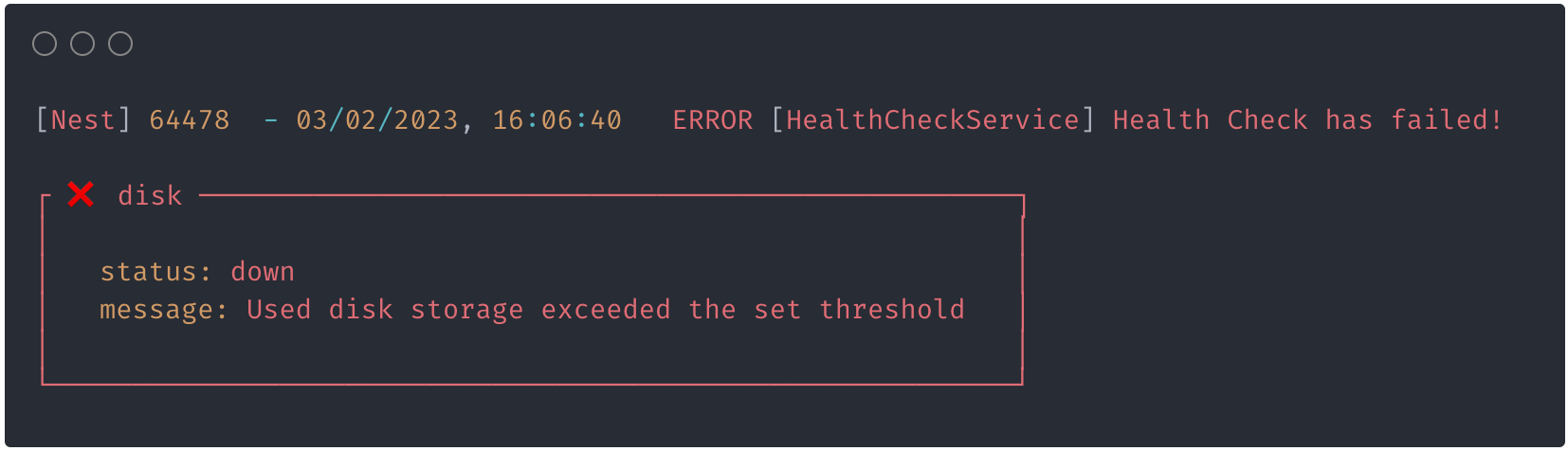 |
To change the log style, use the errorLogStyle configuration option:
@Module({
  imports: [
    TerminusModule.forRoot({
      errorLogStyle: 'pretty',
    }),
  ]
})
export class HealthModule {}
Graceful shutdown timeout#
If your application needs to postpone its shutdown, Terminus can handle it for you with the gracefulShutdownTimeoutMs option (in milliseconds, 0 by default).
This setting is particularly useful with an orchestrator such as Kubernetes.
By setting a delay slightly longer than the readiness check interval, you can achieve zero downtime when shutting down containers: as soon as a termination signal is received, the health check reports 'shutting_down' with a 503 status code, so the orchestrator stops routing new traffic while the application finishes in-flight requests during the delay.
@Module({
  imports: [
    TerminusModule.forRoot({
      gracefulShutdownTimeoutMs: 1000,
    }),
  ]
})
export class HealthModule {}
Warning The delay is only applied onSIGTERM, which is the signal orchestrators such as Kubernetes send when stopping a container. Other signals (e.g.SIGINTfromCtrl+C) still switch the health check to'shutting_down'but shut the application down immediately. Make sure shutdown hooks are enabled; otherwise, Terminus never receives the signal.
More examples#
More working examples are available in the Terminus samples directory.


