
Operations
In OpenAPI terms, paths are the endpoints (resources) that your API exposes, such as /users or /reports/summary. Operations are the HTTP methods used to manipulate these paths, such as GET, POST, or DELETE.
Tags#
To attach a controller to a specific tag, use the @ApiTags(...tags) decorator:
@ApiTags('cats')
@Controller('cats')
export class CatsController {}
OpenAPI 3.2 extends the Tag Object so that tags can be organized into a hierarchy and annotated with a hint about how they should be presented. To declare these relationships, define the tags up front with DocumentBuilder and pass the parent and kind options to addTag():
const config = new DocumentBuilder()
  .setOpenAPIVersion('3.2.0')
  .addTag('Animals', 'Everything about animals', undefined, { kind: 'nav' })
  .addTag('Cats', 'Cat operations', undefined, { parent: 'Animals' })
  .addTag('Dogs', 'Dog operations', undefined, { parent: 'Animals' })
  .build();
The parent option references another tag by name. The kind option is a free-form, machine-readable string that hints at how the tag should be used, commonly nav, badge, or audience. The same options object also accepts a summary, another OpenAPI 3.2 Tag Object field.
Warning Theparentandkindfields belong to the OpenAPI 3.2 Tag Object. You must callsetOpenAPIVersion('3.2.0'). Otherwise, the generated document still declaresopenapi: 3.0.0, and strict validators reject these fields. Hierarchy fields can only be defined throughDocumentBuilder.addTag(). The@ApiTags()decorator ignores them and logs a warning.
Headers#
To define custom headers that are expected as part of the request, use @ApiHeader():
@ApiHeader({
  name: 'X-MyHeader',
  description: 'Custom header',
})
@Controller('cats')
export class CatsController {}
Responses#
To define a custom HTTP response, use the @ApiResponse() decorator:
@Post()
@ApiResponse({ status: 201, description: 'The record has been successfully created.'})
@ApiResponse({ status: 403, description: 'Forbidden.'})
async create(@Body() createCatDto: CreateCatDto) {
  this.catsService.create(createCatDto);
}
Nest provides a set of shorthand API response decorators built on top of @ApiResponse(), one for each common status code. They include:
@ApiOkResponse()@ApiCreatedResponse()@ApiAcceptedResponse()@ApiNoContentResponse()@ApiMovedPermanentlyResponse()@ApiFoundResponse()@ApiBadRequestResponse()@ApiUnauthorizedResponse()@ApiNotFoundResponse()@ApiForbiddenResponse()@ApiMethodNotAllowedResponse()@ApiNotAcceptableResponse()@ApiRequestTimeoutResponse()@ApiConflictResponse()@ApiPreconditionFailedResponse()@ApiTooManyRequestsResponse()@ApiGoneResponse()@ApiPayloadTooLargeResponse()@ApiUnsupportedMediaTypeResponse()@ApiUnprocessableEntityResponse()@ApiInternalServerErrorResponse()@ApiNotImplementedResponse()@ApiBadGatewayResponse()@ApiServiceUnavailableResponse()@ApiGatewayTimeoutResponse()@ApiDefaultResponse()
@Post()
@ApiCreatedResponse({ description: 'The record has been successfully created.'})
@ApiForbiddenResponse({ description: 'Forbidden.'})
async create(@Body() createCatDto: CreateCatDto) {
  this.catsService.create(createCatDto);
}
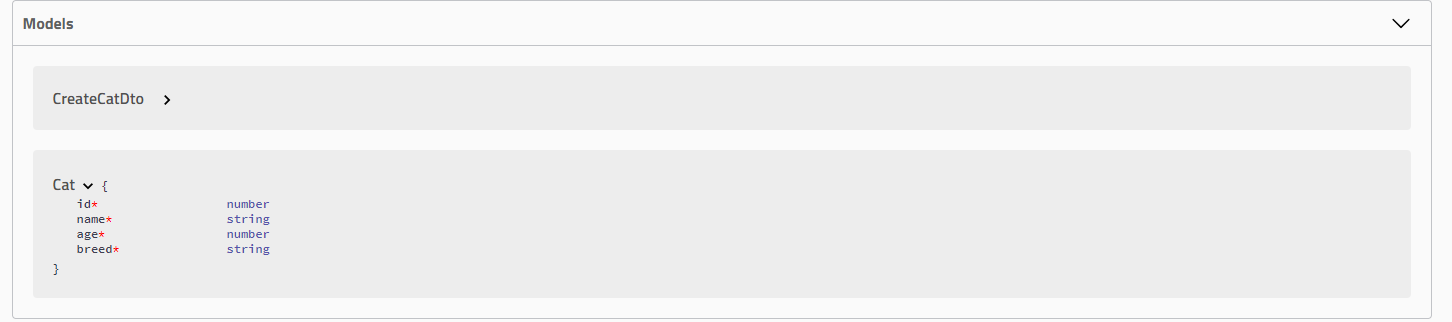
To specify a return model for a request, create a class and annotate all of its properties with the @ApiProperty() decorator:
export class Cat {
  @ApiProperty()
  id: number;

  @ApiProperty()
  name: string;

  @ApiProperty()
  age: number;

  @ApiProperty()
  breed: string;
}
You can then use the Cat model with the type property of the response decorator:
@ApiTags('cats')
@Controller('cats')
export class CatsController {
  @Post()
  @ApiCreatedResponse({
    description: 'The record has been successfully created.',
    type: Cat,
  })
  async create(@Body() createCatDto: CreateCatDto): Promise<Cat> {
    return this.catsService.create(createCatDto);
  }
}
Open the browser and verify the generated Cat model:
Instead of defining responses for each endpoint or controller individually, you can define a global response for all endpoints using the DocumentBuilder class. This is useful for responses that every endpoint in your application can return (e.g., errors like 401 Unauthorized or 500 Internal Server Error).
const config = new DocumentBuilder()
  .addGlobalResponse({
    status: 500,
    description: 'Internal server error',
  })
  // other configurations
  .build();
File upload#
To document file upload for a specific method, use the @ApiBody() decorator together with @ApiConsumes(). Here's a full example using the file upload technique:
@UseInterceptors(FileInterceptor('file'))
@ApiConsumes('multipart/form-data')
@ApiBody({
  description: 'List of cats',
  type: FileUploadDto,
})
uploadFile(@UploadedFile() file: Express.Multer.File) {}
Where FileUploadDto is defined as follows:
class FileUploadDto {
  @ApiProperty({ type: 'string', format: 'binary' })
  file: any;
}
To handle multiple file uploads, define FilesUploadDto as follows:
class FilesUploadDto {
  @ApiProperty({ type: 'array', items: { type: 'string', format: 'binary' } })
  files: any[];
}
Extensions#
To add an extension to an operation, use the @ApiExtension() decorator. The extension name must be prefixed with x- (otherwise, the decorator throws an error).
@ApiExtension('x-foo', { hello: 'world' })
Advanced: Generic ApiResponse#
With raw definitions, you can define a generic schema for Swagger UI. Assume you have the following DTO:
export class PaginatedDto<TData> {
  @ApiProperty()
  total: number;

  @ApiProperty()
  limit: number;

  @ApiProperty()
  offset: number;

  results: TData[];
}
We skip decorating results, because we'll provide a raw definition for it later. Now, define another DTO, for example CatDto, as follows:
export class CatDto {
  @ApiProperty()
  name: string;

  @ApiProperty()
  age: number;

  @ApiProperty()
  breed: string;
}
With this in place, you can define a PaginatedDto<CatDto> response:
@ApiOkResponse({
  schema: {
    allOf: [
      { $ref: getSchemaPath(PaginatedDto) },
      {
        properties: {
          results: {
            type: 'array',
            items: { $ref: getSchemaPath(CatDto) },
          },
        },
      },
    ],
  },
})
async findAll(): Promise<PaginatedDto<CatDto>> {}
In this example, the response combines PaginatedDto (through allOf) with a results property of type Array<CatDto>.
getSchemaPath()returns the OpenAPI schema path of a given model within the OpenAPI document.allOfis an OAS 3 keyword that covers various inheritance-related use cases.
Lastly, because no controller references PaginatedDto directly, the SwaggerModule can't generate a corresponding model definition yet. In this case, you must add it as an extra model. For example, use the @ApiExtraModels() decorator at the controller level:
@Controller('cats')
@ApiExtraModels(PaginatedDto)
export class CatsController {}
If you run Swagger now, the generated swagger.json for this endpoint defines the following response:
"responses": {
  "200": {
    "description": "",
    "content": {
      "application/json": {
        "schema": {
          "allOf": [
            {
              "$ref": "#/components/schemas/PaginatedDto"
            },
            {
              "properties": {
                "results": {
                  "type": "array",
                  "items": {
                    "$ref": "#/components/schemas/CatDto"
                  }
                }
              }
            }
          ]
        }
      }
    }
  }
}
To make it reusable, create a custom decorator for PaginatedDto:
export const ApiPaginatedResponse = <TModel extends Type<any>>(
  model: TModel,
) => {
  return applyDecorators(
    ApiExtraModels(PaginatedDto, model),
    ApiOkResponse({
      schema: {
        allOf: [
          { $ref: getSchemaPath(PaginatedDto) },
          {
            properties: {
              results: {
                type: 'array',
                items: { $ref: getSchemaPath(model) },
              },
            },
          },
        ],
      },
    }),
  );
};
Hint TheType<any>interface and theapplyDecorators()function are imported from the@nestjs/commonpackage.
To ensure that the SwaggerModule generates a definition for the model, the decorator registers it as an extra model with ApiExtraModels(), just as we did earlier for PaginatedDto in the controller.
With this in place, you can use the custom @ApiPaginatedResponse() decorator on your endpoint:
@ApiPaginatedResponse(CatDto)
async findAll(): Promise<PaginatedDto<CatDto>> {}
For client generation tools, this approach makes it ambiguous how PaginatedDto<TModel> should be generated for the client. The following snippet is an example of a client generator result for the GET / endpoint above:
// Angular
findAll(): Observable<{ total: number, limit: number, offset: number, results: CatDto[] }>
The return type here is ambiguous. To work around this issue, add a title property to the schema in ApiPaginatedResponse:
export const ApiPaginatedResponse = <TModel extends Type<any>>(
  model: TModel,
) => {
  return applyDecorators(
    ApiOkResponse({
      schema: {
        title: `PaginatedResponseOf${model.name}`,
        allOf: [
          // ...
        ],
      },
    }),
  );
};
The client generator's result now becomes:
// Angular
findAll(): Observable<PaginatedResponseOfCatDto>


