
Lifecycle Events
A Nest application, as well as every application element, has a lifecycle managed by Nest. Nest provides lifecycle hooks that give you visibility into key lifecycle events and let you act (run registered code on your modules, providers, or controllers) when they occur.
Lifecycle sequence#
The following diagram depicts the sequence of key application lifecycle events, from the time the application is bootstrapped until the Node.js process exits. The overall lifecycle divides into three phases: initializing, running, and terminating. With this lifecycle in mind, you can plan for the appropriate initialization of modules and services, manage active connections, and gracefully shut down your application when it receives a termination signal.
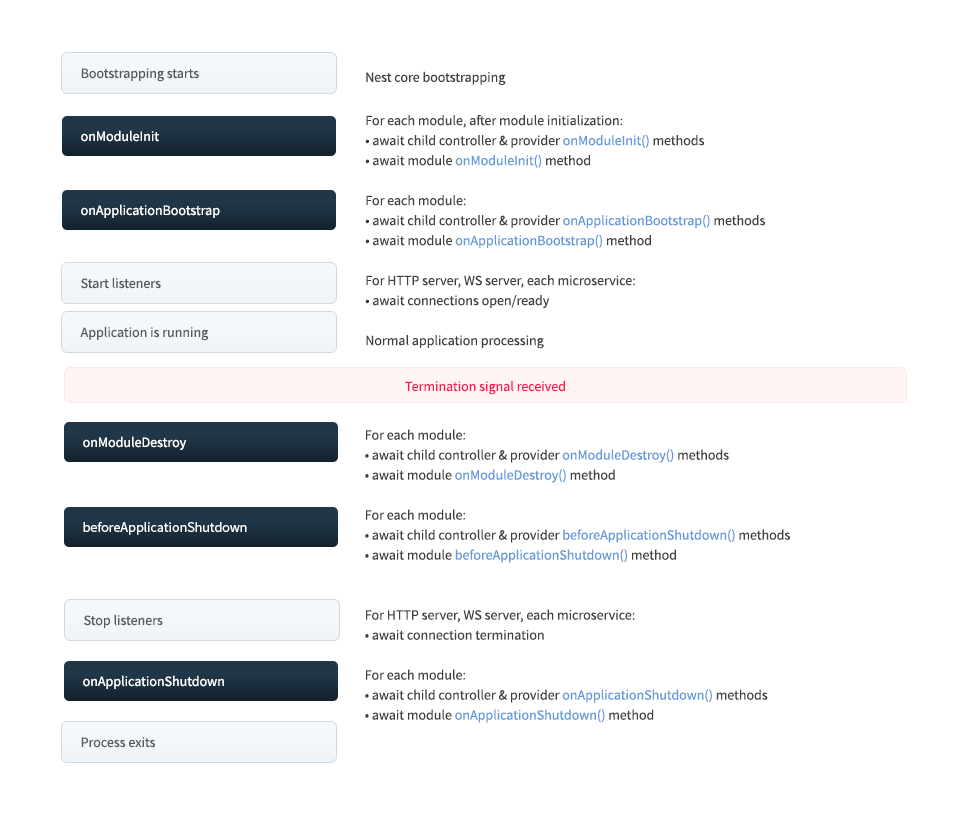
Lifecycle events#
Lifecycle events happen during application bootstrapping and shutdown. Nest calls registered lifecycle hook methods on modules, providers, and controllers at each of the following lifecycle events (shutdown hooks must be enabled first, as described in Application shutdown). As shown in the diagram above, Nest also calls the appropriate underlying methods to begin and stop listening for connections.
In the following table, onModuleInit() and onApplicationBootstrap() are triggered only when the application is initialized: when you call app.init() or app.listen() explicitly, or when you create a standalone application with NestFactory.createApplicationContext(), which initializes it for you.
The onModuleDestroy(), beforeApplicationShutdown(), and onApplicationShutdown() hooks are triggered only when you call app.close() explicitly, or when the process receives a system signal (such as SIGTERM) and you have called enableShutdownHooks() at application bootstrap (see Application shutdown below).
| Lifecycle hook method | Lifecycle event triggering the hook method call |
|---|---|
onModuleInit() | Called once the host module's dependencies have been resolved. |
onApplicationBootstrap() | Called once all modules have been initialized, but before listening for connections. |
onModuleDestroy()* | Called after a termination signal (e.g., SIGTERM) has been received. |
beforeApplicationShutdown()* | Called after all onModuleDestroy() handlers have completed (Promises resolved or rejected);once complete (Promises resolved or rejected), all existing connections will be closed ( app.close() called). |
onApplicationShutdown()* | Called after connections close, as the last step of app.close(). |
* For these events, if you're not calling app.close() explicitly, you must opt in to make them work with system signals such as SIGTERM. See Application shutdown below.
Warning The lifecycle hooks listed above are not triggered for request-scoped classes. Request-scoped classes are not tied to the application lifecycle, and their lifespan is unpredictable. They are created exclusively for each request and garbage-collected after the response is sent.
Hint Nest callsonModuleInit()andonApplicationBootstrap()module by module, ordered by each module's distance from the root module in the import graph: the most deeply imported modules (and global modules) go first, and the root module goes last. Each module's hooks are awaited before Nest moves on to the next module. The shutdown hooks run in the reverse order.
Usage#
Each lifecycle hook is represented by an interface. Interfaces are technically optional because they do not exist after TypeScript compilation. Nonetheless, it's good practice to use them to benefit from strong typing and editor tooling. To register a lifecycle hook, implement the appropriate interface. For example, to register a method to be called during module initialization on a particular class (e.g., a controller, provider, or module), implement the OnModuleInit interface by supplying an onModuleInit() method:
import { Injectable, OnModuleInit } from '@nestjs/common';

@Injectable()
export class UsersService implements OnModuleInit {
  onModuleInit() {
    console.log(`The module has been initialized.`);
  }
}
import { Injectable } from '@nestjs/common';

@Injectable()
export class UsersService {
  onModuleInit() {
    console.log(`The module has been initialized.`);
  }
}
Asynchronous initialization#
Both the OnModuleInit and OnApplicationBootstrap hooks let you defer the application initialization process. Return a Promise, or mark the method as async and await the completion of an asynchronous operation in the method body.
async onModuleInit(): Promise<void> {
  await this.fetch();
}
async onModuleInit() {
  await this.fetch();
}
Application shutdown#
The onModuleDestroy(), beforeApplicationShutdown(), and onApplicationShutdown() hooks are called in the terminating phase, in response to an explicit call to app.close() or, if you opted in, upon receipt of system signals such as SIGTERM. This feature is often used with Kubernetes to manage container lifecycles, with Heroku dynos, and with similar services.
Shutdown hook listeners consume system resources, so they are disabled by default. To use shutdown hooks, you must enable listeners by calling enableShutdownHooks():
import { NestFactory } from '@nestjs/core';
import { AppModule } from './app.module.js';

async function bootstrap() {
  const app = await NestFactory.create(AppModule);

  // Starts listening for shutdown hooks
  app.enableShutdownHooks();

  await app.listen(process.env.PORT ?? 3000);
}
await bootstrap();
Warning Due to inherent platform limitations, NestJS has limited support for application shutdown hooks on Windows. You can expectSIGINTto work, as well asSIGBREAKand, to some extent,SIGHUP. However,SIGTERMnever works on Windows, because killing a process in the Task Manager is unconditional (there is no way for an application to detect or prevent it). To learn more about howSIGINT,SIGBREAK, and other signals are handled on Windows, see the libuv signal handling documentation and the Node.js documentation on signal events.
HintenableShutdownHooks() consumes memory by starting listeners. When you run multiple Nest apps in a single Node.js process (e.g., during parallel test runs), Node.js may warn about too many listeners. For this reason, shutdown hooks are not enabled by default. Keep this in mind when running multiple instances in a single Node.js process.
When the application receives a termination signal, it calls any registered onModuleDestroy(), beforeApplicationShutdown(), and onApplicationShutdown() methods, in that order. beforeApplicationShutdown() and onApplicationShutdown() receive the corresponding signal as their first parameter (onModuleDestroy() takes no arguments). If a registered method returns a promise, Nest doesn't continue the sequence until the promise is resolved or rejected.
@Injectable()
class UsersService implements OnApplicationShutdown {
  onApplicationShutdown(signal: string) {
    console.log(signal); // e.g., "SIGINT"
  }
}
@Injectable()
class UsersService {
  onApplicationShutdown(signal) {
    console.log(signal); // e.g., "SIGINT"
  }
}
Hint Callingapp.close()doesn't terminate the Node.js process. It only runs the shutdown sequence (theonModuleDestroy(),beforeApplicationShutdown(), andonApplicationShutdown()hooks, plus closing the underlying server). If there are active intervals, long-running background tasks, and so on, the process won't exit on its own.


