Pipes
A pipe is a class annotated with the @Injectable() decorator that implements the PipeTransform interface.
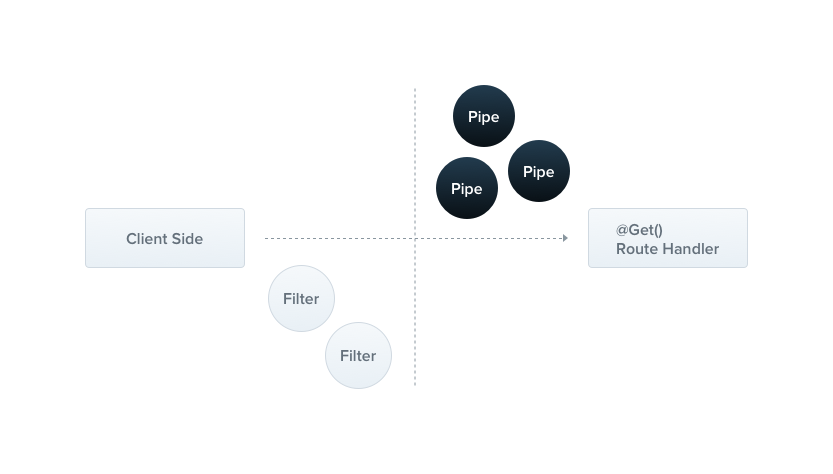
Pipes have two typical use cases:
- transformation: transform input data to the desired form (e.g., from string to integer)
- validation: evaluate input data and, if valid, pass it through unchanged; otherwise, throw an exception
In both cases, pipes operate on the arguments being processed by a controller route handler. Nest interposes a pipe immediately before a method is invoked; the pipe receives the arguments destined for the method and operates on them. Any transformation or validation takes place at that point, after which the route handler is invoked with the (potentially) transformed arguments.
Nest comes with a number of built-in pipes that you can use out of the box, and you can also build your own. This chapter introduces the built-in pipes and shows how to bind them to route handlers. It then walks through several custom pipes to show how to build one from scratch.
Hint Pipes run inside the exceptions zone. An exception thrown by a pipe is handled by the exceptions layer (the global exception filter and any exception filters applied to the current context). When a pipe throws an exception, the route handler is not executed. This makes pipes the recommended place to validate data that enters the application from external sources, at the system boundary.
Built-in pipes#
Nest provides the following pipes out of the box, all exported from the @nestjs/common package:
ValidationPipeStandardSchemaValidationPipeParseIntPipeParseFloatPipeParseBoolPipeParseArrayPipeParseUUIDPipeParseEnumPipeDefaultValuePipeParseFilePipeParseDatePipe
Let's start with ParseIntPipe. It is an example of the transformation use case: the pipe ensures that a route handler parameter is converted to a JavaScript integer, or throws an exception if the conversion fails. Later in this chapter, we'll build a simple custom implementation of ParseIntPipe. The techniques below also apply to the other built-in transformation pipes (ParseBoolPipe, ParseFloatPipe, ParseEnumPipe, ParseArrayPipe, ParseDatePipe, and ParseUUIDPipe), which this chapter refers to collectively as the Parse* pipes.
Binding pipes#
To use a pipe, bind an instance of the pipe class to the appropriate context. In the ParseIntPipe example, we want to associate the pipe with a particular route handler method and make sure it runs before the method is called. The following construct does this; we refer to it as binding the pipe at the method parameter level:
@Get(':id')
async findOne(@Param('id', ParseIntPipe) id: number) {
  return this.catsService.findOne(id);
}
This guarantees one of two outcomes: either the parameter received by findOne() is a number (as this.catsService.findOne() expects), or an exception is thrown before the route handler is called.
For example, suppose the route is called as follows:
GET localhost:3000/abc
Nest throws an exception, which produces the following response:
{
  "statusCode": 400,
  "message": "Validation failed (numeric string is expected)",
  "error": "Bad Request"
}
The exception prevents the body of the findOne() method from executing.
In the example above, we pass a class (ParseIntPipe), not an instance. This leaves instantiation to the framework and enables dependency injection. As with guards and exception filters, you can instead pass an in-place instance, which is useful when you want to customize the built-in pipe's behavior by passing options:
@Get(':id')
async findOne(
  @Param('id', new ParseIntPipe({ errorHttpStatusCode: HttpStatus.NOT_ACCEPTABLE }))
  id: number,
) {
  return this.catsService.findOne(id);
}
The other transformation pipes (all of the Parse* pipes) are bound the same way. They work with route parameters, query string parameters, and request body values.
For example, with a query string parameter:
@Get()
async findOne(@Query('id', ParseIntPipe) id: number) {
  return this.catsService.findOne(id);
}
The following example uses ParseUUIDPipe to verify that a string parameter is a UUID:
@Get(':uuid')
async findOne(@Param('uuid', new ParseUUIDPipe()) uuid: string) {
  return this.catsService.findOne(uuid);
}
@Get(':uuid')
@Bind(Param('uuid', new ParseUUIDPipe()))
async findOne(uuid) {
  return this.catsService.findOne(uuid);
}
Hint By default,ParseUUIDPipeaccepts a UUID of any version (versions 1 through 8, Nil, and Max UUIDs). To require a specific version, pass theversionoption ('1','2','3','4','5','6','7', or'8'). Starting with NestJS v12.1.2, theversionoption also accepts these versions as numbers (for example,7), and'all'to accept any version, the same as leavingversionout. TheUUIDVersiontype describes these values and is exported from@nestjs/common.
Binding validation pipes works slightly differently; we cover it later in this chapter.
Hint See Validation techniques for extensive examples of validation pipes.
Custom pipes#
As mentioned, you can build your own pipes. Although Nest provides robust built-in ParseIntPipe and ValidationPipe implementations, let's build simple versions of each from scratch to see how custom pipes are constructed.
We start with a simple ValidationPipe. Initially, it takes an input value and returns it unchanged, behaving like an identity function.
import { PipeTransform, Injectable, ArgumentMetadata } from '@nestjs/common';

@Injectable()
export class ValidationPipe implements PipeTransform {
  transform(value: any, metadata: ArgumentMetadata) {
    return value;
  }
}
import { Injectable } from '@nestjs/common';

@Injectable()
export class ValidationPipe {
  transform(value, metadata) {
    return value;
  }
}
HintPipeTransform<T, R>is a generic interface that every pipe must implement.Tindicates the type of the inputvalue, andRindicates the return type of thetransform()method.
Every pipe must implement the transform() method to fulfill the PipeTransform interface contract. This method has two parameters:
valuemetadata
The value parameter is the method argument currently being processed (before the route handler receives it), and metadata is that argument's metadata. The metadata object has the following properties:
export interface ArgumentMetadata {
  type: 'body' | 'query' | 'param' | 'custom';
  metatype?: Type<unknown>;
  data?: string;
  schema?: StandardSchemaV1;
}
These properties describe the argument being processed:
type | Indicates whether the argument is a body (@Body()), query (@Query()), param (@Param()), or custom parameter (see custom decorators). |
metatype | The metatype of the argument, for example, String. The value is undefined if you omit the type declaration in the route handler signature or use vanilla JavaScript. |
data | The string passed to the decorator, for example, @Body('string'). It's undefined if you don't pass a string to the decorator, as in @Body(). |
schema | A Standard Schema compatible schema attached through parameter decorator options such as @Body({ schema }) or @Param('id', { schema }). It's undefined if no schema is attached. |
Warning TypeScript interfaces disappear during transpilation. If a method parameter's type is declared as an interface instead of a class, themetatypevalue isObject.
Hint The built-inStandardSchemaValidationPipeuses theschemafield to validate arguments with any Standard Schema compatible library. Arguments without a schema pass through unchanged.
Schema based validation#
Hint The following sections build validation pipes from scratch to show how pipes work. For schema-based validation in production, use the built-inStandardSchemaValidationPipeinstead. It works with Zod, Valibot, ArkType, and any other Standard Schema compatible library, and reads the schema you attach through theschemaoption of parameter decorators such as@Body()and@Param(). See Schema-based validation for details.
Let's make our validation pipe more useful. Consider the create() method of the CatsController: we want to ensure that the POST body object is valid before running the service method.
@Post()
async create(@Body() createCatDto: CreateCatDto) {
  this.catsService.create(createCatDto);
}
@Post()
async create(@Body() createCatDto) {
  this.catsService.create(createCatDto);
}
The createCatDto body parameter is of type CreateCatDto:
export class CreateCatDto {
  name: string;
  age: number;
  breed: string;
}
Every request to the create() method must contain a valid body, so we need to validate the three members of the createCatDto object. We could do this inside the route handler, but that would break the single responsibility principle (SRP).
Another approach is to create a validator class and delegate the task to it. The disadvantage is that we would have to remember to call the validator at the beginning of each method.
What about validation middleware? This could work, but it's not possible to create generic middleware that can be used in every context across the application. Middleware is unaware of the execution context, including the handler that will be called and its parameters.
Pipes are designed for exactly this use case, so we will refine our validation pipe.
Object schema validation#
There are several ways to validate objects in a clean, DRY way. One common approach is schema-based validation, which we use here.
The Zod library lets you define schemas with a readable API. Let's build a validation pipe that uses Zod schemas.
Start by installing the required package:
$ npm install --save zod
The class below takes a schema as a constructor argument and calls schema.parse(), which validates the incoming argument against that schema.
As noted earlier, a validation pipe either returns the value or throws an exception. This pipe returns the value parsed by the schema, or throws a BadRequestException if validation fails.
The next section shows how to supply the appropriate schema for a given route handler using the @UsePipes() decorator. This makes the validation pipe reusable across contexts, which is what we set out to do.
import { PipeTransform, ArgumentMetadata, BadRequestException } from '@nestjs/common';
import { ZodType } from 'zod';

export class ZodValidationPipe implements PipeTransform {
  constructor(private schema: ZodType) {}

  transform(value: unknown, metadata: ArgumentMetadata) {
    try {
      const parsedValue = this.schema.parse(value);
      return parsedValue;
    } catch (error) {
      throw new BadRequestException('Validation failed');
    }
  }
}
import { BadRequestException } from '@nestjs/common';

export class ZodValidationPipe {
  constructor(schema) {
    this.schema = schema;
  }

  transform(value, metadata) {
    try {
      const parsedValue = this.schema.parse(value);
      return parsedValue;
    } catch (error) {
      throw new BadRequestException('Validation failed');
    }
  }
}
Binding validation pipes#
Earlier, we saw how to bind transformation pipes (such as ParseIntPipe and the rest of the Parse* pipes). Binding validation pipes is equally straightforward.
In this case, we want to bind the pipe at the method level. To use the ZodValidationPipe in our example, we need to:
- Create an instance of the
ZodValidationPipe - Pass the context-specific Zod schema to the pipe's constructor
- Bind the pipe to the method
Here's an example Zod schema:
import { z } from 'zod';

export const createCatSchema = z.object({
  name: z.string(),
  age: z.number(),
  breed: z.string(),
});

export type CreateCatDto = z.infer<typeof createCatSchema>;
Bind the pipe with the @UsePipes() decorator:
@Post()
@UsePipes(new ZodValidationPipe(createCatSchema))
async create(@Body() createCatDto: CreateCatDto) {
  this.catsService.create(createCatDto);
}
@Post()
@Bind(Body())
@UsePipes(new ZodValidationPipe(createCatSchema))
async create(createCatDto) {
  this.catsService.create(createCatDto);
}
Hint The@UsePipes()decorator is imported from the@nestjs/commonpackage.
You can also bind the ZodValidationPipe to a specific parameter, alongside built-in pipes. The following example validates the id route parameter with ParseIntPipe and the request body with ZodValidationPipe:
@Put('/:id')
async update(
  @Param('id', ParseIntPipe) id: number,
  @Body(new ZodValidationPipe(createCatSchema)) body: CreateCatDto
): Promise<void> {
  this.catsService.update(id, body);
}
Warning Thezodlibrary requires thestrictNullCheckscompiler option to be enabled in yourtsconfig.jsonfile.
Class validator#
Warning The techniques in this section require TypeScript and are not available if your app is written in vanilla JavaScript.
This section presents an alternative implementation of our validation technique.
Nest works well with the class-validator library, which provides decorator-based validation. Decorator-based validation pairs well with Nest's pipe capabilities, because a pipe has access to the metatype of the processed argument. Before we start, install the required packages:
$ npm i --save class-validator class-transformer
Once these are installed, add a few decorators to the CreateCatDto class. This shows a significant advantage of the technique: the CreateCatDto class remains the single source of truth for the POST body object, so you don't need a separate validation class.
import { IsString, IsInt } from 'class-validator';

export class CreateCatDto {
  @IsString()
  name: string;

  @IsInt()
  age: number;

  @IsString()
  breed: string;
}
Hint Read more about class-validator decorators in the class-validator documentation.
We can now create a ValidationPipe class that uses these decorators.
import { PipeTransform, Injectable, ArgumentMetadata, BadRequestException } from '@nestjs/common';
import { validate } from 'class-validator';
import { plainToInstance } from 'class-transformer';

@Injectable()
export class ValidationPipe implements PipeTransform<any> {
  async transform(value: any, { metatype }: ArgumentMetadata) {
    if (!metatype || !this.toValidate(metatype)) {
      return value;
    }
    const object = plainToInstance(metatype, value);
    const errors = await validate(object);
    if (errors.length > 0) {
      throw new BadRequestException('Validation failed');
    }
    return value;
  }

  private toValidate(metatype: Function): boolean {
    const types: Function[] = [String, Boolean, Number, Array, Object];
    return !types.includes(metatype);
  }
}
Hint This pipe is intentionally basic. You don't have to build a generic validation pipe yourself: Nest provides a more capable ValidationPipe out of the box, described at the end of this section.
Notice The code above uses the class-transformer library, which is made by the same author as the class-validator library, so the two work well together.
Let's go through this code. First, the transform() method is marked as async. This is possible because Nest supports both synchronous and asynchronous pipes. We make this method async because some class-validator validations can be async (they return promises).
Next, we use destructuring to extract the metatype field from the ArgumentMetadata object. This is shorthand for receiving the full ArgumentMetadata and then assigning the metatype variable in a separate statement.
The helper method toValidate() skips validation when the argument being processed is a native JavaScript type. Native types can't have validation decorators attached, so there's no reason to validate them.
Next, we use the class-transformer function plainToInstance() to transform the plain JavaScript argument object into a typed object so that we can apply validation. This is necessary because the incoming POST body, when deserialized from the network request, does not have any type information (this is how the underlying platform, such as Express, works). Because class-validator relies on the validation decorators defined on the DTO earlier, we transform the incoming body into an instance of the decorated class rather than validating a plain object.
Finally, because this is a validation pipe, it either returns the value unchanged or throws an exception.
The last step is to bind the ValidationPipe. Pipes can be parameter-scoped, method-scoped, controller-scoped, or global-scoped. Earlier, we bound the Zod-based validation pipe at the method level with @UsePipes(). In the example below, we bind the pipe instance to the route handler's @Body() decorator so that the pipe validates the POST body.
@Post()
async create(
  @Body(new ValidationPipe()) createCatDto: CreateCatDto,
) {
  this.catsService.create(createCatDto);
}
Parameter-scoped pipes are useful when the validation logic concerns only one parameter.
Global scoped pipes#
Because the ValidationPipe is designed to be as generic as possible, it is most useful as a global-scoped pipe, applied to every route handler across the entire application.
async function bootstrap() {
  const app = await NestFactory.create(AppModule);
  app.useGlobalPipes(new ValidationPipe());
  await app.listen(process.env.PORT ?? 3000);
}
await bootstrap();
Notice In a hybrid application,useGlobalPipes()doesn't set up pipes for connected microservices by default (see Hybrid application to change this behavior). In a standard (non-hybrid) microservice application,useGlobalPipes()does mount the pipes globally.
Global pipes registered outside of any module (with useGlobalPipes(), as in the example above) cannot inject dependencies, because the binding happens outside the context of any module. To solve this, you can register a global pipe directly from any module using the following construction:
import { Module } from '@nestjs/common';
import { APP_PIPE } from '@nestjs/core';

@Module({
  providers: [
    {
      provide: APP_PIPE,
      useClass: ValidationPipe,
    },
  ],
})
export class AppModule {}
Hint When you use this approach to perform dependency injection for the pipe, the pipe is global regardless of the module in which you register it. Register it in the module where the pipe (ValidationPipein the example above) is defined.useClassis not the only way to register a custom provider; learn more in Custom providers.
The built-in ValidationPipe#
You don't have to build a generic validation pipe yourself: Nest provides ValidationPipe out of the box. The built-in ValidationPipe offers more options than the sample built in this chapter, which is kept basic to illustrate the mechanics of a custom pipe. For schema-based validation, Nest also provides the built-in StandardSchemaValidationPipe. See Validation techniques for full details and many examples.
Transformation use case#
Validation isn't the only use case for custom pipes. As mentioned at the beginning of this chapter, a pipe can also transform input data to the desired format. This is possible because the value returned from the transform() method replaces the previous value of the argument.
When is this useful? Sometimes the data passed from the client needs to be changed (for example, converted from a string to an integer) before the route handler can process it. Some required fields may also be missing, and you may want to apply default values. Transformation pipes perform these functions by interposing a processing function between the client request and the route handler.
Here's a simple ParseIntPipe that parses a string into an integer. (As noted above, Nest has a more sophisticated built-in ParseIntPipe; this is a simple example of a custom transformation pipe.)
import { PipeTransform, Injectable, ArgumentMetadata, BadRequestException } from '@nestjs/common';

@Injectable()
export class ParseIntPipe implements PipeTransform<string, number> {
  transform(value: string, metadata: ArgumentMetadata): number {
    const val = parseInt(value, 10);
    if (isNaN(val)) {
      throw new BadRequestException('Validation failed');
    }
    return val;
  }
}
import { Injectable, BadRequestException } from '@nestjs/common';

@Injectable()
export class ParseIntPipe {
  transform(value, metadata) {
    const val = parseInt(value, 10);
    if (isNaN(val)) {
      throw new BadRequestException('Validation failed');
    }
    return val;
  }
}
We can then bind this pipe to the selected parameter:
@Get(':id')
async findOne(@Param('id', new ParseIntPipe()) id) {
  return this.catsService.findOne(id);
}
@Get(':id')
@Bind(Param('id', new ParseIntPipe()))
async findOne(id) {
  return this.catsService.findOne(id);
}
Another useful transformation is to look up an existing user entity in the database using an ID supplied in the request:
@Get(':id')
findOne(@Param('id', UserByIdPipe) userEntity: UserEntity) {
  return userEntity;
}
@Get(':id')
@Bind(Param('id', UserByIdPipe))
findOne(userEntity) {
  return userEntity;
}
We leave the implementation of this pipe to the reader. Like all other transformation pipes, it receives an input value (an id) and returns an output value (a UserEntity object). This makes your code more declarative and DRY by moving boilerplate out of the route handler and into a reusable pipe.
Providing defaults#
By default, Parse* pipes expect a parameter's value to be defined and throw an exception when they receive null or undefined (unless you set their optional option to true). To let an endpoint handle missing query string parameters, provide a default value that is applied before the Parse* pipes operate on it. The DefaultValuePipe serves this purpose. Instantiate a DefaultValuePipe in the @Query() decorator before the relevant Parse* pipe, as shown below:
@Get()
async findAll(
  @Query('activeOnly', new DefaultValuePipe(false), ParseBoolPipe) activeOnly: boolean,
  @Query('page', new DefaultValuePipe(0), ParseIntPipe) page: number,
) {
  return this.catsService.findAll({ activeOnly, page });
}