
Redis
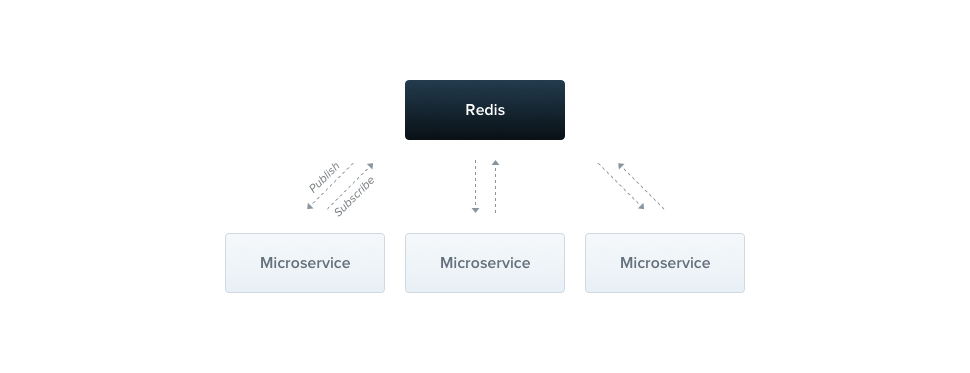
The Redis transporter implements the publish/subscribe messaging paradigm and uses the Pub/Sub feature of Redis. Published messages are categorized in channels, without the publisher knowing which subscribers (if any) will receive them. Each microservice can subscribe to any number of channels, and a single message can be received by multiple subscribers. Messages exchanged through channels are fire-and-forget: if a message is published and no subscriber is interested in it, the message is removed and can't be recovered. As a result, there is no guarantee that a message or event is handled by at least one service.
Installation#
To start building Redis-based microservices, first install the required package:
$ npm i --save ioredis
Overview#
To use the Redis transporter, pass the following options object to the createMicroservice() method:
const app = await NestFactory.createMicroservice<MicroserviceOptions>(AppModule, {
  transport: Transport.REDIS,
  options: {
    host: 'localhost',
    port: 6379,
  },
});
const app = await NestFactory.createMicroservice(AppModule, {
  transport: Transport.REDIS,
  options: {
    host: 'localhost',
    port: 6379,
  },
});
Hint TheTransportenum is imported from the@nestjs/microservicespackage.
Options#
The options property is specific to the chosen transporter. The Redis transporter exposes the properties described below.
host | Connection hostname |
port | Connection port |
retryAttempts | Number of times to retry the connection (default: 0, i.e., no retries) |
retryDelay | Delay between connection retry attempts (ms) (default: 5000) |
wildcards | Enables Redis wildcard subscriptions, instructing the transporter to use psubscribe/pmessage under the hood (default: false) |
The transporter also supports all the properties of the official ioredis client.
Client#
As with other microservice transporters, you have several options for creating a Redis ClientProxy instance.
One way to create an instance is to use the ClientsModule. Import it and use its register() method to pass an options object with the same properties shown above for the createMicroservice() method, plus a name property to use as the injection token. Read more about the ClientsModule in the client section of the overview.
@Module({
  imports: [
    ClientsModule.register([
      {
        name: 'MATH_SERVICE',
        transport: Transport.REDIS,
        options: {
          host: 'localhost',
          port: 6379,
        }
      },
    ]),
  ]
  ...
})
You can also create a client with ClientProxyFactory or the @Client() decorator. Both are described in the client section of the overview.
Context#
In more complex scenarios, you may need additional information about the incoming request. With the Redis transporter, you can access the RedisContext object.
@MessagePattern('notifications')
getNotifications(@Payload() data: number[], @Ctx() context: RedisContext) {
  console.log(`Channel: ${context.getChannel()}`);
}
@Bind(Payload(), Ctx())
@MessagePattern('notifications')
getNotifications(data, context) {
  console.log(`Channel: ${context.getChannel()}`);
}
Hint@Payload(),@Ctx()andRedisContextare imported from the@nestjs/microservicespackage.
Wildcards#
To enable wildcard support, set the wildcards option to true. This instructs the transporter to use psubscribe and pmessage under the hood.
const app = await NestFactory.createMicroservice(AppModule, {
  transport: Transport.REDIS,
  options: {
    // Other options
    wildcards: true,
  },
});
Pass the wildcards option when creating a client instance as well.
With this option enabled, you can use wildcards in your message and event patterns. For example, to subscribe to all channels starting with notifications., use the following pattern:
@EventPattern('notifications.*')
Instance status updates#
To get real-time updates on the connection and the state of the underlying driver instance, subscribe to the status stream. This stream provides status updates specific to the chosen driver. For the Redis driver, the status stream emits connected, disconnected, and reconnecting events.
this.client.status.subscribe((status: RedisStatus) => {
  console.log(status);
});
Hint TheRedisStatustype is imported from the@nestjs/microservicespackage.
Similarly, you can subscribe to the server's status stream to receive notifications about the server's status.
const server = app.connectMicroservice<MicroserviceOptions>(...);
server.status.subscribe((status: RedisStatus) => {
  console.log(status);
});
Listening to Redis events#
In some cases, you might want to listen to internal events emitted by the microservice. For example, you could listen for the error event to trigger additional operations when an error occurs. To do this, use the on() method. Because the Redis transporter uses two connections (see underlying driver access), the callback receives the connection that emitted the event ('pub' or 'sub') as its first argument:
this.client.on('error', (client, err) => {
  console.error(client, err);
});
Similarly, you can listen to the server's internal events:
server.on<RedisEvents>('error', (client, err) => {
  console.error(client, err);
});
Hint TheRedisEventstype is imported from the@nestjs/microservicespackage.
Starting with NestJS v12.1, listeners registered with the client's on() method stay registered until you call close(), so they are also attached to the new pub and sub connections the client creates on the next send() or emit() call after the connection ended (once any configured retryAttempts are exhausted). Registrations are not deduplicated, so register each listener once rather than again from its callback or after each reconnect.
Underlying driver access#
For more advanced use cases, you may need to access the underlying driver instance, for example, to close the connection manually or to use driver-specific methods. In most cases, however, you shouldn't need to access the driver directly.
To do so, use the unwrap() method, which returns the underlying driver instance. The generic type parameter specifies the type of driver instance you expect.
const [pub, sub] =
  this.client.unwrap<[import('ioredis').Redis, import('ioredis').Redis]>();
Similarly, you can access the server's underlying driver instance:
const [pub, sub] =
  server.unwrap<[import('ioredis').Redis, import('ioredis').Redis]>();
Unlike other transporters, the Redis transporter returns a tuple of two ioredis instances: the first one publishes messages, and the second one subscribes to them.


