
Exception filters
Nest comes with a built-in exceptions layer that processes all unhandled exceptions across an application. When your application code does not handle an exception, this layer catches it and automatically sends an appropriate, user-friendly response.
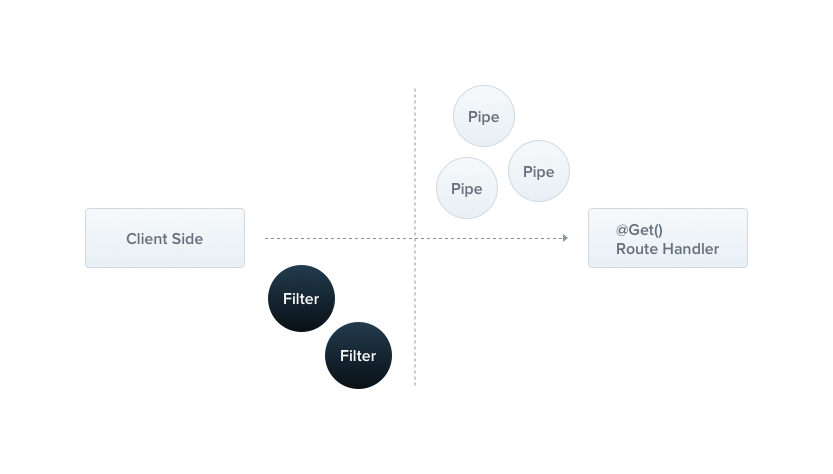
Out of the box, this is done by a built-in global exception filter, which handles exceptions of type HttpException (and its subclasses). When an exception is unrecognized (it is neither an HttpException nor a class that inherits from HttpException), the built-in exception filter generates the following default JSON response:
{
  "statusCode": 500,
  "message": "Internal server error"
}
Hint The global exception filter partially supports thehttp-errorslibrary. A thrown error that carriesstatusCodeandmessageproperties in the shape that library produces is sent back with those values, instead of the defaultInternalServerErrorExceptionresponse for unrecognized exceptions.
Throwing standard exceptions#
Nest provides a built-in HttpException class, exposed from the @nestjs/common package. For typical HTTP-based REST and GraphQL APIs, it's best practice to send standard HTTP response objects when certain error conditions occur.
For example, the CatsController has a findAll() method (a GET route handler). Let's assume that this route handler throws an exception. To demonstrate this, we'll hard-code it as follows:
@Get()
async findAll() {
  throw new HttpException('Forbidden', HttpStatus.FORBIDDEN);
}
HintHttpStatusis a helper enum imported from the@nestjs/commonpackage.
When the client calls this endpoint, the response looks like this:
{
  "statusCode": 403,
  "message": "Forbidden"
}
The HttpException constructor takes two required arguments that determine the response:
- The
responseargument defines the JSON response body. It can be astringor anobject, as described below. - The
statusargument defines the HTTP status code.
By default, the JSON response body contains two properties:
statusCode: defaults to the HTTP status code provided in thestatusargumentmessage: a short description of the HTTP error based on thestatus
To override only the message portion of the JSON response body, supply a string in the response argument. To override the entire JSON response body, pass an object in the response argument. Nest serializes the object and returns it as the JSON response body.
The second constructor argument, status, should be a valid HTTP status code. Best practice is to use the HttpStatus enum imported from @nestjs/common.
An optional third constructor argument, options, can be used to provide an error cause. The cause object is not serialized into the response object, but it is useful for logging, as it provides information about the inner error that caused the HttpException to be thrown.
Here's an example that overrides the entire response body and provides an error cause:
@Get()
async findAll() {
  try {
    await this.service.findAll();
  } catch (error) {
    throw new HttpException({
      status: HttpStatus.FORBIDDEN,
      error: 'This is a custom message',
    }, HttpStatus.FORBIDDEN, {
      cause: error
    });
  }
}
The response then looks like this:
{
  "status": 403,
  "error": "This is a custom message"
}
Exceptions logging#
By default, the exception filter does not log built-in exceptions such as HttpException (and any exceptions that inherit from it). These exceptions are treated as part of the normal application flow, so they don't appear in the console. The same applies to WsException and RpcException in their respective contexts.
HttpException inherits from the IntrinsicException class, which is exported from the @nestjs/common package. The built-in exception filters never log instances of IntrinsicException, which is how they distinguish exceptions that are part of normal operation from those that are not.
To log these exceptions, create a custom exception filter, as described in the Exception filters section below.
Tracking errors in production#
An exception filter decides what the client sees. On its own, it does not tell you that a TypeError started firing in OrdersService twelve minutes ago, on 4% of checkouts, only for customers whose cart contains a discounted item. Nor does it tell you which line threw.
The usual approach is to log the stack trace and search for it later, which falls short: a stack trace in a log file points at compiled output (/var/app/current/dist/orders/orders.service.js:35), carries no source context, and does not tell you whether this is the first occurrence or the ten-thousandth.
NestJS Observe treats an unhandled error as a first-class object rather than a log line. Every error that reaches the exceptions layer is captured along with the request that caused it, and:
- The stack trace comes with source code. The frame is resolved through your source maps back to
src/orders/orders.service.ts:35, and the surrounding lines are shown inline, so you can read the failing code in the error card without cloning anything. - Occurrences are grouped into defects. Errors with the same class and stack shape collapse into one fingerprinted group with a count, first-seen and last-seen timestamps, and the release that introduced it. "New since v2.4.1" is a fact you read off the page rather than infer.
- The failure keeps its context. The trace it belonged to, the user who hit it, the logs written during that request, and the spans that ran before the throw are all attached, so you can see what the request was doing when it failed.
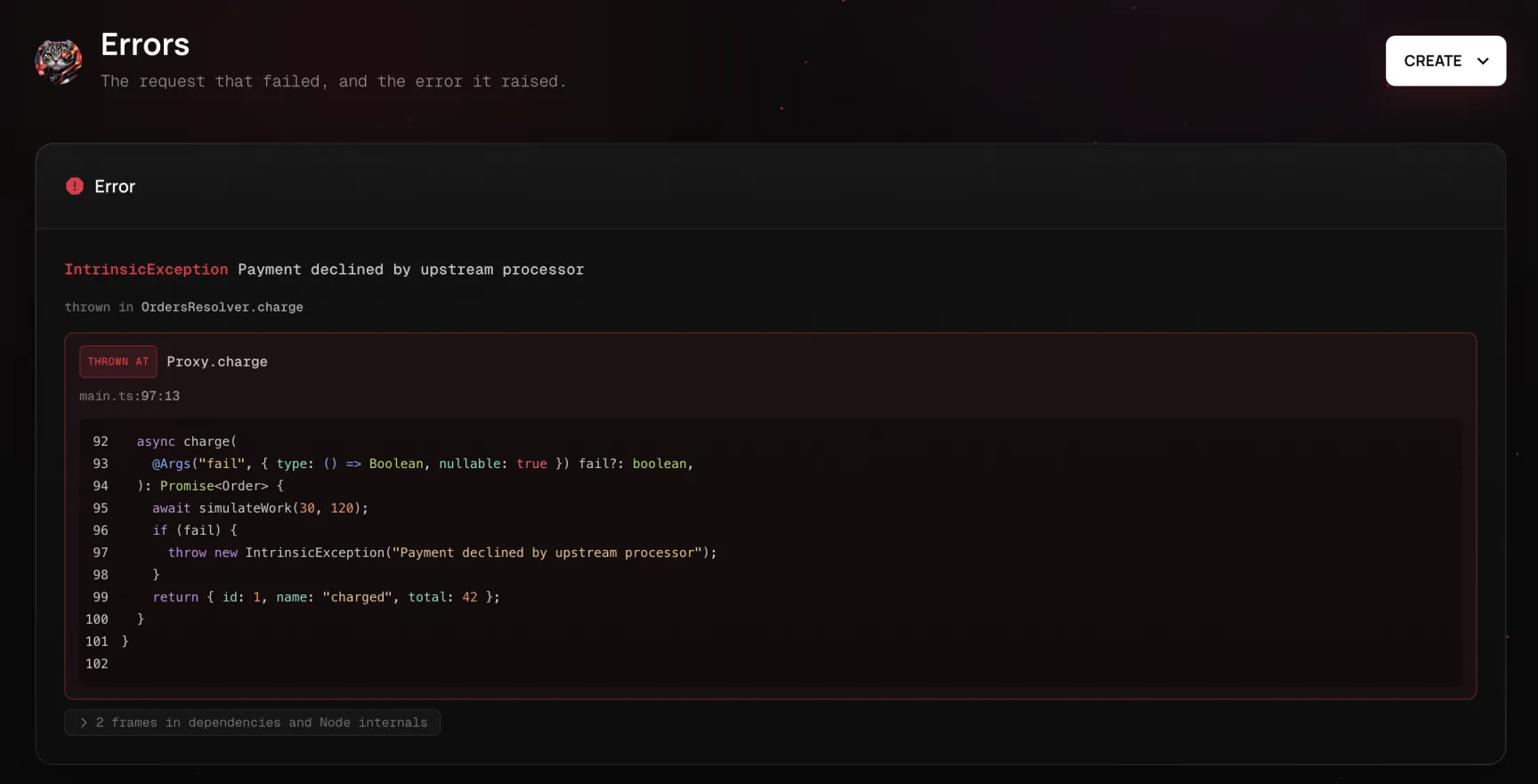
Because the error already carries its own code, you can hand it to a coding agent in one click: Copy agent prompt packages the error, the trimmed stack trace with source lines, the slow spans, and the surrounding logs into a self-contained prompt for Claude Code, Cursor, or any other tool that has your repository open.
This complements the filters described in this chapter rather than replacing them: filters shape the response, while instrumentation records what happened on the way there. See Error monitoring for everything the SDK captures about a failure, the Observability chapter for setup, and Dashboard for turning a recurring error into a tracked issue that verifies its own fix.
Custom exceptions#
In most cases, you won't need to write custom exceptions and can use the built-in Nest HTTP exceptions described in the next section. If you do need custom exceptions, it's good practice to create your own exception hierarchy, in which your custom exceptions inherit from the base HttpException class. Nest then recognizes your exceptions and automatically takes care of the error responses. Let's implement such a custom exception:
export class ForbiddenException extends HttpException {
  constructor() {
    super('Forbidden', HttpStatus.FORBIDDEN);
  }
}
Since ForbiddenException extends the base HttpException, it works with the built-in exception handler, so we can use it inside the findAll() method.
@Get()
async findAll() {
  throw new ForbiddenException();
}
Built-in HTTP exceptions#
Nest provides a set of standard exceptions that inherit from the base HttpException. They are exposed from the @nestjs/common package and represent many of the most common HTTP exceptions:
BadRequestExceptionUnauthorizedExceptionNotFoundExceptionForbiddenExceptionNotAcceptableExceptionRequestTimeoutExceptionConflictExceptionGoneExceptionHttpVersionNotSupportedExceptionPayloadTooLargeExceptionUnsupportedMediaTypeExceptionUnprocessableEntityExceptionInternalServerErrorExceptionNotImplementedExceptionImATeapotExceptionMethodNotAllowedExceptionMisdirectedExceptionBadGatewayExceptionServiceUnavailableExceptionGatewayTimeoutExceptionPreconditionFailedException
All the built-in exceptions can also provide an error cause and an error description through the options parameter:
throw new BadRequestException('Something bad happened', {
  cause: new Error(),
  description: 'Some error description',
});
The response then looks like this:
{
  "message": "Something bad happened",
  "error": "Some error description",
  "statusCode": 400
}
Machine-readable error codes#
The status and message of an exception describe an error well enough for humans, but they are awkward for clients to branch on. Several distinct failures, such as an invalid email and a weak password, can all surface as 400 Bad Request, which forces the client to parse the human-readable message string to tell them apart.
To avoid that, pass an errorCode through the options parameter. It is a stable, machine-readable identifier that is serialized into the response body:
throw new BadRequestException('Password is too weak', {
  errorCode: 'WEAK_PASSWORD',
});
The response then carries the code alongside the usual fields:
{
  "message": "Password is too weak",
  "errorCode": "WEAK_PASSWORD",
  "statusCode": 400
}
errorCode is optional and can be combined with cause and description. It is also available on HttpException itself, so custom exceptions can set it too:
throw new HttpException(
  'Forbidden',
  HttpStatus.FORBIDDEN,
  { errorCode: 'ACCOUNT_SUSPENDED' },
);
Hint Unlikecause, which is intended for logging and is never serialized,errorCodeis part of the response body and is meant to be consumed by clients.
Exception filters#
The built-in exception filter handles many cases automatically, but you may want full control over the exceptions layer, e.g., to add logging or to use a different JSON schema based on dynamic factors. Exception filters are designed for exactly this purpose. They let you control the exact flow of execution and the content of the response sent back to the client.
Let's create an exception filter that catches exceptions that are instances of the HttpException class and implements custom response logic for them. To do this, we need access to the underlying platform Request and Response objects. We'll use the Request object to extract the original url and include it in the response, and the Response object to take direct control of the response that is sent, using the response.json() method.
import { ExceptionFilter, Catch, ArgumentsHost, HttpException } from '@nestjs/common';
import { Request, Response } from 'express';

@Catch(HttpException)
export class HttpExceptionFilter implements ExceptionFilter {
  catch(exception: HttpException, host: ArgumentsHost) {
    const ctx = host.switchToHttp();
    const response = ctx.getResponse<Response>();
    const request = ctx.getRequest<Request>();
    const status = exception.getStatus();

    response
      .status(status)
      .json({
        statusCode: status,
        timestamp: new Date().toISOString(),
        path: request.url,
      });
  }
}
import { Catch, HttpException } from '@nestjs/common';

@Catch(HttpException)
export class HttpExceptionFilter {
  catch(exception, host) {
    const ctx = host.switchToHttp();
    const response = ctx.getResponse();
    const request = ctx.getRequest();
    const status = exception.getStatus();

    response
      .status(status)
      .json({
        statusCode: status,
        timestamp: new Date().toISOString(),
        path: request.url,
      });
  }
}
Hint All exception filters should implement the genericExceptionFilter<T>interface. This requires you to provide thecatch(exception: T, host: ArgumentsHost)method with its indicated signature.Tindicates the type of the exception.
Warning If you are using@nestjs/platform-fastify, useresponse.send()instead ofresponse.json(), and import the corresponding types fromfastify.
The @Catch(HttpException) decorator binds the required metadata to the exception filter, telling Nest that this particular filter is looking for exceptions of type HttpException and nothing else. The @Catch() decorator accepts a single parameter or a comma-separated list, which lets you set up the filter for several types of exceptions at once.
Arguments host#
Let's look at the parameters of the catch() method. The exception parameter is the exception object currently being processed. The host parameter is an ArgumentsHost object, a utility that gives you access to the arguments passed to the original handler, whatever context it was invoked in. In the code sample above, we use its helper methods to obtain the Request and Response objects of the request in which the exception originated. ArgumentsHost is covered in full in the execution context chapter.
The reason for this level of abstraction is that ArgumentsHost works in every context: the HTTP server context used here, but also microservices and WebSockets. The execution context chapter shows how to reach the underlying arguments for any context through the same object, which lets you write a single exception filter that operates across all of them.
Binding filters#
Let's bind our new HttpExceptionFilter to the create() method of the CatsController.
@Post()
@UseFilters(new HttpExceptionFilter())
async create(@Body() createCatDto: CreateCatDto) {
  throw new ForbiddenException();
}
@Post()
@UseFilters(new HttpExceptionFilter())
@Bind(Body())
async create(createCatDto) {
  throw new ForbiddenException();
}
Hint The@UseFilters()decorator is imported from the@nestjs/commonpackage.
Like the @Catch() decorator, @UseFilters() accepts a single filter instance or a comma-separated list of filter instances. Here, we created the HttpExceptionFilter instance in place. Alternatively, you can pass the class (instead of an instance), which leaves instantiation to the framework and enables dependency injection.
@Post()
@UseFilters(HttpExceptionFilter)
async create(@Body() createCatDto: CreateCatDto) {
  throw new ForbiddenException();
}
@Post()
@UseFilters(HttpExceptionFilter)
@Bind(Body())
async create(createCatDto) {
  throw new ForbiddenException();
}
Hint Prefer binding filters by class instead of by instance when possible. This reduces memory usage, since Nest can reuse instances of the same class across your entire module.
In the example above, the HttpExceptionFilter is applied only to the create() route handler, which makes it method-scoped. Exception filters can be scoped at different levels: method-scoped (a method of a controller, resolver, or gateway), controller-scoped, or global-scoped. For example, to set up a controller-scoped filter, do the following:
@Controller()
@UseFilters(new HttpExceptionFilter())
export class CatsController {}
This sets up the HttpExceptionFilter for every route handler defined inside the CatsController.
To create a global-scoped filter, do the following:
async function bootstrap() {
  const app = await NestFactory.create(AppModule);
  app.useGlobalFilters(new HttpExceptionFilter());
  await app.listen(process.env.PORT ?? 3000);
}
await bootstrap();
Warning The useGlobalFilters() method does not set up filters for gateways or hybrid applications.
Global-scoped filters are used across the whole application, for every controller and every route handler. In terms of dependency injection, global filters registered from outside of any module (with useGlobalFilters(), as in the example above) cannot inject dependencies, since this happens outside the context of any module. To solve this, you can register a global-scoped filter directly from any module using the following construction:
import { Module } from '@nestjs/common';
import { APP_FILTER } from '@nestjs/core';

@Module({
  providers: [
    {
      provide: APP_FILTER,
      useClass: HttpExceptionFilter,
    },
  ],
})
export class AppModule {}
Hint When you use this approach to perform dependency injection for the filter, the filter is global regardless of the module in which this construction is employed. Register it in the module where the filter (HttpExceptionFilterin the example above) is defined. Also,useClassis not the only way to register a custom provider. Learn more about custom providers.
Hint Exceptions thrown from middleware are also processed by the exceptions layer. Because middleware runs before a route handler is selected, only global exception filters apply (app.useGlobalFilters()orAPP_FILTER). Method-scoped and controller-scoped@UseFilters()bindings are not invoked.
You can register as many filters as needed with this technique by adding each one to the providers array.
Catch everything#
To catch every unhandled exception, regardless of its type, leave the @Catch() decorator's parameter list empty, i.e., @Catch().
The example below is platform-agnostic: it delivers the response through the HTTP adapter rather than using the platform-specific Request and Response objects directly, so the same filter works with both Express and Fastify.
import {
  ExceptionFilter,
  Catch,
  ArgumentsHost,
  HttpException,
  HttpStatus,
} from '@nestjs/common';
import { HttpAdapterHost } from '@nestjs/core';

@Catch()
export class CatchEverythingFilter implements ExceptionFilter {
  constructor(private readonly httpAdapterHost: HttpAdapterHost) {}

  catch(exception: unknown, host: ArgumentsHost): void {
    // In certain situations `httpAdapter` might not be available in the
    // constructor, so resolve it here.
    const { httpAdapter } = this.httpAdapterHost;

    const ctx = host.switchToHttp();

    const httpStatus =
      exception instanceof HttpException
        ? exception.getStatus()
        : HttpStatus.INTERNAL_SERVER_ERROR;

    const responseBody = {
      statusCode: httpStatus,
      timestamp: new Date().toISOString(),
      path: httpAdapter.getRequestUrl(ctx.getRequest()),
    };

    httpAdapter.reply(ctx.getResponse(), responseBody, httpStatus);
  }
}
Warning When combining a catch-everything filter with one bound to a specific exception type, declare the catch-everything filter first, so the more specific filter can still handle the type it is bound to.
Inheritance#
Typically, you'll create fully customized exception filters tailored to your application's requirements. However, in some cases you may want to extend the built-in global exception filter and override its behavior only under certain conditions.
To delegate exception processing to the base filter, extend BaseExceptionFilter and call the inherited catch() method.
import { Catch, ArgumentsHost } from '@nestjs/common';
import { BaseExceptionFilter } from '@nestjs/core';

@Catch()
export class AllExceptionsFilter extends BaseExceptionFilter {
  catch(exception: unknown, host: ArgumentsHost) {
    super.catch(exception, host);
  }
}
import { Catch } from '@nestjs/common';
import { BaseExceptionFilter } from '@nestjs/core';

@Catch()
export class AllExceptionsFilter extends BaseExceptionFilter {
  catch(exception, host) {
    super.catch(exception, host);
  }
}
Warning Method-scoped and controller-scoped filters that extend theBaseExceptionFiltershould not be instantiated withnew. Instead, let the framework instantiate them automatically.
Global filters can extend the base filter, in one of two ways.
The first is to pass the HttpAdapter reference to the constructor when instantiating the custom global filter:
async function bootstrap() {
  const app = await NestFactory.create(AppModule);

  const { httpAdapter } = app.get(HttpAdapterHost);
  app.useGlobalFilters(new AllExceptionsFilter(httpAdapter));

  await app.listen(process.env.PORT ?? 3000);
}
await bootstrap();
The second is to register the filter with the APP_FILTER token, as shown earlier.


