
Gateways
Most of the concepts discussed elsewhere in this documentation, such as dependency injection, decorators, exception filters, pipes, guards, and interceptors, apply equally to gateways. Wherever possible, Nest abstracts implementation details so that the same components can run across HTTP-based platforms, WebSockets, and microservices. This section covers the aspects of Nest that are specific to WebSockets.
In Nest, a gateway is a class annotated with the @WebSocketGateway() decorator. Gateways are platform-agnostic, so they work with any WebSockets library once an adapter exists for it. Nest supports two WebSocket platforms out of the box: socket.io and ws. Choose the one that best suits your needs. You can also build your own adapter by following the adapters guide.
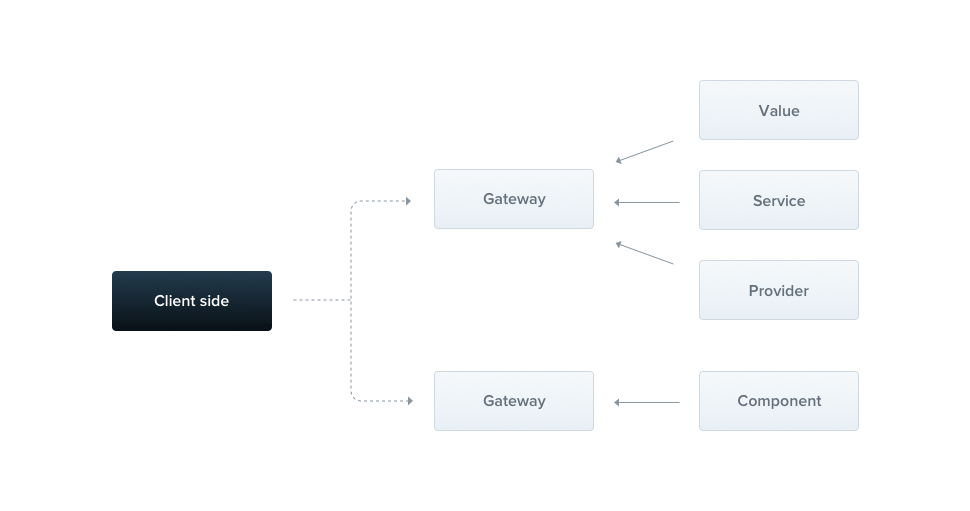
Hint Gateways are providers: they can inject dependencies through the class constructor, and other classes (providers and controllers) can inject them.
Installation#
To start building WebSockets-based applications, first install the required package:
$ npm i --save @nestjs/websockets @nestjs/platform-socket.io
$ npm i --save @nestjs/websockets @nestjs/platform-socket.io
Overview#
By default, each gateway listens on the same port as the HTTP server. To use a different port, pass it as the first argument to the decorator, e.g., @WebSocketGateway(80), where 80 is the chosen port number. You can also set the namespace used by the gateway:
@WebSocketGateway(80, { namespace: 'events' })
Warning Gateways are not instantiated until they are referenced in the providers array of an existing module.
The second argument of the @WebSocketGateway() decorator passes any supported server option to the socket server constructor. If you don't need a custom port, pass the options object as the only argument.
@WebSocketGateway(81, { transports: ['websocket'] })
The gateway is now listening, but it doesn't subscribe to any incoming messages yet. Let's create a handler that subscribes to events messages and responds to the client with the same data.
@SubscribeMessage('events')
handleEvent(@MessageBody() data: string): string {
  return data;
}
@Bind(MessageBody())
@SubscribeMessage('events')
handleEvent(data) {
  return data;
}
Hint The@SubscribeMessage()and@MessageBody()decorators are imported from the@nestjs/websocketspackage.
Once the gateway is created, register it in a module.
import { Module } from '@nestjs/common';
import { EventsGateway } from './events.gateway.js';

@Module({
  providers: [EventsGateway]
})
export class EventsModule {}
You can also pass a property key to the @MessageBody() decorator to extract that property from the incoming message body:
@SubscribeMessage('events')
handleEvent(@MessageBody('id') id: number): number {
  // id === messageBody.id
  return id;
}
@Bind(MessageBody('id'))
@SubscribeMessage('events')
handleEvent(id) {
  // id === messageBody.id
  return id;
}
If you prefer not to use decorators, the following code is functionally equivalent:
@SubscribeMessage('events')
handleEvent(client: Socket, data: string): string {
  return data;
}
@SubscribeMessage('events')
handleEvent(client, data) {
  return data;
}
In the example above, the handleEvent() method takes two arguments. The first is a platform-specific socket instance, and the second is the data received from the client. This approach isn't recommended, because it requires mocking the socket instance in each unit test.
When the events message is received, the handler sends an acknowledgment with the same data that was sent over the network. You can also emit messages with a library-specific API, e.g., the client.emit() method. To access the connected socket instance, use the @ConnectedSocket() decorator.
@SubscribeMessage('events')
handleEvent(
  @MessageBody() data: string,
  @ConnectedSocket() client: Socket,
): string {
  return data;
}
@Bind(MessageBody(), ConnectedSocket())
@SubscribeMessage('events')
handleEvent(data, client) {
  return data;
}
Hint The@ConnectedSocket()decorator is imported from the@nestjs/websocketspackage.
However, messages you emit directly through the socket bypass interceptors, which only see the handler's return value. If you don't want to respond to the client, omit the return statement (or return null or undefined). Other falsy values, such as false or 0, are still sent as a response.
When a client emits the message as follows, the handleEvent() method is executed:
socket.emit('events', { name: 'Nest' });
To receive the response sent by the handler above, the client must attach a corresponding acknowledgment callback:
socket.emit('events', { name: 'Nest' }, (data) => console.log(data));
Returning a value from a message handler implicitly sends an acknowledgment, but advanced scenarios often require direct control over the acknowledgment callback.
The @Ack() parameter decorator injects the ack callback function directly into a message handler. When you use it, Nest doesn't send an acknowledgment based on the return value, so you must call ack() yourself. Without the decorator, the callback is passed as the third argument of the method.
@SubscribeMessage('events')
handleEvent(
  @MessageBody() data: string,
  @Ack() ack: (response: { status: string; data: string }) => void,
) {
  ack({ status: 'received', data });
}
@Bind(MessageBody(), Ack())
@SubscribeMessage('events')
handleEvent(data, ack) {
  ack({ status: 'received', data });
}
Multiple responses#
The acknowledgment is dispatched only once, and native WebSocket implementations don't support it. To work around these limitations, return an object with two properties: event, the name of the emitted event, and data, the payload to forward to the client.
@SubscribeMessage('events')
handleEvent(@MessageBody() data: unknown): WsResponse<unknown> {
  const event = 'events';
  return { event, data };
}
@Bind(MessageBody())
@SubscribeMessage('events')
handleEvent(data) {
  const event = 'events';
  return { event, data };
}
Hint TheWsResponseinterface is imported from the@nestjs/websocketspackage.
Warning If yourdatafield relies onClassSerializerInterceptor, return a class instance that implementsWsResponse, because the interceptor ignores plain JavaScript object responses.
To receive the incoming response(s), the client must add another event listener.
socket.on('events', (data) => console.log(data));
Asynchronous responses#
Message handlers can respond either synchronously or asynchronously, so async methods are supported. A message handler can also return an Observable, in which case each emitted value is sent to the client until the stream completes.
@SubscribeMessage('events')
onEvent(@MessageBody() data: unknown): Observable<WsResponse<number>> {
  const event = 'events';
  const response = [1, 2, 3];

  return from(response).pipe(
    map(data => ({ event, data })),
  );
}
@Bind(MessageBody())
@SubscribeMessage('events')
onEvent(data) {
  const event = 'events';
  const response = [1, 2, 3];

  return from(response).pipe(
    map(data => ({ event, data })),
  );
}
In the example above, the message handler responds 3 times (once for each item in the array).
Lifecycle hooks#
Gateways support three lifecycle hooks. Each has a corresponding interface, described in the following table:
OnGatewayInit | Requires the afterInit() method, which receives the library-specific server instance as an argument. |
OnGatewayConnection | Requires the handleConnection() method, which receives the library-specific client socket instance as its first argument. |
OnGatewayDisconnect | Requires the handleDisconnect() method, which receives the library-specific client socket instance as its first argument. |
Hint Each lifecycle interface is exposed from the @nestjs/websockets package.
Server and Namespace#
Occasionally, you may need direct access to the native, platform-specific server instance. Nest passes it as an argument to the afterInit() method (OnGatewayInit interface). Alternatively, use the @WebSocketServer() decorator.
@WebSocketServer()
server: Server;
You can also retrieve the corresponding namespace:
@WebSocketGateway({ namespace: 'my-namespace' })
export class EventsGateway {
  @WebSocketServer()
  namespace: Namespace;
}
The @WebSocketServer() decorator injects a server instance based on the metadata stored by the @WebSocketGateway() decorator. If you pass the namespace option to @WebSocketGateway(), @WebSocketServer() injects a Namespace instance instead of a Server instance.
Notice The@WebSocketServer()decorator is imported from the@nestjs/websocketspackage.
Nest assigns the server instance to this property once it's ready to use.
Request-scoped gateways#
Starting with NestJS v12, gateways support request-scoped providers. Nest creates a new instance of every request-scoped dependency per connected socket. That instance lives as long as the connection does, so it can safely hold per-connection state.
Inject the socket itself with the REQUEST token, the same way you inject the HTTP request into a request-scoped HTTP provider:
import { Inject, Injectable, Scope } from '@nestjs/common';
import { REQUEST } from '@nestjs/core';
import { Socket } from 'socket.io';

@Injectable({ scope: Scope.REQUEST })
export class ConnectionStateService {
  private sequence = 0;

  constructor(@Inject(REQUEST) private readonly client: Socket) {}

  next() {
    return { clientId: this.client.id, sequence: ++this.sequence };
  }
}
The gateway then injects it like any other provider:
@WebSocketGateway()
export class EventsGateway {
  constructor(private readonly connectionState: ConnectionStateService) {}

  handleConnection(client: Socket) {
    client.emit('connected', this.connectionState.next());
  }

  @SubscribeMessage('state')
  onState() {
    return { event: 'state', data: this.connectionState.next() };
  }
}
Because the scope is tied to the connection rather than to a single message, the sequence counter above increments across every message received on that socket, while a second client gets its own independent instance. Nest tears the request-scoped instances down when the socket disconnects.
Notice As with HTTP, request-scoped providers add per-connection instantiation overhead. Use the default singleton scope unless you need per-connection state.
Example#
A working example is available in the 02-gateways sample.


