
Middleware
Middleware is a function that is called before the route handler. Middleware functions have access to the request and response objects, and to the next() middleware function in the application's request-response cycle. The next middleware function is commonly denoted by a variable named next.
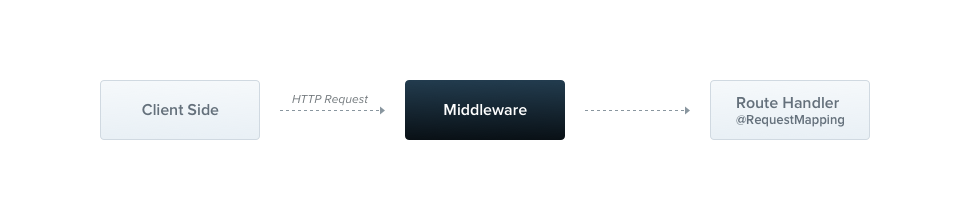
By default, Nest middleware is equivalent to Express middleware. The official Express documentation describes the capabilities of middleware as follows:
Middleware functions can perform the following tasks:
- execute any code.
- make changes to the request and the response objects.
- end the request-response cycle.
- call the next middleware function in the stack.
- if the current middleware function does not end the request-response cycle, it must call
next()to pass control to the next middleware function. Otherwise, the request will be left hanging.
You implement custom Nest middleware either as a function or as a class with the @Injectable() decorator. A class should implement the NestMiddleware interface, while a function has no special requirements. Let's start by implementing a simple middleware class.
Warning Express and Fastify handle middleware differently and provide different method signatures. See the Performance (Fastify) chapter for details.
import { Injectable, NestMiddleware } from '@nestjs/common';
import { Request, Response, NextFunction } from 'express';

@Injectable()
export class LoggerMiddleware implements NestMiddleware {
  use(req: Request, res: Response, next: NextFunction) {
    console.log('Request...');
    next();
  }
}
import { Injectable } from '@nestjs/common';

@Injectable()
export class LoggerMiddleware {
  use(req, res, next) {
    console.log('Request...');
    next();
  }
}
Dependency injection#
Nest middleware fully supports dependency injection. Like providers and controllers, middleware classes can inject dependencies that are available within the same module. As usual, dependencies are injected through the constructor.
Applying middleware#
Middleware is not registered in the @Module() decorator. Instead, you set it up in the configure() method of the module class. Modules that include middleware must implement the NestModule interface. Let's set up the LoggerMiddleware at the AppModule level.
import { Module, NestModule, MiddlewareConsumer } from '@nestjs/common';
import { LoggerMiddleware } from './common/middleware/logger.middleware.js';
import { CatsModule } from './cats/cats.module.js';

@Module({
  imports: [CatsModule],
})
export class AppModule implements NestModule {
  configure(consumer: MiddlewareConsumer) {
    consumer
      .apply(LoggerMiddleware)
      .forRoutes('cats');
  }
}
import { Module } from '@nestjs/common';
import { LoggerMiddleware } from './common/middleware/logger.middleware.js';
import { CatsModule } from './cats/cats.module.js';

@Module({
  imports: [CatsModule],
})
export class AppModule {
  configure(consumer) {
    consumer
      .apply(LoggerMiddleware)
      .forRoutes('cats');
  }
}
In the example above, the LoggerMiddleware is applied to the /cats route handlers defined in the CatsController. To restrict middleware to a particular request method, pass an object containing the route path and the request method to the forRoutes() method. The example below imports the RequestMethod enum to reference the desired request method.
import { Module, NestModule, RequestMethod, MiddlewareConsumer } from '@nestjs/common';
import { LoggerMiddleware } from './common/middleware/logger.middleware.js';
import { CatsModule } from './cats/cats.module.js';

@Module({
  imports: [CatsModule],
})
export class AppModule implements NestModule {
  configure(consumer: MiddlewareConsumer) {
    consumer
      .apply(LoggerMiddleware)
      .forRoutes({ path: 'cats', method: RequestMethod.GET });
  }
}
import { Module, RequestMethod } from '@nestjs/common';
import { LoggerMiddleware } from './common/middleware/logger.middleware.js';
import { CatsModule } from './cats/cats.module.js';

@Module({
  imports: [CatsModule],
})
export class AppModule {
  configure(consumer) {
    consumer
      .apply(LoggerMiddleware)
      .forRoutes({ path: 'cats', method: RequestMethod.GET });
  }
}
Hint Theconfigure()method can be asynchronous. Declare it withasynctoawaitthe completion of an asynchronous operation inside the method body.
Warning With the Express adapter, Nest registers thejsonandurlencodedbody parsers (express.json()andexpress.urlencoded()) by default. To customize these parsers through theMiddlewareConsumer, disable the defaults by setting thebodyParseroption tofalsewhen creating the application withNestFactory.create().
Route wildcards#
Middleware also supports pattern-based routes. For example, the named wildcard (*splat) matches any combination of characters in a route. In the following example, the middleware runs for any route that starts with abcd/, regardless of how many characters follow.
forRoutes({
  path: 'abcd/*splat',
  method: RequestMethod.ALL,
});
Hintsplatis only the name of the wildcard parameter and has no special meaning. You can use any name, e.g.,*wildcard.
The 'abcd/*splat' route path matches abcd/1, abcd/123, abcd/abc, and so on. String-based paths interpret the hyphen (-) and the dot (.) literally. However, abcd/ with no additional characters does not match. To match it as well, wrap the wildcard in braces to make it optional:
forRoutes({
  path: 'abcd/{*splat}',
  method: RequestMethod.ALL,
});
Middleware consumer#
The MiddlewareConsumer is a helper class that provides several built-in methods to manage middleware. All of them can be chained in the fluent style. The forRoutes() method accepts a single string, multiple strings, a RouteInfo object, a controller class, or multiple controller classes. In most cases, you'll pass a comma-separated list of controllers. Below is an example with a single controller:
import { Module, NestModule, MiddlewareConsumer } from '@nestjs/common';
import { LoggerMiddleware } from './common/middleware/logger.middleware.js';
import { CatsModule } from './cats/cats.module.js';
import { CatsController } from './cats/cats.controller.js';

@Module({
  imports: [CatsModule],
})
export class AppModule implements NestModule {
  configure(consumer: MiddlewareConsumer) {
    consumer
      .apply(LoggerMiddleware)
      .forRoutes(CatsController);
  }
}
import { Module } from '@nestjs/common';
import { LoggerMiddleware } from './common/middleware/logger.middleware.js';
import { CatsModule } from './cats/cats.module.js';
import { CatsController } from './cats/cats.controller.js';

@Module({
  imports: [CatsModule],
})
export class AppModule {
  configure(consumer) {
    consumer
      .apply(LoggerMiddleware)
      .forRoutes(CatsController);
  }
}
Hint The apply() method accepts either a single middleware or multiple arguments to specify multiple middleware.
Excluding routes#
To exclude certain routes from having middleware applied, use the exclude() method. It accepts a single string, multiple strings, or a RouteInfo object that identifies the routes to exclude:
consumer
  .apply(LoggerMiddleware)
  .exclude(
    { path: 'cats', method: RequestMethod.GET },
    { path: 'cats', method: RequestMethod.POST },
    'cats/{*splat}',
  )
  .forRoutes(CatsController);
With the example above, LoggerMiddleware is bound to all routes defined inside CatsControllerexcept those matching the three entries passed to the exclude() method.
Hint The exclude() method supports wildcard parameters using the path-to-regexp package.
Functional middleware#
The LoggerMiddleware class we've been using is minimal: it has no members, no additional methods, and no dependencies. Middleware like this can be defined as a plain function instead of a class. This type of middleware is called functional middleware. Let's convert the logger middleware from a class into a function to illustrate the difference:
import { Request, Response, NextFunction } from 'express';

export function logger(req: Request, res: Response, next: NextFunction) {
  console.log('Request...');
  next();
}
export function logger(req, res, next) {
  console.log('Request...');
  next();
}
Then use it within the AppModule:
consumer
  .apply(logger)
  .forRoutes(CatsController);
Hint Consider using functional middleware whenever your middleware doesn't need any dependencies.
Multiple middleware#
To bind multiple middleware that execute sequentially, pass a comma-separated list to the apply() method:
consumer.apply(cors(), helmet(), logger).forRoutes(CatsController);
Global middleware#
To bind middleware to every registered route at once, use the use() method of the INestApplication instance:
const app = await NestFactory.create(AppModule);
app.use(logger);
await app.listen(process.env.PORT ?? 3000);
Hint Global middleware registered withapp.use()cannot access the DI container, so use functional middleware there. Alternatively, use a class middleware and bind it with.forRoutes('*')within theAppModule(or any other module).
Error handling#
When middleware throws an exception, Nest's exceptions layer catches it and sends an appropriate response, just as it does for exceptions thrown from a route handler. The recommended approach is to throw an HttpException (or a built-in subclass such as UnauthorizedException):
import {
  Injectable,
  NestMiddleware,
  UnauthorizedException,
} from '@nestjs/common';
import { Request, Response, NextFunction } from 'express';

@Injectable()
export class AuthMiddleware implements NestMiddleware {
  use(req: Request, res: Response, next: NextFunction) {
    if (!req.headers.authorization) {
      throw new UnauthorizedException();
    }
    next();
  }
}
import { Injectable, UnauthorizedException } from '@nestjs/common';

@Injectable()
export class AuthMiddleware {
  use(req, res, next) {
    if (!req.headers.authorization) {
      throw new UnauthorizedException();
    }
    next();
  }
}
If the middleware is asynchronous, declare use() as async (or return a Promise) so that a rejected promise is forwarded to the exceptions layer:
@Injectable()
export class AuthMiddleware implements NestMiddleware {
  constructor(private readonly authService: AuthService) {}

  async use(req: Request, res: Response, next: NextFunction) {
    const user = await this.authService.verify(req.headers.authorization);
    if (!user) {
      throw new UnauthorizedException();
    }
    req['user'] = user;
    next();
  }
}
You can also pass the error to next(). This is useful when wrapping existing Express-style middleware that reports failures through the callback:
use(req: Request, res: Response, next: NextFunction) {
  if (!req.headers.authorization) {
    return next(new UnauthorizedException());
  }
  next();
}
Warning Because middleware runs before a route handler is selected, only global exception filters (registered withapp.useGlobalFilters()or theAPP_FILTERtoken) catch exceptions thrown from middleware. Method-scoped and controller-scoped filters are not invoked, and binding filters to a middleware class with@UseFilters()is not supported.
Hint Middleware registered withapp.use()is handled by the underlying HTTP platform (Express or Fastify), not by Nest'sMiddlewareModule. Prefer throwing errors (or callingnext(err)) from middleware bound with theMiddlewareConsumer, so that the exceptions layer can process them.


