

Guards
A guard is a class with the @Guard() decorator. The guard should implements the CanActivate interface.
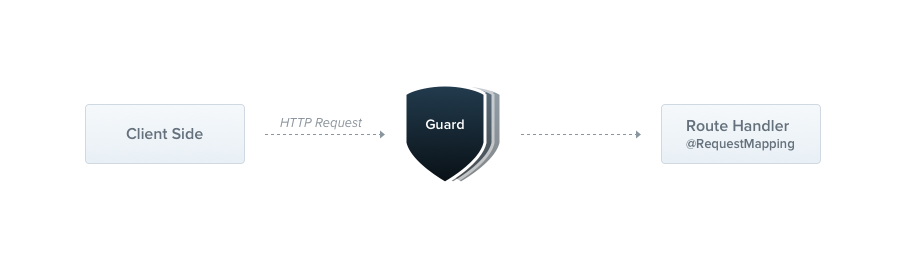
Guards have a single responsibility. They determine whether a request should be handled by the route handler or not.
Until now, the access restriction logic was mostly inside middlewares.
It's still fine since things such as token validation or attaching properties to the req object are not strongly connected with a particular routes.
But Middleware is dumb. It doesn't know which handler should be executed after calling the next() function.
On the other hand, Guards have access to the ExecutionContext object, so we know exactly what's going to be evaluated.
Hint Guards are executed after every middleware, but before pipes.
RolesGuard
One of the best guards use-cases is the role-based authentication because specific routes should only be available when the caller has sufficient permissions (e.g. admin role).
That's why we're gonna create a RolesGuard, this guard permits access only to users with a specific role.
import { Guard, CanActivate, ExecutionContext } from '@nestjs/common';
import { Observable } from 'rxjs/Observable';

@Guard()
export class RolesGuard implements CanActivate {
  canActivate(dataOrRequest, context: ExecutionContext): boolean | Promise<boolean> | Observable<boolean> {
    return true;
  }
}
import { Guard } from '@nestjs/common';

@Guard()
export class RolesGuard {
  canActivate(dataOrRequest, context) {
    return true;
  }
}
Every guard provides a canActivate() function. The guard might return its boolean answer synchronously or asynchronously via a (Promise or Observable).
The returned value controls the Nest behavior:
- If it returns
true, the request will be handled by the route handler. - If it returns
false, Nest will return a Forbidden response and a403status code.
The canActivate() function takes 2 arguments. The first one is dataOrRequest. This value of it depends on where you actually have used the guard.
When it's a HTTP request, this variable is a native expressjs request object, otherwise, it's the data passed to the micro service / or web socket.
The second argument is a context. This object fulfils ExecutionContext interface and contains 2 members - parent and handler.
The parent holds the type of the Controller class, which the handler belongs to. The handler is a reference to the route handler function.
Hint SincecanActivate()method can return aPromise, it can be marked as async.
Usage
The guards can be controller-scoped, method-scoped and global-scoped. To set up the guard, we're using a @UseGuards() decorator. This decorator can take an endless number of arguments.
@Controller('cats')
@UseGuards(RolesGuard)
export class CatsController {}
Notice The@UseGuards()decorator is imported from the@nestjs/commonpackage.
The construction above attaches the guard to every handler declared by this controller. If we'd decide to restrict only one of them, we just need to set up the guard at method level.
To bind the global guard, we're using the useGlobalGuards() method of the Nest application instance:
const app = await NestFactory.create(ApplicationModule);
app.useGlobalGuards(new RolesGuard());
Reflector
The guard is working now, but we're still not taking advantage of the most important guard features, being the execution context.
Now, the RolesGuard isn't reusable. How would we know which roles need to be processed by the handler?
The CatsController could have a lot of them. Some might be available only for admin, some for everyone.
That's why along with the guards, Nest provides the ability to attach custom metadata through @ReflectMetadata() decorator.
@Post()
@ReflectMetadata('roles', ['admin'])
async create(@Body() createCatDto: CreateCatDto) {
  this.catsService.create(createCatDto);
}
@Post()
@ReflectMetadata('roles', ['admin'])
@Bind(Body())
async create(createCatDto) {
  this.catsService.create(createCatDto);
}
Notice The@ReflectMetadata()decorator is imported from the@nestjs/commonpackage.
With the construction above, we attached the roles metadata to the create() method.
It's not a good practice to use @ReflectMetadata() directly. Instead, you should always create your own decorators.
import { ReflectMetadata } from '@nestjs/common';

export const Roles = (...roles: string[]) => ReflectMetadata('roles', roles);
import { ReflectMetadata } from '@nestjs/common';

export const Roles = (...roles) => ReflectMetadata('roles', roles);
This way is much cleaner. Since we've a @Roles() decorator now, we can use it with on the create() method.
@Post()
@Roles('admin')
async create(@Body() createCatDto: CreateCatDto) {
  this.catsService.create(createCatDto);
}
@Post()
@Roles('admin')
@Bind(Body())
async create(createCatDto) {
  this.catsService.create(createCatDto);
}
That's it. Let's focus on the RolesGuard again. Now, it simply returns true immediately, allowing request to proceed.
To reflect the metadata, we'll use the Reflector helper class, which is provided out of the box within @nestjs/core.
import { Guard, CanActivate, ExecutionContext } from '@nestjs/common';
import { Observable } from 'rxjs/Observable';
import { Reflector } from '@nestjs/core';

@Guard()
export class RolesGuard implements CanActivate {
  constructor(private readonly reflector: Reflector) {}

  canActivate(req, context: ExecutionContext): boolean {
    const { parent, handler } = context;
    const roles = this.reflector.get<string[]>('roles', handler);
    if (!roles) {
      return true;
    }

    const user = req.user;
    const hasRole = () => !!user.roles.find((role) => !!roles.find((item) => item === role));
    return user && user.roles && hasRole();
  }
}
import { Guard, Dependencies } from '@nestjs/common';
import { Reflector } from '@nestjs/core';

@Guard()
@Dependencies(Reflector)
export class RolesGuard {
  constructor(reflector) {
    this.reflector = reflector;
  }

  canActivate(req, context) {
    const { parent, handler } = context;
    const roles = this.reflector.get('roles', handler);
    if (!roles) {
      return true;
    }

    const user = req.user;
    const hasRole = () => !!user.roles.find((role) => !!roles.find((item) => item === role));
    return user && user.roles && hasRole();
  }
}
Notice Guards act the same as controllers, components, interceptors and middleware they can inject dependencies through the constructor.
Hint In the node.js world, it's a common practice to attach the authorized user to thereqobject. That's why we've assumed thatreq.usercontains the user object.
The Reflector allows us to easily reflect the metadata by the specified key. In example above, we reflected the handler because it's a reference to the route handler function.
We could make this guard even more generic if we'd add also the controller reflection part.
To extract controller metadata, we're just using parent instead of handler function.
const roles = this.reflector.get<string[]>('roles', parent);
const roles = this.reflector.get('roles', parent);
Now, when the user would try to call the /cats POST endpoint without enough privileges, Nest will automatically
return response below:
{
  "statusCode": 403,
  "message": "Forbidden resource"
}
In fact, the guard which returns false forces Nest to throw a HttpException.
This exception can be caught by the exception filter.
Custom error responses
To change the default access refusal response, just throw a HttpException instead of returning a false value.
Global guards
The global guards don't belong to any scope. They live outside modules, thus as a result - they can't inject dependencies.
We need to create an instance immediately. But quite often, global guards depend on other objects, for example, we'd
love to authenticate request using
AuthService, but this service is a part of the
AuthModule. How do we solve this?
The solution is pretty easy. Each Nest application instance is in fact, a created Nest context. The Nest context is a wrapper around the Nest container, which holds all instantiated classes. We can grab any existing instance from within any imported module directly using the application object.
Let's assume that we have a
AuthGuard registered in the
AuthModule. This
AuthModule is imported into the
root module. We can pick the
AuthGuard instance using following syntax:
const app = await NestFactory.create(ApplicationModule);
const authGuard = app
  .select(AuthModule)
  .get(AuthGuard);

app.useGlobalGuards(authGuard);
To grab the AuthGuard instance we have to use 2 methods, well-described in the table below:
get()
|
Makes it possible to retrieve the instance of the component or controller available inside the processed module. |
select()
|
Allows you to navigate through the module tree, for example, to pull out a specific instance from the selected module. |
Hint The root module is selected by default. To select any other module, you need to go through the entire modules stack (step by step).



