
Exception filters
The built-in exceptions layer is responsible for handling all thrown exceptions across your whole application. When an unhandled exception is caught, the end-user will receive an appropriate user-friendly response.
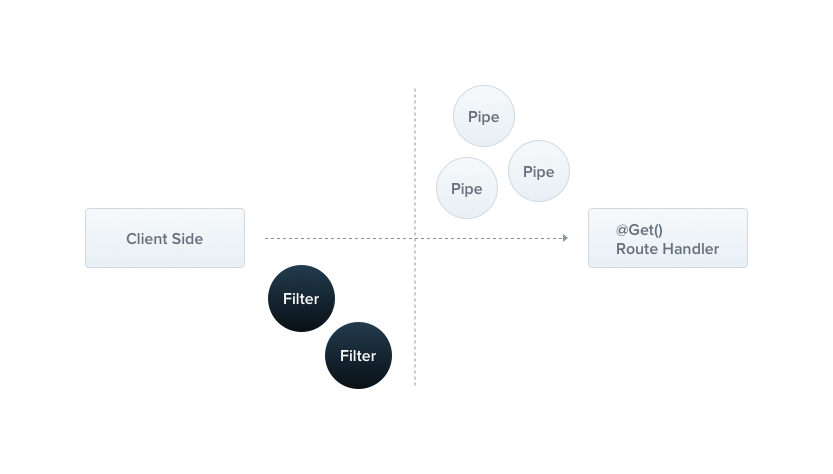
Each ocurred exception is handled by the global exception filter, and when it's unrecognized (is neither HttpException nor a class that inherits from HttpException), a user receives the below JSON response:
{
  "statusCode": 500,
  "message": "Internal server error"
}
Base exceptions
There's a built-in HttpException class exposed from the @nestjs/common package. As you already know, when you throw a HttpException object, it'll be caught by the handler and afterwards, transformed to the relevant JSON response.
In the CatsController, we have a create() method (a POST route). Let's assume that this route handler would throw an exception for some reason. We're gonna hardcode it:
@Post()
async create(@Body() createCatDto: CreateCatDto) {
  throw new HttpException('Forbidden', HttpStatus.FORBIDDEN);
}
@Post()
@Bind(Body())
async create(createCatDto) {
  throw new HttpException('Forbidden', HttpStatus.FORBIDDEN);
}
Hint We used theHttpStatushere. It is a helper enumerator imported from the@nestjs/commonpackage.
When the client calls this endpoint, the response would look like this:
{
  "statusCode": 403,
  "message": "Forbidden"
}
The HttpException constructor takes string | object as the first argument. If you pass an object instead of a string, you'll completely override the response body.
@Post()
async create(@Body() createCatDto: CreateCatDto) {
  throw new HttpException({
    status: HttpStatus.FORBIDDEN,
    error: 'This is a custom message',
  }, 403);
}
@Post()
@Bind(Body())
async create(createCatDto) {
  throw new HttpException({
    status: HttpStatus.FORBIDDEN,
    error: 'This is a custom message',
  }, 403);
}
And this's how the response would look like:
{
  "status": 403,
  "error": "This is a custom message"
}
Exceptions hierarchy
A good practice is to create your own exceptions hierarchy. It means that every HTTP exception should inherit from the base HttpException class. As a result, Nest will recognize your exception, and will fully take care of the error responses.
export class ForbiddenException extends HttpException {
  constructor() {
    super('Forbidden', HttpStatus.FORBIDDEN);
  }
}
Since ForbiddenException extends the base HttpException, it's going to work well with the core exceptions handler, and therefore we can use it inside the create() method.
@Post()
async create(@Body() createCatDto: CreateCatDto) {
  throw new ForbiddenException();
}
@Post()
@Bind(Body())
async create(createCatDto) {
  throw new ForbiddenException();
}
HTTP exceptions
In order to reduce the boilerplate code, Nest provides a set of usable exceptions that inherits from the core HttpException. All of them are exposed from the @nestjs/common package:
BadRequestExceptionUnauthorizedExceptionNotFoundExceptionForbiddenExceptionNotAcceptableExceptionRequestTimeoutExceptionConflictExceptionGoneExceptionPayloadTooLargeExceptionUnsupportedMediaTypeExceptionUnprocessableEntityExceptionInternalServerErrorExceptionNotImplementedExceptionBadGatewayExceptionServiceUnavailableExceptionGatewayTimeoutException
Exception filters
The base exception handler is fine, but sometimes you may want to have a full control over the exceptions layer, for example, add some logging or use a different JSON schema based on some chosen factors. We adore generic solutions and making your life easier, that's why the feature called exception filters has been created.
We are going to create a filter which is responsible for catching exceptions that are an instance of HttpException class and set up a custom response logic for them.
import { ExceptionFilter, Catch, ArgumentsHost } from '@nestjs/common';
import { HttpException } from '@nestjs/common';

@Catch(HttpException)
export class HttpExceptionFilter implements ExceptionFilter {
  catch(exception: HttpException, host: ArgumentsHost) {
    const ctx = host.switchToHttp();
    const response = ctx.getResponse();
    const request = ctx.getRequest();
    const status = exception.getStatus();

    response
      .status(status)
      .json({
        statusCode: status,
        timestamp: new Date().toISOString(),
        path: request.url,
      });
  }
}
import { Catch } from '@nestjs/common';
import { HttpException } from '@nestjs/common';

@Catch(HttpException)
export class HttpExceptionFilter {
  catch(exception, host) {
    const ctx = host.switchToHttp();
    const response = ctx.getResponse();
    const request = ctx.getRequest();
    const status = exception.getStatus();

    response
      .status(status)
      .json({
        statusCode: status,
        timestamp: new Date().toISOString(),
        path: request.url,
      });
  }
}
Hint All exception filters should implement the genericExceptionFilter<T>interface. It forces you to provide thecatch(exception: T, host: ArgumentsHost)method with the valid signature.Tindicates a type of the exception.
The @Catch(HttpException) decorator binds the required metadata to the exception filter, telling Nest that this particular filter is looking for HttpException and nothing else. In practice, the @Catch() decorator may take an endless number of parameters, therefore you can set up the filter for several types of exceptions, just separate them by a comma.
The exception property is a currently processed exception, while host is a ArgumentsHost object. The ArgumentsHost is a wrapper around arguments that have been passed to the original handler, and it contains different arguments array under the hood based on the type of the application.
export interface ArgumentsHost {
  getArgs<T extends Array<any> = any[]>(): T;
  getArgByIndex<T = any>(index: number): T;
  switchToRpc(): RpcArgumentsHost;
  switchToHttp(): HttpArgumentsHost;
  switchToWs(): WsArgumentsHost;
}
The ArgumentsHost supplies us with a set of useful methods that helps to pick correct arguments from the underlying array. In other words, ArgumentsHost is nothing else than just an array of arguments. For example, when the filter is used within HTTP application context, ArgumentsHost will contain [request, response] array inside. However, when current context is a web sockets application, this array will be equal to [client, data]. This design decision enables you to access any argument that would be eventually passed to the corresponding handler.
Binding filters
Let's tie HttpExceptionFilter to the create() method.
@Post()
@UseFilters(new HttpExceptionFilter())
async create(@Body() createCatDto: CreateCatDto) {
  throw new ForbiddenException();
}
@Post()
@UseFilters(new HttpExceptionFilter())
@Bind(Body())
async create(createCatDto) {
  throw new ForbiddenException();
}
Hint The@UseFilters()decorator is imported from the@nestjs/commonpackage.
We have used the @UseFilters() decorator here. Same as @Catch(), it takes an endless number of parameters. The instance of HttpExceptionFilter has been created immediately in-place. Another available way is to pass the class (not instance), leaving framework the instantiation responsibility and enabling dependency injection.
@Post()
@UseFilters(HttpExceptionFilter)
async create(@Body() createCatDto: CreateCatDto) {
  throw new ForbiddenException();
}
@Post()
@UseFilters(HttpExceptionFilter)
@Bind(Body())
async create(createCatDto) {
  throw new ForbiddenException();
}
Hint Prefer applying classes instead of instances when possible. It reduces memory usage since Nest can easily reuse instances of the same class across your whole application.
In the example above, the HttpExceptionFilter is applied only to the single create() route handler, but it's not the only available way. In fact, the exception filters can be method-scoped, controller-scoped, and also global-scoped.
@UseFilters(new HttpExceptionFilter())
export class CatsController {}
This construction sets up the HttpExceptionFilter for every route handler defined inside the CatsController. It's the example of the controller-scoped exception filter. The last available scope is the global-scoped exception filter.
async function bootstrap() {
  const app = await NestFactory.create(ApplicationModule);
  app.useGlobalFilters(new HttpExceptionFilter());
  await app.listen(3000);
}
bootstrap();
Warning The useGlobalFilters() method neither set up filters for gateways nor microservices. The global filters are used across the whole application, for every controller and every route handler. In terms of dependency injection, global filters registered from the outside of any module (as in the previous example above) cannot inject dependencies since they don't belong to any module. In order to solve this issue, you can set up a filter directly from any module using following construction:
app.module.ts
import { Module } from '@nestjs/common';
import { APP_FILTER } from '@nestjs/core';

@Module({
  providers: [
    {
      provide: APP_FILTER,
      useClass: HttpExceptionFilter,
    },
  ],
})
export class ApplicationModule {}
Hint The alternative option is to use an execution context feature. Also, useClass is not the only way of dealing with custom providers registration. Learn more here. Catch everything
In order to handle every occurred exception (regardless of the exception type), you may leave the parentheses empty, e.g. @Catch().
import { ExceptionFilter, Catch, ArgumentsHost } from '@nestjs/common';

@Catch()
export class AllExceptionsFilter implements ExceptionFilter {
  catch(exception: any, host: ArgumentsHost) {
    const ctx = host.switchToHttp();
    const response = ctx.getResponse();
    const request = ctx.getRequest();
    const status = exception.getStatus();

    response
      .status(status)
      .json({
        statusCode: status,
        timestamp: new Date().toISOString(),
        path: request.url,
      });
  }
}
import { ExceptionFilter, Catch } from '@nestjs/common';

@Catch()
export class AllExceptionsFilter implements ExceptionFilter {
  catch(exception, host) {
    const ctx = host.switchToHttp();
    const response = ctx.getResponse();
    const request = ctx.getRequest();
    const status = exception.getStatus();

    response
      .status(status)
      .json({
        statusCode: status,
        timestamp: new Date().toISOString(),
        path: request.url,
      });
  }
}
In the example above the filter will catch each exception that has been thrown without limiting itself to a set of particular classes.
Inheritance
Typically, you'll create fully customized exception filters crafted to fulfill your application requirements. There might be use-cases though when you would like to reuse an already implemented, core exception filter, and override the behavior based on certain factors.
In order to delegate exception processing to the base filter, you need to extend BaseExceptionFilter and call inherited catch() method. Besides, HttpServer reference has to be injected and passed to the super() call.
import { Catch, ArgumentsHost, HttpServer } from '@nestjs/common';
import { BaseExceptionFilter, HTTP_SERVER_REF } from '@nestjs/core';

@Catch()
export class AllExceptionsFilter extends BaseExceptionFilter {
  constructor(@Inject(HTTP_SERVER_REF) applicationRef: HttpServer) {
    super(applicationRef);
  }

  catch(exception: any, host: ArgumentsHost) {
    super.catch(exception, host);
  }
}
import { Catch } from '@nestjs/common';
import { BaseExceptionFilter, HTTP_SERVER_REF } from '@nestjs/core';

@Catch()
export class AllExceptionsFilter extends BaseExceptionFilter {
  constructor(@Inject(HTTP_SERVER_REF) applicationRef) {
    super(applicationRef);
  }

  catch(exception, host) {
    super.catch(exception, host);
  }
}
Warning Filters that extend base classes have to be instantiated by the framework itself (don't manually create instances usingYou can use a global filter that extends the base filter by injecting thenewkeyword but@UseFilters()).
HttpServer reference.
async function bootstrap() {
  const app = await NestFactory.create(ApplicationModule);
  const httpRef = app.get(HTTP_SERVER_REF);
  app.useGlobalFilters(new AllExceptionsFilter(httpRef));
  await app.listen(3000);
}
bootstrap();
Obviously, you should enhance above implementation with your tailored business logic (e.g. add various conditions).



