
Middleware
The middleware is a function which is called before the route handler. Middleware functions have access to the request and response objects, and the next middleware function in the application’s request-response cycle. The next middleware function is commonly denoted by a variable named next.
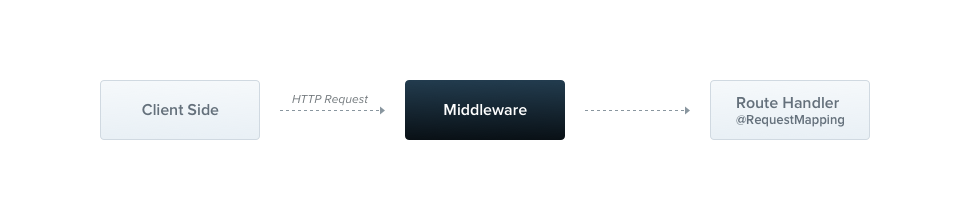
The Nest middleware, by default, are equal to express middleware. Here's a great list of the middleware capabilities copied from the official express documentation:
Middleware functions can perform the following tasks:
- execute any code.
- make changes to the request and the response objects.
- end the request-response cycle.
- call the next middleware function in the stack.
- if the current middleware function does not end the request-response cycle, it must call
next()to pass control to the next middleware function. Otherwise, the request will be left hanging.
The Nest middleware is either a function, or a class with an @Injectable() decorator. The class should implement the NestMiddleware interface, while function does not have any special requirements. Let's start from the LoggerMiddleware example.
import { Injectable, NestMiddleware, MiddlewareFunction } from '@nestjs/common';

@Injectable()
export class LoggerMiddleware implements NestMiddleware {
  resolve(...args: any[]): MiddlewareFunction {
    return (req, res, next) => {
      console.log('Request...');
      next();
    };
  }
}
import { Injectable } from '@nestjs/common';

@Injectable()
export class LoggerMiddleware {
  resolve(...args) {
    return (req, res, next) => {
      console.log('Request...');
      next();
    };
  }
}
The resolve() method has to return a regular library-specific middleware (req, res, next) => any.
Dependency injection
There is no exception when it comes to the middleware. Same as providers and controllers, they are able to inject dependencies that belongs to the same module (through the constructor).
Applying middleware
There is no place for middleware in the @Module() decorator. We have to set them up using the configure() method of the module class. Modules that include middleware have to implement the NestModule interface. Let's set up the LoggerMiddleware at the ApplicationModule level.
import { Module, NestModule, MiddlewareConsumer } from '@nestjs/common';
import { LoggerMiddleware } from './common/middlewares/logger.middleware';
import { CatsModule } from './cats/cats.module';

@Module({
  imports: [CatsModule],
})
export class ApplicationModule implements NestModule {
  configure(consumer: MiddlewareConsumer) {
    consumer
      .apply(LoggerMiddleware)
      .forRoutes('cats');
  }
}
import { Module } from '@nestjs/common';
import { LoggerMiddleware } from './common/middlewares/logger.middleware';
import { CatsModule } from './cats/cats.module';

@Module({
  imports: [CatsModule],
})
export class ApplicationModule {
  configure(consumer) {
    consumer
      .apply(LoggerMiddleware)
      .forRoutes('cats');
  }
}
In the above example we have set up the LoggerMiddleware for /cats route handlers that we have previously defined inside the CatsController. Besides, we may restrict a middleware to the particular request method.
import { Module, NestModule, RequestMethod, MiddlewareConsumer } from '@nestjs/common';
import { LoggerMiddleware } from './common/middlewares/logger.middleware';
import { CatsModule } from './cats/cats.module';

@Module({
  imports: [CatsModule],
})
export class ApplicationModule implements NestModule {
  configure(consumer: MiddlewareConsumer) {
    consumer
      .apply(LoggerMiddleware)
      .forRoutes({ path: 'cats', method: RequestMethod.GET });
  }
}
import { Module, RequestMethod } from '@nestjs/common';
import { LoggerMiddleware } from './common/middlewares/logger.middleware';
import { CatsModule } from './cats/cats.module';

@Module({
  imports: [CatsModule],
})
export class ApplicationModule {
  configure(consumer) {
    consumer
      .apply(LoggerMiddleware)
      .forRoutes({ path: 'cats', method: RequestMethod.GET });
  }
}
Route wildcards
Pattern based routes are supported as well. For instance, the asterisk is used as a wildcard, and will match any combination of characters.
forRoutes({ path: 'ab*cd', method: RequestMethod.ALL }) Above route path will match abcd, ab_cd, abecd, and so on. The characters ?, +, *, and () are subsets of their regular expression counterparts. The hyphen ( -) and the dot (.) are interpreted literally by string-based paths.
Middleware consumer
The MiddlewareConsumer is a helper class. It provides several built-in methods to manage middleware. All of them can be simply chained. The forRoutes() can take a single string, multiple strings, RouteInfo object, a controller class and even multiple controller classes. In most cases you'll probably just pass the controllers and separate them by a comma. Below is an example with a single controller:
import { Module, NestModule, MiddlewareConsumer } from '@nestjs/common';
import { LoggerMiddleware } from './common/middlewares/logger.middleware';
import { CatsModule } from './cats/cats.module';

@Module({
  imports: [CatsModule],
})
export class ApplicationModule implements NestModule {
  configure(consumer: MiddlewareConsumer) {
    consumer
      .apply(LoggerMiddleware)
      .forRoutes(CatsController);
  }
}
import { Module } from '@nestjs/common';
import { LoggerMiddleware } from './common/middlewares/logger.middleware';
import { CatsModule } from './cats/cats.module';

@Module({
  imports: [CatsModule],
})
export class ApplicationModule {
  configure(consumer) {
    consumer
      .apply(LoggerMiddleware)
      .forRoutes(CatsController);
  }
}
Hint The apply() method may either take a single middleware, or an array of middleware. Whilst class is used, quite often we might want to exclude certain routes. That is very intuitive due to the exclude() method.
import { Module, NestModule, RequestMethod, MiddlewareConsumer } from '@nestjs/common';
import { LoggerMiddleware } from './common/middlewares/logger.middleware';
import { CatsModule } from './cats/cats.module';

@Module({
  imports: [CatsModule],
})
export class ApplicationModule implements NestModule {
  configure(consumer: MiddlewareConsumer) {
    consumer
      .apply(LoggerMiddleware)
      .exclude(
        { path: 'cats', method: RequestMethod.GET },
        { path: 'cats', method: RequestMethod.POST },
      )
      .forRoutes(CatsController);
  }
}
import { Module, RequestMethod } from '@nestjs/common';
import { LoggerMiddleware } from './common/middlewares/logger.middleware';
import { CatsModule } from './cats/cats.module';

@Module({
  imports: [CatsModule],
})
export class ApplicationModule {
  configure(consumer) {
    consumer
      .apply(LoggerMiddleware)
      .exclude(
        { path: 'cats', method: RequestMethod.GET },
        { path: 'cats', method: RequestMethod.POST },
      )
      .forRoutes(CatsController);
  }
}
Consequently, LoggerMiddleware will be bounded to all routes defined inside CatsController except these two passed to the exclude() function. Please note that exclude() method won't work with your functional middleware. In addition, this function doesn't exclude paths from more generic routes (e.g. wildcards). In such case, you should rather put your paths-restriction logic directly to the middleware and, for example, compare a request's URL.
Configurable middleware
Sometimes the behaviour of the middleware depends on the custom values e.g. an array of user roles, options object, and so on. We may apply additional arguments to the resolve() using the with() method. See an example below:
import { Module, NestModule, MiddlewareConsumer } from '@nestjs/common';
import { LoggerMiddleware } from './common/middlewares/logger.middleware';
import { CatsModule } from './cats/cats.module';
import { CatsController } from './cats/cats.controller';

@Module({
  imports: [CatsModule],
})
export class ApplicationModule implements NestModule {
  configure(consumer: MiddlewareConsumer) {
    consumer
      .apply(LoggerMiddleware)
      .with('ApplicationModule')
      .forRoutes(CatsController);
  }
}
import { Module } from '@nestjs/common';
import { LoggerMiddleware } from './common/middlewares/logger.middleware';
import { CatsModule } from './cats/cats.module';
import { CatsController } from './cats/cats.controller';

@Module({
  imports: [CatsModule],
})
export class ApplicationModule {
  configure(consumer) {
    consumer
      .apply(LoggerMiddleware)
      .with('ApplicationModule')
      .forRoutes(CatsController);
  }
}
We have passed a plain string - ApplicationModule to the with() method. Thereafter, we have to adjust the resolve() method of the LoggerMiddleware.
import { Injectable, NestMiddleware, MiddlewareFunction } from '@nestjs/common';

@Injectable()
export class LoggerMiddleware implements NestMiddleware {
  resolve(name: string): MiddlewareFunction {
    return (req, res, next) => {
      console.log(`[${name}] Request...`); // [ApplicationModule] Request...
      next();
    };
 }
}
import { Injectable } from '@nestjs/common';

@Injectable()
export class LoggerMiddleware {
  resolve(name) {
    return (req, res, next) => {
      console.log(`[${name}] Request...`); // [ApplicationModule] Request...
      next();
    };
 }
}
In this case, the value of the name property will be 'ApplicationModule'.
Asynchronous middleware
There are no contraindications that would prevent us from returning the async function within the resolve() method. Also, it's possible to make the resolve() method async as well. This common pattern is called deffered middleware.
import { Injectable, NestMiddleware, MiddlewareFunction } from '@nestjs/common';

@Injectable()
export class LoggerMiddleware implements NestMiddleware {
  async resolve(name: string): Promise<MiddlewareFunction> {
    await someAsyncJob();

    return async (req, res, next) => {
      await someAsyncJob();
      console.log(`[${name}] Request...`); // [ApplicationModule] Request...
      next();
    };
 }
}
import { Injectable } from '@nestjs/common';

@Injectable()
export class LoggerMiddleware {
  async resolve(name) {
    await someAsyncJob();

    return async (req, res, next) => {
      await someAsyncJob();
      console.log(`[${name}] Request...`); // [ApplicationModule] Request...
      next();
    };
  }
}
Functional middleware
The LoggerMiddleware is quite short. It has no members, no additional methods, no dependencies. Why can't we just use a simple function? It's a good question, cause in fact - we can. This type of the middleware is called functional middleware . Let's transform the logger into a function.
export function logger(req, res, next) {
  console.log(`Request...`);
  next();
};
And use it within the ApplicationModule:
import { Module, NestModule, MiddlewareConsumer } from '@nestjs/common';
import { logger } from './common/middlewares/logger.middleware';
import { CatsModule } from './cats/cats.module';
import { CatsController } from './cats/cats.controller';

@Module({
  imports: [CatsModule],
})
export class ApplicationModule implements NestModule {
  configure(consumer: MiddlewareConsumer) {
    consumer
      .apply(logger)
      .forRoutes(CatsController);
  }
}
import { Module } from '@nestjs/common';
import { logger } from './common/middlewares/logger.middleware';
import { CatsModule } from './cats/cats.module';
import { CatsController } from './cats/cats.controller';

@Module({
  imports: [CatsModule],
})
export class ApplicationModule {
  configure(consumer) {
    consumer
      .apply(logger)
      .forRoutes(CatsController);
  }
}
Hint Let's consider using functional middleware every time when your middleware doesn't need any dependencies.
Multiple middleware
As mentioned before, in order to bind multiple middleware that are executed sequentially, we can separate them by a comma inside the apply() method.
export class ApplicationModule implements NestModule {
  configure(consumer: MiddlewareConsumer) {
    consumer
      .apply(cors(), helmet(), logger)
      .forRoutes(CatsController);
  }
}
@Module({
  imports: [CatsModule],
})
export class ApplicationModule {
  configure(consumer) {
      consumer
        .apply(cors(), helmet(), logger)
        .forRoutes(CatsController);
    }
  }
Global middleware
In order to tie a middleware to each registered route at once, we can take advantage of use() method that is supplied by the INestApplication instance:
const app = await NestFactory.create(ApplicationModule);
app.use(logger);
await app.listen(3000);


