
Providers
Basically, almost everything may be considered as a provider – service, repository, factory, helper, and so on. All of them can inject dependencies through constructor, meaning, they can create various relationships with each other. But in fact, a provider is nothing else than just a simple class annotated with an @Injectable() decorator.
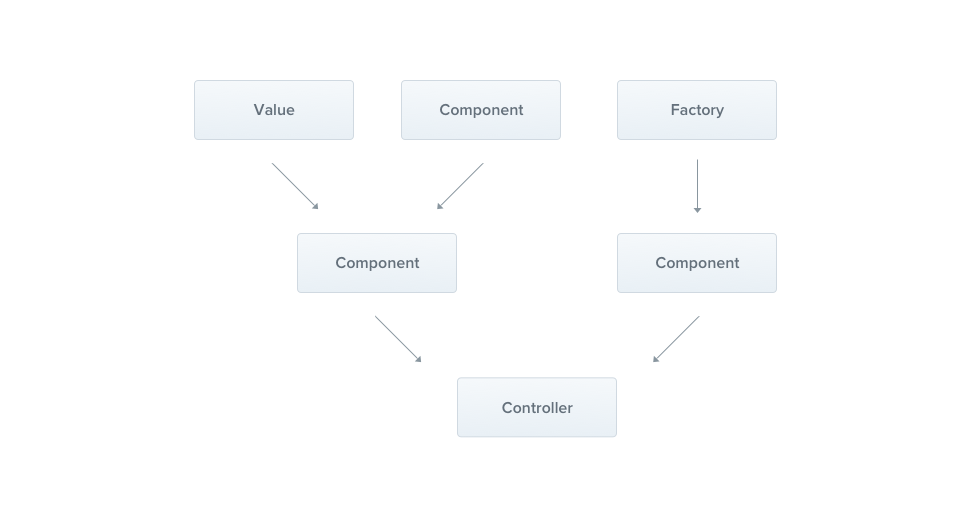
In the previous chapter, we have built a simple CatsController. Controllers shall handle HTTP requests and delegate more complex tasks to the services. The providers are plain JavaScript classes with an @Injectable() decorator on top of them.
Hint Since Nest enables the possibility to design and organize the dependencies in a more OO-way, we strongly recommend following the SOLID principles.
Services
Let's start by creating a simple CatsService provider.
import { Injectable } from '@nestjs/common';
import { Cat } from './interfaces/cat.interface';

@Injectable()
export class CatsService {
  private readonly cats: Cat[] = [];

  create(cat: Cat) {
    this.cats.push(cat);
  }

  findAll(): Cat[] {
    return this.cats;
  }
}
import { Injectable } from '@nestjs/common';

@Injectable()
export class CatsService {
  constructor() {
    this.cats = [];
  }

  create(cat) {
    this.cats.push(cat);
  }

  findAll() {
    return this.cats;
  }
}
Hint To create a service using CLI, simply execute $ nest g service cats/cats command. Here's a CatsService, a basic class with one property and two methods. The only new trait is that it uses the @Injectable() decorator. The @Injectable() attaches the metadata, thereby Nest knows that this class is a Nest provider. Notice that there is a Cat interface used above. We didn't mention it because the schema is exactly same as in the CreateCatDto class which we have created in the previous chapter.
Since we have the service class already done, let's use it inside the CatsController:
import { Controller, Get, Post, Body } from '@nestjs/common';
import { CreateCatDto } from './dto/create-cat.dto';
import { CatsService } from './cats.service';
import { Cat } from './interfaces/cat.interface';

@Controller('cats')
export class CatsController {
  constructor(private readonly catsService: CatsService) {}

  @Post()
  async create(@Body() createCatDto: CreateCatDto) {
    this.catsService.create(createCatDto);
  }

  @Get()
  async findAll(): Promise<Cat[]> {
    return this.catsService.findAll();
  }
}
import { Controller, Get, Post, Body, Bind, Dependencies } from '@nestjs/common';
import { CatsService } from './cats.service';

@Controller('cats')
@Dependencies(CatsService)
export class CatsController {
  constructor(catsService) {
    this.catsService = catsService;
  }

  @Post()
  @Bind(Body())
  async create(createCatDto) {
    this.catsService.create(createCatDto);
  }

  @Get()
  async findAll() {
    return this.catsService.findAll();
  }
}
The CatsService is injected through the class constructor. Don't be afraid of the private readonly shortened syntax. It means that we've created and initialized the catsService member immedietely in the same location.
Dependency injection
Nest is built around the strong design pattern commonly known as Dependency injection. We recommend to read a great article about this concept in the official Angular documentation.
In Nest, thanks to the TypeScript capabilities, it's extremely easy to manage dependencies because they will be resolved just by type and afterward, passed to your controller's constructor:
constructor(private readonly catsService: CatsService) {}Custom providers
An inversion of control container, that Nest makes use of to resolve relationships between providers, is far more powerful than described above. The @Injectable() decorator is only a tip of an iceberg, not strictly required to define providers. Instead, you can use plain values, classes, either asynchronous or synchronous factories. Look here to find more examples.
Optional providers
Occasionally, you might face relations which do not necessarily have to be resolved. For instance, your class may depend on a configuration object, but if none was passed, the default values should be used. In such case, the relation becomes optional, because lack of the configuration provider wouldn't lead to errors.
To ensure that provider isn't required, use @Optional() decorator in the constructor signature.
import { Injectable, Optional, Inject } from '@nestjs/common';

@Injectable()
export class HttpService<T> {
  constructor(
    @Optional() @Inject('HTTP_OPTIONS') private readonly httpClient: T,
  ) {}
}
Property-based injection
In some very specific cases, a property-based injection might be useful. For instance, if your top-level class depends on either one or multiple providers, passing them all the way up by calling super() in sub-classes from the constructor can be very annonying. Thus, in order to avoid it, you can use @Inject() decorator on a property level.
import { Injectable, Inject } from '@nestjs/common';

@Injectable()
export class HttpService<T> {
  @Inject('HTTP_OPTIONS')
  private readonly httpClient: T;
}
Warning If your class doesn't extend any other provider, you should always prefer using constructor-based injection.
Provider registration
The last thing is to tell the module that something called CatsService truly exists. We do this by editing our module file - app.module.ts, and put the service into the providers array of the @Module() decorator.
import { Module } from '@nestjs/common';
import { CatsController } from './cats/cats.controller';
import { CatsService } from './cats/cats.service';

@Module({
  controllers: [CatsController],
  providers: [CatsService],
})
export class ApplicationModule {}
Thanks to that, Nest will be able to resolve the dependencies of the CatsController class. This is how our directory structure looks right now:



