
Gateways
Gateway is a class annotated with @WebSocketGateway() decorator. Gateways, by default, make use of socket.io package under the hood, but also, provide compatibility with a wide range of other libraries, including native web sockets implementation, read more here.
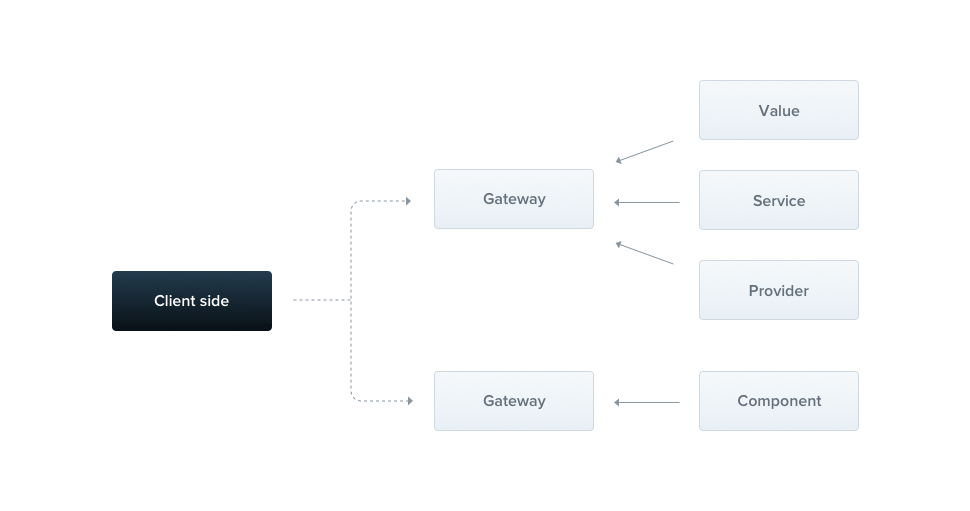
Hint Gateway behaves same as a simple provider, therefore it can effortlessly inject dependencies through constructor. Also, gateway might be injected by other classes (providers and controllers) as well.
Installation
Firstly, we need to install the required package:
$ npm i --save @nestjs/websocketsOverview
In general, each gateway is listening to the same port as HTTP server is running on, unless your app is not a web application, or you have changed the port manually. We can change this behavior by passing an argument to the @WebSocketGateway(81) decorator where 81 is a chosen port number. Additionally, you can set a namespace used by this gateway with the following construction:
@WebSocketGateway(81, { namespace: 'events' })Warning The gateway won't start until you put it inside the providers array. The namespace is not a sole available option. You can pass any other property that is mentioned here. Those properties will be passed to the socket constructor during the instantiation process.
@WebSocketGateway(81, { transports: ['websocket'] }) Alright, the gateway is listening now, but we are not subscribing to the incoming messages so far. Let's create a handler that will subscribe to the events messages and respond to the user with the exact same data.
@SubscribeMessage('events')
onEvent(client, data: string): string {
  return data;
}
@SubscribeMessage('events')
onEvent(client, data) {
  return data;
}
Hint The@SubscribeMessage()decorator is imported from@nestjs/websocketspackage.
The onEvent() function takes two arguments. First one is a library-specific socket instance and the second one is the data received from the client. Once we get the message, we send an acknowledgment with the same data that someone has sent over the network. Also, it is possible to emit messages using a library-specific approach, for example, by making use of client.emit() method. However, in this case, you aren't able to use interceptors. If you don't want to respond to the user, just don't return anything (or explicitly return "falsy" value, e.g. undefined).
Now when the client emits a message in the following manner:
socket.emit('events', { name: 'Nest' }); The onEvent() method will be executed. In order to listen for messages emitted from within above handler, the client has to attach a corresponding acknowledgment's listener:
socket.emit('events', { name: 'Nest' }, (data) => console.log(data));Multiple responses
The acknowledgment is dispatched only once. Furthermore, it is not supported by native WebSockets implementation. To solve this limitation, you may return an object which consist of two properties. The event which is a name of the emitted event and the data that has to be forwarded to the client.
@SubscribeMessage('events')
onEvent(client, data: any): WsResponse<any> {
  const event = 'events';
  return { event, data };
}
@SubscribeMessage('events')
onEvent(client, data) {
  const event = 'events';
  return { event, data };
}
Hint TheWsResponseinterface is imported from@nestjs/websocketspackage.
In order to listen for the incoming response(s), the client has to apply another event listener.
socket.on('events', (data) => console.log(data));Asynchronous responses
Each message handler can be either synchronous or asynchronous (async), thereby you're able to return the Promise. Moreover, you can return the Rx Observable, which means that you can return multiple values (they will be emitted until the stream is completed).
@SubscribeMessage('events')
onEvent(client, data: any): Observable<WsResponse<number>> {
  const event = 'events';
  const response = [1, 2, 3];

  return from(response).pipe(
    map(data => ({ event, data })),
  );
}
@SubscribeMessage('events')
onEvent(client, data) {
  const event = 'events';
  const response = [1, 2, 3];

  return from(response).pipe(
    map(data => ({ event, data })),
  );
}
The above message handler will respond 3 times (sequentially, with each item from the response array).
Lifecycle hooks
There are 3 useful lifecycle hooks. All of them have corresponding interfaces and are described in the following table:
OnGatewayInit | Forces to implement the afterInit() method. Takes library-specific server instance as an argument (and spreads the rest if required). |
OnGatewayConnection | Forces to implement the handleConnection() method. Takes library-specific client socket instance as an argument. |
OnGatewayDisconnect | Forces to implement the handleDisconnect() method. Takes library-specific client socket instance as an argument. |
Hint Each lifecycle interface is exposed from @nestjs/websockets package. Server
Occasionally, you may want to have a direct access to the native, library-specific server instance. The reference to this object is passed as an argument to the afterInit() method (OnGatewayInit interface). The second approach is to make use of @WebSocketServer() decorator.
@WebSocketServer() server;Notice The@WebSocketServer()decorator is imported from the@nestjs/websocketspackage.
Nest will automatically assign the server instance to this property when it's ready to use.
Example
A working example is available here.



