
Modules
A module is a class annotated with a @Module() decorator. The @Module() decorator provides metadata that Nest makes use of to organize the application structure.
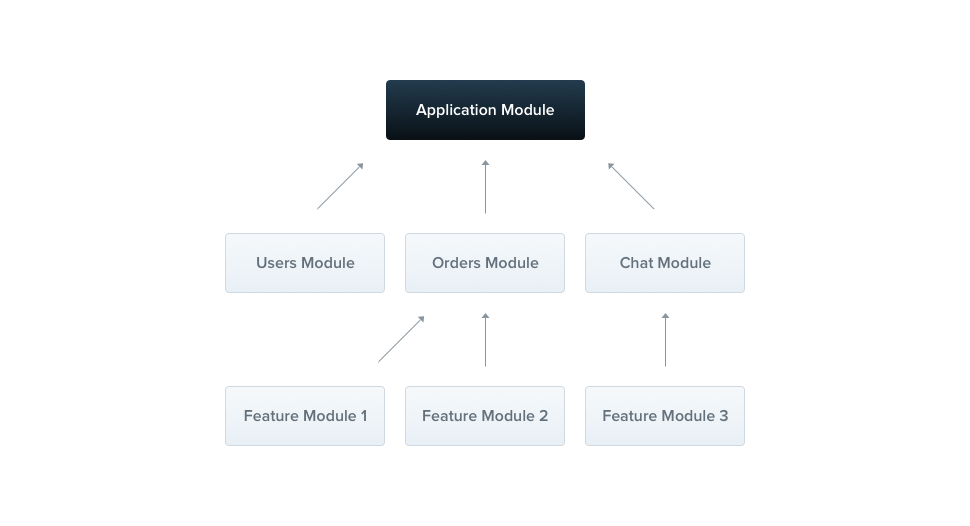
Each application has at least one module, a root module. The root module is the place where Nest is starting to arrange the application tree. In fact, the root module could be the only module in your application, especially when the app is small. For large applications however, it doesn't make sense. In most cases, you'll have several modules, each with a closely related set of capabilities.
The @Module() decorator takes a single object whose properties describe the module:
providers | the providers that will be instantiated by the Nest injector and may be shared at least across this module. |
controllers | the set of controllers which have to be created |
imports | the list of imported modules that export the providers which are required in this module |
exports | the subset of providers that are provided by this module and should be available in the other modules |
The module encapsulates providers by default. It means that it's impossible to inject providers that are neither directly part of the current module nor they're exported from the imported modules.
Feature modules
The CatsController and CatsService belong to the same application domain. We shall consider to move them to a feature module, being the CatsModule.
import { Module } from '@nestjs/common';
import { CatsController } from './cats.controller';
import { CatsService } from './cats.service';

@Module({
  controllers: [CatsController],
  providers: [CatsService],
})
export class CatsModule {}
Hint To create a module using CLI, simply execute $ nest g module cats command. We defined the cats.module.ts file and after that moved everything related to this module into the cats directory. The last thing we need to do is import this module into the root module (ApplicationModule).
import { Module } from '@nestjs/common';
import { CatsModule } from './cats/cats.module';

@Module({
  imports: [CatsModule],
})
export class ApplicationModule {}
Thanks to that Nest knows that besides ApplicationModule, it's essential to register the CatsModule as well. That's how our directory structure looks right now:
Shared module
In Nest, modules are singletons by default, and thus you can share the same instance of any provider between 2..* modules effortlessly.
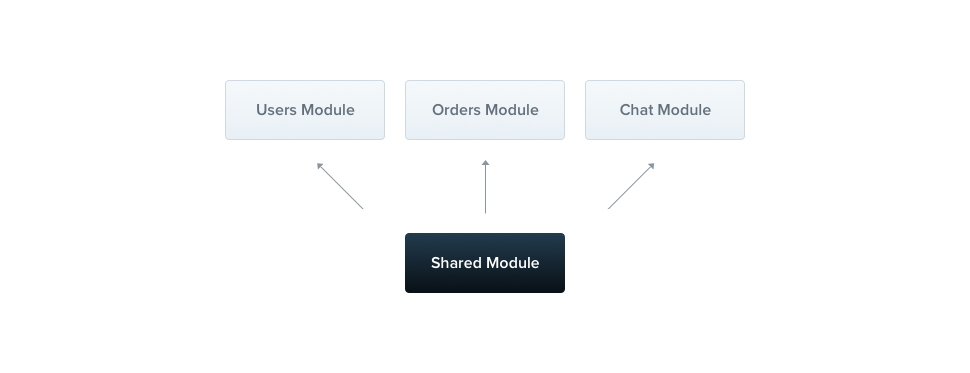
Every module is a shared module in fact. Once created it can be reused by any module. Let's imagine that we want to share the CatsService instance between few other modules. In order to do that, we need to put the CatsService into exports array as shown below:
import { Module } from '@nestjs/common';
import { CatsController } from './cats.controller';
import { CatsService } from './cats.service';

@Module({
  controllers: [CatsController],
  providers: [CatsService],
  exports: [CatsService]
})
export class CatsModule {}
Now each module which would import the CatsModule has an access to the CatsService and will share the same instance with all of the modules that import this module as well.
Modules re-exporting
The modules can export their internal providers. Moreover, they can re-export modules imported by themselves.
@Module({
  imports: [CommonModule],
  exports: [CommonModule],
})
export class CoreModule {}
Dependency injection
A module class can inject providers as well (e.g. for configuration purposes):
cats.module.ts
import { Module } from '@nestjs/common';
import { CatsController } from './cats.controller';
import { CatsService } from './cats.service';

@Module({
  controllers: [CatsController],
  providers: [CatsService],
})
export class CatsModule {
  constructor(private readonly catsService: CatsService) {}
}
import { Module, Dependencies } from '@nestjs/common';
import { CatsController } from './cats.controller';
import { CatsService } from './cats.service';

@Module({
  controllers: [CatsController],
  providers: [CatsService],
})
@Dependencies(CatsService)
export class CatsModule {
  constructor(catsService) {
    this.catsService = catsService;
  }
}
However, module classes cannot be injected by the providers due to circular dependency .
Global modules
If you have to import the same set of modules everywhere, it might be annoying. In Angular, the providers are registered in the global scope. Once defined, they're available everywhere. On the other hand, Nest encapsulates providers inside the module scope. You aren't able to use the module providers elsewhere without importing them. But sometimes, you may just want to provide a set of things which should be available always - out-of-the-box, for example: helpers, database connection, whatever. That's why you're able to make the module a global one.
import { Module, Global } from '@nestjs/common';
import { CatsController } from './cats.controller';
import { CatsService } from './cats.service';

@Global()
@Module({
  controllers: [CatsController],
  providers: [CatsService],
  exports: [CatsService]
})
export class CatsModule {}
The @Global() decorator makes the module global-scoped. Global modules shall be registered only once , in best case by the root or core module. Afterward, the CatsService provider will be ubiquitous, although CatsModule won't be imported.
Hint Making everything global is not a good decision. The global modules are available to reduce the amount of necessary boilerplate. The imports array is still the best way to make the module API transparent. Dynamic modules
The Nest module system comes with a feature called dynamic modules. It enables you to create customizable modules without any effort. Let's have a look at the DatabaseModule:
import { Module, DynamicModule } from '@nestjs/common';
import { createDatabaseProviders } from './database.providers';
import { Connection } from './connection.provider';

@Module({
  providers: [Connection],
})
export class DatabaseModule {
  static forRoot(entities = [], options?): DynamicModule {
    const providers = createDatabaseProviders(options, entities);
    return {
      module: DatabaseModule,
      providers: providers,
      exports: providers,
    };
  }
}
import { Module } from '@nestjs/common';
import { createDatabaseProviders } from './database.providers';
import { Connection } from './connection.provider';

@Module({
  providers: [Connection],
})
export class DatabaseModule {
  static forRoot(entities = [], options?) {
    const providers = createDatabaseProviders(options, entities);
    return {
      module: DatabaseModule,
      providers: providers,
      exports: providers,
    };
  }
}
Hint TheforRoot()may return dynamic module either synchronously or asynchronously (Promise).
This module defines the Connection provider by default, but additionally - depending on the passed options and entities - it exposes a collection of the providers, for example, repositories. In fact, the dynamic module extends the base module metadata. This substantial feature is useful when you need to register providers dynamically. Then you could import the DatabaseModule in the following manner:
import { Module } from '@nestjs/common';
import { DatabaseModule } from './database/database.module';
import { User } from './users/entities/user.entity';

@Module({
  imports: [
    DatabaseModule.forRoot([User]),
  ],
})
export class ApplicationModule {}
In order to export dynamic module, you can omit a function call part:
import { Module } from '@nestjs/common';
import { DatabaseModule } from './database/database.module';
import { User } from './users/entities/user.entity';

@Module({
  imports: [
    DatabaseModule.forRoot([User]),
  ],
  exports: [DatabaseModule]
})
export class ApplicationModule {}


