
Pipes
A pipe is a class annotated with the @Injectable() decorator. The pipe should implement the PipeTransform interface.
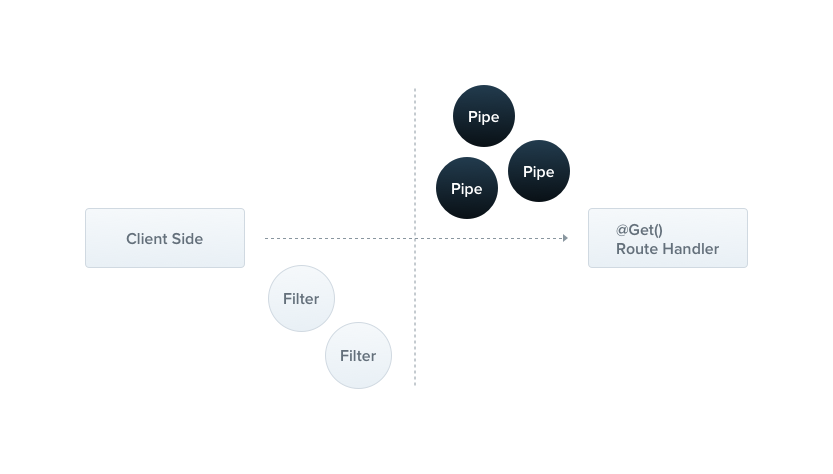
A pipe transforms the input data to the desired output. Also, it could take care of the validation, since it's possible to throw an exception when the data is incorrect.
Hint The pipe runs inside the exceptions zone. This means that when exceptions are thrown they are handled by the core exceptions handler and exceptions filters that are applied to the current context.
Built-in pipes
Nest comes with two pipes available right out-of-the-box, ValidationPipe and ParseIntPipe. They're exported from the @nestjs/common package. In order to better understand how do they work, we're gonna build them from scratch.
What does it look like?
Let's start with the ValidationPipe. In the beginning, it only takes a value and immediately returns the same value, behaving like an identity function.
import { PipeTransform, Injectable, ArgumentMetadata } from '@nestjs/common';

@Injectable()
export class ValidationPipe implements PipeTransform {
  transform(value: any, metadata: ArgumentMetadata) {
    return value;
  }
}
import { Injectable } from '@nestjs/common';

@Injectable()
export class ValidationPipe {
  transform(value, metadata) {
    return value;
  }
}
Hint ThePipeTransform<T, R>is a generic interface in whichTindicates a type of the inputvalue, whileRthe return type of thetransform()method.
Every pipe has to provide the transform() method. This method takes two arguments:
valuemetadata
The value is the currently processed parameter, while metadata is its metadata. The metadata object holds a few properties:
export interface ArgumentMetadata {
  readonly type: 'body' | 'query' | 'param' | 'custom';
  readonly metatype?: new (...args) => any;
  readonly data?: string;
}
These properties describe the input parameter.
type | Tells us whether the property is a body @Body(), query @Query(), param @Param(), or a custom parameter (read more here). |
metatype | The metatype of the property, for example, String. It's undefined either if you omit the type declaration in the function signature, or you use a vanilla JavaScript. |
data | The string passed to the decorator, for example @Body('string'). It's undefined if you leave the brackets empty. |
Warning TypeScript interfaces disappear during the transpilation. Hence, if you use an interface instead of a class, themetatypevalue will be equal toObject.
What's the point?
Let's focus on the create() method of the CatsController for a while.
@Post()
async create(@Body() createCatDto: CreateCatDto) {
  this.catsService.create(createCatDto);
}
There's a CreateCatDto body parameter:
export class CreateCatDto {
  readonly name: string;
  readonly age: number;
  readonly breed: string;
}
This object always has to be correct, and thus we have to validate these three members. We could do it inside the route handler method, but we'd break the single responsibility rule (SRP). The second idea is to create a validator class and delegate the task there, but we'll have to use this validator every time at the beginning of each method. So what about the validation middleware? It's a good idea, but it's impossible to create a generic middleware which could be used across the whole application.
That's the first use-case, when you should consider to use a Pipe.
Object schema validation
One of the frequently encountered approaches is to use a schema-based validation. The Joi library is a tool that allows you creating schemas in a pretty straightforward way with a readable API. In order to create a pipe that makes use of object schemas, we need to create a simple class that takes a schema as a constructor argument.
import * as Joi from 'joi';
import { PipeTransform, Injectable, ArgumentMetadata, BadRequestException } from '@nestjs/common';

@Injectable()
export class JoiValidationPipe implements PipeTransform {
  constructor(private readonly schema) {}

  transform(value: any, metadata: ArgumentMetadata) {
    const { error } = Joi.validate(value, this.schema);
    if (error) {
      throw new BadRequestException('Validation failed');
    }
    return value;
  }
}
import * as Joi from 'joi';
import { Injectable, BadRequestException } from '@nestjs/common';

@Injectable()
export class JoiValidationPipe {
  constructor(schema) {
    this.schema = schema;
  }

  transform(value, metadata) {
    const { error } = Joi.validate(value, this.schema);
    if (error) {
      throw new BadRequestException('Validation failed');
    }
    return value;
  }
}
Binding pipes
The pipe tying is extremely simple - we need to use @UsePipes() decorator and create a pipe instance with the valid Joi schema.
@Post()
@UsePipes(new JoiValidationPipe(createCatSchema))
async create(@Body() createCatDto: CreateCatDto) {
  this.catsService.create(createCatDto);
}
@Post()
@Bind(Body())
@UsePipes(new JoiValidationPipe(createCatSchema))
async create(createCatDto) {
  this.catsService.create(createCatDto);
}
Class validator
This section applies only to TypeScript.
Nest works well with the class-validator. This amazing library allows you to use decorator-based validation. Decorator based validation is really powerful with the pipe capabilities since we have access to the metatype of the processed property. However, before we start, we need to install required packages:
$ npm i --save class-validator class-transformer Once the libraries are installed, we can add a few decorators to the CreateCatDto class.
import { IsString, IsInt } from 'class-validator';

export class CreateCatDto {
  @IsString()
  readonly name: string;

  @IsInt()
  readonly age: number;

  @IsString()
  readonly breed: string;
}
When it's done, we can create a ValidationPipe class.
import { PipeTransform, Injectable, ArgumentMetadata, BadRequestException } from '@nestjs/common';
import { validate } from 'class-validator';
import { plainToClass } from 'class-transformer';

@Injectable()
export class ValidationPipe implements PipeTransform<any> {
  async transform(value, { metatype }: ArgumentMetadata) {
    if (!metatype || !this.toValidate(metatype)) {
      return value;
    }
    const object = plainToClass(metatype, value);
    const errors = await validate(object);
    if (errors.length > 0) {
      throw new BadRequestException('Validation failed');
    }
    return value;
  }

  private toValidate(metatype): boolean {
    const types = [String, Boolean, Number, Array, Object];
    return !types.find((type) => metatype === type);
  }
}
Notice We have used the class-transformer library. It's made by the same author as the class-validator library, and as a result, they play very well together.
Let's go through this code. Firstly, note that the transform() function is async. It's possible because Nest supports both synchronous and asynchronous pipes. Also, there's a helper function - toValidate(). It's responsible for excluding the native JavaScript types from the validation process due to performance reasons. The last worth mentioning part is that we have to return the same value. This pipe is a validation specific pipe, thus we need to return the exact same property to avoid overriding (as noted earlier, pipe transforms input to the desired output).
The last step is to set up the ValidationPipe. Pipes, same as exception filters can be method-scoped, controller-scoped, and global-scoped. Additionally, a pipe can be param-scoped. We can directly tie the pipe instance to the route param decorator, for example, to @Body() decorator. Let's have a look at the below example:
@Post()
async create(@Body(new ValidationPipe()) createCatDto: CreateCatDto) {
  this.catsService.create(createCatDto);
}
The param-scoped pipes are useful when the validation logic concerns only one, specified parameter. In order to set up a pipe at a method level, you'll need the UsePipes() decorator.
@Post()
@UsePipes(new ValidationPipe())
async create(@Body() createCatDto: CreateCatDto) {
  this.catsService.create(createCatDto);
}
Hint The@UsePipes()decorator is imported from the@nestjs/commonpackage.
The instance of ValidationPipe has been created immedietely in-place. Another available way is to pass the class (not instance), leaving framework the instantiation responsibility and enabling dependency injection.
@Post()
@UsePipes(ValidationPipe)
async create(@Body() createCatDto: CreateCatDto) {
  this.catsService.create(createCatDto);
}
Since the ValidationPipe was created to be as generic as possible, we're gonna set it up as a global-scoped pipe, for every route handler across the entire application.
async function bootstrap() {
  const app = await NestFactory.create(ApplicationModule);
  app.useGlobalPipes(new ValidationPipe());
  await app.listen(3000);
}
bootstrap();
Notice The useGlobalPipes() method doesn't set up pipes for gateways and micro services. The global pipes are used across the whole application, for every controller and every route handler. In terms of dependency injection, global pipes registered from the outside of any module (as in the previous example above) cannot inject dependencies since they don't belong to any module. In order to solve this issue, you can set up a pipe directly from any module using following construction:
app.module.ts
import { Module } from '@nestjs/common';
import { APP_PIPE } from '@nestjs/core';

@Module({
  providers: [
    {
      provide: APP_PIPE,
      useClass: CustomGlobalPipe,
    },
  ],
})
export class ApplicationModule {}
Hint The alternative option is to use an execution context feature. Also, useClass is not the only way of dealing with custom providers registration. Learn more here. Transformer pipe
Validation isn't the sole use case. At the beginning of this chapter, we have mentioned that a pipe can also transform the input data to the desired output. It's true because the value returned from the transform function completely overrides the previous value of the argument. Sometimes the data passed from the client needs to undergo some changes. Also, some parts could be missed, therefore we must apply the default values. The transformer pipes fill the gap between the request of the client and the request handler.
import { PipeTransform, Injectable, ArgumentMetadata, HttpStatus, BadRequestException } from '@nestjs/common';

@Injectable()
export class ParseIntPipe implements PipeTransform<string, number> {
  transform(value: string, metadata: ArgumentMetadata): number {
    const val = parseInt(value, 10);
    if (isNaN(val)) {
      throw new BadRequestException('Validation failed');
    }
    return val;
  }
}
import { Injectable, BadRequestException} from '@nestjs/common';

@Injectable()
export class ParseIntPipe {
  transform(value, metadata) {
    const val = parseInt(value, 10);
    if (isNaN(val)) {
      throw new BadRequestException('Validation failed');
    }
    return val;
  }
}
Here's a ParseIntPipe which is responsible for parsing a string into an integer value. We can simply tie a pipe to the selected param:
@Get(':id')
async findOne(@Param('id', new ParseIntPipe()) id) {
  return await this.catsService.findOne(id);
}
@Get(':id')
@Bind(Param('id', new ParseIntPipe()))
async findOne(id) {
  return await this.catsService.findOne(id);
}
Thanks to the above construction, ParseIntPipe will be executed before request even touches the corresponding handler.
Another useful case would be to select an existing user entity from the database by id:
@Get(':id')
findOne(@Param('id', UserByIdPipe) userEntity: UserEntity) {
  return userEntity;
}
@Get(':id')
@Bind(Param('id', UserByIdPipe))
findOne(userEntity) {
  return userEntity;
}
A built-in ValidationPipe
Fortunately, you don't have to build those pipes on your own since the ValidationPipe and the ParseIntPipe are built-in pipes (keep in mind that ValidationPipe requires both class-validator and class-transformer packages installed).
The built-in ValidationPipe offers more options than that one described in this chapter, which has been kept basic for the sake of simplicity and to reduce the learning curve. If you take a look at the createCatDto in your controller function, you will notice that it isn't an actual CreateCatDto instance. That is because this pipe only validates the payload, without transforming it into the expected type. However, if you want the pipe to mutate the payload, you can configure it by passing appropriate options:
@Post()
@UsePipes(new ValidationPipe({ transform: true }))
async create(@Body() createCatDto: CreateCatDto) {
  this.catsService.create(createCatDto);
}
Because this pipe is based on the class-validator and the class-transformer libraries, it is possible to get more of it. Have a look at the constructor optional options.
export interface ValidationPipeOptions extends ValidatorOptions {
  transform?: boolean;
}
There is a transform attribute and all class-validator options (inherited from the ValidatorOptions interface):
| Option | Type | Description |
|---|---|---|
skipMissingProperties | boolean | If set to true, validator will skip validation of all properties that are missing in the validating object. |
whitelist | boolean | If set to true, validator will strip validated object of any properties that do not make use of any decorators. |
forbidNonWhitelisted | boolean | If set to true, instead of stripping non-whitelisted properties validator will throw an exception. |
forbidUnknownValues | boolean | If set to true, the validation of unknown objects would fail immediately. |
disableErrorMessages | boolean | If set to true, the validation errors would not be forwarded to the client. |
groups | string[] | Groups to be used during validation of the object. |
dismissDefaultMessages | boolean | If set to true, the validation will not use default messages. Error message always will be undefined if its not explicitly set. |
validationError.target | boolean | Indicates if target should be exposed in ValidationError |
validationError.value | boolean | Indicates if validated value should be exposed in ValidationError. |
Notice You may find more information about the class-validator package in its repository. 


